
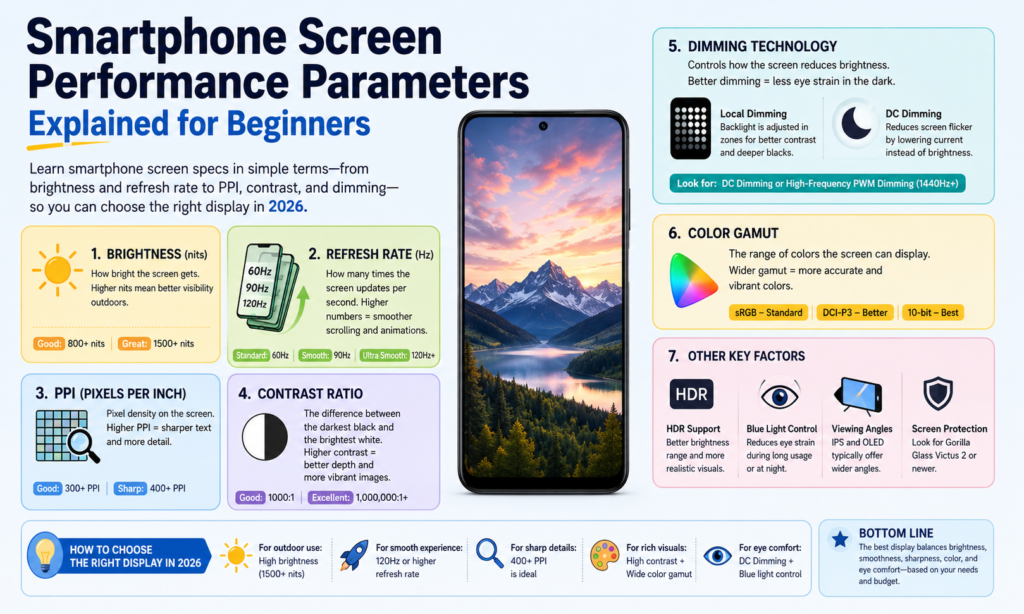
Why Smartphone Screen Specs Matter More Than Ever in 2026 Screen Specs Matter More Than Ever in 2026
If you think about it, the screen is the soul of a smartphone. It’s the one part you touch hundreds of times every day. You read messages on it, watch videos on it, scroll social media on it, edit photos on it, and maybe even work from it. No matter how powerful the processor is or how many megapixels the camera offers, if the screen feels dull, blurry, or uncomfortable to look at, the whole phone experience feels weaker. That’s why understanding smartphone display specifications matters more than many people realize.
In 2026, display technology keeps moving fast. Premium phones now regularly reach 3,000+ nits brightness, while 120Hz adaptive refresh rates have become common across upper-midrange devices. High-frequency PWM dimming above 2,160Hz is also becoming more popular, especially in flagship OLEDe comfort. citeturn0search0turn0search2
The tricky part? Most spec sheets throw numbers at you without explaining what they actually mean. PPI, contrast ratio, refresh rate, color gamut—it can feel like reading another language. This guide breaks everything down in plain English, so whether you’re buying a new phone, comparing LCD vs OLED, or just curious about display technology, you’ll know exactly what to look for.
Dimming Technology
What Is DC Dimming?
DC dimming adjusts brightness by directly changing the electrical current supplied to the display. Think of it like turning a faucet knob down slowly—the water keeps flowing, just with less force. The light stays continuous, but brightness drops.
For LCD screens, brightness mainly comes from the backlight, so reducing voltage or current lowers brightness. For OLED screens, each pixel emits its own light, so brightness changes by reducing the current sent to those individual pixels.
Many users prefer DC dimming because it feels visually stable. Since the light doesn’t rapidly flicker on and off, it can be easier on sensitive eyes. That’s especially important for people who spend hours looking at their phones in dark environments.
The trade-off is that DC dimming can sometimes affect color consistency at very low brightness on OLED panels. Blacks may remain excellent, but color calibration can shift slightly depending on panel design. Manufacturers often try to balance eye comfort and color accuracy here.
What Is PWM Dimming?
PWM stands for Pulse Width Modulation. Instead of lowering power continuously, the display rapidly switches between on → off → on → off at high speed.
Imagine flipping a light switch hundreds or thousands of times per second. Your eyes can’t usually detect the flicker directly, so it appears dimmer rather than blinking.
The amount of time the light stays “on” during each cycle determines brightness:
- Longer “on” time = brighter screen
- Shorter “on” time = dimmer screen
PWM is extremely common on OLED smartphones.
In 2026, flagship Android phones increasingly advertise 2,160Hz to 3,840Hz PWM dimming, which is much higher than older 240Hz–480Hz implementations. Higher frequency PWM tendany users. citeturn0search8turn0search6
Which One Is Better for Eye Comfort?
There’s no universal answer because human eyes are wonderfully complicated.
Some users never notice PWM flicker at all. Others feel headaches after 10 minutes.
Generally:
| Technology | Main Advantage | Main Drawback |
|---|---|---|
| DC Dimming | Less visible flicker, often easier on eyes | Can slightly affect OLED color performance |
| PWM Dimming | Better brightness control and color consistency | May cause eye strain for sensitive users |
If you’re sensitive to screen flicker, DC dimming or high-frequency PWM is worth prioritizing.
Color Performance
Saturation
Saturation describes how rich or pure a color appears.
Highly saturated colors feel vivid and punchy. Low saturation looks muted or washed out.
Think of a ripe red strawberry versus a faded pink shirt left in the sun too long. Same color family—very different intensity.
OLED panels often feel more saturated because each pixel emits its own light independently.
Some people love that “wow” effect. Others prefer more natural colors for editing photos.
Color Gamut
Color gamut refers to the total range of colors a screen can display.
A wider gamut means the display can reproduce more shades.
Common standards include:
- sRGB
- DCI-P3
- Adobe RGB
- BT.2020
In smartphones, DCI-P3 is now very common in premium displays.
Samsung’s latest display concepts shown at SID Display Week 2026 demonstrated up to 96% BT.2020 coverage, whle displays. citeturn0news16turn0news17
Color Accuracy
Color accuracy measures how close the displayed color is to the intended original color.
This matters a lot for:
- photographers
- video editors
- designers
- online sellers showing product colors
If a white image appears yellowish or a red product photo looks orange, color accuracy is poor.
A common measurement here is Delta E.
Lower Delta E = more accurate color reproduction.
Gray Scale
Gray scale refers to the brightness levels between black and white.
Good gray scale performance means smooth transitions.
Poor gray scale creates visible banding or uneven shading.
This becomes very noticeable when watching dark movies or viewing low-light photos.
Brightness and Contrast
Brightness Explained
Brightness is measured in nits.
Higher nits = brighter display.
Why does it matter?
Because sunlight exists.
A phone may look perfect indoors but become unreadable outdoors.
Flagship smartphones in 2026 commonly reach 3,000–3,500 nits peak brightness. For example, the OnePlus 15 is reported around 3,500 nits, while Pixe around 3,300 nits. citeturn0search2
Contrast Ratio Explained
Contrast ratio is the difference between:
brightest white ÷ darkest black
Higher contrast creates:
- deeper blacks
- stronger highlights
- better HDR
- richer image depth
OLED dominates here because pixels can turn completely off.
That creates true black.
LCD can’t fully turn off the backlight the same way.
That’s why OLED blacks often feel like looking into a dark night sky.
Clarity and Sharpness
Resolution (DPI)
Resolution refers to how many pixels exist horizontally and vertically.
Examples:
- 1080 × 2400
- 1440 × 3200
More pixels = more detail.
Though beyond a certain point, the difference becomes harder to notice at normal viewing distance.
Pixel Density (PPI)
PPI means pixels per inch.
It tells you how tightly packed the pixels are.
Higher PPI = sharper text and cleaner edges.
Examples:
| Display Type | Typical PPI |
|---|---|
| Budget LCD | 300–400 |
| Mid-range OLED | 400–460 |
| Flagship OLED | 450–550+ |
Above roughly 450 PPI, text usually looks razor sharp.
Pixel Pitch
Pixel pitch is the distance between neighboring pixels.
Smaller pixel pitch = higher sharpness.
Smaller gaps between pixels make images feel more seamless and polished.
Motion and Responsiveness
Response Time
Response time measures how quickly a pixel changes from one state to another.
Often described as:
Black → White → Black
Lower response time helps reduce:
- ghosting
- blur
- smearing
Especially noticeable during gaming or fast video playback.
Refresh Rate
Refresh rate = how many times the display refreshes every second.
Measured in Hz.
Examples:
- 60Hz
- 90Hz
- 120Hz
- 144Hz
A 120Hz display refreshes twice as often as 60Hz.
That makes scrolling feel smoother and animations more fluid.
Once you use 120Hz regularly, going back to 60Hz can feel like walking through wet sand.
Other Important Display Factors
Viewing Angle
Viewing angle means how well you can still see the display from the side.
Good viewing angles maintain:
- brightness
- color
- contrast
OLED usually performs better than LCD here.
Power Consumption
Displays consume a major portion of smartphone battery life.
OLED can be more efficient with dark mode because black pixels can shut off entirely.
LCD backlights stay on continuously.
This is why dark mode can save battery on OLED devices.
Electromagnetic Radiation
Displays emit energy through electric and magnetic fields as well as visible light and heat.
For normal smartphone use, this remains within consumer electronics safety standards.
What users usually notice more practically is:
- blue light exposure
- eye fatigue
- heat generation
rather than electromagnetic radiation itself.
How to Choose the Right Smartphone Screen Based on Your Needs
Choosing a smartphone display is like choosing a pair of glasses. The “best” one depends on you.
If you care most about watching movies, prioritize:
- OLED
- high contrast
- HDR
- high brightness
If you’re a mobile gamer, focus on:
- 120Hz+
- fast response time
- high touch sampling
If you’re sensitive to eye strain:
- DC dimming
- high-frequency PWM
- eye comfort settings
If battery matters most:
- LTPO OLED
- adaptive refresh rate
- efficient brightness management
Don’t chase every number.
Chase the numbers that match how you actually use your phone.
Conclusion
Smartphone displays are no longer just rectangles that light up. They’re the front door to your entire digital life.
Understanding DC dimming, PWM, saturation, contrast ratio, resolution, PPI, refresh rate, response time, color gamut, and power consumption helps you read beyond the marketing.
A brighter screen isn’t always better.
A higher refresh rate isn’t always necessary.
A wider color gamut isn’t useful if color accuracy is poor.
The best smartphone screen is the one that feels effortless every time you unlock your phone.
And once you know what these specs really mean, choosing that screen becomes much easier.
FAQs
1. Which is better for eyes: DC dimming or PWM dimming?
For many users sensitive to flicker, DC dimming feels more comfortable. High-frequency PWM can also be comfortable depending on sensitivity.
2. Is higher PPI always better?
Not always. Beyond around 450–500 PPI, differences become harder to notice during normal use.
3. Is OLED better than LCD?
OLED usually offers better contrast, deeper blacks, and richer color. LCD can still offer excellent brightness and often avoids OLED flicker concerns.
4. Is 120Hz worth it on a smartphone?
Yes—especially if you game or scroll frequently. The smoother motion is very noticeable.
5. Which screen spec matters most?
There isn’t one single answer. For most people, the biggest daily impact comes from:
- brightness
- refresh rate
- contrast
- eye comfort



