
Réamhrá le Scáileáin LCD Smartphone
Tá scáileáin LCD fón cliste i ngach áit, chumhachtú na milliúin feistí ar fud an domhain. Cuireann siad gile maith ar fáil, feidhmíocht dath cobhsaí, agus costas inacmhainne. Ach cosúil le gach comhpháirteanna crua-earraí, Tugann scáileáin LCD aghaidh ar shaincheisteanna le himeacht ama.
Conas a Oibríonn Teicneolaíocht LCD
LCD (Taispeántas criostail leachtach) braitheann scáileáin ar chriostail leachtacha agus backlight chun íomhánna a tháirgeadh. Gabhann solas trí shraith de chriostail a casadh orthu chun dathanna agus leibhéil gile éagsúla a thaispeáint.
Cén Fáth a Úsáidtear Scáileáin LCD go Forleathan
Tá siad cost-éifeachtach, tíosach ar fhuinneamh, agus oiriúnach d'fhóin bhuiséid go dtí fóin lár-raoin. Cén dóigh faoin spéir a ...?, toisc go bhfuil siad ag brath ar backlight, is gnách leo patrúin agus saincheisteanna caitheamh a léiriú.
Fadhbanna Taispeána Coitianta
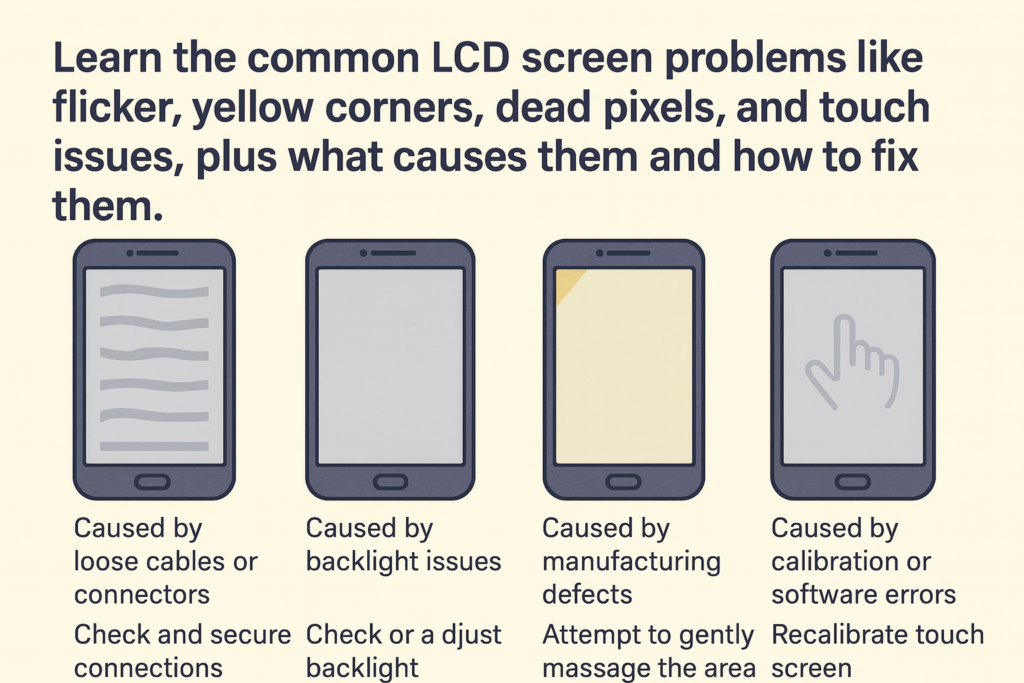
Coirnéil Yellowish nó Gile Éagothrom
Tabhair faoi deara riamh coirnéil do scáileáin ag casadh buí nó dim? Tá sé ar cheann de na saincheisteanna LCD is infheicthe.
Cúis: Backlight Aging
Le himeacht ama, Tá backlights stiúir lagú mar gheall ar theas, úsáid, nó neamhréireachtaí déantúsaíochta, is cúis le gile míchothrom.
Scáileán Flickering
Má thagann caochaíl ar do thaispeántas nó má thiteann sé go randamach, féadfaidh sé fadhb níos doimhne a léiriú.
Cúis: Teip IC nó Cábla Flex Scaoilte
Féadfaidh an tiománaí taispeáin IC díghrádú, nó d'fhéadfaí an cábla flex a dhínascadh go páirteach tar éis titim.
Picteilíní Marbh nó picteilíní i bhfostú
Tá picteilíní marbha le feiceáil mar phonc dubha, agus picteilíní bhfostú fós socraithe i ndath ar leith.
Cúis: Lochtanna Déantúsaíochta nó Damáiste Brú
Féadfaidh fiú fórsa beag seachtrach - cosúil le brú an scáileáin ró-chrua - dochar a dhéanamh do phicteilíní aonair.
Íomhánna Taibhse nó Coinneáil Íomhá
Scáth lag ar íomhá roimhe seo? Sin coinneáil íomhá.
Cúis: Taispeáint Statach Fadtréimhseach
Má choinnítear an taispeáint chéanna ar feadh uaireanta fada, is féidir leis na criostail leachtacha “greamú” go sealadach.
Saobhadh Dath
Taispeánann do scáileán dathanna neamhghnácha amhail glas, corcra, nó toin nite amach.
Cúis: Damáiste Uisce nó Teip Crua-earraí
Bíonn tionchar ag taise ar chiorcaid inmheánacha, agus eascraíonn saincheisteanna datha as sliseanna lochtacha freisin.
Scáileán Gan Soilsiú Suas
Casann an fón ar siúl, ach fanann an scáileán dubh.
Cúis: Damáiste Chuarda Backlight
Seans go n-oibreoidh an taispeáint go hinmheánach fós, ach cuireann ciorcad backlight dóite cosc ar soilsiú.
Fadhbanna a Bhaineann le Scáileán Tadhaill
Teagmháil Ghost
Feidhmíonn do ghuthán mar atá duine éigin eile ag cnagadh air.
Cúis: Ciseal Tadhaill damáiste nó Flex
Go minic de bharr lúbthachta, tionchar, nó scáileáin ar chaighdeán íseal.
Teagmháil Neamhfhreagrach
Beartaíonn tú, ach ní tharlaíonn aon rud.
Cúis: IC díghrádaithe nó Damáiste Fisiciúil
Féadfar an digiteoir a chaitheamh amach nó a dhícheangal.
Teip Tadhaill Pháirtigh
Ní fhreagraíonn ach réimsí áirithe.
Cúis: Deighleoga Digitithe Briste
Féadfaidh ciorcaid bheaga faoi bhun an ghloine a bheith briste.
Tosca Seachtracha a Chuireann le Fadhbanna LCD
Buail nó Tionchar
Is féidir le titim cur isteach ar chomhpháirteanna inmheánacha fiú gan scoilteanna infheicthe.
Nochtadh Uisce nó Taise
Cruthaíonn taise creimeadh agus gearrchiorcaid.
Brú Iomarcach ar an Scáileán
Is féidir le do ghuthán a choinneáil i bpóca daingean dífhoirmiú ar na sraitheanna laistigh den LCD.
Scáileáin Athsholáthair Droch-Cháilíochta
Is minic a theipeann ar scáileáin iarmhargadh saor níos luaithe agus is cúis le saincheisteanna tadhaill nó datha taibhse.
Conas Saincheisteanna LCD a Dhiagnóiseadh
Amharciniúchadh
Seiceáil le haghaidh scoilteanna, paistí datha, stains leachtacha, nó sceitheadh éadrom.
Tástáil Le Feidhmchláir Taispeána
Is féidir le feidhmchláir caochaíl a bhrath, Picteilíni marbh, agus cruinneas tadhaill.
Úsáid Uirlisí Diagnóiseacha
Úsáideann teicneoirí uirlisí gairmiúla chun feidhm IC a thomhas, voltas, agus sreabhadh comhartha.
Réitigh agus Roghanna Deisiúcháin
Nuair a Cuidíonn Glanadh
Uaireanta, déanann deannach timpeall an chónascaire flex teip taispeána.
Nuair a Oibríonn Athchalabrú
Féadfaidh calabrú bogearraí mioncheisteanna tadhaill a réiteach.
Nuair a bhíonn Athsholáthar Riachtanach
Damáiste backlight, flicker dian, nó go mbíonn athsholáthar scáileáin iomlán de dhíth ar digiteoirí briste.
Leideanna chun Scáileáin LCD a Chosaint
Ag baint úsáide as Cosantóir Scáileáin Chuí
Roghnaigh cosantóir gloine tempered chun tionchar brú a laghdú.
Teochtaí Foircní a Sheachaint
Luathaíonn teas dul in aois backlight.
Leideanna cothabhála rialta
Glan do scáileán go réidh agus seachain brú gan ghá.
Deireadh
Bíonn saincheisteanna éagsúla le sárú ag scáileáin LCD fón cliste - ó choirnéil buí go teip tadhaill. Cuidíonn tuiscint ar na bunchúiseanna leat fadhbanna a dhiagnóiseadh go tapa agus an réiteach ceart a roghnú. Cibé an bhfuil sé ag glanadh, athchalabrú, nó athsholáthar iomlán, cinntíonn a bhrath go luath saol scáileáin níos faide agus feidhmíocht níos fearr.
Ceisteanna Coitianta
1. Cén fáth a n-iompaíonn mo scáileán LCD buí?
De ghnáth mar gheall ar dul in aois backlight nó nochtadh teasa.
2. Cad is cúis le teagmháil taibhse?
A digiteoir damáiste, páirteanna athsholáthair droch-chaighdeán, nó frámaí lúbtha.
3. An féidir picteilíní marbh a shocrú?
Is féidir roinnt picteilíní greamaithe a athbheochan le haipeanna, ach is minic go dteastaíonn athsholáthar ar phicteilíní marbh.
4. Cén fáth a bhfuil mo scáileán flickering?
Is dócha mar gheall ar theip IC taispeána nó cábla solúbtha scaoilte.
5. Ar cheart dom mo scáileán LCD a dheisiú nó a athsholáthar?
D’fhéadfadh sé go mbeifear in ann mioncheisteanna a réiteach, ach de ghnáth is gá athsholáthar iomlán a dhéanamh ar dhamáiste mór.



