
Tabhairt isteach
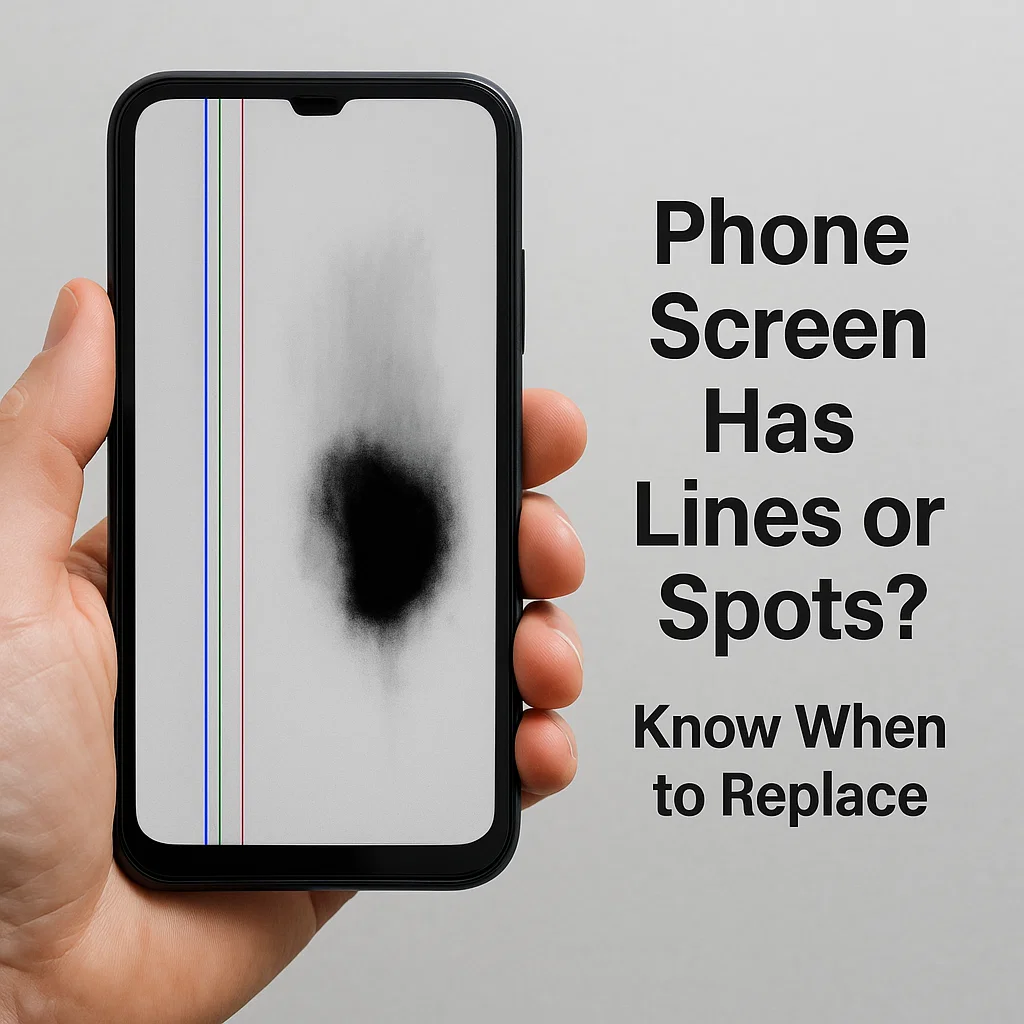
Ar chas tú riamh ar do ghuthán agus thug sé faoi deara blob dubh aisteach nó líne ingearach mistéireach ag slisniú trasna do scáileáin? Tá sé frustrachas, Ar an gceart? Is é an rud is measa ná nach bhfuil a fhios agam an bhfuil sé ina shocrú tapa nó ina bhfuil scáileán do ghutháin ar thacaíocht saoil. Tá an treoir seo anseo chun cabhrú leat a fháil amach cad atá ar siúl i ndáiríre, Nuair a theastaíonn athsholáthar scáileáin uait, agus an méid is féidir leat a dhéanamh idir an dá linn chun é a chosc ó dhul in olcas.
Abnormalities scáileáin a thuiscint
Línte ingearacha ar an scáileán
Cúiseanna coitianta
De ghnáth léiríonn línte ingearacha saincheist le nasc inmheánach an scáileáin. D’fhéadfadh sé a bheith:
- Cábla scaoilte scaoilte
- Ciseal LCD a ndearnadh damáiste dó
- GPU nó Taispeáin Saincheisteanna Tiomána
Cathain a bheidh sé in -deisiúcháin?
Más líne amháin é agus go n -oibríonn do chuid feidhmeanna tadhaill fós, Uaireanta d’fhéadfadh sé go gcabhródh athchruthú nó athsholáthar an chábla cónascaire. Cén dóigh faoin spéir a ...?, Is iondúil go gciallaíonn illínte nó flickering go bhfuil an painéal ag teip.
Spotaí dubha nó blobaí cosúil le dúch
Cad is cúis le spotaí dubha?
Is minic a bhíonn siad seo de bharr damáiste brú nó tionchair. Is é an ceantar dubh go bunúsach an áit a bhfuair na picteilíni bás, cosúil le criosanna marbh ar shean -teilifís.
An féidir iad a shocrú gan athsholáthar?
Ar an drochuair, níl. Ní ghnóthaíonn na ceantair seo. Má tá na spotaí dubha ag fás, Níl ann ach am sula n -úsáidfear an scáileán.
Sceitheadh criostail leachtach (Lcd bleed)
Conas sceitheadh LCD a aithint
Má fheiceann tú cén chuma atá ar dúch ag leathadh trasna do scáileáin, go háirithe tar éis tionchair, Tá tú ag déileáil le sceitheadh criostail leachtach. Tá sreabhán i LCDanna is féidir a éalú nuair a dhéantar damáiste dóibh.
Contúirtí maidir le húsáid leanúnach
D’fhéadfadh an sceitheadh a bheith ina chúis le húsáid leanúnach. Féadfaidh sé fiú cur isteach ar chomhpháirteanna eile nó shorts leictreacha a chur i mbaol.
Bunchúiseanna Damáiste Scáileáin
Damáiste Fisiciúil (Titeann, Brú, Tionchar)
Is é seo an #1 cultúir. Má scaoiltear do ghuthán nó fiú suí air, féadann sé briseadh scáileáin nó brúphointí inmheánacha a chruthú.
Mífheidhmeanna Inmheánacha nó Lochtanna Déantúsaíochta
Uaireanta, ní ortsa atá an locht. Sádráil dona, naisc laga, nó is féidir go dteipeann ar phainéil taispeána lochtacha leis an am.
Teacht isteach Uisce nó Taise
Níl fiú fóin atá “resistant uisce” imdhíonachta. Is féidir le taise taobh istigh den fheiste a bheith ina chúis le spotaí dubha nó creimeadh faoin scáileán.
Róthéamh agus Úsáid Fadtréimhseach Gile
Is féidir le nochtadh seasta ar ghile ard nó ar sheisiúin chearrbhachais fhada picteilíní a dhó nó go dtiocfaidh díghrádú luath ar OLED.
Conas Breithiúnas a Dhéanamh Má Chaithfidh Tú an Scáileán a Athsholáthar
Táscairí Amhairc
- Línte, Saincheisteanna Dath, nó spotaí dorcha ollmhóra
- Paistí cosúil le dúch a scaipeadh
- Blackout scáileán iomlán nó páirteach
Tástáil Feidhmiúlacht dteagmháil
Bain triail as swiping ar fud an scáileáin. An bhfuil réimsí ann nach bhfreagraíonn? Sin bratach dhearg.
Taispeáin Soiléire agus Leathnú Damáiste
Má tá damáiste ag scaipeadh, moltar go mór athsholáthar. Statach, d'fhéadfadh go mbeadh picteilíní greamaithe nó marcanna nach bhfuil ag fás infhulaingthe ar feadh tamaill.
Ceartúcháin Sealadacha agus Láimhseáil Éigeandála
Modh Téip le haghaidh Scoilteanna Cuimsithe
Bain úsáid as téip pacála soiléir nó cosantóir scáileáin chun scáileán scáinte a shéaladh agus é a choinneáil ó dhul in olcas.
Brú nó Damáiste Breise a Sheachaint
Coinnigh an fón i gcás crua. Seachain brú go dian ar an scáileán nó é a líonadh isteach i bpócaí daingean.
Uirlisí Calabrú Scáileáin
Féadfaidh feidhmchláir a chuidíonn le híogaireacht tadhaill a athchalabrú cuidiú go sealadach le freagrúlacht.
Roghanna Bogearraí
Úsáid gnéithe inrochtaineachta ionsuite cosúil le formhéadaitheoirí scáileáin nó inbhéartú datha a thaispeáint chun cabhrú leat nascleanúint a dhéanamh timpeall ar limistéir a ndearnadh damáiste dóibh.
Cásanna ina bhfuil athsholáthar scáileáin dosheachanta
Criosanna tadhaill neamhfhreagracha
Mura n -oibríonn Touch a thuilleadh i gcodanna den scáileán, Níl aon réiteach fíor ann seachas athsholáthar.
Limistéir dhubha nó leathadh leachtach a leathnú
Ciallaíonn leathadh go bhfuil an painéal LCD nó OLED ag teip go tapa. Faigh é ASAP ASAP.
Fliceáil, Teagmháil Ghost, nó teip iomlán taispeána
Tadhall randamach, flickers, nó scáileán bán? Sin an rabhadh deiridh.
An féidir leat moill a chur ar athsholáthar scáileáin?
Ag baint úsáide as gloine tempered mar mhaolán
Ní stopfaidh gloine mheáite an damáiste atá ann cheana ach is féidir leis é a choinneáil ó dhul in olcas má tá scoilteanna ar leibhéal an dromchla.
Gile an scáileáin a laghdú
Is féidir le gile a ísliú moill a chur ar bhreis strus ar thaispeántais a bhfuil damáiste déanta dóibh cheana féin.
Ag baint úsáide as mód dorcha
Ní shocróidh sé seo rud ar bith, ach déanann sé spotaí dubha agus scoilteanna níos lú faoi deara agus an riosca dóite OLED á íoslaghdú.
Deisiúchán Gairmiúil vs DIY: Cad a Roghnaigh
Cathain a Bhfuil DIY Sábháilte?
Má tá na huirlisí agus an taithí agat, is féidir airgead a shábháil má chuirtear tú féin in áit scáileáin gutháin níos sine.
Na Rioscaí a bhaineann leis an Scáileán a Oscailt Tú Féin
D'fhéadfá:
- Briseadh an digiteoir
- Scrios cáblaí inmheánacha
- Caill uiscedhíonta
Comparáid Costas agus Breithnithe Baránta
Tá deisiúcháin déantúsóirí níos sábháilte ach cosnaíonn siad níos mó. Tairgeann siopaí deisiúcháin neamhspleácha roghanna eile níos saoire, cé go bhféadfadh siad barántaí a chur ar neamhní.
Leideanna chun Ceisteanna Scáileáin sa Todhchaí a Chosc
Úsáid Cosantóirí Scáileáin agus Cásanna Cáilíochta
Infheistiú i bhfearas cosanta maith. Tá sé níos saoire ná scáileán nua.
Timpeallachtaí Róthéamh agus Taise a Sheachaint
Ná húsáid fóin faoi ghrian díreach nó i seomraí folctha gaile.
Nósanna Láimhseála Cuí
Uimh pócaí cúil. Uimh cois leapa le leabhair trom. Déileáil le cúram.
Smaointe Deiridh
Nuair a thosaíonn do scáileán ag gníomhú suas le línte, spotaí, nó sceitheanna, tá do ghuthán ag iarraidh aird. Ná fan go bhfaighidh sé bás go hiomlán ort. Cé nach dteastaíonn athsholáthar láithreach ar gach saincheist, is féidir le tuiscint na gcomharthaí rabhaidh tú a shábháil ó theip scáileáin iomlán síos an bóthar. Tabhair aire, gníomhú go tapa, agus do infheistíocht theicniúil a chosaint.
Ceisteanna Coitianta
1. An féidir liom leanúint ar aghaidh ag úsáid fón le spotaí dubha ar an scáileán?
Tá, ach amháin mura bhfuil an láthair ag scaipeadh agus go bhfuil an teagmháil fós sofhreagrach. Faoi dheireadh, d'fhéadfadh go mbeadh gá le hathsholáthar.
2. An mbaineann damáiste do líne ingearach i gcónaí le crua-earraí?
Ní i gcónaí. Uaireanta is nasc inmheánach scaoilte nó glitch bogearraí é, ach is gnách go mbíonn saincheisteanna crua-earraí i gceist le línte marthanacha.
3. Cad é an difríocht idir sceitheadh OLED agus LCD?
Is cosúil go bhfuil sruthán isteach OLED mar íomhánna taibhse, cé go bhfuil cuma dúch dubh ar sceitheanna LCD ag scaipeadh faoin ghloine.
4. An féidir le leacht sceitheadh a thriomú agus stop a scaipeadh?
Níl. Chomh luath agus a sceitheann an leachtchriostail, leanann sé ag scaipeadh go dtí go dteipeann ar an scáileán go hiomlán.
5. Cé mhéad a chosnaíonn athsholáthar scáileáin de ghnáth?
Athraíonn sé de réir branda. $50– Tá $300 coitianta ag brath ar mhúnla agus cibé an OEM nó tríú páirtí é.



