
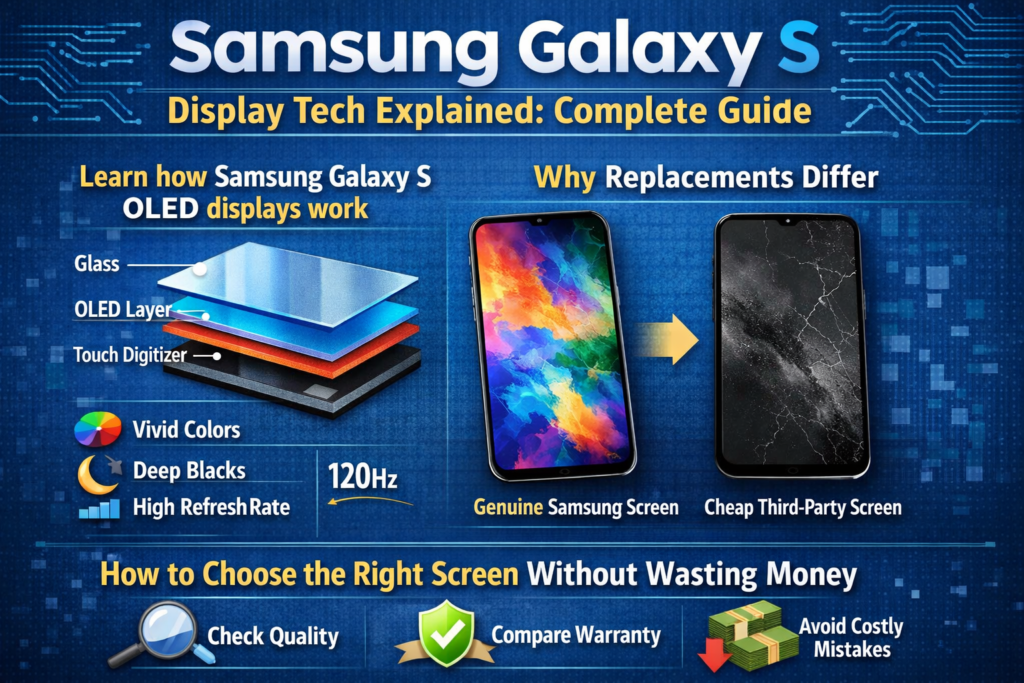
Introduzione ai display Samsung Galaxy serie S
Quando le persone parlano di telefoni Samsung Galaxy S, la prima cosa che di solito salta fuori non è la fotocamera o il processore: è lo schermo. E onestamente, ha perfettamente senso. Samsung non si è limitata a farlo utilizzo visualizza; ha costruito un impero intorno a loro. La serie Galaxy S è diventata lo standard di riferimento per gli schermi degli smartphone, stabilendo parametri di riferimento che altri marchi inseguono anno dopo anno.
Ma cosa c’è realmente dietro quelle straordinarie immagini? Ciò che rende uno schermo del Galaxy S premium mentre un altro schermo sostitutivo sembra... spento? Questo è esattamente ciò che stiamo analizzando qui: niente lanugine, nessuna parola d'ordine di marketing, semplicemente reale, spiegazioni pratiche.
Perché lo schermo è l'anima della serie Galaxy S
Pensa allo schermo come al palcoscenico dove tutto accade. Foto, video, giochi, impronte digitali, anche la durata della batteria: tutto dipende dal display. Samsung lo capisce meglio di chiunque altro, ecco perché la serie Galaxy S non scende quasi mai a compromessi sulla tecnologia dello schermo.
Uno schermo difettoso non solo ha un aspetto peggiore; Esso cambia il comportamento del telefono. Precisione del tocco, luminosità, consumo di energia, e la sicurezza biometrica vivono o muoiono in base alla qualità del display.
Evoluzione della tecnologia dello schermo del Samsung Galaxy serie S
Le prime innovazioni AMOLED
Samsung è stato uno dei primi produttori a scommettere molto sull'AMOLED. Mentre altri sono rimasti con il display LCD, Samsung ha visto il futuro: pixel autoemissivi, neri più profondi, pannelli più sottili. I primi modelli Galaxy S hanno introdotto l'AMOLED nel mainstream e non hanno mai guardato indietro.
Dal Super AMOLED all'AMOLED dinamico
Super AMOLED ha rimosso gli strati aggiuntivi tra il display e il sensore touch, rendere gli schermi più sottili e più reattivi. Dynamic AMOLED ha portato le cose oltre con HDR10+, migliore precisione del colore, e certificazioni sul comfort visivo. Insomma: più carino, più intelligente, e più facile per i tuoi occhi.
Innovazioni nel LTPO e nella frequenza di aggiornamento adattiva
I moderni modelli Galaxy S utilizzano pannelli OLED LTPO che regolano dinamicamente le frequenze di aggiornamento, da un minimo di 10 Hz fino a 120 Hz. È come il controllo automatico della velocità della batteria: veloce quando hai bisogno di velocità, rallenta quando non lo fai.
Tecnologie di visualizzazione principali utilizzate nella serie Galaxy S
Spiegazione della tecnologia dei display OLED
Struttura e principio di funzionamento dell'OLED
OLED sta per diodo organico a emissione di luce. Ogni pixel produce la propria luce. Nessuna retroilluminazione. Nessun compromesso. Quando un pixel si spegne, è veramente nero, come se le luci si fossero spente completamente.
Vantaggi dell'OLED negli smartphone di punta
- Rapporto di contrasto infinito
- Neri veri e colori vibranti
- Tempi di risposta più rapidi
- Pannelli più sottili e flessibili
- Consumo energetico ridotto con interfaccia utente scura
Ecco perché l’OLED non è negoziabile nei flagship Galaxy S.
Spiegazione della tecnologia LCD in-cell
Cosa significa realmente "In-cell"
In-cell non è un tipo di display: è un metodo di integrazione touch. I sensori tattili sono incorporati nel pannello LCD stesso. Sembra efficiente, Giusto? È... per i telefoni di fascia media.
Limitazioni tecniche degli schermi in-cell
Ecco il problema: Gli schermi interni alle celle si basano ancora sulla retroilluminazione LCD. Ciò significa:
- Nessun vero nero
- Contrasto inferiore
- Maggiore consumo energetico
- Nessun supporto per impronte digitali ad ultrasuoni
E quest'ultimo punto? È un problema per i dispositivi Galaxy S.
OLED e LCD in-cell: Principali differenze tecniche
Confronto qualità visualizzazione
L'OLED vince. Ogni volta. Migliore contrasto, colori più ricchi, maggiore luminosità, e un adeguato supporto HDR. Gli schermi LCD in-cell semplicemente non riescono a eguagliare la grafica di punta.
Consumo energetico ed efficienza
I pixel OLED si spengono individualmente. La retroilluminazione LCD rimane accesa qualunque cosa accada. La modalità oscura su OLED consente di risparmiare batteria. Sul display LCD? Non proprio.
Compatibilità con sensori di impronte digitali a ultrasuoni
Questo è fondamentale. Utilizzo dei telefoni Samsung Galaxy S ultrasonico scanner di impronte digitali. La retroilluminazione LCD blocca le onde ultrasoniche. Risultato? Schermate in-cell = impronta digitale non funzionante. Periodo.
Schermate originali e schermate sostitutive
Schermate del Service Pack originale Samsung
Si tratta di schermi certificati dalla fabbrica venduti tramite canali ufficiali. Stessa qualità, stessa prestazione, stesso prezzo che fa un po' male.
Schermi OLED OEM e ricondizionati
Alternative di alta qualità che utilizzano pannelli OLED originali o quasi originali. Se fatto bene, questi schermi supportano i sensori di impronte digitali, HDR, e frequenze di aggiornamento adattive, a un costo più ragionevole.
Schermi sostitutivi LCD in-cell
Economico, funzionale, e compromesso. Funzionano, ma tolgono ciò che rende speciale un telefono Galaxy S. Meglio riservato per uso temporaneo o di emergenza.
Comprendere i gradi di qualità degli schermi nel mercato delle riparazioni
Schermi originali smontati
Estratto da telefoni danneggiati. Solitamente di ottima qualità, ma le condizioni variano. L'età e l'utilizzo precedente contano.
Vantaggi dello schermo assemblato con telaio
Preinstallato con cornice = meno errori di installazione, migliore allineamento, rischio ridotto di perdite di luce. Per schermi curvi Galaxy S, questo è un vantaggio enorme.
Come scegliere lo schermo giusto per il tuo telefono Galaxy S
Basato sul budget
- Budget illimitato → Service Pack originale
- Spesa intelligente → OEM / OLED ricondizionato
- Budget minimo → LCD integrato nella cella (con compromessi)
In base alle esigenze di utilizzo
Se usi lo sblocco tramite impronta digitale ogni giorno, OLED è obbligatorio. Nessuna eccezione.
Basato sull'affidabilità a lungo termine
Gli schermi OLED durano più a lungo, eseguire meglio, e preservare il valore di rivendita.
Suggerimenti per l'identificazione dello schermo e il test
Test della funzione delle impronte digitali
Testare sempre la funzionalità dell'impronta digitale a ultrasuoni prima dell'installazione finale.
Ispezione visiva e fisica
Controllare l'uniformità della luminosità, tinta di colore, pixel morti, e le condizioni del connettore.
Lista di controllo per la verifica del venditore
- Supporto per impronte digitali garantito
- Politica di restituzione disponibile
- Etichettatura chiara del prodotto
Miti comuni sugli schermi del Samsung Galaxy S
- “In-cell sembra uguale a OLED” → Non è così
- “L’impronta digitale può essere corretta con il software” → Non è possibile
- “Tutti gli schermi OLED sono originali” → Sicuramente no
Chi dovrebbe scegliere il tipo di schermo
- Consumatori → OEM o originale
- Professionisti della riparazione → OLED assemblato a telaio
- Utenti temporanei → LCD integrato nella cella
Tendenze future nella tecnologia dei display Samsung
Aspettatevi pannelli più luminosi, gestione energetica più intelligente, fotocamere sotto il display, e materiali OLED flessibili ancora più durevoli. Samsung non sta rallentando, se non altro, sta accelerando.
Conclusione
Gli schermi della serie Samsung Galaxy S non sono solo display: sono capolavori di ingegneria. La tecnologia OLED definisce l'esperienza di punta, mentre gli schermi LCD In-cell esistono esclusivamente come alternative economiche nel mercato delle riparazioni. Comprendere queste differenze ti consente di scegliere saggiamente, proteggere il tuo investimento, ed evitare spiacevoli sorprese.
Quando si tratta di display Galaxy S, la conoscenza è davvero potere.
Domande frequenti (FAQ)
1. Uno schermo In-cell può supportare l'impronta digitale ultrasonica Samsung?
NO. La limitazione hardware lo rende impossibile.
2. Gli schermi OLED ricondizionati sono sicuri da usare?
SÌ, se provenienti da fornitori affidabili e adeguatamente testati.
3. Perché lo schermo originale Samsung è così costoso?
Certificazione, controllo di qualità, e prestazioni garantite.
4. La qualità dello schermo influisce sulla durata della batteria?
Assolutamente. Gli schermi OLED sono molto più efficienti dal punto di vista energetico.
5. Ne vale la pena uno schermo assemblato a telaio?
Sì, soprattutto per i modelli Galaxy S curvi.



