
🔧 Introduzione
Ammettiamolo: rompere lo schermo del telefono è come calpestare LEGO a piedi nudi. Doloroso, inaspettato, e costoso. Ma hey, e se potessi sostituirlo tu stesso?? Benvenuto nella guida definitiva che ti mostra come fare esattamente questo, sia che tu abbia a che fare con un iPhone o un Android. Ti guideremo attraverso tutto passo dopo passo, con foto o collegamenti video, e inserisci avvisi di rischio per assicurarti di non trasformare il telefono in un fermacarte.
🔩 Strumenti essenziali & Materiali
Kit di strumenti di base per la sostituzione dello schermo
Per iniziare, ne avrai bisogno:
- Un set di cacciaviti di precisione (solitamente con Pentalobe, Phillips, Teste a tre punte)
- Ventosa
- Strumenti per fare leva in plastica
- Pinzette
- Strumento di espulsione della scheda SIM
- Alcol isopropilico (per la pulizia)
Attrezzatura di sicurezza consigliata
- Cinturino da polso ESD (previene danni statici)
- Tappetino antistatico
- Occhiali di sicurezza (gli schermi possono frantumarsi durante la rimozione)
Come ottenere schermi sostitutivi di qualità
Non tutti gli schermi sono uguali. Evita quelli super economici sui mercati loschi. Cercare:
- Etichette OEM o simili a OEM
- Garanzia (Anche 30 giorni è meglio di niente)
- Compatibilità verificata con il modello del tuo telefono
⚠️ Avvisi sui rischi prima di iniziare
Annullamento della garanzia
Una volta aperto il dispositivo, dire addio alle richieste di garanzia. Pensaci due volte se il tuo dispositivo è ancora in garanzia o AppleCare.
Parti ad alto rischio che potresti rompersi
- Scanner di impronte digitali (Tocca l'ID, sotto-display)
- Moduli Face ID (sugli iPhone)
- Pannelli OLED (molto fragile, soprattutto su Samsung)
Danni statici e rischi ESD
L'elettricità statica può friggere componenti delicati. Utilizzare la protezione ESD e collegarsi a terra.
Quando non dovresti fare il fai-da-te
- Se lo schermo è fuso con la batteria
- Se ti mancano le mani ferme o la pazienza
- Se il telefono presenta danni causati dall'acqua
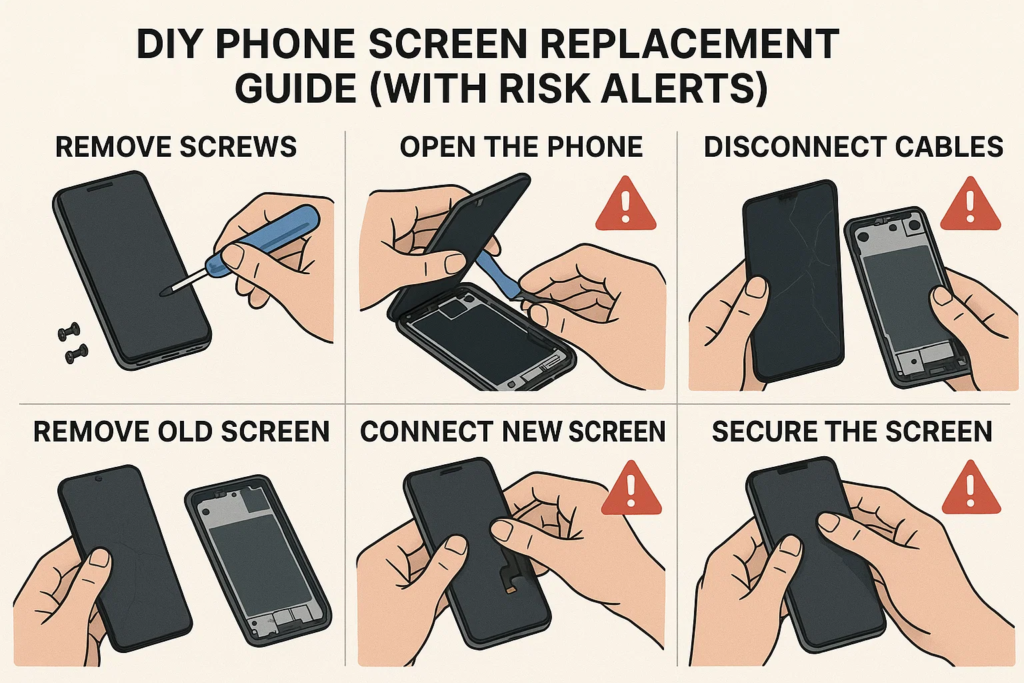
🛠️ Processo di smontaggio passo dopo passo
Fare un passo 1: Spegnere e scaricare la batteria
Tieni premuto il pulsante di accensione e spegni il telefono. Attendere 2-3 minuti per consentire lo scarico dei condensatori.
Fare un passo 2: Rimuovere le viti e aprire il dispositivo
iPhone
Utilizza un cacciavite Pentalobe per rimuovere le viti inferiori vicino alla porta di ricarica. Applica una ventosa allo schermo e fai leva delicatamente con uno strumento di plastica. Non inserire troppo in profondità!
Androide
Dipende dal modello. Per Samsung, scaldare i bordi con una pistola termica (70–80°C), utilizzare l'aspirazione e una carta di plastica per separare il vetro. Per Xiaomi o OPPO, le viti potrebbero trovarsi sotto il pannello posteriore.
Fare un passo 3: Scollegare prima la batteria!
Non saltarlo mai. Scollegare prima la batteria impedisce il cortocircuito della scheda logica.
Fare un passo 4: Etichettare e scollegare i cavi flessibili
Usa delle pinzette o uno spudger per staccare con attenzione i cavi flessibili che collegano lo schermo, telecamera, o sensori.
Fare un passo 5: Rimuovere con attenzione lo schermo rotto
Una volta scollegati tutti i cavi, sollevare lo schermo. Sii gentile. Alcuni dispositivi sono dotati di adesivo che dovrai ammorbidire nuovamente con il calore.
📲 Installazione della nuova schermata
Fare un passo 6: Pulisci l'alloggiamento e riapplica l'adesivo
Raschiare la colla rimanente. Utilizzare alcool e un panno privo di lanugine. Applicare nuove strisce adesive o colla.
Fare un passo 7: Collega i cavi flessibili alla scheda logica
Ricollegare lo schermo, digitalizzatore, fotocamera frontale, ecc. Sii fermo ma attento.
Fare un passo 8: Ricollegare la batteria (Ultimo passo!)
Una volta che tutto è dentro, ricollegare la batteria e fissarla.
Fare un passo 9: Ricollegare le viti e sigillare il dispositivo
Sostituire il pannello posteriore o lo schermo, applicare una pressione uniforme, e riavvitare il tutto.
🧪 Collaudo prima dell'assemblaggio finale
Prima di sigillare tutto definitivamente:
- Reattività al tocco
- Luminosità & visualizzare i colori
- Pixel morti
- Fronte & funzione della fotocamera posteriore
- Face ID o lettore di impronte digitali
Se qualcosa non va, riaprire e controllare i connettori.
🚫 Errori comuni da evitare
Dimenticare di scollegare la batteria
Questo è il #1 causa di circuiti di retroilluminazione bruciati o schede logiche danneggiate.
Pizzicamento dei cavi o disallineamento dei connettori
I cavi flessibili sono come le vene, se li pizzichi o li torci, possono strapparsi internamente.
Viti di serraggio eccessivo
Ciò può rompere il vetro a causa della pressione interna. Aderente è sufficiente.
🔍 Note speciali per marca del dispositivo
iPhone X e versioni successive: Avviso ID viso
I componenti di Face ID sono sensibili. Danneggiarli = perdita permanente di Face ID. Non puoi semplicemente sostituirli: il sistema Apple li accoppia con la scheda logica.
Display Samsung Edge: Fragilità dell'OLED
Questi schermi flessibili sono super delicati. Applicare troppo calore o pressione può rovinarli prima ancora di finirli.
Xiaomi & Oppo: Integrazione di batteria e schermo
Su alcuni modelli, lo schermo è incollato direttamente sopra la batteria. Se vai troppo in profondità rischi di forare la batteria.
🎥 Video demo e guida visiva
Canali YouTube consigliati
- JerryRigTutto
- iFixit
- Istituto di riparazione mobile
- Witrigs
Dove trovare i PDF di smontaggio
- iFixit.com
- Witrigs
- Manuali di servizio del produttore (se pubblico)
👨🔧 Dovresti invece assumere un professionista?
Confronto dei costi: Fai da te contro negozio
- Fai da te: $20–$80 per le parti
- Negozio: $50–$150+ a seconda del modello
Il fai-da-te fa risparmiare denaro, ma solo se fatto bene la prima volta.
Quando un tecnico di riparazione salva la situazione
- Se il tuo telefono è la tua unica ancora di salvezza
- Se il lavoro prevede la saldatura della scheda madre
- Se stai sostituendo sia il vetro anteriore che quello posteriore
🧠 Considerazioni finali
Sostituire lo schermo del telefono può essere estremamente soddisfacente, come riparare la tua bicicletta per la prima volta. Ma è anche facile sbagliare se non sei preparato. Se stai attento, utilizzare gli strumenti giusti, e segui guide come questa, puoi risparmiare denaro e aumentare di livello il tuo gioco di riparazione.
Ma ehi, se non sei sicuro o se il tuo telefono è un modello di punta, va benissimo lasciare che siano i professionisti a gestirlo.
❓ Domande frequenti
1. Posso sostituire uno schermo senza attrezzi?
Non raccomandato. Rischierai di danneggiare i componenti o di farti male.
2. Quanto tempo ci vuole per sostituire lo schermo del telefono?
In genere 30-90 minuti, a seconda della vostra esperienza e del modello.
3. Il mio telefono sarà ancora impermeabile dopo la sostituzione dello schermo??
NO. Una volta aperto, la resistenza all'acqua è compromessa a meno che non venga richiusa professionalmente.
4. Come faccio a sapere se il mio schermo sostitutivo è difettoso?
Verificare lo sfarfallio, pixel morti, problemi di colore, o mancata reattività prima dell'assemblaggio finale.
5. Posso utilizzare uno schermo usato da un altro telefono?
Solo se è il modello esatto e perfettamente funzionante. Testarlo prima dell'installazione.



