
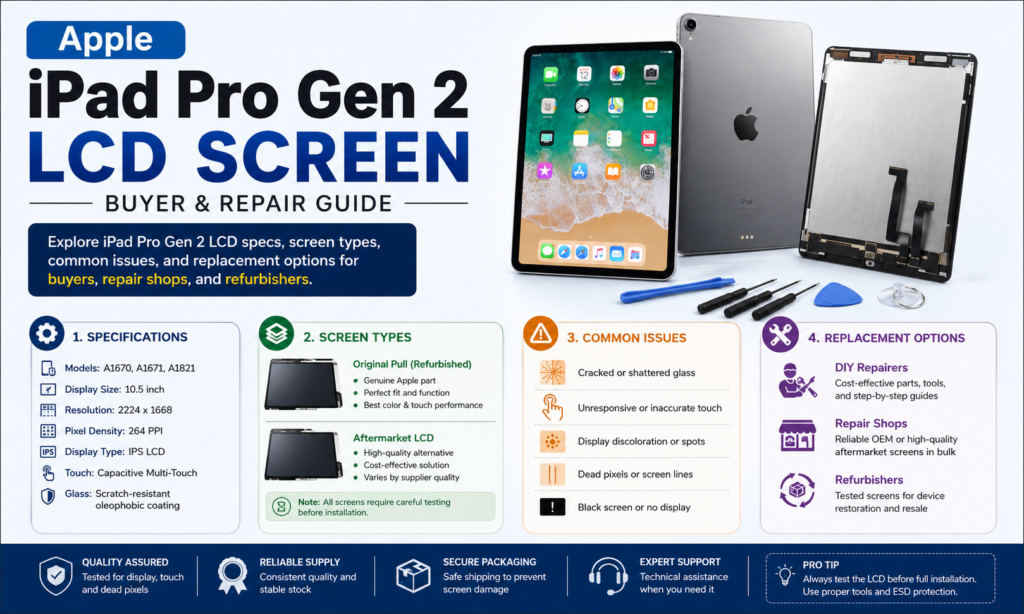
Présentation de l'iPad Pro Gen 2 Afficher
Lorsqu'Apple a présenté l'iPad Pro de deuxième génération en 2017, il a élevé la norme en matière d'écrans de tablettes. Même si les nouveaux modèles d'iPad sont désormais dotés des technologies Mini-LED et OLED, le iPad Pro Gen 2 Écran LCD reste l'un des écrans de tablette les plus respectés jamais produits. De nombreux ateliers de réparation, grossistes, rénovateurs, et les consommateurs continuent de rechercher des écrans de remplacement, car des millions de ces appareils sont encore activement utilisés dans le monde..
L'iPad Pro génération 2 a été lancé avec plusieurs innovations d'affichage bien en avance sur son temps. Apple a équipé l'appareil d'un panneau LCD IPS de haute qualité doté Technologie Promotion, Ton vrai, et Prise en charge de la large gamme de couleurs P3. Ces technologies ont considérablement amélioré la fluidité des mouvements, précision des couleurs, et confort visuel. Même dans 2026, de nombreux utilisateurs estiment que la qualité d'affichage reste excellente pour la lecture, dessin, montage vidéo, et consommation des médias.
Pour les entreprises de réparation, comprendre la structure et les niveaux de qualité de l'iPad Pro Gen 2 les écrans de remplacement sont essentiels. Les clients demandent souvent s'ils doivent acheter un écran original, un panneau remis à neuf, ou un remplacement après-vente à moindre coût. Connaître les différences contribue à établir la confiance et garantit la satisfaction du client.
Ce guide explore tout sur l'Apple iPad Pro Gen 2 Écran LCD, y compris les spécifications, technologies, problèmes courants, options de remplacement, et recommandations d'achat pour le marché de la réparation d'aujourd'hui.
Comprendre l'iPad Pro Gen 2 Modèles
Apple a lancé deux iPad Pro Gen majeurs 2 variantes, chacun doté d'un écran LCD haut de gamme conçu pour un usage professionnel. Bien qu'ils partagent de nombreuses technologies d'affichage, il existe des différences importantes entre les modèles.
10.5-pouces iPad Pro Gen 2
La version 10,5 pouces a été introduite en remplacement de l'ancien iPad Pro 9,7 pouces.. L'écran plus grand a été obtenu en réduisant la taille du cadre tout en conservant un encombrement global compact de l'appareil.. Ce modèle est rapidement devenu populaire auprès des étudiants, créateurs, et les utilisateurs professionnels en raison de son équilibre entre portabilité et productivité.
L'écran offre une excellente luminosité, couleurs précises, et une réactivité à la pointe du secteur. Les artistes ont particulièrement apprécié la faible latence de l'Apple Pencil rendue possible par le taux de rafraîchissement de 120 Hz.. Même des années plus tard, de nombreux utilisateurs continuent d'utiliser ce modèle pour la prise de notes, conception graphique, et la consommation de contenu.
12.9-pouces iPad Pro Gen 2
Le modèle 12,9 pouces ciblait les professionnels qui avaient besoin d'un espace de travail plus grand. Apple l'a équipé d'un écran Retina offrant une résolution de 2732 × 2048 pixels et une densité de 264 pixels par pouce. L'écran prend en charge la technologie ProMotion, Large couleur P3, Ton vrai, et un design entièrement laminé.
En raison de sa plus grande toile, la version 12,9 pouces est devenue particulièrement populaire parmi les artistes, architectes, ingénieurs, et photographes. L'écran reste très apprécié pour le multitâche et le travail créatif, même par rapport à de nombreuses tablettes plus récentes.
Technologie LCD utilisée dans l'iPad Pro Gen 2
Apple n'a pas simplement installé un panneau LCD standard dans l'iPad Pro Gen 2. Plutôt, l'entreprise a optimisé plusieurs technologies pour créer une expérience visuelle haut de gamme.
Structure du panneau LCD IPS
L'iPad Pro génération 2 utilise Ips (Commutation dans le plan) Technologie LCD, qui est connu pour son excellente reproduction des couleurs et ses angles de vision larges. Contrairement aux anciennes dalles TN, Les écrans IPS conservent des couleurs précises même vus de côté.
Cette caractéristique est particulièrement importante pour les professionnels travaillant avec des images, illustrations, et contenu vidéo. Si l'appareil est tenu verticalement, horizontalement, ou partagé entre plusieurs spectateurs, la qualité de l'image reste constante. L’architecture IPS contribue également à la présentation naturelle des couleurs de l’écran, ce qui le rend adapté aux flux de travail créatifs professionnels.
L’une des raisons pour lesquelles de nombreux techniciens de réparation recommandent encore les écrans Apple d’origine ou remis à neuf est que les panneaux du marché secondaire ont souvent du mal à égaler la cohérence des couleurs et la luminosité des écrans IPS d’Apple.. Même si les remplacements moins chers peuvent sembler similaires à première vue, les différences deviennent souvent perceptibles lors d'une utilisation à long terme.
Système de rétroéclairage LED
L'écran s'appuie sur un système de rétroéclairage LED sophistiqué positionné derrière la couche LCD. Cette configuration permet à l'écran de produire des images lumineuses et éclatantes tout en conservant une efficacité énergétique raisonnable..
Contrairement aux écrans OLED, où les pixels individuels émettent leur propre lumière, Les écrans LCD nécessitent une source de lumière séparée. Bien que cette conception empêche les vrais niveaux de noir, il offre des avantages tels qu'un risque de brûlure plus faible et une durée de vie d'affichage généralement plus longue.
Pour les utilisateurs professionnels, étudiants, et les professionnels qui passent de nombreuses heures chaque jour sur leurs appareils, l'architecture LCD rétroéclairée par LED continue de fournir des performances et une durabilité fiables.
Spécifications de l'affichage des touches
L'iPad Pro génération 2 les spécifications d'affichage étaient révolutionnaires lors de leur introduction et restent impressionnantes aujourd'hui.
Résolution et densité de pixels
Le modèle 12,9 pouces offre une résolution de 2732 × 2048 pixels avec une densité de pixels de 264 IPP. Apple l'appelle un écran Retina, car les pixels individuels deviennent difficiles à distinguer à des distances de visualisation normales..
| Spécification | iPad Pro 12.9 Gén. 2 |
|---|---|
| Taille d'affichage | 12.9-pouce |
| Résolution | 2732 × 2048 |
| Densité de pixels | 264 IPP |
| Type de panneau | Écran LCD IPS |
| Taux de rafraîchissement | Jusqu'à 120 Hz |
| Gamme de couleurs | P3 Large Couleur |
| Ton vrai | Oui |
| Laminage | Entièrement laminé |
Le texte apparaît net, les images semblent détaillées, et les vidéos restent très agréables. Pour de nombreux utilisateurs, la différence visuelle entre cet écran et certaines tablettes modernes est étonnamment faible.
Technologie Promotion 120 Hz
Peut-être la fonctionnalité la plus révolutionnaire de l'iPad Pro Gen 2 était Technologie Promotion. Apple a introduit un taux de rafraîchissement adaptatif capable d'atteindre 120 Hz, rendant le défilement et les animations considérablement plus fluides que les écrans 60 Hz traditionnels.
Pour les utilisateurs d'Apple Pencil, cette technologie réduit considérablement la latence d'entrée. Écrire sur l'écran semblait plus naturel, presque comme utiliser un stylo et du papier. Les artistes ont immédiatement remarqué l'amélioration, et beaucoup l'ont considéré comme une fonctionnalité révolutionnaire.
Aujourd'hui, les écrans à taux de rafraîchissement élevé sont courants sur tous les smartphones, comprimés, et ordinateurs portables. Dans 2017, cependant, Apple a été parmi les pionniers à proposer cette technologie au grand public..
True Tone et Wide Color P3
L'écran prend en charge Ton vrai, qui ajuste automatiquement la balance des blancs en fonction des conditions d'éclairage ambiant. Cela aide à réduire la fatigue oculaire et crée une expérience visuelle plus naturelle..
Apple également inclus Prise en charge de la large gamme de couleurs P3, permettant à l'écran de reproduire une gamme de couleurs plus large que les écrans sRGB traditionnels.
Les photographes et les designers bénéficient particulièrement de cette gamme de couleurs plus large.. Les images semblent plus riches, et les variations de couleurs subtiles deviennent plus faciles à distinguer lors du travail d'édition.
Qualité d'affichage par rapport aux iPads modernes
La technologie évolue rapidement, alors, comment fonctionne l'iPad Pro Gen 2 L'écran LCD se compare aux écrans Apple actuels?
LCD vs rétine liquide
Les derniers écrans Liquid Retina d'Apple sont également basés sur la technologie LCD, mais incluent des améliorations de conception telles que des cadres plus fins et une gestion améliorée de la luminosité.. En utilisation réelle, la différence entre l'iPad Pro Gen 2 L'écran Retina et les nouveaux écrans Liquid Retina sont plus petits que ce à quoi beaucoup de gens s'attendent.
Précision des couleurs, acuité, et la qualité visuelle globale reste excellente. Pour les tâches quotidiennes, la plupart des utilisateurs auraient du mal à identifier les différences majeures sans comparaisons directes côte à côte.
LCD vs Mini-LED
Apple a introduit la technologie Mini-LED dans les derniers modèles d'iPad Pro 12,9 pouces. La mini-LED améliore considérablement le contraste et les performances HDR grâce à des milliers de zones de gradation locales.
Les écrans mini-LED produisent des noirs plus profonds et des reflets plus lumineux, rendre les films HDR et le contenu professionnel plus dramatiques. Cependant, l'ancien écran LCD fonctionne toujours exceptionnellement bien en termes de productivité, navigation, éducation, et applications de dessin.
LCD contre OLED
La technologie OLED offre des niveaux de noir parfaits et un contraste exceptionnel car chaque pixel émet sa propre lumière. De nombreux experts du secteur considèrent l'OLED comme la technologie d'affichage ultime pour les tablettes..
Pourtant le LCD conserve plusieurs avantages. Le risque de brûlure est pratiquement inexistant, les coûts de remplacement sont souvent inférieurs, et la durabilité à long terme reste excellente. Pour les utilisateurs qui privilégient la fiabilité et l’abordabilité, l'iPad Pro génération 2 L'écran LCD continue d'être un choix pratique.
iPad Pro Gen commun 2 Problèmes d'écran
Comme tout composant électronique, iPad Pro Gen 2 les écrans peuvent développer des problèmes avec le temps.
Problème de points blancs
L'un des problèmes les plus fréquemment signalés est l'apparition d'un point blanc brillant près de la zone du bouton Accueil.. On pense que ce problème résulte de la pression affectant les couches LCD sous le verre..
Le problème commence généralement par une petite zone lumineuse et peut progressivement devenir plus visible.. Bien que cela n'affecte pas toujours la fonctionnalité, cela peut être gênant lors d'une utilisation normale.
Problèmes de réactivité tactile
Après des années d'utilisation intensive, certains appareils peuvent rencontrer des problèmes de sensibilité tactile. Ces problèmes peuvent résulter de l'usure du numériseur, dommage au connecteur, ou impact physique.
Les techniciens de réparation professionnels diagnostiquent généralement si le problème provient de l'ensemble LCD ou de la carte mère interne de l'appareil avant de recommander le remplacement..
Rétroéclairage et fuite de lumière
Des saignements de rétroéclairage peuvent se produire sur les bords des panneaux LCD vieillissants. Certains utilisateurs de longue date ont également signalé des fuites de lumière se développant au fil du temps.. Les discussions communautaires entre propriétaires d'iPad indiquent que ces problèmes peuvent s'aggraver progressivement avec l'âge et une utilisation intensive..
Bien que ces problèmes rendent rarement l'appareil inutilisable, ils peuvent affecter la qualité globale de visualisation.
Types d'écrans de remplacement disponibles
Le marché du remplacement propose plusieurs catégories d'affichage pour l'iPad Pro Gen 2.
Écran d'origine
Les écrans d'origine sont de véritables écrans fabriqués par Apple, retirés des nouveaux appareils ou provenant de canaux d'approvisionnement agréés.. Ceux-ci offrent les meilleures performances, luminosité, précision des couleurs, et réponse tactile.
Ils constituent généralement l'option la plus chère, mais offrent également l'expérience la plus proche de l'écran installé en usine..
Écran tiré
Un écran retiré est un écran Apple d'origine supprimé d'un autre appareil. Ces écrans conservent généralement la qualité d'origine tout en coûtant moins cher que les unités neuves.
De nombreux rénovateurs professionnels préfèrent les écrans tirés car ils préservent les performances et la compatibilité de niveau Apple..
Écran remis à neuf
Les écrans remis à neuf combinent généralement un panneau LCD d'origine avec un verre extérieur récemment remplacé. Cette approche réduit les coûts tout en conservant une grande partie de la qualité d'affichage d'origine..
Une rénovation de haute qualité peut produire d’excellents résultats, faisant des écrans remis à neuf l'un des choix les plus populaires dans l'industrie de la réparation.
Écran LCD compatible avec le marché secondaire
Les écrans de rechange sont fabriqués par des fournisseurs tiers. La qualité peut varier considérablement selon le fabricant.
Bien que ces écrans proposent des prix inférieurs, ils peuvent avoir une luminosité réduite, précision des couleurs plus faible, sensibilité tactile inférieure, ou durée de vie plus courte par rapport aux écrans Apple d'origine.
Comment choisir le meilleur écran de remplacement
Le choix du bon remplacement dépend du budget, attentes en matière de performances, et l'utilisation prévue. Les artistes et designers professionnels doivent donner la priorité aux écrans originaux ou remis à neuf de qualité supérieure, car la précision des couleurs est très importante pour le travail créatif..
Les étudiants et les utilisateurs occasionnels peuvent trouver que les écrans remis à neuf de haute qualité offrent le meilleur équilibre entre coût et performances.. Les ateliers de réparation recommandent souvent les écrans remis à neuf car ils offrent un excellent rapport qualité-prix tout en minimisant les plaintes des clients..
Lors de l'évaluation des fournisseurs, les acheteurs doivent rechercher un contrôle de qualité cohérent, couverture de garantie, test tactile, test de luminosité, et procédures d'inspection des pixels morts. Un fournisseur digne de confiance peut faire la différence entre une réparation réussie et un retour coûteux.
Demande du marché et opportunités de réparation en 2026
Bien que l'iPad Pro Gen 2 a été libéré en 2017, l'appareil reste étonnamment pertinent. De nombreux utilisateurs continuent d'utiliser ces tablettes pour lire, streaming, prise de notes, éducation, et projets créatifs. Les discussions communautaires de ces dernières années montrent que de nombreux propriétaires considèrent toujours l'appareil fonctionnel pour les tâches quotidiennes malgré son âge..
Cette utilisation continue crée une demande continue d'écrans de remplacement. Les entreprises de réparation bénéficient de l'offre de plusieurs qualités d'écran, permettant aux clients de choisir entre prix abordable et qualité supérieure. Les fournisseurs en gros qui maintiennent des stocks stables et des procédures de test fiables peuvent continuer à servir un marché de niche rentable..
Alors que les nouveaux modèles d’iPad deviennent de plus en plus chers, réparer des appareils plus anciens reste souvent la solution la plus économique pour les consommateurs. Cette tendance contribue à soutenir la demande pour l’iPad Pro Gen 2 Assemblages LCD bien intégrés 2026.
Conclusion
Le Apple iPad Pro génération 2 Écran LCD reste l'un des écrans de tablette les plus impressionnants jamais produits par Apple. Sa combinaison de technologie IPS, Taux de rafraîchissement ProMotion 120 Hz, Ton vrai, et la prise en charge de Wide Color P3 a créé une expérience utilisateur qui semble toujours premium des années après le lancement..
Pour les professionnels de la réparation, comprendre les différences entre l'original, tiré, remis à neuf, et les écrans de rechange sont essentiels pour fournir la bonne solution aux clients. Alors que les panneaux Mini-LED et OLED modernes offrent des améliorations en termes de contraste et de performances HDR, l'iPad Pro génération 2 L'écran LCD continue de fournir une qualité d'image exceptionnelle, durabilité, et valeur.
Tant que des millions de ces comprimés resteront en usage actif, le marché des écrans de remplacement de haute qualité continuera de présenter des opportunités pour les grossistes, rénovateurs, et entreprises de réparation dans le monde entier.
FAQ
1. Quel type d'écran l'iPad Pro Gen 2 utiliser?
L'iPad Pro génération 2 utilise une prime Écran LCD Retina IPS avec rétroéclairage LED, Technologie Promotion 120 Hz, Ton vrai, et prise en charge Wide Color P3.
2. L'iPad Pro Gen 2 avoir un écran OLED?
Non. L'iPad Pro génération 2 utilise un panneau LCD IPS plutôt que la technologie OLED.
3. Est-ce un iPad Pro Gen reconditionné 2 écran qui vaut la peine d'être acheté?
Oui. Un écran reconditionné de haute qualité conserve souvent l'écran LCD Apple d'origine tout en remplaçant le verre endommagé, offrant d'excellentes performances à moindre coût.
4. Quel est le problème de points blancs courant sur l'iPad Pro Gen 2?
Le problème des points blancs apparaît sous la forme d'une zone lumineuse sur l'écran, généralement causé par la pression affectant les couches internes de l'écran LCD.
5. L'iPad Pro Gen est-il 2 ça vaut toujours la peine d'être réparé 2026?
Oui. De nombreux utilisateurs continuent d'utiliser l'appareil pour la productivité, éducation, streaming, prise de notes, et travail créatif, faire du remplacement de l'écran une option rentable.



