Obrazovky iPhone patří mezi nejdůležitější součásti zařízení, a když se displej začne chovat divně, i perfektně fungující telefon se může najednou cítit nepoužitelný. Prasklý displej poznáte snadno, ale mnoho Problémy s LCD obrazovkou iPhone jsou méně zřejmé: dotyk může v jednom rohu přestat reagovat, displej může blikat, mohou se objevit svislé čáry, jas může být nerovnoměrný, nebo může obrazovka zůstat zcela černá, zatímco telefon nadále přijímá hovory a upozornění. Tyto problémy mohou pocházet z fyzického dopadu, expozice kapalinám, poškození konektoru, selhání součásti, problémy se softwarem, nebo nekvalitní náhradní displej. Apple sám doporučuje řešení problémů, jako je přerušovaný dotyk, restartováním iPhone, aby byla obrazovka čistá a suchá, odpojení příslušenství, a odstranění pouzder nebo chráničů obrazovky před sjednáním servisu, pokud problém přetrvává.
Pro opravny, velkoobchodníci, techniků, i běžní uživatelé iPhonů, klíčem je naučit se rozlišovat jednoduchý problém od skutečného selhání displeje. Ne každý problém s obrazovkou znamená, že je třeba vyměnit celou sestavu displeje. Někdy je problém způsoben příslušenstvím, kontaminace, volné spojení, nebo chování softwaru, zatímco jiné případy vyžadují odbornou diagnostiku a nové zobrazení. Apple v současné době poskytuje oficiální služby opravy obrazovky prostřednictvím Apple Stores a Apple Authorized Service Providers, zatímco oprávnění nezávislí poskytovatelé oprav a uživatelé samoobslužných oprav mají také přístup k originálním dílům Apple v rámci příslušných programů.
Proč jsou problémy s displejem iPhone tak časté
Moderní displeje iPhone jsou spíše sofistikované sestavy než jednoduché kusy skla. Obrazovka normálně kombinuje viditelný zobrazovací panel, technologie dotykového snímání, ochranné sklo, flexibilní kabely, konektory, a podpůrná elektronika, s přesnou konstrukcí se liší podle modelu a generace. To znamená, že jedna nehoda může způsobit několik různých příznaků najednou: pád může sklo prasknout, poškodit dotykovou vrstvu, deformovat rám, a zatěžujte flex kabel displeje, i když se zdá, že telefon zpočátku funguje normálně. To je důvod, proč by diagnostika obrazovky iPhone měla být spíše detektivní prací než pouhým hledáním trhliny.
Dalším důvodem, proč mohou být problémy se zobrazením matoucí, je to příznaky obrazovky ne vždy identifikují vadnou součást. Černý displej, například, může znamenat poškozený panel, problém s konektorem, problém s napájením, nebo hlubší chyba logické desky. Podobně, duch dotyku může pocházet z poškozené dotykové vrstvy, nekvalitní náhradní hardware, vlhkost, nebo jiný elektrický problém. Apple poznamenává, že neoriginální displeje mohou způsobit problémy s kompatibilitou a výkonem, včetně Multi-Touch problémů, a že dříve používané díly mohou mít nekonzistentní výkon v závislosti na jejich předchozím použití nebo úpravě.
Rozdíl mezi LCD a OLED displeji iPhone
Je také užitečné si tento pojem ujasnit LCD displej iPhone, protože ne každý moderní iPhone používá LCD panel. Dřívější generace iPhonů se hodně spoléhaly na technologii LCD, zatímco mnoho novějších modelů iPhone používá displeje založené na OLED. OLED panely generují světlo na úrovni pixelů, zatímco tradiční sestavy LCD závisí na systému podsvícení. V důsledku toho, jejich vzorce selhání se mohou lišit: LCD může způsobit problémy související s podsvícením, zatímco OLED může zobrazovat problémy, jako je poškození pixelů, zachování obrazu jako vypálení, nebo lokalizované tmavé oblasti.
Pro kupující a opravny, identifikace přesného modelu iPhonu před objednáním výměny je proto zásadní. Dvě obrazovky mohou vypadat podobně, ale používají zcela odlišné konektory, rozměry, zobrazovací technologie, dotykové systémy, a požadavky na programování nebo konfiguraci. Technik, který objednává pouze podle velikosti obrazovky nebo vzhledu, může snadno skončit s nekompatibilní komponentou. Vždy potvrďte přesný model, specifikace obrazovky, uspořádání konektorů, a náhradní typ před zahájením opravy.
Nejčastější problémy s obrazovkou iPhone
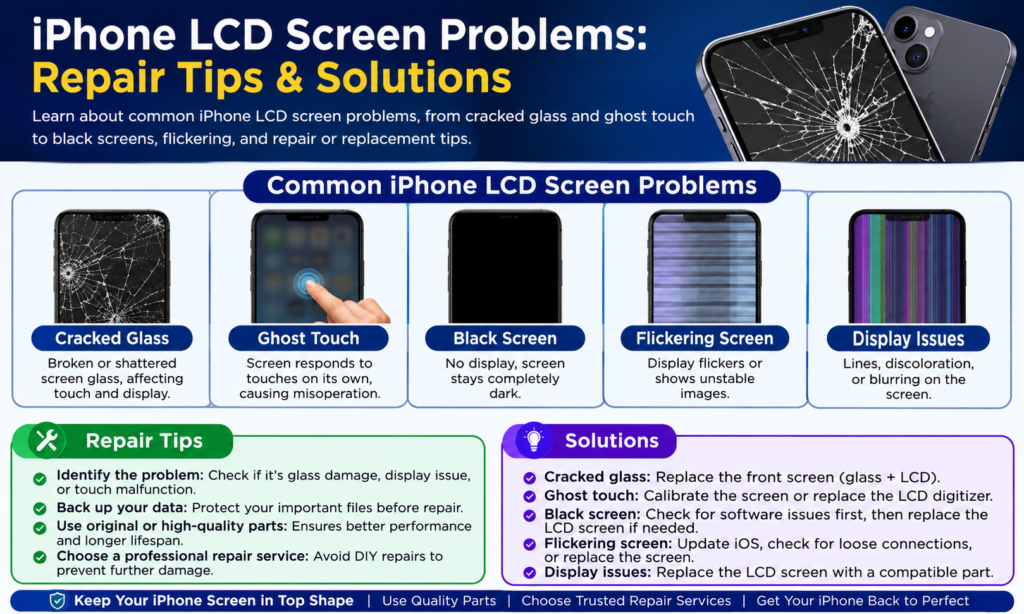
Nejčastější stížnosti na displej iPhonu lze rozdělit do několika kategorií: fyzické poškození, problémy s dotykem, problémy s výstupem displeje, abnormality jasu nebo barev, a úplná ztráta obrazu. Každá kategorie říká technikovi něco jiného. Prasklé vnější sklo s perfektně fungujícím obrazem a odezvou na dotek může být mnohem snazší řešit než obrazovka zobrazující náhodné čáry a nereagující dotykové zóny. Důležité je neskočit přímo k výměně, než přesně identifikujete příznak.
Užitečným prvním krokem je přesně zaznamenat, co obrazovka dělá. Vyskytuje se problém neustále nebo jen občas? Objeví se po zahřátí telefonu? Dotykem obrazovky se změní obraz? Stále telefon vibruje, kroužek, účtovat, nebo připojit k počítači? Problém začal okamžitě po pádu, vystavení vodě, aktualizace softwaru, nebo předchozí oprava? Tato jednoduchá pozorování mohou ušetřit značný čas na opravu, protože pomáhají oddělit problém s displejem od širšího problému se zařízením.
Prasklé nebo rozbité sklo
Prasklé sklo je pravděpodobně nejrozpoznatelnějším problémem obrazovky iPhone. Telefon může spadnout ze stolu, vyklouznout z kapsy, nebo přijímat tlak uvnitř vaku, zanechávající na předním skle pavučinu prasklin. Někdy je poškození čistě kosmetické a displej a dotykové funkce fungují dál. V jiných případech, náraz pronikne hlouběji a poškodí dotykovou vrstvu nebo panel displeje, vytváří příznaky, které se časem zhoršují.
Malá prasklina by neměla být automaticky ignorována. Ostré skleněné úlomky mohou způsobit, že manipulace se zařízením bude nepohodlná nebo nebezpečná, a pokračující tlak na poškozený panel může způsobit další selhání. Pokud je obrazovka prasklá, ale stále funguje, uživatelé by měli zálohovat důležitá data a zajistit vhodnou opravu, spíše než opakovaně mačkat poškozená místa. Profesionální technici by také měli zkontrolovat rám, protože ohnutý kryt může bránit správnému usazení náhradního displeje, potenciálně vytvářet tlakové body, které způsobí pozdější selhání nové obrazovky.
Selhání dotykové obrazovky a Ghost Touch
Problémy s dotykovou obrazovkou jsou obzvláště frustrující, protože obraz může vypadat zcela normálně, zatímco ovládání telefonu je obtížné nebo nemožné. Mezi běžné příznaky patří část obrazovky, která nereaguje, zpožděná registrace dotyku, náhodná klepnutí, zmeškané přejetí, nebo dotek ducha, kde se zdá, že telefon provádí akce, aniž by se ho uživatel dotkl. Tyto příznaky mohou být důsledkem poškození dotykového systému, kontaminace, vlhkost, poškozený konektor, nebo nevhodný náhradní displej.
Před předpokladem, že hardware selhal, Apple doporučuje několik základních kontrol pro problémy s dotykem: restartujte iPhone, ujistěte se, že je displej čistý a bez vody nebo nečistot, odpojte příslušenství Lightning nebo USB-C, a odstraňte pouzdra nebo chrániče obrazovky. Pokud problém po jednom z těchto kroků zmizí, výměna obrazovky může být zbytečná. Pokud po základním řešení problémů zůstává dotyk nespolehlivý, však, odborná diagnostika se stává mnohem vhodnější.
Černá obrazovka nebo žádný displej
Úplně černá obrazovka je jednou z nejvíce alarmujících poruch zobrazení, ale to automaticky neznamená, že je iPhone mrtvý. Pokud telefon stále zvoní, vibruje, produkuje zvuky, nebo reaguje při připojení k počítači, zařízení může stále fungovat, i když se na displeji nezobrazuje žádný obrázek. Toto rozlišení je pro techniky nesmírně důležité, protože mění směr diagnostiky.
Černý displej může být způsoben poškozením nárazem, problémy s vnitřním konektorem, selhání displeje, poruchy související s napájením, nebo jiné hardwarové problémy. Pokud telefon nedávno spadl, sestava displeje by měla být pečlivě zkontrolována. Pokud utrpělo expozici kapalinám, technici by také měli zvážit korozi nebo elektrické poškození, spíše než prostou instalaci další obrazovky. Výměna displeje může vyřešit problém, když je původní panel vadný, ale nemůže opravit chybu jinde v telefonu.
Čáry, Blikající, a Zobrazit artefakty
Svislé nebo vodorovné čáry jsou dalším běžným varovným signálem. Můžete vidět jedinou jasnou čáru, více barevných čar, rychle blikající oblasti, přerušované zkreslení obrazu, nebo bloky pixelů, které vypadají abnormálně. Tyto příznaky se často stávají znatelnějšími po fyzickém nárazu, zvláště když byl telefon ohnutý nebo stlačený.
Blikání může být někdy spojeno se špatným připojením nebo vadnou náhradní součástí, zatímco trvalé čáry mohou naznačovat fyzické poškození sestavy displeje. Technik by měl telefon před a po opětovném připojení displeje pečlivě otestovat, spíše než okamžitě předpokládat, že samotný panel je vadný. Pokud stejný příznak přetrvává u kompatibilního displeje, o kterém je známo, že je dobrý, pozornost by se měla přesunout směrem ke konektoru telefonu nebo obvodům na úrovni desky.
Barva, Jas, a Problémy s podsvícením
Ne každé selhání obrazovky způsobí zcela černý nebo prasklý displej. Některé iPhony nadále zobrazují obraz, ale vyvíjejí neobvyklé barvy, nerovnoměrný jas, tmavé skvrny, blikající oblasti, nebo zjevný žlutý nebo modrý odstín. Zákazník může popsat obrazovku jako “příliš tmavé,” “vyprané,” “odlišný od originálu,” nebo jednoduše “nevypadá správně.” Tyto popisy jsou subjektivní, takže dobrý technik by měl porovnávat displej za kontrolovaných podmínek místo toho, aby se spoléhal pouze na paměť.
Kvalita náhrady může také ovlivnit, jak jsou tyto problémy vnímány. Apple uvádí, že displeje iPhone jsou navrženy společně s iOS pro výkon a kvalitu, a varuje, že neoriginální displeje mohou způsobit problémy s kompatibilitou nebo výkonem. Pro opravny, to znamená, že výběr náhradní obrazovky pouze na základě nejnižší ceny může později vést k dalším stížnostem. Přesnost barev, jas, dotyková odpověď, úhel pohledu, spotřeba energie, Při hodnocení náhradních displejů záleží na dlouhodobé spolehlivosti.
Žlutý odstín, Tmavé oblasti, a nerovnoměrný jas
Nažloutlý nebo namodralý vzhled může někdy souviset spíše s nastavením zobrazení než s vadnou obrazovkou. Před otevřením zařízení, zkontrolujte jas, nastavení zobrazení, Noční směna, Chování související s True Tone tam, kde je to možné, a další softwarové funkce, které mohou změnit vzhled barev. Porovnání telefonu s jiným dobrým zařízením za stejných světelných podmínek může také usnadnit identifikaci rozdílu.
Nerovnoměrný jas nebo tmavé oblasti jsou spíše znepokojivé, když zůstanou po kontrole nastavení. Na LCD zařízení, Problémy související s podsvícením mohou vytvořit oblasti, které jsou výrazně tmavší než ostatní. Na OLED zařízení, jednotlivé pixely nebo části panelu se mohou chovat odlišně. Technik by měl před výměnou displeje zdokumentovat příznak fotografiemi a testovacími vzory, zvláště když je oprava prováděna v rámci záruky.
Poškození obrazovky po pádech nebo vystavení vodě
Kapky a expozice kapalinám jsou dvě hlavní příčiny selhání displeje. Pád může způsobit zjevné poškození skla, ale může také vytvořit neviditelné napětí uvnitř sestavy displeje. Telefon se může ihned po nehodě jevit normálně a poté se mohou objevit problémy s dotykem nebo řádky displeje o několik hodin nebo dní později. Toto opožděné chování je jedním z důvodů, proč by se opravny měly ptát zákazníků na nedávné nehody, i když obrazovka vypadá neporušená.
Poškození vodou je obzvláště komplikované, protože kapalina může proniknout do konektorů a dalších vnitřních oblastí. Pouhá výměna displeje nemusí problém vyřešit, pokud koroze již zasáhla jinou součást. Technici by proto měli zařízení pečlivě zkontrolovat a dodržovat příslušné bezpečnostní a diagnostické postupy, spíše než považovat každou černou obrazovku související s kapalinou za jednoduchou výměnu obrazovky..
Jak zkontrolovat skryté poškození displeje
Užitečná kontrola začíná exteriérem. Hledejte praskliny, tlakové značky, deformace rámu, mezery mezi obrazovkou a krytem, poškozené hrany, a znamení, že se displej zvedl. Potom otestujte dotyk přes celou obrazovku, místo abyste kontrolovali pouze střed. Otevřete aplikace, zadejte na klávesnici, přejeďte z různých okrajů, a testovací oblasti, které zákazníci běžně používají.
Další, zkontrolujte kvalitu obrazu. Hledejte mrtvé pixely, linky, blikat, odbarvení, tmavé skvrny, abnormální jas, a zkreslení obrazu. Konečně, zeptejte se na historii zařízení: Bylo to upuštěno? Vystaveno vodě? Dříve opravené? Začal problém po aktualizaci iOS? Byla nedávno nainstalována ochrana obrazovky nebo nabíjecí příslušenství? Podrobná historie často poskytuje chybějící vodítko.
Základní odstraňování problémů s obrazovkou iPhone
Před zaplacením opravy, existuje několik jednoduchých kontrol, které stojí za to vyzkoušet. Ty jsou zvláště užitečné při problémech s občasným dotykem, protože ne každé neobvyklé chování obrazovky pochází z poškozeného panelu. Apple konkrétně doporučuje restartovat zařízení, aby byla obrazovka čistá a suchá, odpojení nabíjecího nebo datového příslušenství, a odstranění pouzder nebo chráničů obrazovky při řešení problémů s dotykem. Tyto kroky zaberou jen několik minut a mohou zabránit zbytečné opravě.
Důležitá zásada je nejprve vyřešte problémy, nahradit druhý. Pokud se obrazovka při připojení k nabíječce třetí strany začne chovat podivně, odpojte nabíječku a znovu otestujte. Pokud problémy s dotykem zmizí po odstranění silné nebo špatně nasazené ochrany obrazovky, výměna displeje by bylo špatné řešení. Na druhé straně, pokud telefon po základních kontrolách nadále vykazuje stejnou poruchu, odborná kontrola je bezpečnější další krok.
Když restartování nebo čištění může problém vyřešit
Restartování může někdy vyřešit dočasné chování softwaru, zatímco čištění může odstranit vlhkost, prach, olej, nebo úlomky, které narušují dotyk. Tato řešení jsou jednoduchá, ale neměly by být zaměňovány za trvalé opravy, pokud je přítomno fyzické poškození. Pokud má displej viditelné praskliny, trvalé linky, mrtvá dotyková zóna, nebo opakovaný dotyk ducha po restartu, měl by být prozkoumán základní hardware.
Netlačte agresivně na poškozenou obrazovku ve snaze ji přimět reagovat. Nadměrný tlak může zhoršit již poškozený panel nebo vytvořit další napětí. Rovněž, k čištění okrajů obrazovky nepoužívejte ostré předměty. Při podezření na vlhkost, profesionální servis je vhodnější než experimentování s teplem nebo jinými improvizovanými technikami, které mohou způsobit další poškození.
Kdy je potřeba vyměnit obrazovku iPhonu?
Rozhodnutí vyměnit displej iPhonu by mělo být založeno na příznacích, diagnóza, ekonomika oprav, a kvalitu náhradního dílu. Výměna displeje je obvykle vhodná, když selhal panel nebo dotykový systém a nelze je ekonomicky opravit na úrovni komponent. Může to mít smysl i v případě, že je sklo vážně poškozeno, obraz je trvale zkreslený, nebo dotykový výkon je nespolehlivý.
Aktuální informace o opravách společnosti Apple uvádějí, že technici kontrolují iPhone a na základě problému určí vhodnou službu a cenu, stav zařízení, krytí, a dostupné možnosti služeb. Tento přístup je vhodný i pro nezávislé opravárenské podniky: nejprve diagnostikovat, citovat druhý, a nahradit pouze tehdy, když to podporují důkazy.
Oprava obrazovky vs výměna kompletního displeje
Existují různé přístupy k opravě obrazovky, v závislosti na modelu a dostupné výbavě. Kompletní výměna sestavy displeje je obecně jednodušší, protože technik vyměňuje poškozené součásti displeje jako celek. Jiné opravárenské podniky se mohou specializovat pouze na renovaci skla, Renovace OLED, oprava dotykové vrstvy, nebo jiné procesy na úrovni komponent.
Pro velkoobjemovou opravnu, nejlepší přístup závisí na vybavení, technická dovednost, očekávaná poruchovost, záruční požadavky, a očekávání zákazníků. Levná obrazovka, která generuje opakované výnosy, může stát po práci více než kvalitnější součástka, expedice, služby zákazníkům, a pověst jsou zahrnuty. Přemýšlejte o výměně displeje jako o základu opravy: pokud je základ slabý, vše na ní postavené se stává obtížnějším.
Výběr náhradního displeje pro iPhone
Náhradní obrazovky nejsou všechny stejné. V závislosti na trhu, kupující se mohou setkat s originálními díly Apple, dříve použité originální díly, repasované displeje, aftermarket displeje, a různé třídy náhradních součástí. Tyto kategorie se mohou výrazně lišit v ceně a výkonu. Apple poznamenává, že originální díly jsou navrženy a testovány pro jeho produkty, zatímco neoriginální displeje mohou způsobit problémy s kompatibilitou nebo výkonem.
| Náhradní typ | Typická výhoda | Hlavní úvaha |
|---|---|---|
| Originální displej Apple | Silná kompatibilita a originální specifikace | Obvykle vyšší náklady |
| Dříve používaný originální displej | Originální komponent s potenciálně nižšími náklady | Předchozí použití může ovlivnit stav |
| Repasovaný displej | Dokáže vyvážit kvalitu a cenu | Kvalita renovace je různá |
| Aftermarket displej | Často nižší pořizovací náklady | Kvalita a kompatibilita se značně liší |
| Nekvalitní náhrada | Nejnižší počáteční cena | Vyšší riziko špatného dotyku, barva, jas, nebo trvanlivost |
Pro velkoobchody a opravny, zvláště důležitá je kontrola kvality. Dodavatel by měl být schopen vysvětlit stupeň zobrazení, kompatibilita, testovací proces, záruční politika, obal, a postup vrácení. Před zadáním velké objednávky, je rozumné testovat vzorky ze stejné výrobní šarže, která bude dodána později. Obrazovka, která na produktové fotografii vypadá skvěle, vám o její skutečné odezvě na dotek řekne jen velmi málo, konzistence jasu, trvanlivost, nebo dlouhodobý výkon.
Tipy pro profesionální opravu obrazovky iPhone
Profesionální oprava začíná dříve, než se šroubovák dotkne telefonu. Zaznamenejte model zařízení, stav, stížnost zákazníka, a viditelné poškození. Pokud je to možné, vyzkoušejte původní displej, dokumentovat problém, a potvrdit, zda má zákazník důležitá data, která je třeba zachovat. Disciplinovaný proces příjmu předchází sporům, protože technik i zákazník mají jasný záznam o stavu telefonu před opravou.
Ekosystém oprav společnosti Apple v současnosti zahrnuje autorizované poskytovatele služeb Apple a nezávislé poskytovatele oprav, zatímco samoobslužná oprava je určena pro osoby s odpovídajícími znalostmi a zkušenostmi s elektronickými opravami. Pro nezávislé techniky, použití vhodných nástrojů a dodržování dokumentace pro opravy specifické pro daný model je důležité, protože konstrukce iPhonu se mezi generacemi liší. Dokonce i zkušený technik by se měl vyvarovat zacházení s každým iPhonem, jako by vnitřní uspořádání a postup opravy byly identické.
Jak se vyhnout problémům po výměně obrazovky
Úspěšná instalace je jen polovinou opravy. Po montáži náhradního displeje, zkušební dotyk přes celou obrazovku, zkontrolujte jas, zkontrolovat barvy, v případě potřeby ověřte chování související s blízkostí, otestujte díly směřující dopředu, kterých se oprava týká, a ujistěte se, že obrazovka sedí uvnitř krytu rovnoměrně. Přesné kontroly po opravě by měly záviset na modelu iPhone a typu provedené opravy.
Pozornost si zaslouží také kompatibilita softwaru a součástí. Apple vysvětluje, že displeje iPhone jsou navrženy společně s iOS, a že některé problémy s neoriginálním zobrazením se mohou projevit po aktualizacích softwaru. To je jeden z důvodů, proč by se opraváři měli vyhýbat slibům, že každá levná výměna se bude chovat přesně jako originální displej. Jasná záruka a transparentní vysvětlení třídy výměny jsou pro dlouhodobé vztahy se zákazníky mnohem lepší než nereálné reklamace.
Závěr
Problémy s LCD obrazovkou iPhone sahat od jednoduchých dotykových přerušení až po vážné poruchy displeje, a správné řešení závisí na přesné diagnóze. Prasklé sklo, dotek ducha, černé obrazovky, blikající, linky, nerovnoměrný jas, odbarvení, a přerušovaný dotyk může mít různé příčiny, takže okamžitá výměna obrazovky není vždy tím nejlepším prvním krokem. Základní řešení problémů, jako je restartování telefonu, čištění displeje, odpojení příslušenství, a odstranění ochrany obrazovky může odstranit některé dočasné problémy, zatímco přetrvávající příznaky obecně ospravedlňují odbornou prohlídku.
Pro opravny a nákupčí náhradních dílů, kvalita výměny je stejně důležitá jako technika instalace. Originální díly Apple, dříve používané originální komponenty, repasované obrazovky, a displeje na trhu s náhradními díly se mohou lišit výkonem, kompatibilita, a spolehlivost. Apple v současné době poskytuje možnosti oprav originálních dílů prostřednictvím svých autorizovaných a nezávislých opravárenských programů, a její program samoobslužných oprav poskytuje oprávněným uživatelům originální díly, nástroje, a návody k opravám.
Nejjednodušší pravidlo je toto: diagnostikovat pečlivě, zvolte správný displej, nainstalujte jej správně, a vše otestujte, než telefon vrátíte zákazníkovi. Několik minut testování navíc může zabránit druhé opravě, záruční reklamace, a nespokojený zákazník.
Časté časté
1. Jaký je nejčastější problém s obrazovkou iPhone?
Prasklé sklo a problémy související s dotykem patří mezi nejčastější stížnosti po náhodném pádu. Však, obrazovka, která se zdá být poškozená, může mít také hlubší panel, konektor, nebo problémy s dotykovým systémem, takže jen vizuální kontrola nestačí.
2. Může být problém s dotykem iPhone vyřešen bez výměny obrazovky?
Někdy. Apple doporučuje restartovat zařízení, čištění a sušení obrazovky, odpojení příslušenství Lightning nebo USB-C, a odstranění pouzder nebo chráničů obrazovky při odstraňování problémů s přerušovaným nebo příliš citlivým dotykem. Pokud problém přetrvává, může být nutná odborná diagnóza.
3. Jedná se o poprodejní zařízení pro výměnu obrazovky pro iPhone?
Kvalita se mezi displeji na trhu s náhradními díly výrazně liší. Apple varuje, že neoriginální displeje mohou mít problémy s kompatibilitou nebo výkonem, včetně sníženého výkonu Multi-Touch. Pokud používáte náhradní díl, kupující by měli pečlivě hodnotit kvalitu dodavatele, zkušební normy, záruční podmínky, a kompatibilitu.
4. Mám opravit prasklou obrazovku iPhone nebo vyměnit telefon?
To záleží na modelu telefonu, celkový stav, cena opravy, stav baterie, a hodnotu. Pokud je zařízení jinak zdravé, kvalitní výměna obrazovky může být často ekonomicky rozumná. Pokud je poškozeno více hlavních součástí, výměna může být praktičtější.
5. Mohu vyměnit obrazovku iPhone sám?
Program samoobslužných oprav společnosti Apple poskytuje originální díly, nástroje, a opravárenské příručky pro oprávněné opravy a je určen pro osoby se znalostmi a zkušenostmi potřebnými k opravám elektronických zařízení. Pro uživatele bez zkušeností s opravami, profesionální servis je obecně bezpečnější možností.