
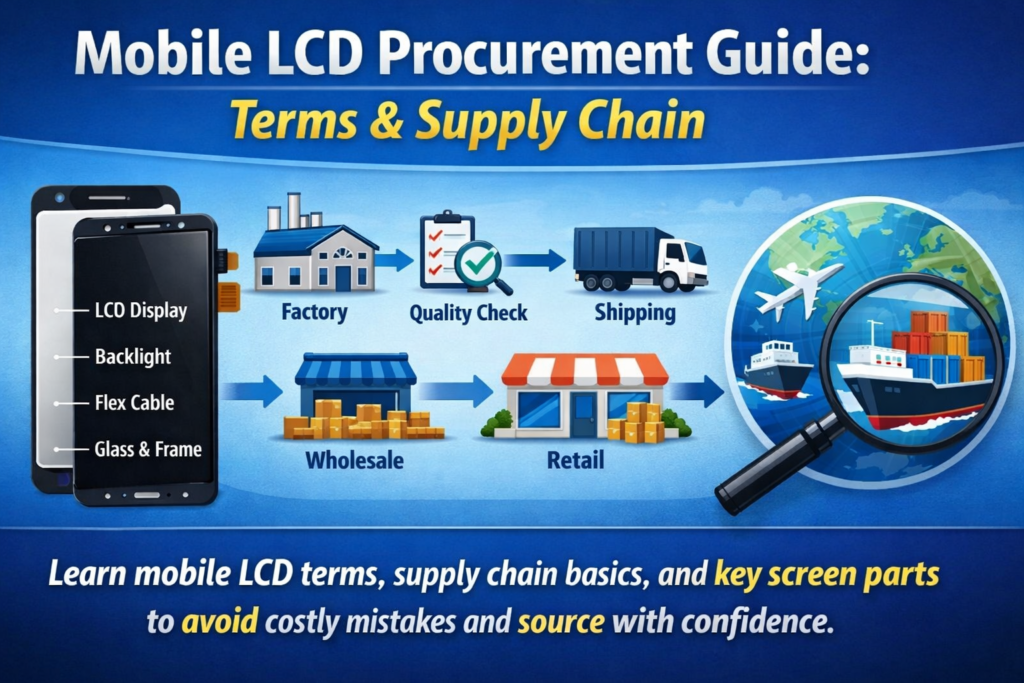
Comprender la cadena de suministro de pantallas móviles
Componentes clave en la pantalla de un teléfono inteligente
Si alguna vez ha intentado conseguir pantallas de teléfonos móviles, Probablemente hayas notado lo confusa que puede llegar a ser la terminología.. Un proveedor dice "módulo LCD,” otro dice “toque el ensamblaje,”Y alguien más agrega “vidrio exterior” o “digitalizador”. Es como si todos hablaran el mismo idioma, pero con dialectos completamente diferentes..
En su núcleo, la pantalla de un teléfono inteligente no es una sola pieza. Es una pila de componentes cuidadosamente diseñada que trabajan juntos para ofrecer respuestas visuales y táctiles.. El Panel LCD produce la imagen, el capa táctil detecta los movimientos de tus dedos, y el cubreobjetos protege todo lo que hay debajo. Estos elementos se pueden vender por separado o como un módulo totalmente integrado., dependiendo del tipo de producto y los requisitos de reparación.
Comprender cómo interactúan estas partes es esencial, especialmente si estás en adquisiciones. Un pequeño malentendido, como confundir un conjunto completo con solo una lente de cristal, puede provocar errores costosos., retrasos, o quejas de clientes. Es por eso que familiarizarse con estos términos no sólo es útil: es absolutamente necesario si desea operar de manera eficiente en esta industria..
Por qué es importante la terminología en las adquisiciones
seamos honestos: en el negocio de repuestos móviles, claridad es igual a beneficio. Si no defines claramente lo que estás comprando, podría terminar pagando por algo que no tenía intención de comprar, o algo peor, recibir componentes incompatibles.
Por ejemplo, ordenar una “pantalla” sin especificar si es una módulo LCD completo o simplemente el vidrio exterior puede llevar a una gran confusión. Los proveedores pueden asumir cosas diferentes según sus propios estándares.. Y porque el comercio internacional está involucrado, Las barreras del idioma solo amplifican el problema..
La terminología precisa ayuda a agilizar la comunicación, reduce las disputas, y garantiza la coherencia entre los pedidos. También facilita la comparación de cotizaciones de diferentes proveedores.. Cuando todos están alineados en las definiciones, los precios se vuelven transparentes, y la negociación se vuelve mucho más fluida.
En breve, Dominar estos términos no es solo conocimiento técnico, es una ventaja estratégica..
¿Qué es un módulo de pantalla LCD móvil??
Definición de módulo LCD (LCM)
El término Módulo LCD (LCM) es una de las frases más utilizadas en la industria de visualización móvil. En pocas palabras, un LCM es un unidad de visualización completa eso incluye el panel LCD y generalmente la funcionalidad táctil, todo premontado en un solo componente.
Piense en ello como un paquete listo para instalar. En lugar de tratar varias capas por separado, Tienes todo unido. Esto reduce el tiempo de instalación y minimiza el riesgo de daños durante la reparación o el montaje..
En adquisiciones, especificar "LCM" generalmente significa que desea un unidad de visualización completamente funcional, no solo partes individuales. Sin embargo, Aún es importante aclarar si el módulo incluye componentes adicionales como el marco., iluminar desde el fondo, o chips IC.
Componentes principales dentro de un LCM
Un módulo LCD estándar normalmente consta de varias capas.:
- Panel LCD (Pantalla de cristal líquido) – responsable de la generación de imágenes
- Unidad de retroiluminación – proporciona iluminación
- Digitalizador táctil – detecta la entrada táctil
- Cubierta de vidrio – protege la pantalla
- FPC (Circuito impreso flexible) – conecta el módulo a la placa base
Estas capas a menudo se unen mediante técnicas de laminación avanzadas como OCA (Adhesivo ópticamente transparente). La integración mejora la claridad de la pantalla y la sensibilidad táctil al tiempo que reduce los reflejos..
Para compradores, Comprender estos componentes le ayuda a evaluar la calidad y el precio del producto.. Un módulo con mejor laminación y materiales de mayor calidad costará naturalmente más, pero también ofrecerá mejor rendimiento y durabilidad..
Tecnología táctil de pantalla móvil explicada
Táctil capacitivo versus táctil resistivo
La tecnología táctil es la magia invisible detrás de cada golpe, grifo, y pellizca. Hoy, casi todos los teléfonos inteligentes usan pantallas táctiles capacitivas, pero los dispositivos más antiguos o especializados aún pueden depender de tecnología táctil resistiva.
Las pantallas táctiles capacitivas detectan señales eléctricas de su dedo, ofreciendo tiempos de respuesta más rápidos y capacidades multitáctiles. Por eso dominan el mercado de consumo.. Pantallas resistivas, por otro lado, Dependen de la presión y son menos sensibles pero más duraderos en ciertos entornos industriales..
Desde el punto de vista de las adquisiciones, Los paneles táctiles capacitivos son el estándar.. Sin embargo, no todas las pantallas capacitivas son iguales. Variaciones de sensibilidad, durabilidad, y los circuitos integrados de controlador pueden afectar significativamente la experiencia del usuario.
Papel del panel táctil en los teléfonos inteligentes modernos
El panel táctil, también conocido como el digitalizador, se encuentra encima de la capa de visualización y traduce el tacto físico en señales digitales. En diseños modernos, Esta capa a menudo se integra directamente en la pantalla LCD o en el vidrio utilizando tecnologías como incel o oncell.
Esta integración reduce el grosor y mejora la capacidad de respuesta.. También simplifica la cadena de suministro., ya que se necesitan menos componentes separados. Sin embargo, puede encarecer las reparaciones, ya que es posible que sea necesario reemplazar todo el módulo si falla una capa.
Para compradores, La elección entre paneles táctiles independientes y soluciones integradas depende del mercado objetivo, ya sea productos centrados en reparaciones o productos para el usuario final..
Pantalla exterior (Vaso) vs pantalla interior (Mostrar)
¿Qué es la pantalla exterior? (Cubierta de vidrio)?
El pantalla exterior, a menudo referido como cubreobjetos, es la capa superior que los usuarios tocan físicamente. Su función principal es la protección.. Protege los delicados componentes internos contra rasguños., impactos, y daño ambiental.
El cubreobjetos de alta calidad suele estar fabricado con materiales reforzados, como el vidrio templado.. Algunos incluso cuentan con revestimientos para antihuellas o antideslumbrante propiedades.
En adquisiciones, El vidrio exterior a menudo se vende por separado para fines de reparación.. Es más barato que un módulo completo pero requiere técnicos capacitados para instalarlo.. Esta opción es popular en mercados donde se prefieren reparaciones que ahorran costos..
¿Qué es la pantalla interior? (Panel LCD)?
El pantalla interior se refiere al panel de visualización real, la parte que genera imágenes. Esto incluye la capa de cristal líquido., filtros de color, y sistema de retroiluminación.
A diferencia del cristal exterior, la pantalla interior es muy sensible y cara. El daño a este componente generalmente resulta en problemas de visualización como píxeles muertos, pauta, o ninguna imagen en absoluto.
Separar la pantalla interior del cristal exterior es posible pero técnicamente complicado. Es por eso que muchos compradores optan por módulos completos: es más simple y confiable..
Diferencias entre ensamblaje completo y piezas separadas
Laminación completa versus separación del marco
A montaje completo (también llamado laminación completa) significa todas las capas: vidrio, tocar, y pantalla: están unidos en una sola unidad. Esto proporciona una mejor claridad óptica y durabilidad..
En contraste, partes separadas permitir que cada capa sea reemplazada individualmente. Si bien esto reduce los costos de material, aumenta la complejidad laboral y el riesgo durante la instalación.
Pros y contras para los compradores
| Opción | Ventajas | Desventajas |
|---|---|---|
| Asamblea completa | fácil instalación, mejor calidad | Mayor costo |
| Partes separadas | Menor costo, reparación flexible | Mayor riesgo laboral |
Elegir la opción correcta depende de tu modelo de negocio. Si priorizas la velocidad y la confiabilidad, las asambleas completas son el camino a seguir. Si el ahorro de costes es tu principal objetivo, piezas separadas pueden ser más adecuadas.
Términos comunes de la industria que debes conocer
OEM, Mercado de accesorios, Reformado explicado
- OEM (Fabricante de equipos originales): Piezas originales fabricadas en fábrica.
- Mercado de accesorios: Componentes fabricados por terceros
- Renovar: Piezas usadas restauradas a condiciones de funcionamiento.
Cada categoría tiene su propio precio y nivel de calidad.. Las piezas OEM son las más caras pero ofrecen la mayor confiabilidad..
incel, oncell, y tecnologías TFT
- incel: Táctil integrado en la capa LCD
- oncell: Capa táctil en la parte superior de la pantalla LCD
- TFT: Tecnología LCD tradicional
Comprender estos términos le ayuda a comparar productos de forma más eficaz.
Grados de calidad y estándares de prueba
Pantallas de grado A versus grado B
La calificación de calidad es crucial en las adquisiciones. Pantallas de grado A son casi perfectos, mientras Pantallas de grado B puede tener defectos menores.
Procedimientos de prueba clave antes del envío
Los proveedores suelen realizar:
- Prueba de brillo
- Prueba de sensibilidad al tacto
- Inspección de píxeles muertos
Estas pruebas garantizan la confiabilidad del producto antes de la entrega..
Factores de precio en la adquisición de pantallas LCD
Costo de materiales e impacto tecnológico
Las tecnologías avanzadas como Incell aumentan los costos de producción pero mejoran el rendimiento.
Consideraciones de MOQ y cadena de suministro
Cantidad mínima de pedido (Moq) puede afectar significativamente el precio. Los pedidos al por mayor suelen tener descuentos..
Elegir el proveedor adecuado
Criterios clave de evaluación
Buscar:
- Calidad constante
- Comunicación transparente
- Entrega confiable
Banderas rojas a evitar
Evite proveedores que:
- Falta certificaciones
- Proporcionar especificaciones poco claras.
- Ofrecer precios inusualmente bajos.
Tendencias futuras en la adquisición de pantallas móviles
Cambio hacia OLED y pantallas flexibles
Si bien la pantalla LCD sigue dominando los dispositivos económicos, OLED está ganando popularidad debido a su mejor color y flexibilidad.
Demanda creciente de módulos integrados
Las soluciones integradas seguirán creciendo, simplificando la fabricación y las reparaciones.
Conclusión
Navegar por el mundo de la adquisición de pantallas LCD móviles puede resultar abrumador al principio, pero una vez que entiendes la terminología, todo empieza a tener sentido. De módulos LCD a paneles táctiles, de vidrio exterior a pantallas interiores, cada término representa un componente específico con su propio papel en el panorama general.
Cuando entiendes claramente lo que estás comprando, tu reduces los riesgos, mejorar la comunicación con los proveedores, y, en última instancia, tomar decisiones de compra más inteligentes. Ya sea que busque talleres de reparación, distribución mayorista, o fabricación, Dominar estos conceptos le brinda una ventaja competitiva real..
Preguntas frecuentes
1. ¿Cuál es la diferencia entre el módulo LCD y la pantalla táctil??
Un módulo LCD incluye tanto la pantalla como los componentes táctiles., mientras que la pantalla táctil se refiere sólo a la capa sensible al tacto.
2. ¿Puedo reemplazar solo el cristal exterior de la pantalla de un teléfono??
Sí, pero requiere equipos especializados y técnicos capacitados..
3. ¿Qué significa la tecnología Incell??
Incell integra la función táctil directamente en la capa LCD, hacer que las pantallas sean más delgadas y con mayor capacidad de respuesta.
4. ¿Son confiables las pantallas del mercado de accesorios??
pueden ser, Pero la calidad varía según el fabricante..
5. ¿Por qué son más caros los montajes completos??
Porque combinan múltiples componentes en una sola unidad., ofreciendo un mejor rendimiento y una instalación más sencilla.



