
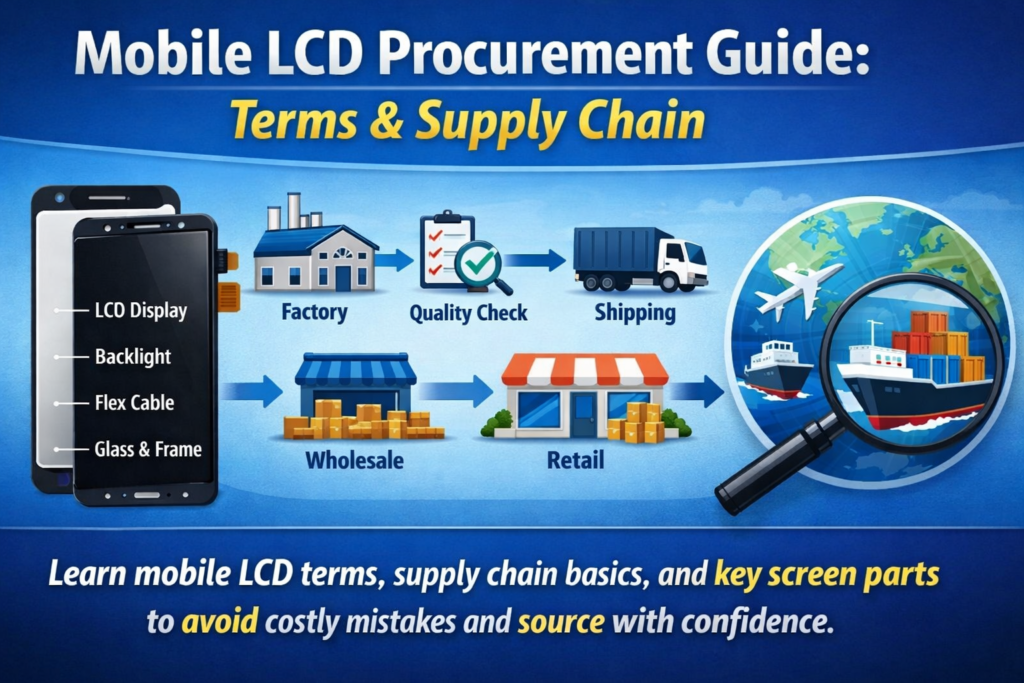
Понимание цепочки поставок мобильных дисплеев
Ключевые компоненты экрана смартфона
Если вы когда-нибудь пробовали искать экраны мобильных телефонов, вы, наверное, заметили, насколько запутанной может быть терминология. Один поставщик говорит: «Модуль ЖК-дисплея,другой говорит: «сенсорная сборка,» а кто-то еще добавляет «внешнее стекло» или «дигитайзер». Как будто все говорят на одном языке, но на совершенно разных диалектах..
По своей сути, дисплей смартфона — это не просто цельная деталь. Это тщательно разработанный набор компонентов, которые работают вместе, обеспечивая визуальные эффекты и реакцию на прикосновения.. The ЖК-панель производит изображение, тот сенсорный слой распознает движения ваших пальцев, и защитное стекло защищает все, что находится под ним. Эти элементы могут продаваться отдельно или как полностью интегрированный модуль., в зависимости от типа изделия и требований к ремонту.
Понимание того, как эти части взаимодействуют, имеет важное значение., особенно если вы занимаетесь закупками. Небольшое недоразумение, например, перепутать весь узел со стеклянной линзой, может привести к дорогостоящим ошибкам., задержки, или жалобы клиентов. Вот почему ознакомление с этими терминами не просто полезно — оно абсолютно необходимо, если вы хотите эффективно работать в этой отрасли..
Почему терминология имеет значение в закупках
Давайте будем честными: в сфере мобильных запчастей, ясность равна прибыли. Если вы не четко определяете, что покупаете, в конечном итоге вы можете заплатить за то, что не собирались покупать, или еще хуже., получение несовместимых компонентов.
Например, заказ «ширмы» без уточнения, является ли она полный ЖК-модуль или просто внешнее стекло может привести к серьезной путанице. Поставщики могут предполагать разные вещи, исходя из своих собственных стандартов.. И поскольку международная торговля вовлечена, языковые барьеры только усугубляют проблему.
Точная терминология помогает упростить общение., уменьшает споры, и обеспечивает согласованность заказов. Это также упрощает сравнение предложений от разных поставщиков.. Когда все согласны с определениями, ценообразование становится прозрачным, и переговоры становятся намного более гладкими.
Суммируя, владение этими терминами — это не просто технические знания, это стратегическое преимущество..
Что такое мобильный модуль ЖК-экрана?
Определение ЖК-модуля (ЛКМ)
Термин ЖК-модуль (ЛКМ) — одна из наиболее часто используемых фраз в индустрии мобильных дисплеев.. Проще говоря, LCM - это полный дисплейный блок который включает в себя ЖК-панель и обычно сенсорную функциональность, все предварительно собрано в один компонент.
Думайте об этом как о готовом к установке пакете.. Вместо того, чтобы работать с несколькими слоями по отдельности, у тебя все скреплено воедино. Это сокращает время монтажа и сводит к минимуму риск повреждения при ремонте или сборке..
В закупках, указание «LCM» обычно означает, что вы хотите полнофункциональный дисплейный блок, не только отдельные части. Однако, еще важно уточнить, включает ли модуль дополнительные компоненты, такие как рама, подсветка, или микросхемы.
Основные компоненты внутри LCM
Стандартный ЖК-модуль обычно состоит из нескольких слоев.:
- ЖК-панель (Жидкокристаллический дисплей) – отвечает за создание изображений
- Блок подсветки - обеспечивает освещение
- Сенсорный дигитайзер - обнаруживает сенсорный ввод
- Защитное стекло - защищает экран
- ФПК (Гибкая печатная схема) — подключает модуль к материнской плате
Эти слои часто соединяются с использованием передовых методов ламинирования, таких как ОСА (Оптически прозрачный клей). Интеграция улучшает четкость дисплея и чувствительность к касанию, одновременно уменьшая отражения..
Для покупателей, понимание этих компонентов поможет вам оценить качество продукции и цены.. Модуль с более качественной ламинацией и более качественными материалами, естественно, будет стоить дороже, но при этом обеспечит лучшую производительность и долговечность..
Объяснение технологии сенсорного экрана мобильного телефона
Емкостное касание против резистивного касания
Сенсорная технология — это невидимая магия каждого движения, кран, и ущипнуть. Сегодня, почти все смартфоны используют емкостные сенсорные экраны, но старые или специализированные устройства все еще могут полагаться на резистивная сенсорная технология.
Емкостные сенсорные экраны улавливают электрические сигналы вашего пальца., предлагая более быстрое время отклика и возможности мультитач. Вот почему они доминируют на потребительском рынке.. Резистивные экраны, с другой стороны, зависят от давления и менее чувствительны, но более долговечны в определенных промышленных условиях.
С точки зрения закупок, емкостные сенсорные панели являются стандартом. Однако, не все емкостные экраны одинаковы. Изменения чувствительности, долговечность, и микросхемы контроллера могут существенно повлиять на взаимодействие с пользователем.
Роль сенсорной панели в современных смартфонах
The сенсорная панель, также известный как дигитайзер, находится над слоем дисплея и преобразует физическое прикосновение в цифровые сигналы. В современном дизайне, этот слой часто интегрируется непосредственно в ЖК-дисплей или стекло с использованием таких технологий, как Инселл или Онселл.
Эта интеграция уменьшает толщину и улучшает отзывчивость.. Это также упрощает цепочку поставок, поскольку требуется меньше отдельных компонентов. Однако, это может сделать ремонт более дорогим, поскольку в случае выхода из строя одного слоя может потребоваться замена всего модуля..
Для покупателей, Выбор между отдельными сенсорными панелями и интегрированными решениями зависит от целевого рынка — будь то продукты, ориентированные на ремонт, или продукты для конечных пользователей..
Внешний экран (Стекло) против внутреннего экрана (Отображать)
Что такое внешний экран (Защитное стекло)?
The внешний экран, часто называют защитное стекло, это самый верхний уровень, к которому физически прикасаются пользователи. Его основная роль – защита. Он защищает хрупкие внутренние компоненты от царапин., воздействия, и экологический ущерб.
Высококачественное защитное стекло обычно изготавливается из прочных материалов, таких как закаленное стекло.. Некоторые даже имеют покрытия для против отпечатков пальцев или антибликовый характеристики.
В закупках, внешнее стекло часто продается отдельно для ремонта.. Это дешевле, чем полный модуль, но для установки требуются квалифицированные специалисты.. Этот вариант популярен на рынках, где предпочтение отдается экономичному ремонту..
Что такое внутренний экран (ЖК-панель)?
The внутренний экран относится к фактической панели дисплея — той части, которая генерирует изображения. Сюда входит жидкокристаллический слой, цветные фильтры, и система подсветки.
В отличие от внешнего стекла, внутренний экран очень чувствителен и дорог. Повреждение этого компонента обычно приводит к проблемам с отображением, таким как битые пиксели., линии, или вообще нет изображения.
Отделить внутренний экран от внешнего стекла возможно, но технически сложно.. Вот почему многие покупатели предпочитают вместо этого полные модули — это проще и надежнее..
Различия между полной сборкой и отдельными частями
Полное ламинирование против разделения рамки
А полная сборка (также называется полным ламинированием) означает все слои — стекло, трогать, и дисплей — склеены в единое целое. Это обеспечивает лучшую оптическую прозрачность и долговечность..
В отличие, отдельные части позволяют заменять каждый слой индивидуально. Хотя это снижает материальные затраты, увеличивает трудоемкость и риск при монтаже.
Плюсы и минусы для покупателей
| Вариант | Преимущества | Недостатки |
|---|---|---|
| Полная сборка | простая установка, лучшее качество | Более высокая стоимость |
| Отдельные части | Более низкая стоимость, гибкий ремонт | Более высокий трудовой риск |
Выбор подходящего варианта зависит от вашей бизнес-модели.. Если вы цените скорость и надежность, полные сборки - лучший вариант. Если экономия — ваша главная цель, отдельные части могут быть более подходящими.
Общие отраслевые термины, которые вы должны знать
OEM, вторичный рынок, Восстановленное объяснение
- OEM (Производитель оригинального оборудования): Оригинальные детали заводского изготовления
- вторичный рынок: Компоненты стороннего производства
- Отремонтированный: Б/у детали восстановлены до рабочего состояния
Каждая категория имеет свою цену и уровень качества.. OEM-запчасти самые дорогие, но обеспечивают высочайшую надежность..
Инселл, Онселл, и TFT-технологии
- Инселл: Сенсорный экран интегрирован в слой ЖК-дисплея
- Онселл: Сенсорный слой поверх ЖК-дисплея
- TFT: Традиционная ЖК-технология
Понимание этих терминов поможет вам более эффективно сравнивать продукты..
Классы качества и стандарты тестирования
Экраны оценок A и B
Оценка качества имеет решающее значение в закупках. Экраны класса А почти идеальны, пока Экраны B-класса могут иметь незначительные дефекты.
Ключевые процедуры тестирования перед отправкой
Поставщики обычно выполняют:
- Тестирование яркости
- Тестирование сенсорной чувствительности
- Проверка битых пикселей
Эти тесты гарантируют надежность продукта перед поставкой..
Ценовые факторы при закупке ЖК-экранов
Стоимость материалов и влияние технологий
Передовые технологии, такие как Incell, увеличивают производственные затраты, но повышают производительность..
Вопросы минимального заказа и цепочки поставок
Минимальное количество заказа (Могил) может существенно повлиять на ценообразование. Оптовые заказы обычно сопровождаются скидками..
Выбор правильного поставщика
Ключевые критерии оценки
Искать:
- Постоянное качество
- Прозрачное общение
- Надежная доставка
Красные флажки, которых следует избегать
Избегайте поставщиков, которые:
- Отсутствие сертификатов
- Укажите неясные характеристики
- Предлагайте необычно низкие цены
Будущие тенденции в закупках мобильных дисплеев
Переход к OLED и гибким экранам
Хотя ЖК-дисплеи по-прежнему доминируют в бюджетных устройствах, OLED набирает популярность благодаря лучшей цветопередаче и гибкости..
Растущий спрос на интегрированные модули
Интегрированные решения будут продолжать расти, упрощение изготовления и ремонта.
Заключение
Навигация в мире закупок мобильных ЖК-экранов поначалу может показаться сложной, но как только вы поймете терминологию, все начинает иметь смысл. От ЖК-модули к сенсорные панели, от внешнее стекло к внутренние дисплеи, каждый термин представляет собой конкретный компонент, имеющий свою роль в общей картине..
Когда ты четко понимаешь, что покупаешь, вы снижаете риски, улучшить взаимодействие с поставщиками, и в конечном итоге принимать более разумные решения о покупке. Независимо от того, ищете ли вы ремонтные мастерские, оптовая дистрибуция, или производство, освоение этих концепций дает вам реальное конкурентное преимущество..
Часто задаваемые вопросы
1. В чем разница между ЖК-модулем и сенсорным экраном?
ЖК-модуль включает в себя как дисплей, так и сенсорные компоненты., в то время как сенсорный экран относится только к сенсорному слою.
2. Можно ли заменить только внешнее стекло экрана телефона?
Да, но для этого требуется специализированное оборудование и квалифицированные специалисты.
3. Что означает технология Incell?
Incell интегрирует сенсорную функцию непосредственно в слой ЖК-дисплея., сделать экраны тоньше и отзывчивее.
4. Надежны ли экраны послепродажного обслуживания?
Они могут быть, но качество зависит от производителя.
5. Почему полная сборка дороже?
Потому что они объединяют несколько компонентов в один блок., предлагает лучшую производительность и более простую установку.



