
Zavedení
Už jste někdy zapnuli svůj telefon a všimli jste si podivné černé skvrny nebo tajemné svislé čáry protínající se po obrazovce? je to frustrující, právo? Nejhorší je, že nevíte, zda jde o rychlou opravu nebo znamení, že obrazovka vašeho telefonu je na podpoře života. Tato příručka vám pomůže zjistit, co se skutečně děje, když potřebujete vyměnit obrazovku, a co můžete mezitím udělat, aby se to nezhoršovalo.
Pochopení abnormalit obrazovky
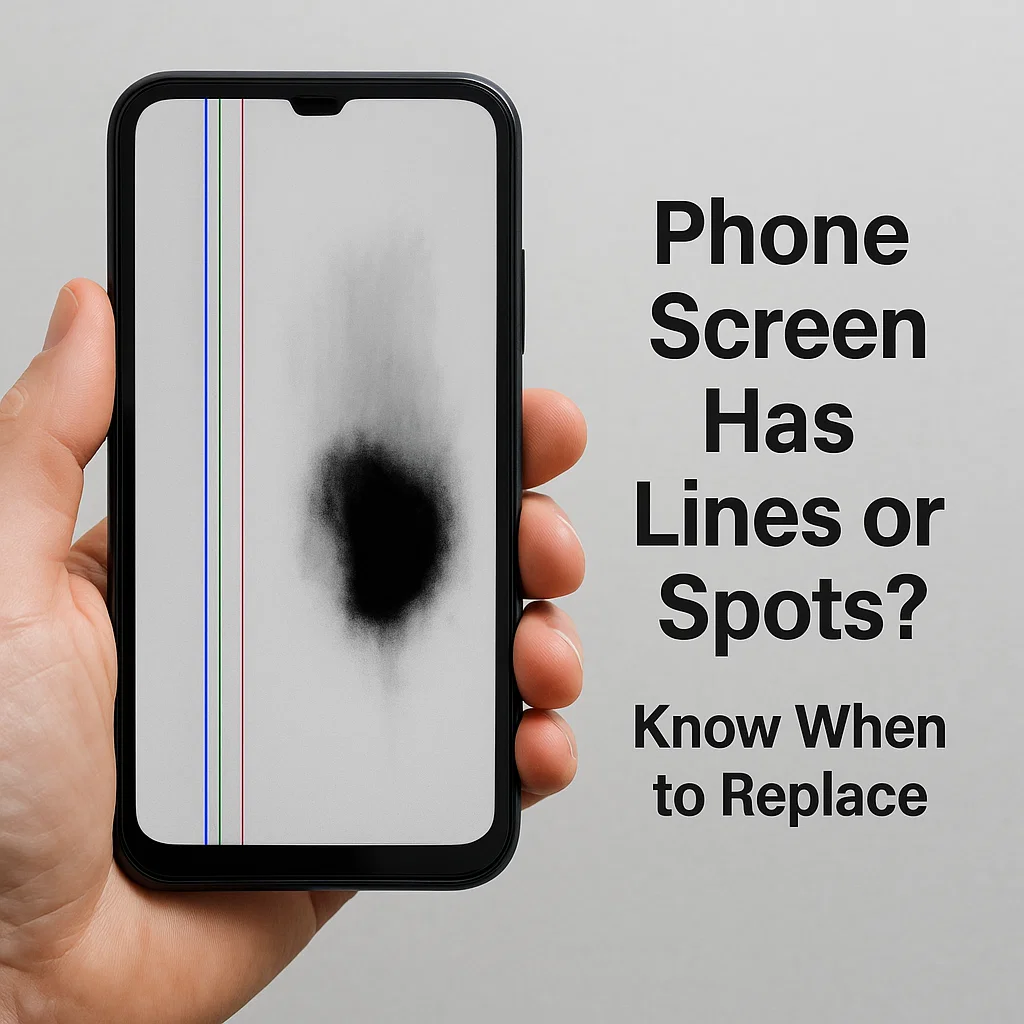
Svislé čáry na obrazovce
Běžné příčiny
Svislé čáry obvykle indikují problém s vnitřním připojením obrazovky. Může být:
- Uvolněný flex kabel
- Poškozená vrstva LCD
- Problémy s GPU nebo ovladačem displeje
Kdy je to opravitelné?
Pokud je to jeden řádek a vaše dotykové funkce stále fungují, někdy může pomoci opětovné usazení nebo výměna kabelu konektoru. Však, více řádků nebo blikání obvykle znamená, že panel selhává.
Černé skvrny nebo inkoustové skvrny
Co způsobuje černé skvrny?
Ty jsou často způsobeny poškozením tlakem nebo nárazem. Černá oblast je v podstatě místo, kde pixely zemřely, podobné mrtvým zónám na staré televizi.
Lze je opravit bez výměny?
Bohužel, žádný. Tyto oblasti se neobnoví. Pokud černé skvrny rostou, je jen otázkou času, kdy se obrazovka stane nepoužitelnou.
Únik tekutých krystalů (LCD Bleed)
Jak identifikovat únik LCD
Pokud vidíte, co vypadá jako inkoust šířící se po obrazovce, hlavně po nárazu, máte co do činění s únikem tekutých krystalů. Displeje LCD obsahují kapalinu, která může při poškození uniknout.
Nebezpečí dalšího používání
Další používání může způsobit rozšíření úniku. Může dokonce rušit jiné součásti nebo riskovat elektrický zkrat.
Hlavní příčiny poškození obrazovky
Fyzické poškození (Kapky, Tlak, Dopad)
Toto je #1 viník. Pád telefonu nebo dokonce sezení na něm může způsobit prasknutí obrazovky nebo vnitřní tlakové body.
Vnitřní poruchy nebo výrobní vady
Někdy, není to tvoje chyba. Špatné pájení, slabá spojení, nebo vadné zobrazovací panely mohou časem selhat.
Vniknutí vody nebo vlhkosti
Ani „voděodolné“ telefony nejsou imunní. Vlhkost uvnitř zařízení může způsobit černé skvrny nebo korozi pod obrazovkou.
Použití přehřátí a prodlouženého jasu
Neustálé vystavení vysokému jasu nebo dlouhé hraní her může vypálit pixely nebo vést k brzké degradaci OLED.
Jak posoudit, zda musíte vyměnit obrazovku
Vizuální indikátory
- Čáry, barevné problémy, nebo masivní tmavé skvrny
- Roztírání inkoustových záplat
- Částečné nebo úplné zatemnění obrazovky
Dotykový test funkčnosti
Zkuste přejet prstem po obrazovce. Existují oblasti, které nereagují? To je červená vlajka.
Zobrazení jasnosti a šíření poškození
Pokud se poškození šíří, výměna je vysoce doporučena. Statický, přilepené pixely nebo nerostoucí značky mohou být po určitou dobu tolerovatelné.
Dočasné opravy a nouzové řešení
Pásková metoda pro uzavřené trhliny
Použijte průhlednou balicí pásku nebo ochrannou fólii na obrazovku, abyste utěsnili prasklou obrazovku a zabránili jejímu zhoršení.
Zabránění tlaku nebo dalšímu poškození
Uchovávejte telefon v pevném pouzdře. Vyhněte se silnému tlaku na obrazovku nebo jejímu strkání do těsných kapes.
Nástroje pro kalibraci obrazovky
Aplikace, které pomáhají překalibrovat citlivost dotyku, mohou dočasně pomoci s odezvou.
Možnosti softwaru
Použijte vestavěné funkce usnadnění, jako jsou lupy nebo inverze barev zobrazení, které vám pomohou procházet poškozenými oblastmi.
Situace, kdy je výměna obrazovky nevyhnutelná
Nereagující dotykové zóny
Pokud dotyk v některých částech obrazovky již nefunguje, kromě výměny neexistuje žádná skutečná oprava.
Rozšíření černých oblastí nebo kapalné šíření
Šíření znamená, že LCD nebo OLED panel rychle selhává. Změňte to co nejdříve.
Blikající, Ghost Touch, nebo Full Display Failure
Náhodné doteky, bliká, nebo prázdná obrazovka? To je poslední varování.
Můžete odložit výměnu obrazovky?
Použití tvrzeného skla jako vyrovnávací paměti
Tvrzené sklo nezastaví stávající poškození, ale může zabránit jeho zhoršení, pokud jsou praskliny na úrovni povrchu.
Snížení jasu obrazovky
Snížení jasu může oddálit další namáhání již poškozených displejů.
Použití tmavého režimu
Tím se nic nevyřeší, ale činí černé skvrny a praskliny méně nápadné a zároveň minimalizuje riziko vypálení OLED.
Profesionální vs DIY opravy: Co si vybrat
Kdy je DIY bezpečné?
Pokud máte nástroje a zkušenosti, výměnou starších displejů telefonů svépomocí můžete ušetřit peníze.
Rizika vlastního otevření obrazovky
Mohl bys:
- Rozbijte digitizér
- Zničte vnitřní kabely
- Ztratit hydroizolaci
Srovnání nákladů a záruky
Opravy výrobce jsou bezpečnější, ale dražší. Nezávislé opravny nabízejí levnější alternativy, i když mohou zrušit záruku.
Tipy, jak předejít budoucím problémům s obrazovkou
Používání ochranných fólií a kvalitních pouzder
Investujte do dobrých ochranných pomůcek. Je to levnější než nová obrazovka.
Vyvarujte se přehřátí a vlhkému prostředí
Nepoužívejte telefony na přímém slunci nebo v zapařené koupelně.
Správné manipulační návyky
Bez zadních kapes. Žádné postele s těžkými knihami. Zacházejte opatrně.
Závěrečné myšlenky
Když se vaše obrazovka začne chovat s řádky, skvrny, nebo netěsnosti, je to váš telefon prosící o pozornost. Nečekejte, až na vás úplně umře. I když ne každý problém vyžaduje okamžitou výměnu, pochopení varovných značek vás může zachránit před úplným selháním obrazovky na silnici. opatruj se, jednat rychle, a chránit vaši investici do technologií.
Časté časté
1. Mohu nadále používat telefon s černými skvrnami na obrazovce?
Ano, ale pouze v případě, že se skvrna nešíří a dotyk je stále citlivý. Nakonec, může být nutná výměna.
2. Poškození svislé čáry vždy souvisí s hardwarem?
Ne vždy. Někdy je to uvolněné vnitřní spojení nebo softwarová závada, ale trvalé čáry obvykle znamenají problémy s hardwarem.
3. Jaký je rozdíl mezi únikem OLED a LCD?
Vypálení OLED se zobrazí jako duchy, zatímco úniky z LCD vypadají jako černý inkoust rozlévající se pod sklem.
4. Kapalina může vyschnout a přestat se šířit?
Žádný. Jakmile tekutý krystal unikne, pokračuje v šíření, dokud obrazovka zcela selže.
5. Kolik obvykle stojí výměna obrazovky?
Liší se podle značky. $50– 300 $ je běžné v závislosti na modelu a na tom, zda jde o OEM nebo třetí stranu.



