
Zavedenie
Už ste niekedy zapli telefón a všimli ste si podivnú čiernu škvrnu alebo záhadnú zvislú čiaru, ktorá sa rozrezáva na obrazovke? je to frustrujúce, správne? Najhoršie je, že neviete, či ide o rýchlu opravu alebo znamenie, že obrazovka vášho telefónu je zapnutá. Táto príručka je tu, aby vám pomohla zistiť, čo sa skutočne deje, keď potrebujete vymeniť obrazovku, a čo môžete medzitým urobiť, aby sa to nezhoršovalo.
Pochopenie abnormalít obrazovky
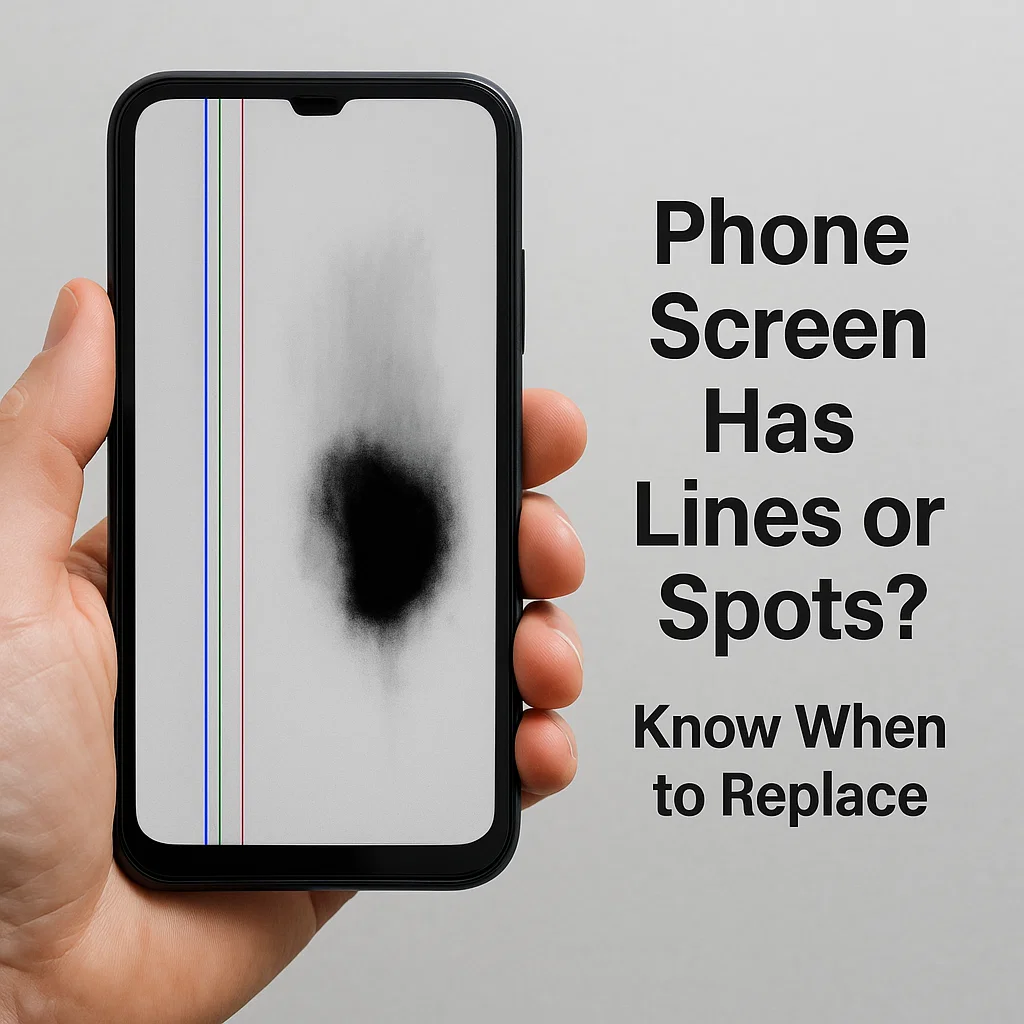
Vertikálne čiary na obrazovke
Časté príčiny
Zvislé čiary zvyčajne označujú problém s vnútorným pripojením obrazovky. Môže byť:
- Uvoľnený flex kábel
- Poškodená vrstva LCD
- Problémy s GPU alebo ovládačom displeja
Kedy je to opraviteľné?
Ak je to jeden riadok a vaše dotykové funkcie stále fungujú, niekedy môže pomôcť opätovné usadenie alebo výmena kábla konektora. Avšak, viac čiar alebo blikanie zvyčajne znamená, že panel zlyháva.
Čierne škvrny alebo škvrny podobné atramentu
Čo spôsobuje čierne škvrny?
Tie sú často spôsobené poškodením tlakom alebo nárazom. Čierna oblasť je v podstate miesto, kde pixely odumreli, podobne ako mŕtve zóny na starom televízore.
Môžu byť opravené bez výmeny?
Bohužiaľ, č. Tieto oblasti sa neobnovia. Ak rastú čierne škvrny, je len otázkou času, kedy sa obrazovka stane nepoužiteľnou.
Únik tekutých kryštálov (LCD krvácanie)
Ako identifikovať netesnosť LCD
Ak vidíte, ako sa po obrazovke šíri atrament, najmä po náraze, máte čo do činenia s únikom tekutých kryštálov. Displeje LCD obsahujú tekutinu, ktorá môže pri poškodení unikať.
Nebezpečenstvo pokračujúceho používania
Ďalšie používanie môže spôsobiť rozšírenie úniku. Môže dokonca rušiť iné komponenty alebo riskovať elektrické skraty.
Hlavné príčiny poškodenia obrazovky
Fyzické poškodenie (Kvapky, Tlak, Vplyv)
Toto je #1 vinníkom. Pád telefónu alebo dokonca sedenie na ňom môže spôsobiť prasknutie obrazovky alebo vnútorné tlakové body.
Vnútorné poruchy alebo výrobné chyby
Niekedy, nie je to tvoja chyba. Zlé spájkovanie, slabé spojenia, alebo chybné zobrazovacie panely môžu časom zlyhať.
Vniknutie vody alebo vlhkosti
Ani „vodoodolné“ telefóny nie sú imúnne. Vlhkosť vo vnútri zariadenia môže spôsobiť čierne škvrny alebo koróziu pod obrazovkou.
Použitie prehriatia a predĺženého jasu
Neustále vystavenie vysokému jasu alebo dlhé hranie môže spáliť pixely alebo viesť k skorej degradácii OLED.
Ako posúdiť, či musíte vymeniť obrazovku
Vizuálne indikátory
- Čiary, problémy s farbami, alebo masívne tmavé škvrny
- Rozotieranie atramentových náplastí
- Čiastočné alebo úplné zatemnenie obrazovky
Dotykový test funkčnosti
Skúste prejsť prstom po obrazovke. Existujú oblasti, ktoré nereagujú? To je červená vlajka.
Zobraziť jasnosť a šírenie poškodenia
Ak sa poškodenie šíri, výmena sa dôrazne odporúča. Statické, prilepené pixely alebo nerastúce značky môžu byť chvíľu tolerovateľné.
Dočasné opravy a núdzové riešenie
Pásková metóda pre uzavreté trhliny
Použite priehľadnú baliacu pásku alebo ochrannú fóliu na obrazovku, aby ste utesnili prasknutú obrazovku a zabránili jej zhoršeniu.
Vyhýbanie sa tlaku alebo ďalšiemu poškodeniu
Uchovávajte telefón v pevnom obale. Vyhnite sa silnému tlaku na obrazovku alebo jej strkaniu do tesných vreciek.
Nástroje na kalibráciu obrazovky
Aplikácie, ktoré pomáhajú prekalibrovať citlivosť na dotyk, môžu dočasne pomôcť s odozvou.
Možnosti softvéru
Použite vstavané funkcie zjednodušenia ovládania, ako sú zväčšovače obrazovky alebo inverzia farieb zobrazenia, ktoré vám pomôžu pri navigácii v poškodených oblastiach.
Situácie, kedy je výmena obrazovky nevyhnutná
Nereagujúce dotykové zóny
Ak dotyk v niektorých častiach obrazovky už nefunguje, okrem výmeny neexistuje žiadna skutočná oprava.
Rozšírenie čiernych plôch alebo tekutého rozloženia
Šírenie znamená, že LCD alebo OLED panel rýchlo zlyháva. Zmeňte to čo najskôr.
Blikanie, Ghost Touch, alebo Full Display Failure
Náhodné dotyky, bliká, alebo prázdna obrazovka? To je posledné varovanie.
Môžete odložiť výmenu obrazovky?
Použitie tvrdeného skla ako vyrovnávacej pamäte
Tvrdené sklo nezastaví existujúce poškodenie, ale môže zabrániť jeho zhoršeniu, ak sú praskliny na úrovni povrchu.
Zníženie jasu obrazovky
Zníženie jasu môže oddialiť ďalšie namáhanie už poškodených displejov.
Používanie tmavého režimu
Toto nič nevyrieši, ale robí čierne škvrny a praskliny menej nápadné a zároveň minimalizuje riziko vypálenia OLED.
Profesionálna vs DIY oprava: Čo si vybrať
Kedy je DIY bezpečné?
Ak máte nástroje a skúsenosti, Výmena starších obrazoviek telefónu svojpomocne môže ušetriť peniaze.
Riziká otvárania obrazovky sami
Mohol by si:
- Rozbiť digitizér
- Zničte vnútorné káble
- Stratiť hydroizoláciu
Porovnanie nákladov a záruky
Opravy výrobcu sú bezpečnejšie, ale stoja viac. Nezávislé opravovne ponúkajú lacnejšie alternatívy, aj keď môžu stratiť platnosť záruky.
Tipy, ako predísť budúcim problémom s obrazovkou
Používanie chráničov obrazovky a kvalitných puzdier
Investujte do dobrého ochranného vybavenia. Je to lacnejšie ako nová obrazovka.
Zabráňte prehriatiu a vlhkému prostrediu
Nepoužívajte telefóny na priamom slnku alebo v zaparených kúpeľniach.
Správne manipulačné návyky
Žiadne zadné vrecká. Žiadne postele s ťažkými knihami. Zaobchádzajte opatrne.
Záverečné myšlienky
Keď sa obrazovka začne zobrazovať s čiarami, škvrny, alebo netesnosti, je to váš telefón, ktorý prosí o pozornosť. Nečakajte, kým vo vás úplne nezomrie. Aj keď nie každý problém vyžaduje okamžitú výmenu, pochopenie varovných značiek vás môže zachrániť pred úplným zlyhaním obrazovky na ceste. opatruj sa, konať rýchlo, a chráňte svoje investície do technológií.
Časté otázky
1. Môžem naďalej používať telefón s čiernymi škvrnami na obrazovke?
Áno, ale iba vtedy, ak sa miesto nerozširuje a dotyk stále reaguje. Nakoniec, môže byť potrebná výmena.
2. Je poškodenie zvislej čiary vždy spojené s hardvérom?
Nie vždy. Niekedy je to uvoľnené interné spojenie alebo chyba softvéru, ale trvalé čiary zvyčajne znamenajú problémy s hardvérom.
3. Aký je rozdiel medzi únikom OLED a LCD?
Vypálenie OLED sa zobrazí ako duchovné obrázky, zatiaľ čo úniky LCD vyzerajú ako čierny atrament šíriaci sa pod sklom.
4. Kvapalina môže zaschnúť a prestať sa šíriť?
Nie. Akonáhle tekutý kryštál vytečie, pokračuje v rozširovaní, kým obrazovka úplne nezlyhá.
5. Koľko zvyčajne stojí výmena obrazovky?
Líši sa podľa značky. $50– 300 USD je bežné v závislosti od modelu a od toho, či ide o OEM alebo tretiu stranu.



