
An Fáth Atá an Comparáid Seo
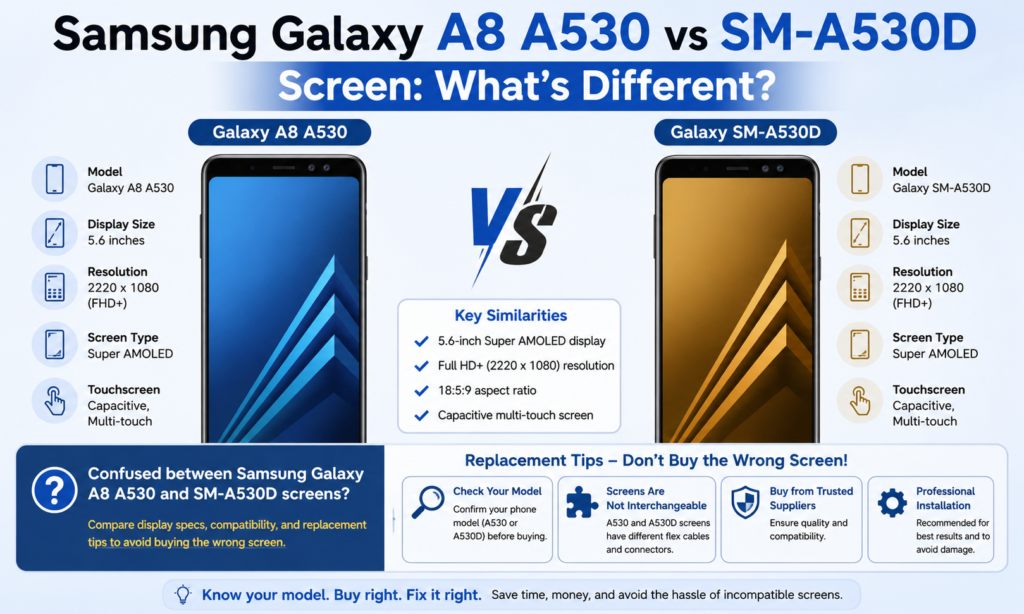
Má chuardaigh tú ar líne riamh do thaispeántas athsholáthair le haghaidh a Samsung réaltra A8 A530, tá seans maith ann gur rith tú isteach i múnla eile a raibh cuma amhrasach air: Mothú Réaltra Samsung SM-A530D 2 LTE JPSC-02L / SGH-N767, an leagan Seapánach-mhargaidh. Ar an gcéad amharc, mothaíonn sé gur imir Samsung cleas ainmniúcháin ar gach duine. An teaghlach céanna A530. Méid den chineál céanna. Teanga deartha den chineál céanna. Mar an gcéanna a bhí. An lorg céanna taispeána 5.6-orlach. Is furasta glacadh leis go n-úsáideann siad an scáileán céanna, Ar an gceart? Níl sé chomh tapaidh.
Tá an mearbhall sin tábhachtach toisc go bhfuil ordú an scáileáin athsholáthair mícheart ar cheann de na botúin bheaga is costasaí maidir le deisiú gutháin. Is féidir le taispeáint teacht ag breathnú foirfe sa phacáiste, ach a fháil amach nach bhfuil an cónascaire líne suas, ní oibríonn an teagmháil, nó ní bheidh an painéal ag lasadh suas. Ansin tagann an próiseas fillte, moilleanna loingseoireachta, agus custaiméir - nó do ghuthán féin - i bhfostú ag fanacht ar an mbinse oibre. Tá sé cosúil le boinn a cheannach mar go dtagann an trastomhas, ansin a bhaint amach nach bhfuil an patrún bolt.
Briseann an treoir seo síos na fíordhifríochtaí idir na Samsung réaltra A8 (2018) SM-A530 taispeáint agus an Mothaigh Samsung Galaxy 2 / SM-A530D taispeáin, go háirithe ó thaobh scáileáin deisiúcháin agus athsholáthair. Is é an sprioc simplí: cabhrú leat an scáileán ceart a roghnú an chéad uair.
Forbhreathnú Taispeána Samsung Galaxy A8 A530
Sonraíochtaí Taispeána Eochair
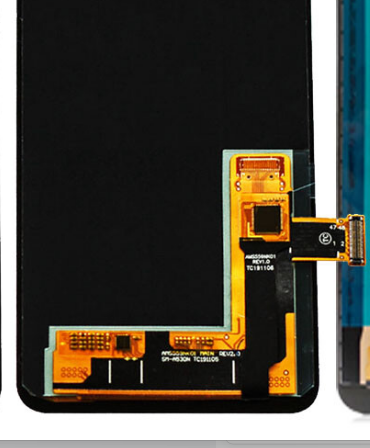
An idirnáisiúnta Samsung réaltra A8 (2018) SM-A530 seolta le a 5.6-orlach Super AMOLED Infinity Taispeáin, rún 2220 × 1080 picteilíní, le dlús picteilín de thart 441 PPI. Liostaíonn Samsung go hoifigiúil é mar phainéal Iomlán HD+ le painéal 18.5:9 cóimheas gné.
Seo an áit a sheasann sé amach. Tá an painéal géar. An-ghéar. Tá cuma brioscach ar an téacs, cuma glan ar dheilbhíní, agus tá codarsnacht dhomhain Samsung AMOLED ag na híomhánna a fhágann go bhfuil cuma ar na blacks go bhfuil an scáileán múchta. Má d'úsáid tú gléasanna lár-réimse níos sine Samsung, mothaíonn an A8 níos gaire do phríomhthionscadal mion ná fón leibhéal iontrála.
Cuimsíonn an tionól taispeána de ghnáth:
- Painéal AMOLED
- digiteoir dteagmháil
- gloine tosaigh
- cábla flex
- fráma roghnach ag brath ar an díoltóir
Cé go ndéanann go leor díoltóirí iarmhargadh lipéadú orthu seo mar “scáileáin athsholáthair LCD,” Is é an scáileán monarcha bunaidh ní LCD—tá Super AMOLED. Tá an t-idirdhealú sin tábhachtach mar go bhfuil tiontuithe LCD iarmhargadh ann, ach iad féin a iompar difriúil ó na tionóil OLED bunaidh.
Taithí Úsáideora agus Feidhmíocht Amharc
Ag baint úsáide as an scáileán Réaltra A8 mothaíonn préimhe fiú blianta ina dhiaidh sin. Dathanna pop gan breathnú cartoonish. Tá Blacks domhain. Tá infheictheacht lasmuigh soladach. Mar gheall ar an 441 Dlús PPI, fanann an téacs glan fiú ag clómhéideanna níos lú. Is iontach an rud é athsheinm físe fós 2026.
Is minic gur fearr le teicneoirí deisiúcháin tionóil OEM AMOLED don mhúnla seo mar is féidir le tiontuithe LCD iarmhargadh saincheisteanna cosúil le:
- próifíl scáileán níos tiús
- gile níos laige
- saincheisteanna ailíniú méarloirg
- tomhaltas ceallraí níos airde
- neamhréir datha
Má tá tábhacht le cáilíocht íomhá, bunaidh AMOLED fós an bealach is fearr.
Mothú Réaltra Samsung SM-A530D 2 Taispeáin Forbhreathnú
Suíomh an Mhargaidh an tSeapáin
Tá an Mothaigh Samsung Galaxy 2 (SC-02L / SM-A530D / SGH-N767) díoladh go príomha sa tSeapáin tríd NTT Docomo. Breathnaíonn sé thar a bheith gar don A8. Dearadh DNA céanna Samsung. Toisí cosúla. Glúin chéanna. An teaghlach chipset céanna i go leor liostaí.
Is é an cosúlacht amhairc sin go díreach an fáth a dtarlaíonn mearbhall maidir le páirteanna athsholáthair.
Ach shuigh Samsung an Galaxy Feel 2 difriúil. Cé gur chlaon an A8 i dtreo lár-réimse uachtair ar fud an domhain, an Fheilim 2 díríodh ar lucht éisteachta a bhaineann go sonrach leis an tSeapáin agus a dhírigh ar láimhseáil dlúth, tacaíocht iompróir áitiúil, agus praghsáil beagán níos inrochtana.
Core Screen Specifications
Most sources list the Galaxy Feel 2 le:
- 5.6-orlach Super AMOLED
- 720 × 1480 rún
- 18.5:9 cóimheas gné
- approximately 294 PPI dlús picteilín
That resolution difference is the first major clue that these are not identical replacement panels.
Suimiúil, one database lists 1080 × 2220 for the A530D. But multiple independent spec databases consistently show 720 × 1480, which is generally accepted for the Japanese Feel 2.
This means even if the screen size matches physically, the internal panel specification may not.
Head-to-Head Comparison
| Gné | Galaxy A8 A530 | Galaxy Feel 2 SM-A530D |
|---|---|---|
| Méid Taispeána | 5.6-orinte | 5.6-orinte |
| Cineál Painéil | Super AMOLED | Super AMOLED |
| Réiteach | 2220 × 1080 | 720 × 1480 |
| Dlús picteilíní | ~441 PPI | ~294 PPI |
| Aspect Ratio | 18.5:9 | 18.5:9 |
| Margadh | Domhanda | tSeapáin |
| Model Names | SM-A530F/A530W/A530N | SC-02L / SM-A530D / SGH-N767 |
Resolution Difference
The biggest practical difference is rún.
The Galaxy A8’s Full HD+ panel packs significantly more pixels. The Feel 2 uses a lower-density AMOLED display.
Which Looks Sharper in Real Use?
Side-by-side, the A8 looks sharper.
You’ll notice it most in:
- small text
- deilbhíní app
- detailed photos
- YouTube subtitles
- web browsing
Le húsáid ócáideach, an Fheilim 2 fós cuma breá inghlactha. Ach in aice leis an A8, is léir go bhfuil níos mó sonraí amhairc ag an bpainéal A8.
Smaoinigh air mar iris chlóite a chur i gcomparáid le nuachtán. Tá an dá cheann inléite. Breathnaíonn ceann amháin níos míne agus níos glaine.
Nascóirí agus Comhoiriúnacht Cábla Flex
Seo nuair is gá do cheannaitheoirí deisiúcháin an aird is mó a thabhairt.
An Féidir Leat na Scáileáin a Mhalartú?
Freagra gairid: ná glac le comhoiriúnacht.
Fiú más rud é:
- oireann méid
- Meaitseálann cineál AMOLED
- Breathnaíonn toisí gloine comhionann
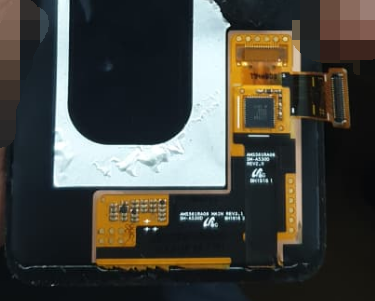
... is féidir leis an nascóir flex taispeána a bheith difriúil fós.
Is minic a athraíonn monaróirí:
- ródú cábla flex
- taispeáint léarscáiliú IC
- suíomh cónascaire
- socrúchán scriú fráma
- ailíniú ghreamaitheach
Toisc go mbraitheann an 2 Tógadh go sonrach le haghaidh an margadh iompróir Seapáine, Is dócha go ndearna Samsung coigeartú ar leagan amach an bhoird inmheánaigh agus ar uimhriú na bpáirteanna.
Má fhógraíonn díoltóir:
"Le haghaidh A530 / A530D / SC-02L comhoiriúnach"
fhíorú:
- Grianghraf cábla flex
- suíomh cónascaire cúil
- greamán samhail
- Cóid pacáiste seirbhíse
Ná ceannaigh riamh bunaithe ar chuma tosaigh amháin.
Fráma agus Feistiú Tithíochta
Saincheist eile nach bhfuiltear ag súil léi is ea ailíniú tithíochta.
Féadfaidh scáileán íomhá a thaispeáint go teicniúil ach go gcruthódh sé fadhbanna feistiúcháin mar:
- mí-ailíniú mogalra cainteoir barr
- fritháireamh gearrtha amach ceamara tosaigh
- saincheisteanna brú braiteoir méarloirg
- bearnaí bezel taobh
- séalaithe greamaitheach neamhiomlán
Tá sé sin contúirteach go háirithe má cheannaítear a scáileán le tionól fráma.
Más rud é ag ceannach scáileán amháin, bíonn sé níos fusa feistiú a bhainistiú. Más rud é ag ceannach scáileán + freagair, dearbhaigh an uimhir mhúnla cruinn.
Feidhm Tadhaill agus Feidhmíocht Gile
Úsáideann an dá mhúnla teicneolaíocht AMOLED, a thugann:
- codarsnacht den scoth
- dathanna sáithithe
- blacks domhain
- úsáid éifeachtach cumhachta
Ach athraíonn cáilíocht athsholáthair go fiáin.
Pacáiste seirbhíse bunaidh Samsung:
- gile is fearr
- freagra dteagmháil is fearr
- dath cruinn
- marthanacht is fearr
Iarmhargadh bog OLED:
- cothromaíocht réasúnta
- níos inacmhainne
Iarmhargadh crua OLED:
- níos saoire
- níos sobhriste
comhshó iarmhargadh LCD:
- saoire
- dath is laige
- painéal níos tiús
Má éilíonn do dheisiú cáilíocht taispeána Samsung bunaidh a chaomhnú, Is fiú íoc as AMOLED.
Cén Scáileán Athsholáthair Ar Chóir duit a Cheannach?
Leideanna Roimh Ordú
Roimh cheannach:
1. Seiceáil Socruithe an ghutháin → Maidir le Fón → Uimhir Mhúnla
Cuardaigh cóid chruinne:
- SM-A530F
- SM-A530W
- SM-A530N
- SM-A530D
- SC-02L
- SGH-N767
2. Bain an clúdach cúil agus deimhnigh an lipéad
Tá lipéid níos iontaofa ná teidil margaidh.
3. Déan comparáid idir grianghraif flex-cábla an díoltóra
Déan iniúchadh i gcónaí:
- suíomh cónascaire
- cruth cábla
- fad cábla
- Marcálacha greamán QR
4. Iarr ar an díoltóir go díreach
Is féidir le teachtaireacht tapa uaireanta a shábháil:
“An bhfuil sé seo ráthaithe ag luí le SC-02L / SM-A530D?”
Botúin choitianta le seachaint
Seachain na botúin deisiúcháin choitianta seo:
- ceannach de réir méid scáileáin amháin
- muinín a bheith agat as an bhfoclaíocht “comhoiriúnach le sraith A530”.
- ag glacadh leis go n-úsáideann gach leagan Samsung A530 an painéal céanna
- ceannach LCD má táthar ag súil le caighdeán AMOLED bunaidh
- neamhaird a dhéanamh ar litreacha iarmhír samhail
Na litreacha deiridh sin—F, D, W, N-ábhar níos mó ná an chuid is mó ceannaitheoirí ag súil leis.
Deireadh
Tá an Samsung réaltra A8 A530 is Mothú Réaltra Samsung SM-A530D 2 Is féidir breathnú cosúil le siblíní, ach níl a gcuid taispeántais idirmhalartaithe go huathoibríoch.
Is iad na difríochtaí is mó:
- rún → Tá A8 Iomlán HD+, Mothaigh 2 tá taifeach níos ísle i bhformhór na dtagairtí
- cumraíocht crua-earraí réigiúnacha → A8 domhanda vs Mothú 2 An tSeapáin-eisiach
- difríochtaí cónascaire/flex féideartha
- éagsúlachtaí feisteas fráma
Má tá scáileán athsholáthair á ordú agat, mheaitseáil leis an uimhir mhúnla cruinn - ní hamháin "A530."
Chun an ceannach is sábháilte:
- deimhnigh uimhir mhúnla
- comparáid a dhéanamh idir íomhánna cábla flex
- iarr ar an díoltóir dearbhú comhoiriúnachta
- tosaíocht a thabhairt do OEM AMOLED nuair is féidir
Is féidir leis na cúig nóiméad breise seiceála sin tú a shábháil ón scáileán mícheart a cheannach agus an fón a athoscailt faoi dhó.
Ceisteanna Coitianta
1. An bhfuil scáileáin Samsung Galaxy A8 A530 agus SM-A530D mar an gcéanna?
Ní gá. Tá siad cosúil ó thaobh amhairc agus an méid céanna, ach d’fhéadfadh difríocht a dhéanamh i rún, dearadh cábla flex, agus comhoiriúnacht inmheánach.
2. An bhfuil an scáileán Galaxy A8 A530 LCD nó AMOLED?
Is é an taispeáint mhonarcha bunaidh Super AMOLED, ní LCD. Úsáideann go leor díoltóirí iarmhargadh “LCD” mar théarma ginearálta athsholáthair scáileáin.
3. An féidir liom scáileán SM-A530D a shuiteáil ar Réaltra A8 A530?
Ní mholtar mura ndeimhníonn an díoltóir go sonrach comhoiriúnacht agus go bhfuil an cábla flex ag teacht leis.
4. Cén scáileán a bhfuil caighdeán íomhá níos fearr aige?
Tá an Galaxy A8 A530 go ginearálta cuireann géire níos fearr a bhuíochas dá 2220 × 1080 Taifeach iomlán HD+.
5. Cad ba cheart dom a fhíorú sula gceannaím taispeáint athsholáthair?
Seiceáil:
- uimhir mhúnla cruinn
- Grianghraf cábla flex
- liosta comhoiriúnachta díoltóir
- cibé an bhfuil sé OLED nó LCD
- cibé an bhfuil fráma san áireamh



