
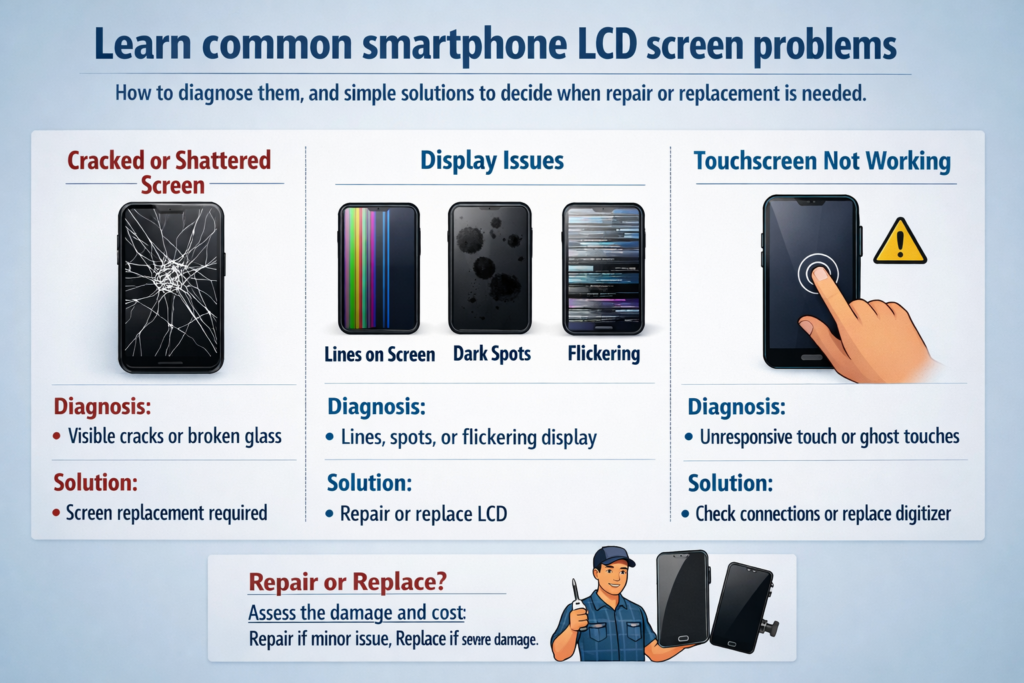
Introduzione ai problemi dello schermo LCD dello smartphone
Ammettiamolo: lo schermo del tuo smartphone è la parte più abusata del tuo dispositivo. Viene toccato migliaia di volte al giorno, caduto accidentalmente, infilato nelle tasche, ed esposto al calore e all'umidità. Quindi quando qualcosa va storto, raramente è una sorpresa.
Mentre gli schermi OLED fanno notizia, Gli schermi LCD sono ancora ampiamente utilizzati, soprattutto negli smartphone economici e di fascia media. Comprendere i problemi specifici dello schermo LCD può farti risparmiare denaro, tempo, e frustrazione.
Come funzionano gli schermi LCD degli smartphone (Panoramica rapida)
Prima di diagnosticare i problemi, aiuta a sapere cosa c'è dentro.
Uno schermo LCD è come un panino:
- Vetro frontale di protezione
- Tocca il digitalizzatore per percepire le tue dita
- Strato di cristalli liquidi per controllare la luce
- Modulo retroilluminazione per illuminare tutto
Quando uno strato fallisce, i sintomi raccontano una storia, se sai come leggerla.
Schermo rotto o rotto
Cause comuni
La maggior parte delle crepe provengono dalle gocce, pressione, o forze di flessione. Sedersi sul telefono o lasciarlo cadere a faccia in giù è tutto ciò che serve.
Sintomi visibili e rischi nascosti
- La ragnatela si rompe
- Bordi di vetro taglienti
- Il tocco potrebbe ancora funzionare... per ora
Il pericolo? Le crepe lasciano entrare umidità e polvere, uccidendo lentamente il display LCD sottostante.
Suggerimenti per l'autodiagnosi
Se il display è chiaro e il tocco funziona ovunque, il display LCD potrebbe essere ancora intatto. Ma se compaiono successivamente punti o linee nere, il danno si sta espandendo.
Linee orizzontali o verticali sullo schermo
Quali sono le cause delle linee
Queste linee spesso significano:
- Pixel LCD danneggiati
- Cavo flessibile del display allentato o danneggiato
- Errore del driver del pannello
Temporaneo vs permanente
Se le linee cambiano quando si ruota leggermente il telefono, potrebbe essere una connessione allentata. Fisso, le linee immobili di solito significano danni permanenti al display LCD.
Prova rapida
Fai uno screenshot.
- Nello screenshot appaiono delle linee? Problema software
- Lo screenshot sembra normale? Problema hardware
Perdita di liquido dal display LCD (Macchie nere o fuoriuscite di inchiostro)
Cos'è la perdita dell'LCD
Quelle macchie nere o viola che si diffondono sullo schermo? Si tratta di una perdita di cristalli liquidi dovuta alla pressione o a danni da impatto.
Segnali premonitori
- Una piccola macchia scura sta crescendo nel tempo
- I colori sanguinano ai bordi
Può essere risolto??
NO. Una volta che iniziano le perdite, La sostituzione del display LCD è l'unica soluzione. Pensalo come un uovo rotto: non tornerà indietro.
Problemi di sfarfallio dello schermo
Ragioni comuni
- Alimentazione instabile
- Retroilluminazione difettosa
- Connettore del display danneggiato
PWM e problemi di alimentazione
Si verificano alcuni sfarfallii a bassa luminosità a causa dell'attenuazione PWM, ma lo sfarfallio costante non è normale.
Controlli fai da te
- Aumenta la luminosità
- Riavvia il telefono
- Prova in modalità provvisoria
Se lo sfarfallio persiste, è probabilmente legato all'hardware.
Il touchscreen non risponde o funziona parzialmente
Tocca Livello vs Livello display
L'immagine potrebbe sembrare perfetta, ma il tocco fallisce perché il digitalizzatore è danneggiato.
Sintomi tipici
- Zone morte
- Risposta ritardata
- Il tocco funziona solo con la pressione
Prova semplice
Comporre *#*#2664#*#* (su alcuni telefoni Android) per accedere alla modalità test tocco.
Macchie scure o retroilluminazione irregolare
Cosa causa questo
- Danni da pressione
- Invecchiamento della retroilluminazione
- Danni al diffusore interno
Come appare
- Zone d'ombra
- Bordi luminosi, centro oscuro
- Aspetto "nuvoloso" su schermi bianchi
Suggerimento per la diagnosi
Visualizza un'immagine completamente bianca. L'illuminazione irregolare diventa immediatamente evidente.
Il display dello schermo è scuro o sbiadito
Possibili cause
- LED di retroilluminazione invecchiati
- Connettore allentato
- Problemi relativi al circuito integrato di potenza
Lista di controllo
- Luminosità massima abilitata?
- Luminosità automatica disattivata?
- Confronta con un altro telefono affiancato
Se ancora debole, è necessaria la riparazione dell'hardware.
Ghost Touch e ingressi casuali
Perché succede
- Umidità sotto il vetro
- Schermi sostitutivi di bassa qualità
- Interferenza elettrica
Tentativi di correzione rapida
- Pulisci accuratamente lo schermo
- Rimuovere la protezione dello schermo
- Riavviare il dispositivo
Il tocco fantasma persistente di solito significa la sostituzione del digitalizzatore.
Problemi di schermo software o hardware
Come dirlo
- Appare in modalità provvisoria? Hardware
- Appare dopo l'aggiornamento? Software
Test affidabili
- Metodo dello screenshot
- Display esterno (se supportato)
- Ripristino delle impostazioni di fabbrica (ultima risorsa)
Quando è necessaria la sostituzione dello schermo
Se necessario, sostituire lo schermo:
- Appare una perdita di liquido
- Le linee non cambiano
- Il tocco fallisce completamente
- I danni alla retroilluminazione peggiorano
Usare uno schermo danneggiato è come guidare su un parabrezza rotto: la situazione peggiora solo.
Suggerimenti preventivi per prolungare la durata dello schermo LCD
Piccole abitudini fanno una grande differenza:
- Utilizzare una protezione in vetro temperato
- Evitare la pressione nelle tasche
- Non utilizzare il telefono durante la ricarica eccessiva
- Tenere lontano dall'umidità e dal calore
Scegliere una soluzione di riparazione affidabile
Originale vs aftermarket
- Originale: colore migliore, luminosità, durata
- Aftermarket: più economico, la qualità varia
Domande da porre
- E' originale o compatibile??
- Periodo di garanzia?
- Viene testato al tocco prima dell'installazione?
Conclusione
I problemi dello schermo LCD dello smartphone possono sembrare intimidatori, ma la maggior parte segue schemi chiari. Comprendendo i sintomi come linee, sfarfallio, perdita, o toccare il fallimento, puoi giudicare rapidamente se si tratta di un problema minore o di un guasto meritevole di riparazione. Pensa al tuo schermo come alla "finestra sul mondo" del tuo telefono, una volta danneggiato, la chiarezza e il controllo svaniscono rapidamente. La diagnosi precoce fa risparmiare denaro, dati, e frustrazione.
FAQ
1. Uno schermo rotto può ancora essere utilizzato in sicurezza?
Temporaneamente, SÌ, ma i rischi aumentano nel tempo a causa dell'umidità e di ulteriori danni.
2. Le linee verticali sono sempre un problema hardware?
La maggior parte delle volte, sì, soprattutto se non compaiono negli screenshot.
3. La perdita del display LCD può diffondersi?
SÌ. Di solito diventa più grande con il tempo.
4. Lo sfarfallio è sempre causato da uno schermo difettoso?
Non sempre. Anche problemi di alimentazione o software possono causare sfarfallio.
5. Vale la pena riparare il display LCD di un vecchio telefono?
Se il costo di riparazione supera 50% del valore del telefono, la sostituzione potrebbe non essere economica.



