
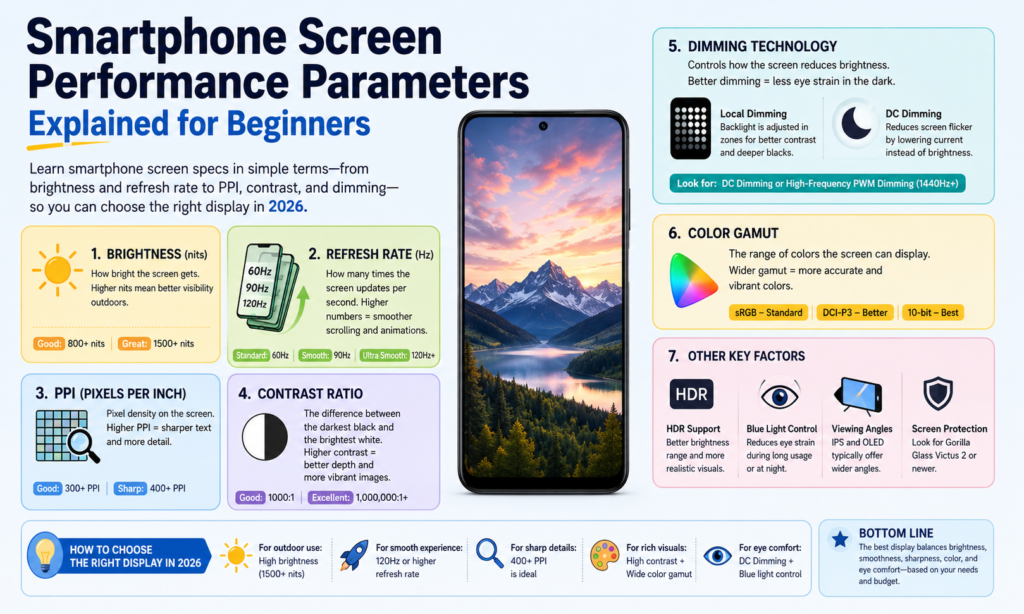
Hvorfor smartphone-skærmspecifikationer betyder mere end nogensinde før 2026 Skærmspecifikationer betyder mere end nogensinde før 2026
Hvis du tænker over det, de skærmen er sjælen i en smartphone. Det er den ene del, du rører ved hundredvis af gange hver dag. Du læser beskeder på den, se videoer om det, scroll sociale medier på den, redigere billeder på den, og måske endda arbejde ud fra det. Uanset hvor kraftig processoren er, eller hvor mange megapixel kameraet tilbyder, hvis skærmen føles sløv, sløret, eller ubehagelige at se på, hele telefonoplevelsen føles svagere. Det er grunden til, at forståelsen af smartphones displayspecifikationer er vigtigere, end mange mennesker er klar over.
I 2026, skærmteknologi bliver ved med at bevæge sig hurtigt. Premium-telefoner når nu regelmæssigt 3,000+ nits lysstyrke, mens 120Hz adaptive opdateringshastigheder er blevet almindelige på tværs af enheder i øvre mellemtone. Højfrekvent PWM-dæmpning ovenfor 2,160Hz bliver også mere populær, især i flagskibet OLEDe komfort. citerturn0search0turn0search2
Den vanskelige del? De fleste spec-ark kaster tal efter dig uden at forklare, hvad de egentlig betyder. PPI, kontrastforhold, opdateringshastighed, farveskala – det kan føles som at læse et andet sprog. Denne guide nedbryder alt på almindeligt engelsk, så om du køber en ny telefon, sammenligne LCD vs OLED, eller bare nysgerrig efter skærmteknologi, du ved præcis, hvad du skal kigge efter.
Dæmpningsteknologi
Hvad er DC-dæmpning?
DC dæmpning justerer lysstyrken ved direkte at ændre den elektriske strøm, der leveres til skærmen. Tænk på det som at dreje en vandhanes håndtag langsomt ned - vandet bliver ved med at flyde, bare med mindre kraft. Lyset forbliver konstant, men lysstyrken falder.
For LCD skærme, lysstyrken kommer hovedsageligt fra baggrundsbelysningen, så reduktion af spænding eller strøm sænker lysstyrken. For OLED skærme, hver pixel udsender sit eget lys, så lysstyrken ændres ved at reducere den strøm, der sendes til de individuelle pixels.
Mange brugere foretrækker DC-dæmpning, fordi det føles visuelt stabilt. Da lyset ikke hurtigt flimrer til og fra, det kan være nemmere for følsomme øjne. Det er især vigtigt for folk, der bruger timer på at kigge på deres telefoner i mørke omgivelser.
Afvejningen er, at DC-dæmpning nogle gange kan påvirke farvekonsistensen ved meget lav lysstyrke på OLED-paneler. Sorte kan forblive fremragende, men farvekalibrering kan skifte lidt afhængigt af paneldesign. Producenter forsøger ofte at balancere øjenkomfort og farvenøjagtighed her.
Hvad er PWM-dæmpning?
PWM står for Pulsbreddemodulation. I stedet for at sænke strømmen løbende, displayet skifter hurtigt mellem on → off → on → off ved høj hastighed.
Forestil dig at dreje en lyskontakt hundredvis eller tusindvis af gange i sekundet. Dine øjne kan normalt ikke registrere flimren direkte, så det ser mere svagt ud end at blinke.
Den tid, lyset forbliver "tændt" under hver cyklus, bestemmer lysstyrken:
- Længere "on"-tid = lysere skærm
- Kortere "on"-tid = svagere skærm
PWM er ekstremt almindeligt på OLED-smartphones.
I 2026, flagskibet Android-telefoner annoncerer i stigende grad 2,160Hz til 3.840 Hz PWM-dæmpning, hvilket er meget højere end ældre 240Hz-480Hz implementeringer. Højere frekvens PWM tendens brugere. citerturn0search8turn0search6
Hvilken er bedre til øjenkomfort?
Der er ikke noget universelt svar, fordi menneskelige øjne er vidunderligt komplicerede.
Nogle brugere bemærker aldrig PWM-flimmer overhovedet. Andre føler hovedpine efter 10 minutter.
Generelt:
| Teknologi | Hovedfordel | Vigtigste ulempe |
|---|---|---|
| DC-dæmpning | Mindre synligt flimmer, ofte lettere for øjnene | Kan påvirke OLED-farveydelsen lidt |
| PWM dæmpning | Bedre lysstyrkekontrol og farvekonsistens | Kan forårsage belastning af øjnene for følsomme brugere |
Hvis du er følsom over for skærmflimmer, DC dæmpning eller højfrekvent PWM er værd at prioritere.
Farveydelse
Mætning
Mætning beskriver, hvor rig eller ren en farve fremstår.
Meget mættede farver føles levende og punchy. Lav mætning ser dæmpet eller udvasket ud.
Tænk på et modent rødt jordbær i forhold til en falmet lyserød skjorte efterladt i solen for længe. Samme farvefamilie - meget forskellig intensitet.
OLED-paneler føles ofte mere mættede, fordi hver pixel udsender sit eget lys uafhængigt.
Nogle mennesker elsker den "wow"-effekt. Andre foretrækker mere naturlige farver til redigering af billeder.
Farveskala
Farveudvalg refererer til det samlede udvalg af farver en skærm kan vise.
En bredere farveskala betyder, at skærmen kan gengive flere nuancer.
Fælles standarder omfatter:
- SRGB
- DCI-P3
- Adobe RGB
- BT.2020
I smartphones, DCI-P3 er nu meget almindelig i premium-skærme.
Samsungs seneste skærmkoncepter vist på SID Display Week 2026 demonstreret op til 96% BT.2020-dækning, whle vises. citerturn0news16turn0news17
Farvenøjagtighed
Farvenøjagtighed måler, hvor tæt den viste farve er på den tilsigtede originalfarve.
Dette betyder meget for:
- fotografer
- video editorer
- designere
- online sælgere, der viser produktfarver
Hvis et hvidt billede ser gulligt ud, eller et rødt produktbillede ser orange ud, farvenøjagtigheden er dårlig.
En almindelig måling her er Delta E.
Lavere Delta E = mere nøjagtig farvegengivelse.
Gråskala
Gråskala refererer til lysstyrkeniveauerne mellem sort og hvid.
God gråtoneydelse betyder jævne overgange.
Dårlige gråtoner skaber synlige bånd eller ujævn skygge.
Dette bliver meget mærkbart, når du ser mørke film eller ser billeder i svagt lys.
Lysstyrke og Kontrast
Lysstyrke forklaret
Lysstyrken måles i nits.
Højere nits = lysere display.
Hvorfor betyder det noget?
Fordi sollys eksisterer.
En telefon ser måske perfekt ud indendørs, men bliver ulæselig udendørs.
Flagskib smartphones i 2026 almindeligvis nå 3,000–3.500 nits maksimal lysstyrke. For eksempel, OnePlus 15 er meldt rundt 3,500 nits, mens Pixe rundt 3,300 nits. citerturn0search2
Kontrastforhold forklaret
Kontrastforhold er forskellen mellem:
lyseste hvid ÷ mørkest sort
Højere kontrast skaber:
- dybere sorte
- stærkere højdepunkter
- bedre HDR
- rigere billeddybde
OLED dominerer her, fordi pixels kan slukke helt.
Det skaber ægte sort.
LCD kan ikke helt slukke for baggrundsbelysningen på samme måde.
Derfor har OLED-sorte ofte lyst til at se ind i en mørk nattehimmel.
Klarhed og skarphed
Opløsning (DPI)
Opløsning refererer til, hvor mange pixels der findes vandret og lodret.
Eksempler:
- 1080 × 2400
- 1440 × 3200
Flere pixels = flere detaljer.
Skønt ud over et vist punkt, forskellen bliver sværere at bemærke ved normal synsafstand.
Pixeltæthed (PPI)
PPI betyder pixels pr. tomme.
Det fortæller dig, hvor tæt pakkede pixels er.
Højere PPI = skarpere tekst og renere kanter.
Eksempler:
| Display Type | Typisk PPI |
|---|---|
| Budget LCD | 300–400 |
| Mellemklasse OLED | 400–460 |
| Flagskib OLED | 450–550+ |
Over nogenlunde 450 PPI, tekst ser normalt knivskarp ud.
Pixel Pitch
Pixelpitch er afstanden mellem nabopixels.
Mindre pixelpitch = højere skarphed.
Mindre mellemrum mellem pixels får billeder til at føles mere sømløse og polerede.
Bevægelse og lydhørhed
Svartid
Responstid måler, hvor hurtigt en pixel skifter fra en tilstand til en anden.
Ofte beskrevet som:
Sort → Hvid → Sort
Lavere responstid hjælper med at reducere:
- spøgelse
- sløring
- udtværing
Især mærkbar under spil eller hurtig videoafspilning.
Opdateringshastighed
Opdateringshastighed = hvor mange gange skærmen opdateres hvert sekund.
Målt i Hz.
Eksempler:
- 60Hz
- 90Hz
- 120Hz
- 144Hz
EN 120Hz display opdaterer dobbelt så ofte som 60Hz.
Det gør, at rulning føles jævnere og animationer mere flydende.
Når du bruger 120Hz regelmæssigt, at gå tilbage til 60Hz kan føles som at gå gennem vådt sand.
Andre vigtige visningsfaktorer
Betragtningsvinkel
Synsvinkel betyder, hvor godt du stadig kan se skærmen fra siden.
Gode betragtningsvinkler opretholdes:
- Lysstyrke
- farve
- kontrast
OLED fungerer normalt bedre end LCD her.
Strømforbrug
Skærme bruger en stor del af smartphones batterilevetid.
OLED kan være mere effektivt med mørk tilstand, fordi sorte pixels kan slukke helt.
LCD-baggrundsbelysning forbliver tændt konstant.
Dette er grunden til, at mørk tilstand kan spare batteri på OLED-enheder.
Elektromagnetisk stråling
Skærme udsender energi gennem elektriske og magnetiske felter samt synligt lys og varme.
Til normal smartphonebrug, dette forbliver inden for forbrugerelektroniksikkerhedsstandarder.
Hvad brugere normalt bemærker mere praktisk er:
- eksponering for blåt lys
- træthed i øjnene
- varmeudvikling
snarere end selve elektromagnetisk stråling.
Sådan vælger du den rigtige smartphone-skærm baseret på dine behov
At vælge en smartphone-skærm er som at vælge et par briller. Den "bedste" afhænger af dig.
Hvis du holder mest af ser film, prioritere:
- OLED
- høj kontrast
- HDR
- høj lysstyrke
Hvis du er en mobil gamer, fokus på:
- 120Hz+
- hurtig responstid
- høj berøringsprøvetagning
Hvis du er følsom over for øjenbelastning:
- DC dæmpning
- højfrekvent PWM
- indstillinger for øjenkomfort
Hvis batteriet betyder mest:
- LTPO DU ER
- adaptiv opdateringshastighed
- effektiv lysstyrkestyring
Forfølge ikke hvert nummer.
Jagt de numre, der matcher, hvordan du rent faktisk bruger din telefon.
Konklusion
Smartphone-skærme er ikke længere kun rektangler, der lyser op. De er hoveddøren til hele dit digitale liv.
Forståelse DC dæmpning, PWM, mætning, kontrastforhold, opløsning, PPI, opdateringshastighed, responstid, farveskala, og strømforbrug hjælper dig med at læse ud over markedsføringen.
En lysere skærm er ikke altid bedre.
En højere opdateringshastighed er ikke altid nødvendig.
En bredere farveskala er ikke nyttig, hvis farvenøjagtigheden er dårlig.
Den bedste smartphone-skærm er den, der føles ubesværet, hver gang du låser din telefon op.
Og når du først ved, hvad disse specifikationer virkelig betyder, at vælge den skærm bliver meget nemmere.
FAQS
1. Hvilket er bedre for øjnene: DC-dæmpning eller PWM-dæmpning?
For mange brugere, der er følsomme over for flimmer, DC dæmpning føles mere behageligt. Højfrekvent PWM kan også være behageligt afhængigt af følsomhed.
2. Er højere PPI altid bedre?
Ikke altid. Over omkring 450-500 PPI, forskelle bliver sværere at bemærke ved normal brug.
3. Er OLED bedre end LCD?
OLED giver normalt bedre kontrast, dybere sorte, og rigere farve. LCD kan stadig tilbyde fremragende lysstyrke og undgår ofte bekymringer om OLED-flimmer.
4. Er 120Hz det værd på en smartphone?
Ja – især hvis du spiller eller scroller ofte. Den jævnere bevægelse er meget mærkbar.
5. Hvilken skærmspecifikation er vigtigst?
Der er ikke ét enkelt svar. For de fleste mennesker, den største daglige påvirkning kommer fra:
- Lysstyrke
- opdateringshastighed
- kontrast
- øjenkomfort



