
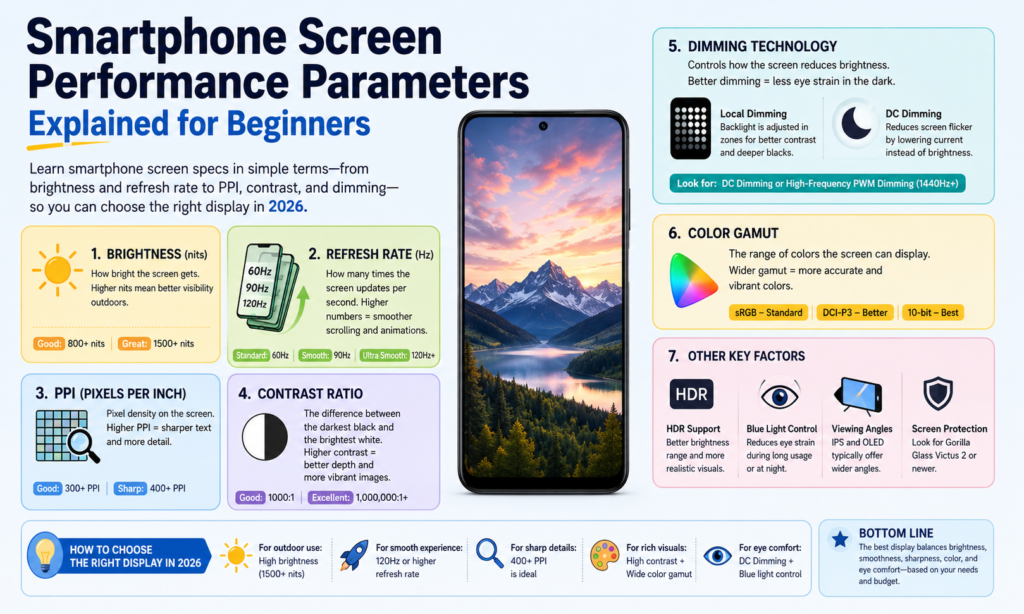
Pourquoi les spécifications de l'écran du smartphone sont plus importantes que jamais 2026 Les spécifications des écrans comptent plus que jamais 2026
Si tu y penses, le écran est l'âme d'un smartphone. C'est la seule partie que vous touchez des centaines de fois chaque jour. Vous lisez des messages dessus, regarde des vidéos dessus, faites défiler les réseaux sociaux dessus, éditer des photos dessus, et peut-être même travailler à partir de là. Quelle que soit la puissance du processeur ou le nombre de mégapixels proposés par l'appareil photo, si l'écran est terne, flou, ou inconfortable à regarder, toute l'expérience téléphonique semble plus faible. C’est pourquoi comprendre les spécifications de l’écran du smartphone est plus important que beaucoup de gens ne le pensent..
Dans 2026, la technologie d’affichage continue d’évoluer rapidement. Les téléphones premium atteignent désormais régulièrement 3,000+ luminosité des lentes, alors que 120Taux de rafraîchissement adaptatifs Hz sont devenus courants sur les appareils haut de gamme. Gradation PWM haute fréquence ci-dessus 2,160Hz est également de plus en plus populaire, surtout dans le confort phare OLEDe. citeturn0search0turn0search2
La partie délicate? La plupart des fiches techniques vous lancent des chiffres sans expliquer ce qu'ils signifient réellement.. IPP, rapport de contraste, taux de rafraîchissement, gamme de couleurs : on peut avoir l'impression de lire une autre langue. Ce guide explique tout dans un anglais simple, donc si vous achetez un nouveau téléphone, comparer l'écran LCD et l'OLED, ou simplement curieux de connaître la technologie d'affichage, Vous saurez exactement ce qu'il faut chercher.
Technologie de gradation
Qu'est-ce que la gradation CC?
Gradation CC ajuste la luminosité en modifiant directement le courant électrique fourni à l'écran. Pensez-y comme si vous tourniez lentement le bouton d’un robinet : l’eau continue de couler., juste avec moins de force. La lumière reste continue, mais la luminosité baisse.
Pour Écrans LCD, la luminosité vient principalement du rétroéclairage, donc réduire la tension ou le courant diminue la luminosité. Pour Écrans OLED, chaque pixel émet sa propre lumière, donc la luminosité change en réduisant le courant envoyé à ces pixels individuels.
De nombreux utilisateurs préfèrent la gradation DC car elle semble visuellement stable. Puisque la lumière ne s’allume pas et ne s’éteint pas rapidement, cela peut être plus facile pour les yeux sensibles. C’est particulièrement important pour les personnes qui passent des heures à regarder leur téléphone dans des environnements sombres..
Le compromis est que la gradation CC peut parfois affecter la cohérence des couleurs à très faible luminosité sur les panneaux OLED.. Les noirs peuvent rester excellents, mais l'étalonnage des couleurs peut légèrement varier en fonction de la conception du panneau. Les fabricants essaient souvent d’équilibrer ici le confort des yeux et la précision des couleurs..
Qu'est-ce que la gradation PWM?
MLI représente Modulation de largeur d'impulsion. Au lieu de baisser continuellement la puissance, l'affichage bascule rapidement entre activé → désactivé → activé → désactivé à grande vitesse.
Imaginez que vous actionnez un interrupteur des centaines ou des milliers de fois par seconde.. Vos yeux ne peuvent généralement pas détecter directement le scintillement, donc il semble plus faible plutôt que de clignoter.
La durée pendant laquelle la lumière reste allumée pendant chaque cycle détermine la luminosité:
- Temps d'allumage plus long = écran plus lumineux
- Temps de marche plus court = écran plus sombre
Le PWM est extrêmement courant sur les smartphones OLED.
Dans 2026, Les téléphones Android phares font de plus en plus de publicité 2,160Gradation PWM de Hz à 3 840 Hz, ce qui est beaucoup plus élevé que les anciennes implémentations 240 Hz-480 Hz. Utilisateurs de tendance PWM à fréquence plus élevée. citeturn0search8turn0search6
Lequel est le meilleur pour le confort des yeux?
Il n’y a pas de réponse universelle car les yeux humains sont merveilleusement compliqués.
Certains utilisateurs ne remarquent jamais le scintillement PWM. D'autres ressentent des maux de tête après 10 minutes.
En général:
| Technologie | Principal avantage | Principal inconvénient |
|---|---|---|
| Gradation CC | Scintillement moins visible, souvent plus agréable pour les yeux | Peut légèrement affecter les performances des couleurs OLED |
| Gradation PWM | Meilleur contrôle de la luminosité et cohérence des couleurs | Peut provoquer une fatigue oculaire pour les utilisateurs sensibles |
Si vous êtes sensible au scintillement de l’écran, Gradation CC ou PWM haute fréquence vaut la peine d'être prioritaire.
Performance des couleurs
Saturation
Saturation décrit la richesse ou la pureté d'une couleur.
Les couleurs très saturées sont vives et percutantes. Une faible saturation semble atténuée ou délavée.
Pensez à une fraise rouge mûre par rapport à une chemise rose délavée laissée trop longtemps au soleil.. Même famille de couleurs – intensité très différente.
Les panneaux OLED semblent souvent plus saturés car chaque pixel émet sa propre lumière indépendamment.
Certaines personnes aiment cet effet « wow ». D'autres préfèrent des couleurs plus naturelles pour l'édition de photos.
Gamme de couleurs
Gamme de couleurs fait référence à la gamme totale de couleurs qu'un écran peut afficher.
Une gamme plus large signifie que l'écran peut reproduire plus de nuances.
Les normes communes comprennent:
- SRGB
- DCI-P3
- Adobe RVB
- BT.2020
Dans les smartphones, DCI-P3 est désormais très courant dans les écrans premium.
Les derniers concepts d'affichage de Samsung présentés à la SID Display Week 2026 démontré jusqu'à 96% Couverture BT.2020, tout affiche. citeturn0news16turn0news17
Précision des couleurs
Précision des couleurs mesure à quel point la couleur affichée est proche de la couleur originale prévue.
Cela compte beaucoup pour:
- photographes
- éditeurs vidéo
- créateurs
- vendeurs en ligne affichant les couleurs des produits
Si une image blanche apparaît jaunâtre ou une photo de produit rouge apparaît orange, la précision des couleurs est médiocre.
Une mesure courante ici est DeltaE.
Delta E inférieur = reproduction des couleurs plus précise.
Échelle de gris
L'échelle de gris fait référence aux niveaux de luminosité entre le noir et le blanc.
De bonnes performances en échelle de gris signifient des transitions fluides.
Une mauvaise échelle de gris crée des bandes visibles ou des ombres inégales.
Cela devient très visible lorsque vous regardez des films sombres ou lorsque vous regardez des photos dans des conditions de faible luminosité..
Luminosité et contraste
La luminosité expliquée
La luminosité est mesurée en lentes.
Nits plus élevés = affichage plus lumineux.
Pourquoi est-ce important?
Parce que la lumière du soleil existe.
Un téléphone peut paraître parfait à l’intérieur mais devenir illisible à l’extérieur.
Smartphones phares en 2026 atteignent généralement 3,000–3 500 nits de luminosité maximale. Par exemple, le OnePlus 15 est signalé autour 3,500 lentes, pendant que Pixe est dans les parages 3,300 lentes. citeturn0search2
Rapport de contraste expliqué
Le rapport de contraste est la différence entre:
blanc le plus brillant ÷ noir le plus foncé
Un contraste plus élevé crée:
- Noirs plus profonds
- faits saillants plus forts
- meilleur HDR
- profondeur d'image plus riche
L'OLED domine ici car les pixels peuvent s'éteindre complètement.
Cela crée du vrai noir.
L'écran LCD ne peut pas éteindre complètement le rétroéclairage de la même manière.
C'est pourquoi les noirs OLED ont souvent l'impression de regarder dans un ciel nocturne sombre..
Clarté et netteté
Résolution (PPP)
La résolution fait référence au nombre de pixels existants horizontalement et verticalement.
Exemples:
- 1080 × 2400
- 1440 × 3200
Plus de pixels = plus de détails.
Bien qu'au-delà d'un certain point, la différence devient plus difficile à remarquer à une distance de visualisation normale.
Densité de pixels (IPP)
IPP moyens pixels par pouce.
Il vous indique à quel point les pixels sont serrés.
PPI plus élevé = texte plus net et bords plus nets.
Exemples:
| Type d'affichage | IPP typique |
|---|---|
| Écran LCD économique | 300–400 |
| OLED milieu de gamme | 400–460 |
| OLED phare | 450–550+ |
Ci-dessus à peu près 450 IPP, le texte est généralement très net.
Pas de pixels
Le pas des pixels est la distance entre les pixels voisins.
Pas de pixel plus petit = netteté plus élevée.
Des écarts plus petits entre les pixels rendent les images plus fluides et plus soignées.
Mouvement et réactivité
Temps de réponse
Le temps de réponse mesure la rapidité avec laquelle un pixel passe d'un état à un autre.
Souvent décrit comme:
Noir → Blanc → Noir
Un temps de réponse réduit permet de réduire:
- fantôme
- se brouiller
- barbouillage
Particulièrement visible pendant les jeux ou la lecture vidéo rapide.
Taux de rafraîchissement
Taux de rafraîchissement = combien de fois l'affichage se rafraîchit chaque seconde.
Mesuré en Hz.
Exemples:
- 60Hz
- 90Hz
- 120Hz
- 144Hz
UN 120Affichage Hz se rafraîchit deux fois plus souvent qu'à 60 Hz.
Cela rend le défilement plus fluide et les animations plus fluides..
Une fois que vous utilisez régulièrement 120 Hz, revenir à 60 Hz peut donner l'impression de marcher dans du sable mouillé.
Autres facteurs d'affichage importants
Angle de vision
L'angle de vision signifie dans quelle mesure vous pouvez toujours voir l'écran de côté.
De bons angles de vision sont maintenus:
- luminosité
- couleur
- contraste
L'OLED fonctionne généralement mieux que l'écran LCD ici.
Consommation d'énergie
Les écrans consomment une grande partie de la durée de vie de la batterie des smartphones.
OLED peut être plus efficace avec le mode sombre car les pixels noirs peuvent s'éteindre complètement.
Les rétroéclairages LCD restent allumés en continu.
C'est pourquoi le mode sombre peut économiser la batterie sur les appareils OLED.
Rayonnement électromagnétique
Les écrans émettent de l'énergie via des champs électriques et magnétiques ainsi que de la lumière visible et de la chaleur..
Pour une utilisation normale du smartphone, cela reste dans les normes de sécurité des appareils électroniques grand public.
Ce que les utilisateurs remarquent généralement de manière plus pratique, c'est:
- exposition à la lumière bleue
- fatigue oculaire
- génération de chaleur
plutôt que le rayonnement électromagnétique lui-même.
Comment choisir le bon écran de smartphone en fonction de vos besoins
Choisir un écran de smartphone, c'est comme choisir une paire de lunettes. Le « meilleur » dépend de vous.
Si tu tiens le plus à regarder des films, prioriser:
- Oled
- contraste élevé
- HDR
- luminosité élevée
Si vous êtes un joueur mobile, se concentrer sur:
- 120Hz+
- temps de réponse rapide
- échantillonnage tactile élevé
Si vous êtes sensible à la fatigue oculaire:
- Gradation CC
- PWM haute fréquence
- réglages de confort oculaire
Si la batterie compte le plus:
- LTPO VOUS ÊTES
- taux de rafraîchissement adaptatif
- gestion efficace de la luminosité
Ne courez pas après tous les chiffres.
Recherchez les numéros qui correspondent à la façon dont vous utilisez réellement votre téléphone.
Conclusion
Les écrans des smartphones ne sont plus de simples rectangles lumineux. Ils sont la porte d’entrée de toute votre vie numérique.
Compréhension Gradation CC, MLI, saturation, rapport de contraste, résolution, IPP, taux de rafraîchissement, temps de réponse, gamme de couleurs, et consommation d'énergie vous aide à lire au-delà du marketing.
Un écran plus lumineux n’est pas toujours meilleur.
Un taux de rafraîchissement plus élevé n’est pas toujours nécessaire.
Une gamme de couleurs plus large n’est pas utile si la précision des couleurs est mauvaise.
Le meilleur écran de smartphone est celui qui s’affiche sans effort à chaque fois que vous déverrouillez votre téléphone.
Et une fois que vous savez ce que signifient réellement ces spécifications, choisir cet écran devient beaucoup plus facile.
FAQ
1. Ce qui est meilleur pour les yeux: Gradation DC ou gradation PWM?
Pour de nombreux utilisateurs sensibles au scintillement, Gradation CC se sent plus à l'aise. Le PWM haute fréquence peut également être confortable en fonction de la sensibilité.
2. Un PPI plus élevé est-il toujours meilleur?
Pas toujours. Au-delà d'environ 450 à 500 PPI, les différences deviennent plus difficiles à remarquer lors d'une utilisation normale.
3. L'OLED est-il meilleur que l'écran LCD?
OLED offre généralement un meilleur contraste, Noirs plus profonds, et une couleur plus riche. L'écran LCD peut toujours offrir une excellente luminosité et évite souvent les problèmes de scintillement OLED.
4. Est-ce que 120 Hz en vaut la peine sur un smartphone?
Oui, surtout si vous jouez ou faites défiler fréquemment. Le mouvement plus fluide est très visible.
5. Quelle spécification d'écran compte le plus?
Il n'y a pas une seule réponse. Pour la plupart des gens, le plus grand impact quotidien vient de:
- luminosité
- taux de rafraîchissement
- contraste
- confort des yeux



