
Introduction – Votre fenêtre sur le monde numérique
Votre smartphone n’est plus seulement un outil de communication. C'est ta banque, votre cinéma, votre bureau, votre carte, votre console de jeu — votre passerelle vers l'univers numérique. Et au cœur de tout cela se trouve quelque chose auquel nous pensons rarement: l'écran.
Mais voici la partie fascinante.
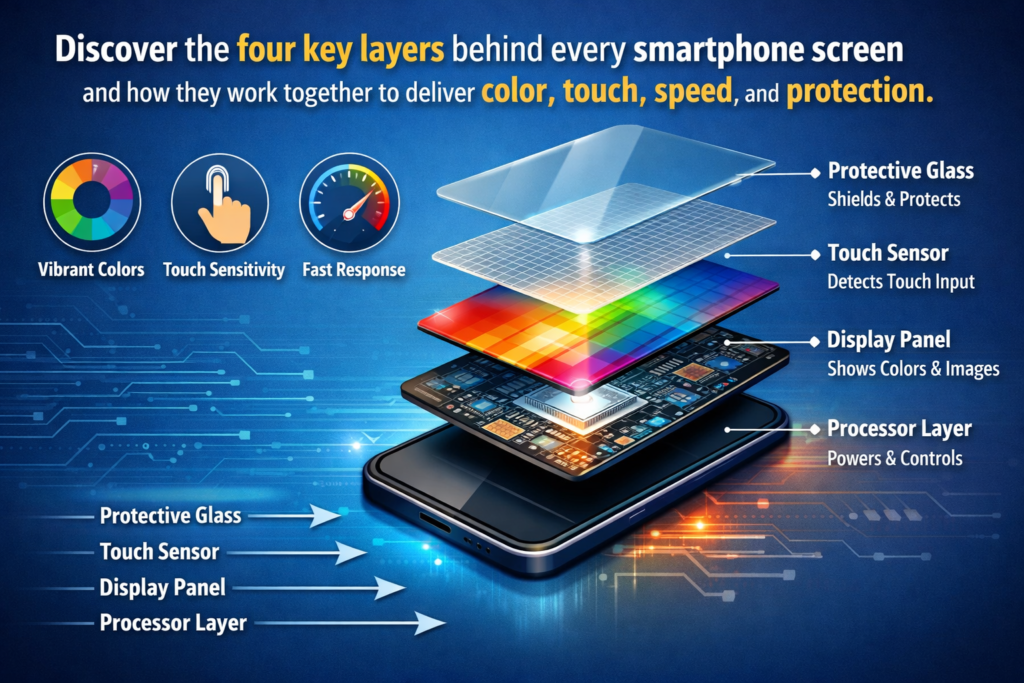
Cette surface de verre lisse que vous glissez des dizaines de fois par jour n’est pas seulement un « écran ». Il s’agit d’une pile de quatre composants essentiels travailler ensemble en parfaite harmonie:
- Le panneau d'affichage
- Le écran tactile
- Le toucher IC (Circuit intégré)
- Le couvercle en verre
Comme un orchestre bien répété, chacun joue de son propre instrument, mais ensemble, ils créent l'expérience transparente que vous prenez pour acquise.
Découvrons les différentes couches et explorons ce qui se passe réellement sous vos doigts..
Première partie – Le panneau d’affichage: La source de chaque pixel
Évolution des écrans de smartphone
Il était une fois, les écrans des téléphones étaient minuscules, faible, et à peine coloré. Avance rapide jusqu'à aujourd'hui, et nous transportons des écrans de qualité cinéma dans nos poches.
Comment en sommes-nous arrivés là?
Le parcours est passé des écrans LCD monochromes de base aux panneaux OLED à taux de rafraîchissement élevé, capables d'afficher plus d'un milliard de couleurs.. Chaque génération a repoussé les limites de la clarté, luminosité, et le réalisme.
Décomposons maintenant les deux technologies dominantes qui alimentent les smartphones modernes.
La technologie LCD expliquée
LCD signifie Affichage à Cristaux Liquides. Considérez-le comme un système de barrière lumineuse hautement contrôlé.
Comment fonctionnent les modules de rétroéclairage
Les panneaux LCD ne produisent pas leur propre lumière. Plutôt, ils s'appuient sur un module de rétroéclairage.
Voici la version simple:
- La lumière brille de l'arrière.
- Il passe par un polariseur.
- Les cristaux liquides s'ajustent pour contrôler la quantité de lumière qui passe à travers.
- Les filtres de couleur créent du rouge, vert, et pixels bleus.
- L'image finale apparaît sur votre écran.
C'est comme si la lumière du soleil traversait des stores réglables et des verres colorés..
Ips, Tft, et variantes
Tous les écrans LCD ne sont pas égaux.
- TFT-LCD: Plus vieux, moins cher, couleurs moins précises.
- IPS-LCD: Meilleure précision des couleurs et angles de vision plus larges.
La technologie LCD est mature, abordable, et stable. Il produit également moins de scintillement à faible luminosité, que de nombreux utilisateurs trouvent plus doux pour les yeux.
La technologie OLED expliquée
OLED signifie Organic Light Emitting Diode. Contrairement à l'écran LCD, Les pixels OLED génèrent leur propre lumière.
Pas de rétroéclairage. Pas de couches supplémentaires. Juste une pure émission.
Couches organiques auto-émissives
Chaque pixel s'allume indépendamment lorsque l'électricité traverse des composés organiques.
Je veux du noir?
Éteignez le pixel.
C’est pourquoi les écrans OLED offrent un « contraste infini ». Le noir n’est pas gris foncé, c’est vraiment noir.
AMOLED et innovations modernes
Amoufré (Matrice active OLED) est le type OLED dominant dans les téléphones phares aujourd'hui.
Il propose:
- Temps de réponse plus rapide
- Taux de rafraîchissement plus élevés
- Meilleure efficacité énergétique en mode sombre
- Possibilités de conception flexibles et pliables
C’est ainsi que les écrans incurvés et les téléphones pliables sont devenus réalité.
LCD vs OLED – Comparaison des performances
Alors, qu'est-ce qui est mieux?
OLED gagne généralement dans:
- Rapport de contraste
- Le dynamisme des couleurs
- Vitesse de réponse
- Flexibilité de conception
L'écran LCD reste fortement compétitif dans:
- Rentabilité
- Durabilité
- Risque de brûlure réduit
La tendance du marché? OLED se développe rapidement, tandis que le LCD domine les segments budgétaires.
Tendances futures de la technologie d'affichage
Nous voyons des innovations comme:
- Taux de rafraîchissement adaptatif LTPO
- Recherche MicroLED
- Fréquences de gradation PWM plus élevées
- Panneaux pliables et enroulables
Le but? Diluant, plus brillant, plus intelligent.
Deuxième partie – L’écran tactile: Transformer le mouvement en commandes
Si l'écran affiche du contenu, l'écran tactile vous écoute.
L'histoire de la technologie tactile
Premiers appareils mobiles utilisés écrans tactiles résistifs. N'oubliez pas d'appuyer fort avec un stylet? C'était une technologie résistive au travail.
Puis les écrans capacitifs ont tout changé.
Écrans tactiles résistifs
Les écrans résistifs sont constitués de deux couches conductrices séparées par de minuscules espaceurs.
Quand tu appuies, les couches se connectent. Le système détecte le changement de tension et calcule la position.
Pros:
- Fonctionne avec n'importe quel objet
- Faible coût
Inconvénients:
- Pas de multi-touch
- Nécessite une pression
- Moins réactif
Écrans tactiles capacitifs
Les écrans capacitifs détectent les changements de charge électrique lorsque votre doigt touche le verre.
Votre corps conduit l'électricité. L'écran détecte que.
Aucune pression requise. Il suffit de toucher.
Avantages:
- Prise en charge multi-touch
- Des gestes fluides
- Une sensibilité plus élevée
- Meilleure durabilité
C'est pourquoi les écrans capacitifs dominent les smartphones d'aujourd'hui.
Pourquoi le capacitif a conquis le marché
Parce que les smartphones sont devenus pilotés par les gestes.
Pincer pour zoomer. Glisser. Jeu à plusieurs doigts.
Le résistif n’arrivait pas à suivre.
L'interaction capacitive a transformé la « pression sur des boutons » en « manipulation directe ».
Contrôle multi-touch et gestuel
Les écrans tactiles modernes détectent 10+ points simultanés.
Cela permet:
- Précision de jeu
- Saisie rapide
- Navigation gestuelle avancée
Cela semble naturel car cela reflète la façon dont nous utilisons nos mains dans la vraie vie..
Troisième partie – Le Touch IC: Le cerveau invisible
Voici maintenant le véritable héros méconnu.
Qu'est-ce qu'un circuit intégré tactile?
Le Touch IC est une micropuce chargée d'interpréter les données tactiles.
L'écran tactile détecte les changements électriques.
Le Touch IC calcule les coordonnées, filtre le bruit, et envoie des instructions au système.
Sans ça? L'écran ne ressentirait rien.
Comment les signaux tactiles deviennent des commandes numériques
Voici ce qui se passe en millisecondes:
- Le doigt touche l'écran.
- Modifications du champ électrique.
- Touch IC mesure les différences de signal.
- Le bruit est filtré.
- Les coordonnées sont générées.
- Les données sont envoyées au processeur.
C'est comme traduire un murmure en une phrase claire.
Taux d'échantillonnage et performances de jeu
Avez-vous déjà entendu parler de l'échantillonnage tactile à 120 Hz? Ou même 240 Hz ou plus?
C'est la fréquence à laquelle le Touch IC vérifie les entrées par seconde.
Des taux d'échantillonnage plus élevés signifient:
- Réponse plus rapide
- Latence inférieure
- Avantage de jeu compétitif
Dans les téléphones de jeu haut de gamme, les taux d'échantillonnage peuvent atteindre des niveaux ultra-élevés pour une réaction quasi instantanée.
Fonctionnalités avancées des circuits intégrés tactiles modernes
Prise en charge des puces modernes:
- Opération avec les mains mouillées
- Mode gant
- Interférence anti-électromagnétique
- Algorithmes de rejet d'eau
Ils sont petits mais incroyablement puissants.
Quatrième partie – Le couvercle en verre: Le bouclier de protection
C'est la partie que vous touchez physiquement tous les jours.
Et ça marche plus dur que tu ne le penses.
Evolution des matériaux en verre
Les premiers téléphones utilisaient du verre sodocalcique – bon marché et fragile.
Aujourd'hui, la plupart des smartphones utilisent renforcé verre aluminosilicate pour la durabilité.
De la chaux sodée à l’aluminosilicate
Le verre aluminosilicate subit un renforcement chimique.
Le résultat?
- Résistance aux chocs plus élevée
- Meilleure résistance aux rayures
- Une plus grande intégrité structurelle
C'est comme transformer du verre ordinaire en armure.
Verre microcristallin et flexible (PUBLICATION)
Les appareils haut de gamme expérimentent désormais:
- Verre microcristallin pour une résistance extrême
- Verre ultra fin (PUBLICATION) pour téléphones pliables
UTG peut se plier des milliers de fois tout en restant durable.
C'est la magie de l'ingénierie.
2D, 2.5D, 3Conceptions de verre D et 3.5D
Le design du verre a évolué esthétiquement:
- 2D: Plat
- 2.5D: Bords légèrement incurvés
- 3D: Façade entièrement incurvée
- 3.5D: Courbure du corps intégrée
Le design rencontre l’ergonomie.
Traitements de surfaces: Revêtements AF et AR
Deux revêtements critiques:
- DE (Anti-empreinte digitale): Réduit les taches
- RA (Anti-reflet): Améliore la visibilité du soleil
Petits soins. Énorme différence.
Processus de fabrication du verre de protection
La production de vitres de protection pour smartphone implique:
- Coupe
- Façonnage CNC
- Polissage
- Flexion thermique
- Renforcement chimique
- Revêtement
Des dizaines d'étapes précises – aucune marge d'erreur.
Tendances d'intégration – Quand les composants ne font plus qu'un
L’industrie ne se contente pas d’améliorer les pièces individuellement.
C’est les intégrer.
Technologie TDDI
TDDI combine le circuit intégré de pilote tactile et le circuit intégré de pilote d'affichage en une seule puce.
Avantages:
- Modules plus fins
- Consommation d'énergie réduite
- Coût réduit
Solutions en cellule et sur cellule
In-Cell intègre des capteurs tactiles directement dans la couche d'affichage.
Moins de couches.
Profil plus fin.
Meilleures performances optiques.
Diluant, Plus intelligent, Sans couture
La direction est claire:
- Cadres plus étroits
- Poids plus léger
- Interaction transparente
L'écran n'est plus qu'un composant. C'est un système entièrement intégré.
Conclusion – Un micro-monde sous vos doigts
La prochaine fois que tu glisseras ton téléphone, fais une pause une seconde.
Sous cette surface lisse se trouve un monde microscopique de physique, chimie, génie électrique, et conception travaillant en parfaite coordination.
Le panneau d'affichage peint l'image.
Le écran tactile sent votre intention.
Le Touchez IC interprète votre commande.
Le couvercle en verre protège tout.
Ce n'est pas qu'un écran.
C'est une symphonie d'innovation à plusieurs niveaux — et elle tient dans votre poche.
FAQ
1. Quelle est la différence entre les écrans LCD et OLED?
L'écran LCD utilise un rétroéclairage pour éclairer les pixels, tandis que les pixels OLED émettent leur propre lumière, permettant un meilleur contraste et des designs plus fins.
2. Pourquoi les écrans OLED sont-ils plus chers?
La fabrication des OLED est plus complexe et nécessite des matériaux organiques avancés, augmentation des coûts de production.
3. Quelles sont les causes des brûlures d'écran sur OLED?
L’affichage prolongé d’images statiques peut dégrader les matières organiques de manière inégale, provoquant une faible rétention d'image au fil du temps.
4. Que signifie le taux d'échantillonnage tactile?
Il s'agit du nombre de fois par seconde que le circuit intégré tactile recherche une entrée.. Des taux plus élevés réduisent le délai d’entrée.
5. Pourquoi les téléphones modernes utilisent-ils du verre incurvé?
Le verre incurvé améliore l'ergonomie, améliore l'esthétique, et complète les écrans OLED flexibles.



