
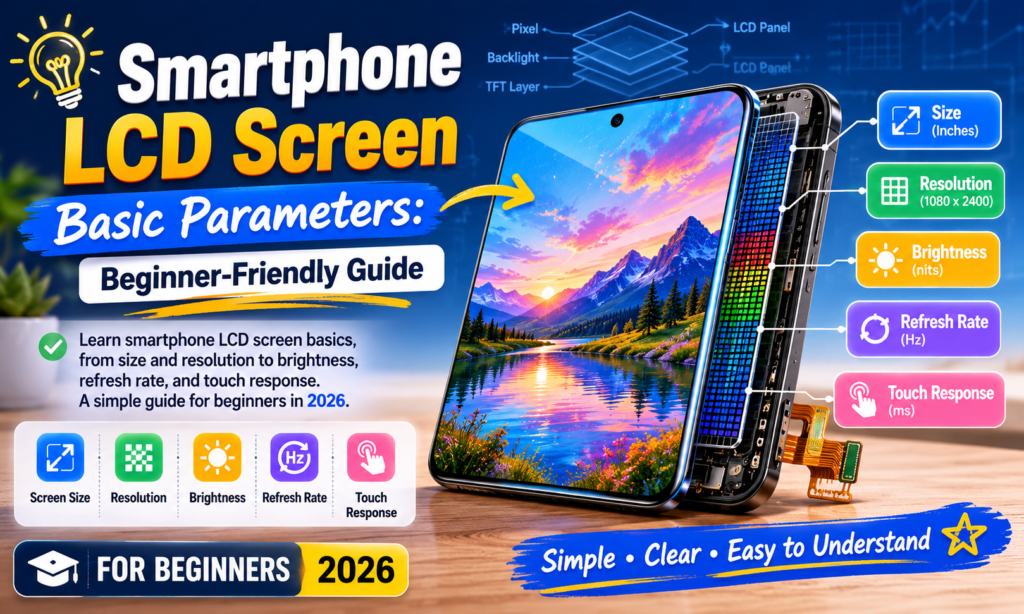
Hvorfor det er vigtigt at forstå LCD-skærmparametre
Hvis du nogensinde har kigget på en smartphone-skærmspecifikationsark og tænkt, Hvad betyder alle disse tal overhovedet? - du er bestemt ikke alene. Begreber som FHD+, 120Hz, 1000 nits, og PPI blive kastet rundt overalt, men de føles ofte mere som marketingsprog end nyttig information. Sandheden er, disse tal betyder noget. Meget mere end de fleste er klar over.
Din smartphone-skærm er den del af telefonen, du interagerer med mere end noget andet. Du trykker på den hundredvis af gange om dagen. Du læser beskeder på den, se videoer, gennemse hjemmesider, redigere billeder, spille spil, og stirrer sikkert mere på det før sengetid, end du gerne vil indrømme. Det er din telefons hoveddør til alt. Hvis displayet er dårligt, hele oplevelsen føles dårlig – også selvom processoren er hurtig, og kameraet er fremragende.
Det er især vigtigt i smartphone LCD-udskiftnings- og reparationsindustrien. Uanset om du køber en erstatnings-LCD, indkøb af dele til videresalg, eller blot at vælge din næste telefon, at forstå LCD-parametre hjælper dig med at træffe bedre beslutninger. Et spec-ark holder op med at være en mur af forvirrende tal og bliver noget praktisk. Det bliver en tjekliste.
Tænk på det som at købe en bil. Du behøver ikke at være mekaniker for at forstå hestekræfter, brændstofeffektivitet, eller sikkerhedsvurderinger. Smartphone-skærme fungerer på samme måde. Du behøver ikke at være ingeniør - du skal bare vide, hvad der betyder noget.
Hvad er en smartphone LCD-skærm?
LCD står for Liquid Crystal Display, og på trods af OLED-dominerende flagskibstelefonsamtaler, LCD er stadig utroligt almindeligt - især i budgettelefoner, enheder i mellemklassen, og eftermarkedet erstatningsskærme.
En LCD producerer ikke lys alene. I stedet, den er afhængig af en baggrundsbelysning bag panelet. Flydende krystaller styrer derefter, hvor meget lys der passerer gennem farvede filtre for at skabe de billeder, du ser. Det er derfor, LCD-paneler normalt ser lyse og rene ud, men producerer ikke den samme "ægte sorte" kontrast, som du vil se på OLED.
OLED fungerer anderledes, fordi hver pixel udsender sit eget lys. Sorte pixels kan slukke helt. LCD-pixel kan ikke. Selv sorte områder har stadig baggrundsbelysningen bag sig, hvilket får sorte til at se lidt grå ud i sammenligning.
Stadig, LCD har flere fordele:
- Lavere omkostninger
- Stabil farveydelse
- Ingen risiko for indbrænding
- Ofte nemmere og billigere at udskifte
- Pålidelig langtidsholdbarhed
Mange brugere foretrækker stadig LCD af praktiske årsager. På markedet for reparationsdele, LCD er især vigtigt, fordi udskiftningsomkostningerne er lavere, og kompatibiliteten ofte er bredere.
Skærmstørrelse
Skærmstørrelse er normalt det første tal, folk bemærker.
En smartphone-skærm måles diagonalt i tommer - fra det ene hjørne til det modsatte hjørne.
I 2026, almindelige størrelser inkluderer:
| Skærmstørrelse | Typisk oplevelse | Bedst til |
|---|---|---|
| 6.1″ | Kompakt | Enhåndsbrug |
| 6.4″ | Balanceret | Daglige brugere |
| 6.6″ | Stor | Videoer & sociale medier |
| 6.7–6.9″ | Ekstra stor | Spil & streaming |
De fleste telefoner sidder nu et sted imellem 6.1 og 6.8 tommer. Større betyder ikke altid bedre.
En større skærm giver dig:
- Mere fordybende videoafspilning
- Større tastatur
- Bedre spilsynlighed
- Lettere læsning
Men det betyder også:
- Sværere enhåndsbetjening
- Tungere enhed
- Større lommefodaftryk
Valget af skærmstørrelse er personligt. Det handler mindre om "bedst" og mere om "bedst for dig."
Opløsning
Opløsning fortæller dig, hvor mange pixels der er pakket ind i skærmen.
Flere pixels betyder generelt flere detaljer.
Almindelige smartphone LCD-opløsninger inkluderer:
| Opløsning | Antal pixels | Kvalitetsniveau |
|---|---|---|
| HD | 1280 × 720 | Entry-level |
| FHD | 1920 × 1080 | Standard |
| FHD+ | 2400 × 1080 | Moderne standard |
| QHD | 2560 × 1440 | Præmie |
FHD+ er fortsat det bedste sted i 2025-2026, tilbyder stærk skarphed uden det ekstra batteridræn fra QHD.
Opløsning påvirker:
- Tekstskarphed
- Fotoklarhed
- Video detaljer
- App UI sprødhed
En relateret metrik er PPI (pixels pr. tomme).
Typisk smartphone PPI:
- 300 PPI = acceptabelt
- 400 PPI = skarp
- 450+ PPI = meget skarp
- 500+ PPI = tæthed på premiumniveau
Ud over omkring 450 PPI, mange mennesker har svært ved at mærke en kæmpe forskel ved normal brug.
Lysstyrke
Lysstyrken måles i nits.
En nit er lig med en candela per kvadratmeter. Det lyder teknisk – men det er faktisk enkelt.
Højere nits = lysere display.
Lysstyrke er en af de vigtigste LCD-specifikationer i den virkelige verden, fordi den påvirker, om du rent faktisk kan se din skærm udendørs.
Typisk lysstyrkeguide:
| Lysstyrke | Erfaring |
|---|---|
| 400-500 nits | Kun indendørs brug |
| 700-900 nits | God |
| 1000+ nits | Fremragende udendørs synlighed |
| 2000+ nits | Højeste lysstyrke på flagskibsniveau |
Nylige smartphone display rapporter anbefaler 800–1000 nits eller mere for behagelig synlighed i sollys.
Lysstyrken påvirker også:
- HDR-afspilning
- læsbarhed i sollys
- fotoredigeringsnøjagtighed
- øjenkomfort
En lys skærm føles straks mere premium. Det er en af de specifikationer, som brugere bemærker uden at vide hvorfor.
Opdateringshastighed
Opdateringshastighed måles i Hz.
Den beskriver, hvor mange gange i sekundet skærmen opdateres.
Fælles opdateringshastigheder:
| Opdateringshastighed | Brugeroplevelse |
|---|---|
| 60Hz | Standard |
| 90Hz | Glat |
| 120Hz | Meget glat |
| 144Hz+ | Fokus på spil |
60Hz betyder 60 opdateres hvert sekund.
120Hz betyder det dobbelte.
Det påvirker:
- rullende glathed
- app animationer
- spil
- berøringsfølelse
Når du bruger 120Hz regelmæssigt, at gå tilbage til 60Hz kan føles overraskende hakkende.
Men der er en afvejning.
Højere opdateringshastighed betyder ofte:
- mere batteriforbrug
- højere GPU-arbejdsbelastning
Derfor er adaptive opdateringsskærme blevet mere almindelige.
Ved 2025, 120Hz er nu almindeligt selv på enheder i mellemklassen.
Farveydelse
Opløsning får opmærksomhed, men farvekvalitet er det, der får en skærm til at føles levende.
Vigtige LCD-farveparametre inkluderer:
- Farveudvalg
- Farvetemperatur
- Farvenøjagtighed
- Kontrast
- Betragtningsvinkel
Farveskala
Dette definerer, hvor mange farver skærmen kan gengive.
Fælles standarder:
- SRGB
- DCI-P3
DCI-P3 er bredere og rigere end sRGB.
Farvenøjagtighed
Ofte målt ved Delta E.
Lavere = bedre.
- Delta E < 3 = meget god
- Delta E < 2 = fremragende
Nogle premium-skærme opnår nu næsten professionel kalibrering.
Farvenøjagtighed betyder noget for:
- fotografering
- video
- online shopping
- gengivelse af hudfarve
Hvis farverne er slukket, alt føles forkert.
Tryk på Ydelse
Berøring er ikke bare berøring længere.
Der er to vigtige målinger her:
Berøringsfølsomhed
Hvor let skærmen reagerer på fingerkontakt.
En dårlig LCD kan føles forsinket eller inkonsekvent.
Tryk på Sampling Rate
Dette er hvor ofte skærmen registrerer berøringsinput hvert sekund.
Målt i Hz.
Eksempler:
- 120Hz
- 240Hz
- 360Hz
Højere touch sampling betyder:
- hurtigere trykrespons
- jævnere spilstyring
- bedre skrivenøjagtighed
Spillere bemærker dette med det samme.
Tilfældige brugere bemærker måske ikke bevidst - men de føler det.
Det er som at styre en bil med strammere håndtering. Du kan ikke forklare det teknisk, men du mærker lydhørheden.
Konklusion
Forståelse af smartphone LCD-skærmparametre kræver ikke teknisk viden. Når terminologien bliver bekendt, det bliver meget nemmere at læse et skærmspecifikationsark.
Hvis du kun husker nogle få ting, fokusere på disse:
- Skærmstørrelse påvirker komforten
- Opløsning påvirker skarpheden
- Lysstyrke påvirker synlighed
- Opdater hastighed påvirker glatheden
- Farveydelse påvirker den visuelle kvalitet
- Trykprøveudtagning påvirker reaktionsevnen
For de fleste brugere i 2026, en stor LCD-skærm ser normalt sådan ud:
- 6.4–6,7 tommer
- FHD+
- 450+ PPI
- 800+ nits lysstyrke
- 120Hz opdateringshastighed
- stærk farvekalibrering
Den kombination leverer den søde spot mellem pris, anvendelighed, og vise ydeevne.
Skærmen er der, hvor hele din smartphone-oplevelse sker. Det er scenen. Hver app, hvert billede, hver video vises der først.
Vælg med omhu.
FAQS
1. Hvad er den vigtigste LCD-parameter i en smartphone?
Det afhænger af brugen, men Lysstyrke og opløsning er normalt de mest bemærkelsesværdige ved daglig brug. Lysstyrke påvirker udendørs læsbarhed, mens opløsning påvirker skarpheden.
2. Er LCD bedre end OLED?
Ikke universelt. OLED har bedre sort og kontrast. LCD er ofte billigere, holdbar, og fri for risiko for indbrænding.
3. Er 120Hz det værd?
Ja for de fleste brugere. Rulning føles glattere, og telefonen føles generelt hurtigere.
4. Hvilken opløsning er bedst til smartphone LCD'er?
For de fleste mennesker, FHD+ tilbyder den bedste balance mellem skarphed og batterilevetid.
5. Hvor mange nits er godt for en smartphoneskærm?
Omkring 800-1000 nits er fremragende til det meste daglige brug, især udendørs. Højere er endnu bedre i direkte sollys.



