
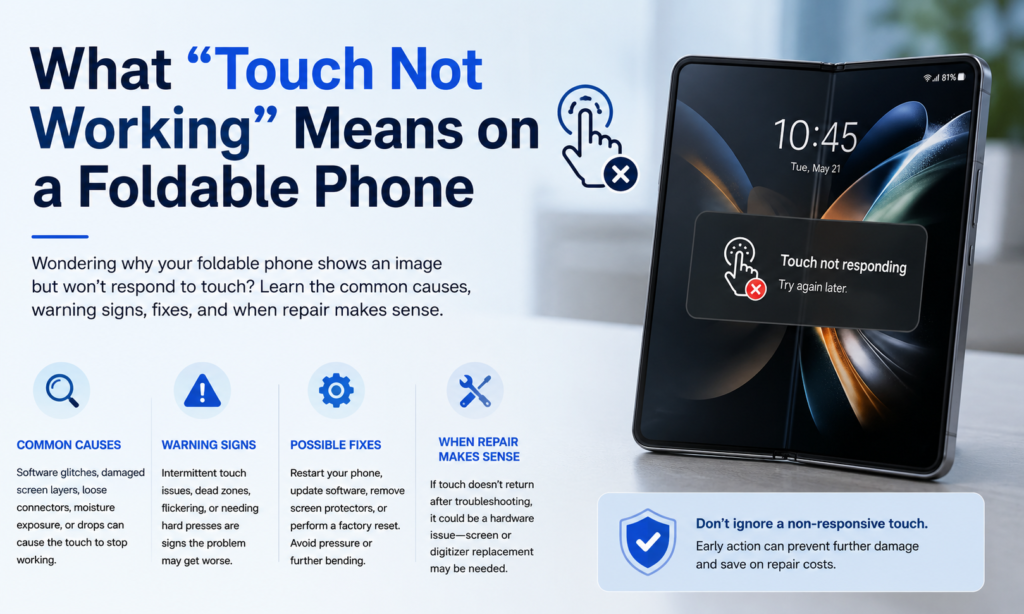
Når folk siger, at en foldbar telefon har "død berøring" eller "berøring reagerer ikke,” problemet kan se meget forskelligt ud fra en enhed til en anden. Nogle gange lyser skærmen stadig smukt op - farverne er perfekte, lysstyrken er normal - men berøringsinput forsvinder fuldstændigt. Andre gange fejler kun en del af displayet, ofte omkring midterfolden, hvor skærmen foldes tusindvis af gange i løbet af sin levetid.
Dette betyder noget, fordi et skærmproblem og et berøringsproblem ikke altid er det samme. OLED-panelet producerer billedet. De digitalisering læser din finger. På foldbare, disse lag sidder utrolig tæt sammen, næsten som sider limet inde i en lille bevægende bog. Hvis det ene lag er beskadiget, telefonen viser muligvis stadig et billede, mens den nægter at registrere berøring. Derfor kan nogle brugere stadig se notifikationer, låses op med en fingeraftrykssensor, eller se videoer – men kan ikke trykke på noget på det indre display.
Symptomerne kan føles tilfældige i starten. Måske fungerer den øverste halvdel, mens den nederste ikke gør. Måske holder din stylus op med at reagere i nærheden af folden. Måske opstår problemet først, når det er helt åbnet. Den tilfældighed er normalt slet ikke tilfældig. Det er ofte et fingerpeg, der peger mod den virkelige hardwarefejl nedenunder.
Hvorfor foldbare telefoner er mere sårbare end traditionelle telefoner
En normal smartphone-skærm sidder fladt hele dagen. En foldbar skærm bøjes hver gang du åbner eller lukker den. Den enkelte forskel ændrer alt.
Brug foldbare skærme ultra tyndt glas, fleksible OLED-lag, klæbemidler, polymerer, og indbyggede berøringssensorer. Hvert lag skal bevæge sig jævnt sammen uden at revne. Forestil dig at bøje en stak papir, plast, og ledninger igen og igen. Det virker – indtil slid begynder at bygge sig usynligt under overfladen.
Reparationsspecialister fremhæver fortsat, at foldningsområdet forbliver den mest mekanisk belastede del af enheden. Over tid, gentagen åbning og lukning skaber belastning ikke kun på selve skærmen, men også på de bittesmå indvendige båndkabler, der føres gennem hængslet.
Og så er der hængslet.
Hængslet er genialt konstruktion, men det er også den foldbare telefons største trykpunkt. Små bevægelige komponenter åbner og lukker hundredvis af gange hver uge. Støv kan trænge ind. Mikroskopisk friktion opbygges. Et mindre fald kan flytte justeringen uden synlig ydre skade. I modsætning til traditionelle pladetelefoner, foldbare er altid under bevægelsesstress.
Det er grunden til, at foldbare dele føles fantastiske at bruge - men også derfor, de kræver mere pleje.
De mest almindelige årsager til touchscreen-fejl på foldbare telefoner
Flexkabel skader
Hvis der er en komponent, der kommer op gentagne gange i foldbare reparationsdiskussioner, det er flexkabel.
Indvendig foldbare telefoner, tynde båndkabler passerer gennem hængslet for at forbinde de to halvdele af enheden. Disse kabler bøjes hver eneste gang telefonen foldes. Over måneder eller år, materialet bliver træt. Der dannes små revner. Forbindelser svækkes. Til sidst begynder signalerne mellem skærmen og bundkortet at svigte.
Når dette sker, brugere kan bemærke:
- Indre berøring reagerer ikke
- Skærm bliver sort, når den er foldet ud
- Berør kun arbejde ved bestemte åbningsvinkler
- Wi-Fi eller Bluetooth fejler på samme tid
- Stylus problemer
Teknikere rapporterer i stigende grad flexkabelfejl som en af de mest almindelige årsager bag foldbare berøringsproblemer i de seneste Galaxy Fold, Vend, og Pixel Fold-enheder.
Tænk på det som at bøje et ladekabel gentagne gange i nærheden af stikket. Til sidst flosser det indeni. Samme idé - bare gemt dybt inde i hængslet.
Tryk på Digitalizer-fejl
Digitalizeren er det usynlige lag, der fornemmer din finger. Hvis det mislykkes, billedet kan stadig se normalt ud, mens berøring forsvinder.
Digitaliseringsfejl kan være forårsaget af:
- Gentaget tryk rundt om folden
- Indvendige mikrorevner
- Fremstillingsstress
- Varmeskader
- Delaminering mellem skærmlag
Dette er grunden til, at mange foldbare telefoner med "perfekt udseende" skærme stadig skal udskiftes i fuld skærm. OLED'en kan være i orden. Berøringslaget nedenunder er det ikke.
Trykskade nær folden
Sammenfoldelige skærme er hårdere, end de ser ud - men ikke uovervindelige.
Trykskader sker ofte, uden at brugerne er klar over det:
- Sidder med telefonen i lommen
- Bærer det stramt i en rygsæk
- Lukning af enheden med støv eller grus indeni
- Tryk hårdt på foldelinjen
Fordi displayet bøjer indad, enhver fanget partikel bliver et trykpunkt. Det lille sandkorn virker pludselig som en sten, der presses mod en forrude.
Reparationscentre beskriver ofte trykket i foldarealet som en væsentlig bidragyder til døde berøringszoner og skærmfejl.
Støv og snavs inde i hængslet
Støv er lusket.
Du ser det ikke komme ind i hængslet. Du hører det ikke bevæge sig. Men med tiden bygges det op. Sammenfoldelige har forbedret modstand sammenlignet med tidlige modeller, alligevel er hængselskontamination stadig et kendt problem.
Affald kan:
- Begræns hængslets bevægelse
- Undgå fuld åbning
- Skab ujævnt tryk på skærmen
- Skader interne kabler over tid
Nogle brugere har rapporteret, at telefoner ikke længere åbner fladt på grund af forurening af hængsler. Når hængseljusteringen skifter, trykfordelingen over skærmen ændres også.
Fugteksponering
Vand forårsager ikke altid øjeblikkelig fejl.
Nogle gange er det langsomt.
Fugt trænger ind gennem små huller, hængselåbninger, eller svækkede sæler. Så starter korrosion. Berøringsrespons bliver inkonsekvent. Spøgelsesberøringer vises. Døde zoner følger.
Selv fugtighed kan påvirke følsomme berøringskredsløb inde i en foldbar skærm.
Software glider
Ikke alle berøringsproblemer betyder ødelagt hardware.
Nogle gange fryser telefonen simpelthen.
Almindelige software-relaterede årsager omfatter:
| Spørgsmål | Mulig Fix |
|---|---|
| System UI fryser | Tving genstart |
| Firmware fejl efter opdatering | Opdater patch eller rollback |
| App konflikt | Fejlsikret tilstand test |
| Berøringskalibreringsproblem | Fabriksindstilling |
| Midlertidigt cache-problem | Ryd systemcache |
Hvis berøring pludselig stopper efter en opdatering - eller kun i visse apps - er software værd at tjekke først.
Stadig, hvis genstart ikke hjælper, og problemet følger foldevinklen, hardware er normalt den mere sandsynlige synder.
Advarselsskilte før berøring holder helt op med at virke
Foldelige telefoner fejler sjældent uden varsel.
Normalt hvisker enheden, før den skriger.
Hold øje med tegn som:
- Berøringsforsinkelse nær den midterste fold
- Spøgelse tapper
- Flimrer ved åbning
- Skærmen bliver kortvarigt sort, når den foldes ud
- Telefonen åbner ikke fladt længere
- Stylus mangler visse områder
- Død stribe ned i midten
Mange brugere ignorerer disse tidlige symptomer, fordi telefonen stadig for det meste fungerer. Det er forståeligt. Ingen vil tro, at en premium foldbar er på vej mod reparation.
Men tidlige advarselstegn betyder noget.
En lille død zone i dag kan blive en fuldstændig uresponsiv indre skærm næste måned.
Kan det ordnes uden at udskifte skærmen?
Nogle gange ja. Nogle gange nej.
Det er den frustrerende sandhed.
Start med de enkle trin:
- Tving genstart telefonen
- Fjern eftermarkedets skærmbeskytter
- Test i fejlsikret tilstand
- Opdater firmware
- Sikkerhedskopier data med det samme
- Tjek garantistatus
Hvis berøring vender tilbage efter genstart, det kan have været softwarerelateret.
Hvis berøring kun mislykkes, mens den er udfoldet, eller kun i nærheden af folden, hardware er mere sandsynligt.
Hardware reparationsmuligheder kan omfatte:
- Flex kabel udskiftning
- Udskiftning af indvendig skærm
- Digitalizer udskiftning
- Hængsel reparation
- Fuld udskiftning af displaysamling
Desværre, mange producenter udskifter hele skærmen i stedet for individuelle lag, fordi komponenterne er bundet sammen.
Sådan forhindrer du problemer med foldbar skærm
Du kan ikke eliminere risiko - men du kan reducere den.
Gode vaner hjælper meget.
Undgå at trykke direkte på folden. Snap ikke telefonen aggressivt. Hold lommerne fri for mønter eller støv. Luk aldrig enheden med snavs på skærmen.
Rengøring betyder også noget.
Brug jævnligt en mikrofiberklud. Vær ekstra opmærksom omkring hængselkanterne. Undgå trykluftsprængninger direkte ind i hængselsåbninger, medmindre producenten er godkendt.
Varme betyder også mere, end mange mennesker er klar over.
At efterlade en foldbar telefon i en varm bil svækker klæbestoffer over tid. Høj temperatur plus gentagen foldning er en grov kombination for OLED-lag.
Tænk på foldbare ure som luksusure eller performance-biler: de er bygget genialt, men de belønner omhyggeligt ejerskab.
Reparationsomkostninger vs udskiftning: Hvilket giver mere mening?
Det er her, tingene bliver praktiske.
Sammenfoldelige reparationer er dyre sammenlignet med traditionelle smartphones.
Typiske reparationsbeslutninger afhænger af:
- Telefonens alder
- Garantistatus
- Forsikringsdækning
- Pris for udskiftning af skærm
- Indbytteværdi
- Gensalgsværdi efter reparation
En to år gammel foldbar med dyre indvendige skærmskader kan koste næsten lige så meget at reparere som at opgradere til en nyere enhed.
Hvis det er under garanti? Nem beslutning - reparer den.
Uden for garanti? Det bliver et matematisk problem.
Spørge:
- Virker den ydre skærm stadig?
- Kan den byttes ind?
- Er flex kabel reparation tilgængelig lokalt?
- Udskifter producenten kun samlinger?
Nogle gange vinder reparation.
Nogle gange er udskiftning det smartere økonomiske skridt.
Konklusion
Foldbare telefoner er nogle af de mest spændende enheder i moderne forbrugerelektronik. De blander telefon og tablet til ét slankt stykke teknik. Men den innovation kommer med afvejninger.
Når en foldbar skærm holder op med at reagere på berøring, hovedårsagen spores normalt tilbage til gentagen mekanisk belastning. Hængslet bøjes. Flexkablet bøjes. OLED'en bøjer. Digitalisatoren bøjer. Over tid, noget når til sidst sin grænse.
De mest almindelige årsager omfatter:
- Flex kabel træthed
- Touch digitizer fejl
- Trykskader
- Støv inde i hængslet
- Fugteksponering
- Softwarefejl
De gode nyheder? Ikke alle berøringsproblemer betyder, at enheden er død. Nogle problemer kan diagnosticeres tidligt. Nogle kan repareres. Og med bedre håndteringsvaner, mange kan blive forsinket.
Sammenfoldelige er stadig i hurtig udvikling. Producenter bliver ved med at forbedre hængslernes holdbarhed, beskyttende lag, og kabelføring hver generation. Det betyder, at fremtidige foldbare enheder sandsynligvis bliver mere pålidelige.
Men i dag, hvis din foldbare telefon pludselig ignorerer din berøring, det forsøger normalt at fortælle dig, at noget mekanisk indeni har brug for opmærksomhed.
Lyt tidligt - og du kan spare dig selv for en meget større reparation senere.
FAQS
1. Hvorfor virker min foldbare telefonberøringsskærm kun, når den er halvåben?
Dette peger ofte på flex kabelslid inde i hængslet. Kablet kan stadig tilsluttes i visse vinkler, men mister kontakten, når det åbnes helt.
2. Kan en foldbar telefonskærm vises normalt, men har ingen berøringsrespons?
Ja. OLED-panelet og touch digitizer er separate lag. Billedet kan stadig vises, mens digitaliseringen fejler.
3. Kan repareres i nærheden af foldelinjen?
Undertiden. Afhængig af årsagen, reparation kan involvere udskiftning af flex-kablet eller den fulde indvendige skærmsamling.
4. Beskadiger foldning af telefonen for ofte skærmen?
Sammenfoldelige er designet til gentagen brug, men over år, gentagen foldning tilføjer naturligt slid på hængslet og de indvendige komponenter.
5. Skal jeg fortsætte med at bruge min foldbare telefon, hvis berøring begynder at svigte?
Hvis problemet er mindre, sikkerhedskopiere dine data med det samme. Fortsat brug kan forværre indre skader - især hvis problemet er relateret til hængslet eller flexkablet.



