
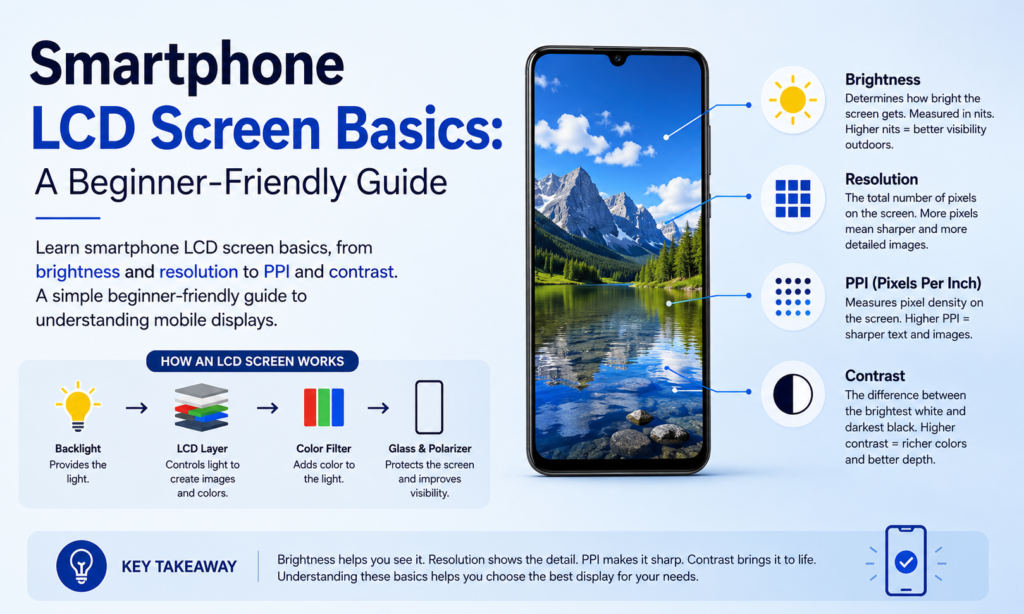
Prečo na obrazovkách smartfónov záleží viac ako kedykoľvek predtým
Pozrite sa rýchlo na svoj telefón. S čím najčastejšie komunikujete? Nie náraz fotoaparátu. Nie mriežka reproduktora. Dokonca ani tlačidlá. Je to obrazovka. V dnešnej dobe smartfónov, displej zaberá väčšinu prednej plochy, a je tam takmer každý kohútik, potiahnutie, video, správu, a fotografické životy. Vaša obrazovka je vaša klávesnica, váš televízor, náhľad vášho fotoaparátu, vaše nákupné okno, a vaša mapa je zabalená do jedného tenkého kusu technológie.
to je dôvod kvalitu obrazovky záleží oveľa viac ako len „vyzerá to pekne?“ Lepšie zobrazenie mení čitateľnosť textu, ako živé vyzerajú vaše fotografie, ako plynule prebiehajú hry, a dokonca aj to, ako dlho vám vydrží batéria, kým nebudete potrebovať nabíjačku. Výrobcovia obrazoviek tvrdo tlačia na zlepšenie jasu, účinnosť, chudosť, trvanlivosť, a farebný výkon – všetko naraz. Je to vyvažovanie, ako keď sa snažíte urobiť športové auto rýchlejšie, ľahší, bezpečnejšie, a zároveň úspornejšie.
Trh toto úsilie odráža. Podľa Omdie, Smartfóny vybavené AMOLED sú vyrobené 63% globálnych dodávok smartfónov v 1. štvrťroku 2025, ukazuje, ako rýchlo sa displej techeturn0search0turn0search7 LCD obrazovky sú však stále veľmi dôležité, najmä v cenovo dostupných smartfónoch, opravárenské trhy, a zariadenia, kde najviac záleží na cene a životnosti.
Pravdepodobne ste už počuli výrazy ako jas, PPI, rozlíšenie, kontrast, úplná laminácia, alebo Dotyk v bunke. Zobrazujú sa v špecifikáciách, recenzie, a online obchody po celú dobu. Ale pokiaľ nepracujete v displejoch, môžu sa cítiť ako technický žargón, ktorý sa na vás vrhá plnou rýchlosťou.
Táto príručka rozdeľuje bežné výrazy týkajúce sa obrazovky smartfónu do jednoduchej angličtiny.
Jas
Čo vlastne znamená jas
Jas vyjadruje, koľko svetla vyžaruje obrazovka. Jednoducho povedané: ako môže byť jas obrazovky pri zobrazení bielej. Bežne sa meria v hnidy, hoci mnohí ľudia túto jednotku nikdy neuvidia, pokiaľ si neprečítajú technické špecifikácie.
Jasnejšia obrazovka zvyčajne vyzerá živšie. Biele vyzerajú silnejšie. Farby pôsobia výraznejšie. Obrázky môžu pôsobiť živšie. Predstavte si jas ako slnečné svetlo presvitajúce cez farebné sklo – čím viac svetla je za ním, tým viac farby vyniknú.
Ale svetlejšie nie je vždy lepšie.
Ak je v interiéri príliš vysoký jas, môže pôsobiť drsne na oči. Čítanie v posteli s displejom pri maximálnom jase? Môže to byť ako pozeranie do baterky. Väčšina používateľov sa prirodzene usadí v komfortnej strednej zóne v závislosti od prostredia.
Jas tiež veľmi priamo ovplyvňuje životnosť batérie. Čím vyšší je jas, tým viac energie displej spotrebuje. Keďže displej je už teraz jedným z najväčších spotrebiteľov energie vo vnútri smartfónu, maximálny jas môže výrazne skrátiť výdrž batérie.
Horná strana? Vysoký jas sa stáva neuveriteľne užitočným vonku. Pod priamym slnečným žiarením, matný displej sa môže stať takmer nečitateľný. Jasná obrazovka pretína odlesky a odrazy, takže text zostáva viditeľný.
| Scenár použitia | Odporúčaný jas |
|---|---|
| Použitie v tmavej miestnosti/noci | Nízka |
| Vnútorná kancelária/domov | Stredná |
| Vonkajšie denné svetlo | Vysoká |
| Priame slnečné svetlo | Maximálne / automatické zosilnenie |
To je dôvod, prečo mnohé moderné telefóny teraz ponúkajú špičkové zvýšenie jasu vonku, automatické dočasné zvýšenie jasu iba v prípade potreby.
Teplota farby
Teplé obrazovky verzus studené obrazovky
Teplota farby popisuje, či obrazovka vyzerá viac žltá/červená alebo viac modro/biela.
Ak je displej mierne nažltlý, volá sa to a teplá obrazovka. Ak sa zdá byť namodralý, považuje sa za a chladná obrazovka.
Ani jedno nie je automaticky lepšie.
Je to prekvapivo osobné.
Niekto zvyknutý na teplý displej sa môže pozerať na chladný displej a rozmýšľať: "Prečo to vyzerá modro?"?“
Niekto zvyknutý na chladný displej môže zdvihnúť teplý displej a povedať: "Prečo to vyzerá žlto?"?“
Oboje môže byť technicky normálne.
Naše oči sa rýchlo prispôsobia. Po niekoľkých dňoch používania jednej obrazovky, začína sa cítiť „správne,“ a čokoľvek iné môže byť nepríjemné.
Výrobcovia tiež ladia obrazovky inak. Niektorí uprednostňujú živú studenú bielu, pretože v obchodoch vyzerajú ostrejšie. Iné chudnú teplejšie, pretože to pôsobí mäkšie a prirodzenejšie.
Neexistuje univerzálny dokonalý štandard, preto aj dve jednotky rovnakého modelu telefónu môžu niekedy vyzerať mierne odlišne.
Mnoho novších smartfónov teraz obsahuje nastavenia ako:
- Teplý
- Štandardné
- V pohode
- Prirodzené
- Živé
- Nočný režim / Režim pre oči
Tieto umožňujú používateľom vybrať si, čo je pre ich oči najlepšie.
Kontrastný pomer
Ako kontrast zlepšuje jasnosť a detaily
Kontrastný pomer je rozdiel medzi najjasnejšou bielou a najtmavšou čiernou, ktorú môže displej produkovať.
Čím vyšší je kontrast, tým viac vizuálnych oddelení existuje medzi svetlom a tmou.
Predstavte si, že sledujete filmovú scénu odohrávajúcu sa v noci.
Na displeji s nízkym kontrastom:
- čierne vyzerajú sivo
- tiene sú zablatené
- detaily zmiznú
Na vysoko kontrastnom displeji:
- černosi sa cítia hlbšie
- zdôrazňuje pop
- detaily si všimnete ľahšie
Vďaka tomu je všetko ostrejšie.
Text bude ostrejší.
Fotografie získajú hĺbku.
Videá pôsobia viac filmovo.
To je dôvod, prečo je kontrast pri každodennom používaní taký dôležitý. Zlepšuje sa to:
- jasnosť obrazu
- výkon v odtieňoch šedej
- tieňový detail
- vnímaná ostrosť
- farebná živosť
Obrazovka so slabým kontrastom je často vyblednutá – aj keď je rozlíšenie vysoké.
Je to ako tlač fotografie na vyblednutý papier oproti lesklému papieru. Rovnaký obrázok, veľmi odlišná skúsenosť.
Pozorovací uhol
Prečo obrazovky vyzerajú inak zboku
Pozorovací uhol označuje, ako dobre si obrazovka zachováva farby a jas pri pohľade z rôznych uhlov.
Pri pohľade priamo na telefón, takmer každý displej vyzerá dobre.
Ale nakloňte to.
Otočte ho nabok.
Nahliadnuť z uhla.
Vtedy sú rozdiely zjavné.
Displeje nižšej kvality môžu:
- posunúť farby
- stratiť jas
- obrátení černosi
- vyzerať vyblednuté
Lepšie zobrazenia zostávajú konzistentné.
Na tom záleží viac, ako si ľudia myslia.
Všimnete si to, keď:
- pozeranie videí s priateľom
- hranie pri nakláňaní telefónu
- používanie telefónu na stole
- kontrola displeja zboku
Výkon TFT vs IPS vs AMOLED
Tu je rýchle porovnanie:
| Typ obrazovky | Výkon pozorovacieho uhla |
|---|---|
| TFT LCD | Spravodlivé |
| IPS LCD | Dobre |
| AMOLED | Výborne |
Tradičné TFT panely často vykazujú pri naklonení zreteľný posun farieb.
IPS to dramaticky zlepšuje.
AMOLED zvyčajne funguje veľmi dobre, aj keď skutočná kvalita stále silne závisí od kalibrácie výrobcu.
PPI (Pixely na palec)
Čo znamená hustota pixelov
PPI znamená Pixely na palec.
Toto meria, koľko pixelov sa nachádza na jednom palci obrazovky.
Vyššie PPI znamená:
- jemnejší detail
- ostrejší text
- hladšie okraje
- realistickejšie obrázky
Nižšie PPI znamená, že pixely si možno ľahšie všimnúť.
Predstavte si to ako mozaiku.
Postavte sa ďaleko a obraz bude vyzerať hladko.
Postavte sa dostatočne blízko a uvidíte každú jednotlivú dlaždicu.
Pixely fungujú rovnakým spôsobom.
Čím sú tesnejšie zbalené, tým sú menej viditeľné.
Príklad výpočtu pomocou displeja smartfónu
Vezmite si tento klasický príklad:
- Veľkosť obrazovky: 4.3 palcov
- RozlíšeniePPI=12802+72024.3PPI=frac{\sqrt{1280^2+720^2}}{4.3}PPI = 4,312802 + 7202 sqrt{1280^2+720^2}}{4.3}”}}
Výsledok:
≈ 342 PPI
To znamená zhruba 342 pixelov nabitých na každom palci obrazovky.
Pri tej hustote, text a obrázky sa zdajú ľudskému oku pri bežnej pozorovacej vzdialenosti veľmi ostré.
Rozlíšenie
Prečo viac pixelov zvyčajne znamená ostrejšie obrázky
Rozlíšenie označuje počet pixelov zobrazených na obrazovke.
Bežné príklady:
- 1280 × 720
- 1920 × 1080
- 2400 × 1080
- 3200 × 1440
Čím vyššie rozlíšenie:
- tým viac detailov je možné zobraziť
- objavia sa ostrejšie obrázky
- tým viac informácií sa zmestí na obrazovku
Viac pixelov znamená viac vizuálnych informácií zabalených do rovnakého priestoru.
Toto sa zlepšuje:
- ostrosť fotografie
- čistota videa
- Detail používateľského rozhrania
- čitateľnosť textu
To povedal, rozlíšenie spolupracuje s veľkosťou obrazovky.
Obrovský displej s vysokým rozlíšením môže mať stále nižšie PPI ako menší displej.
Takže samotné rozlíšenie nehovorí celý príbeh.
Rozlíšenie + veľkosť = skutočný zážitok.
Technológia úplnej laminácie
Ako sú štruktúrované vrstvy zobrazenia
Obrazovka smartfónu zvyčajne obsahuje niekoľko vrstiev:
- Ochranné sklo
- Dotyková vrstva
- Zobrazovací panel
Tieto vrstvy potrebujú spojenie.
Staršie návrhy mali často medzi vrstvami malé vzduchové medzery.
Tie medzery môžu spôsobiť:
- viac odrazov
- hrubšie displeje
- znížená prehľadnosť
Kompletná laminácia spája tieto vrstvy pevne dohromady pomocou optického lepidla.
To znižuje vnútorné odrazy a zlepšuje vizuálnu kvalitu.
Medzi výhody patrí:
- lepšia prehľadnosť zobrazenia
- tenšia štruktúra obrazovky
- zlepšený dotykový pocit
- znížené oslnenie
- užšie vizuálne spojenie medzi obrazom a sklom
Vďaka tomu máte pocit, že vám sedí priamo pod prstom.
Ako keby ste sa dotkli atramentu priamo pod sklom.
In-Cell, On-Cell, a OGS vysvetlil
Výrobcovia neskôr integráciu posunuli ešte ďalej.
Namiesto samostatných dotykových vrstiev, dotykové snímanie začalo byť zabudované do samotného zásobníka displeja.
Tu je rozdiel:
| Technológia | Popis |
|---|---|
| In-Cell | Dotyk integrovaný do LCD pixelov |
| On-Cell | Dotyk umiestnený medzi filtrom a polarizátorom |
| OGS | Dotyková vrstva integrovaná s krycím sklom |
Všetky tri majú za cieľ:
- znížiť hrúbku
- zlepšiť priepustnosť svetla
- znížiť hmotnosť
- nižšia spotreba energie
To je jeden z dôvodov, prečo sú moderné smartfóny štíhlejšie, zatiaľ čo displeje vyzerajú čistejšie ako staršie modely.
Záver
Displeje smartfónov sú jednou z technológií, s ktorými komunikujeme každý deň bez toho, aby sme o tom veľa premýšľali – kým neporovnáme skvelú obrazovku so slabou obrazovkou..
Potom je to okamžite zrejmé.
Dobrá obrazovka nie je len o honosných farbách. Ovplyvňuje výdrž batérie, čitateľnosť, hranie, fotografovanie, pohodlie očí, a dokonca aj to, aký prémiový je telefón vo vašej ruke.
Keď rozumiete pojmom ako jas, farebná teplota, kontrast, pozorovací uhol, PPI, rozlíšenie, a úplná laminácia, čítanie technických údajov telefónu je oveľa jednoduchšie.
Prestanete vidieť marketingové módne slová.
Začnete vidieť, na čom skutočne záleží pre použitie v reálnom svete.
A vďaka tomu je výber vášho ďalšieho telefónu – alebo náhradnej LCD obrazovky – oveľa jednoduchší.
Časté otázky
1. Znamená vyšší jas vždy lepšiu obrazovku telefónu?
Nie vždy. Vyšší jas pomáha vonku, najmä pod slnečným žiarením, ale príliš veľa jasu v interiéri môže byť nepríjemné a rýchlejšie vybíja batériu.
2. Je AMOLED lepší ako LCD?
AMOLED vo všeobecnosti ponúka hlbšiu čiernu a silnejší kontrast. LCD často stojí menej a stále môže poskytovať vynikajúci výkon, najmä IPS LCD panely.
3. Čo sa PPI považuje za dobré pre smartfóny?
Okolo 300+ PPI je už pre väčšinu používateľov veľmi ostrý. Prémiové telefóny často prevyšujú 400 PPI.
4. Prečo niektoré obrazovky vyzerajú žlté, zatiaľ čo iné modré?
To je teplota farby. Teplejšie displeje vyzerajú viac do žlta. Chladnejšie displeje vyzerajú modrejšie. Osobné preferencie zohrávajú veľkú úlohu.
5. Čo zlepšuje plná laminácia?
Zlepšuje prehľadnosť, znižuje odraz, robí obrazovky tenšie, a vytvára lepší dotykový zážitok.



