
Εισαγωγή στις οθόνες LCD smartphone
Οι οθόνες LCD των smartphone είναι παντού, τροφοδοτώντας εκατομμύρια συσκευές σε όλο τον κόσμο. Προσφέρουν καλή φωτεινότητα, σταθερή απόδοση χρώματος, και προσιτό κόστος. Αλλά όπως όλα τα εξαρτήματα υλικού, Οι οθόνες LCD αντιμετωπίζουν προβλήματα με την πάροδο του χρόνου.
Πώς λειτουργεί η τεχνολογία LCD
οθόνη υγρού κρυστάλλου (Οθόνη υγρού κρυστάλλου) Οι οθόνες βασίζονται σε υγρούς κρυστάλλους και οπίσθιο φωτισμό για την παραγωγή εικόνων. Το φως περνά μέσα από στρώματα κρυστάλλων που συστρέφονται για να εμφανίσουν διαφορετικά χρώματα και επίπεδα φωτεινότητας.
Γιατί οι οθόνες LCD χρησιμοποιούνται ευρέως
Είναι οικονομικά αποδοτικά, ενεργειακά αποδοτική, και κατάλληλο για οικονομικά έως μεσαίας κατηγορίας τηλέφωνα. Ωστόσο, επειδή βασίζονται σε έναν οπίσθιο φωτισμό, τείνουν να δείχνουν συγκεκριμένα μοτίβα φθοράς και προβλήματα.
Συνήθη προβλήματα εμφάνισης
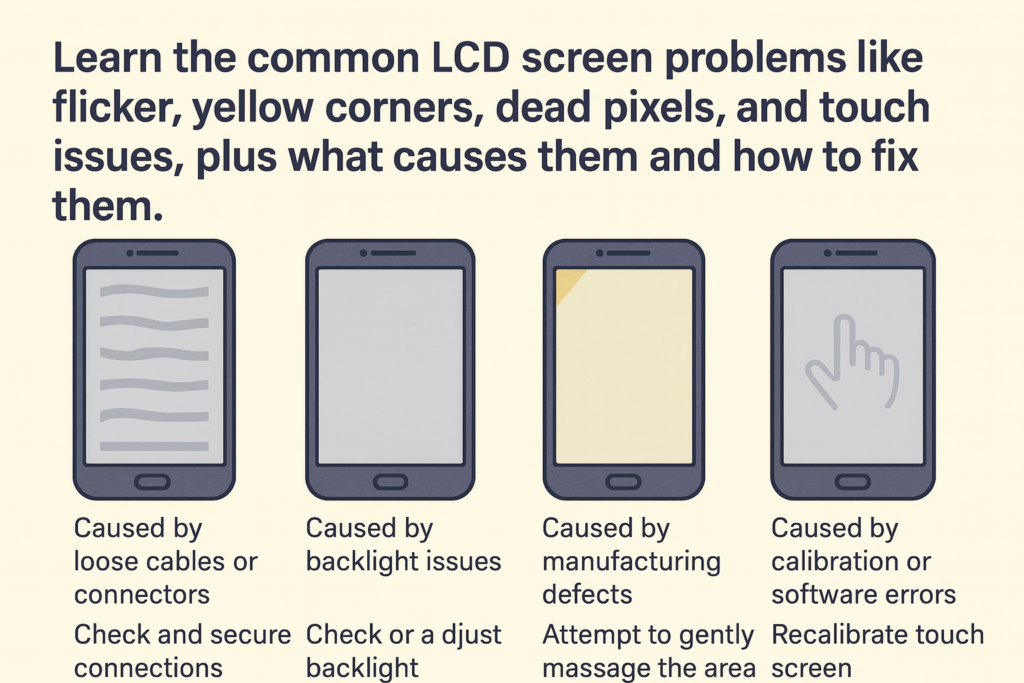
Κιτρινωπές γωνίες ή ανομοιόμορφη φωτεινότητα
Παρατηρήστε ποτέ ότι οι γωνίες της οθόνης σας κιτρινίζουν ή θαμπώνουν? Είναι ένα από τα πιο ορατά ζητήματα LCD.
Αιτία: Γήρανση οπίσθιου φωτισμού
Με την πάροδο του χρόνου, Οι οπίσθιοι φωτισμοί LED εξασθενούν λόγω θερμότητας, χρήση, ή κατασκευαστικές ασυνέπειες, προκαλώντας ανομοιόμορφη φωτεινότητα.
Τρεμόπολο
Εάν η οθόνη σας τρεμοπαίζει ή χαμηλώνει τυχαία, μπορεί να υποδηλώνει ένα βαθύτερο πρόβλημα.
Αιτία: Βλάβη IC ή χαλαρό καλώδιο Flex
Το IC του προγράμματος οδήγησης της οθόνης ενδέχεται να υποβαθμιστεί, ή το ευέλικτο καλώδιο μπορεί να αποσυνδεθεί μερικώς μετά από πτώση.
Νεκρά εικονοστοιχεία ή κολλημένα εικονοστοιχεία
Τα νεκρά pixel εμφανίζονται ως μαύρες κουκκίδες, ενώ τα κολλημένα pixel παραμένουν σταθερά σε ένα συγκεκριμένο χρώμα.
Αιτία: Κατασκευαστικά ελαττώματα ή ζημιά υπό πίεση
Ακόμη και μια ελαφρά εξωτερική δύναμη —όπως το πολύ δυνατό πάτημα της οθόνης— μπορεί να βλάψει μεμονωμένα pixel.
Εικόνες φαντασμάτων ή διατήρηση εικόνας
Μια αμυδρή σκιά μιας προηγούμενης εικόνας? Αυτό είναι διατήρηση εικόνας.
Αιτία: Παρατεταμένη στατική οθόνη
Η διατήρηση της ίδιας οθόνης για πολλές ώρες μπορεί να προκαλέσει την προσωρινή «κόλληση» των υγρών κρυστάλλων.
Παραμόρφωση χρώματος
Η οθόνη σας εμφανίζει μη φυσιολογικά χρώματα όπως το πράσινο, μωβ, ή ξεπλυμένους τόνους.
Αιτία: Βλάβη νερού ή αστοχία υλικού
Η υγρασία επηρεάζει τα εσωτερικά κυκλώματα, ενώ τα ελαττωματικά τσιπ οδηγούν επίσης σε προβλήματα χρώματος.
Η οθόνη δεν ανάβει
Το τηλέφωνο ανάβει, αλλά η οθόνη παραμένει μαύρη.
Αιτία: Βλάβη κυκλώματος οπίσθιου φωτισμού
Η οθόνη μπορεί να εξακολουθεί να λειτουργεί εσωτερικά, αλλά ένα καμένο κύκλωμα οπίσθιου φωτισμού εμποδίζει τον φωτισμό.
Προβλήματα που σχετίζονται με την οθόνη αφής
Φάντασμα
Το τηλέφωνό σας λειτουργεί σαν να το πατάει κάποιος άλλος.
Αιτία: Κατεστραμμένο επίπεδο αφής ή Flex
Συχνά προκαλείται από κάμψη, σύγκρουση, ή οθόνες χαμηλής ποιότητας.
Άγγιγμα που δεν ανταποκρίνεται
Πατάς, αλλά δεν γίνεται τίποτα.
Αιτία: Υποβαθμισμένο IC ή φυσική βλάβη
Ο ψηφιοποιητής μπορεί να είναι φθαρμένος ή αποσυνδεδεμένος.
Μερική αποτυχία αφής
Μόνο ορισμένες περιοχές δεν ανταποκρίνονται.
Αιτία: Σπασμένα τμήματα ψηφιοποίησης
Μικροσκοπικά κυκλώματα κάτω από το γυαλί μπορεί να σπάσουν.
Εξωτερικοί παράγοντες που συμβάλλουν σε προβλήματα LCD
Drop ή Impact
Μια πτώση μπορεί να διαταράξει τα εσωτερικά εξαρτήματα ακόμη και χωρίς ορατές ρωγμές.
Έκθεση σε νερό ή υγρασία
Η υγρασία οδηγεί σε διάβρωση και βραχυκυκλώματα.
Υπερβολική πίεση στην οθόνη
Εάν κρατάτε το τηλέφωνό σας σε σφιχτή τσέπη, μπορεί να παραμορφωθούν τα στρώματα μέσα στην οθόνη LCD.
Ανταλλακτικές οθόνες κακής ποιότητας
Οι φτηνές οθόνες aftermarket συχνά αποτυγχάνουν νωρίτερα και προκαλούν προβλήματα αφής φαντασμάτων ή χρώματος.
Πώς να διαγνώσετε προβλήματα LCD
Οπτική Επιθεώρηση
Ελέγξτε για ρωγμές, χρωματικά μπαλώματα, υγρούς λεκέδες, ή διαρροή φωτός.
Δοκιμή με εφαρμογές προβολής
Οι εφαρμογές μπορούν να ανιχνεύσουν το τρεμόπαιγμα, νεκρά εικονοστοιχεία, και ακρίβεια αφής.
Χρήση διαγνωστικών εργαλείων
Οι τεχνικοί χρησιμοποιούν επαγγελματικά εργαλεία για τη μέτρηση της λειτουργίας IC, δυναμικό, και ροή σήματος.
Λύσεις και επιλογές επισκευής
Όταν βοηθά το καθάρισμα
Μερικές φορές, Η σκόνη γύρω από την υποδοχή flex προκαλεί αστοχία της οθόνης.
Όταν λειτουργεί η επαναβαθμονόμηση
Η βαθμονόμηση λογισμικού μπορεί να λύσει μικρά ζητήματα αφής.
Όταν είναι απαραίτητη η αντικατάσταση
Ζημιά στον οπίσθιο φωτισμό, έντονο τρεμόπαιγμα, ή σπασμένοι ψηφιοποιητές συνήθως απαιτούν αντικατάσταση πλήρους οθόνης.
Συμβουλές για την προστασία των οθονών LCD
Χρήση κατάλληλου προστατευτικού οθόνης
Επιλέξτε ένα προστατευτικό γυαλιού για να μειώσετε την πίεση.
Αποφυγή ακραίων θερμοκρασιών
Η θερμότητα επιταχύνει τη γήρανση του οπίσθιου φωτισμού.
Συμβουλές τακτικής συντήρησης
Καθαρίστε απαλά την οθόνη σας και αποφύγετε την περιττή πίεση.
Σύναψη
Οι οθόνες LCD των smartphone αντιμετωπίζουν διάφορα ζητήματα—από κιτρίνισμα των γωνιών έως αστοχία αφής. Η κατανόηση των βασικών αιτιών σάς βοηθά να διαγνώσετε γρήγορα τα προβλήματα και να επιλέξετε τη σωστή λύση. Είτε πρόκειται για καθάρισμα, επαναβαθμονόμηση, ή πλήρη αντικατάσταση, Η έγκαιρη ανίχνευση εξασφαλίζει μεγαλύτερη διάρκεια ζωής της οθόνης και καλύτερη απόδοση.
Συχνές ερωτήσεις
1. Γιατί η οθόνη LCD μου γίνεται κίτρινη?
Συνήθως λόγω της γήρανσης του οπίσθιου φωτισμού ή της έκθεσης στη θερμότητα.
2. Τι προκαλεί άγγιγμα φαντασμάτων?
Ένας χαλασμένος ψηφιοποιητής, ανταλλακτικά κακής ποιότητας, ή λυγισμένα πλαίσια.
3. Μπορεί να διορθωθούν νεκρά pixel?
Μερικά κολλημένα pixel μπορούν να αναβιώσουν με εφαρμογές, αλλά τα νεκρά pixel συχνά απαιτούν αντικατάσταση.
4. Γιατί η οθόνη μου τρεμοπαίζει?
Πιθανότατα οφείλεται σε βλάβη του IC της οθόνης ή σε χαλαρό εύκαμπτο καλώδιο.
5. Πρέπει να επισκευάσω ή να αντικαταστήσω την οθόνη LCD μου?
Μικρά προβλήματα ενδέχεται να επιδιορθωθούν, αλλά η σοβαρή ζημιά συνήθως χρειάζεται πλήρη αντικατάσταση.



