
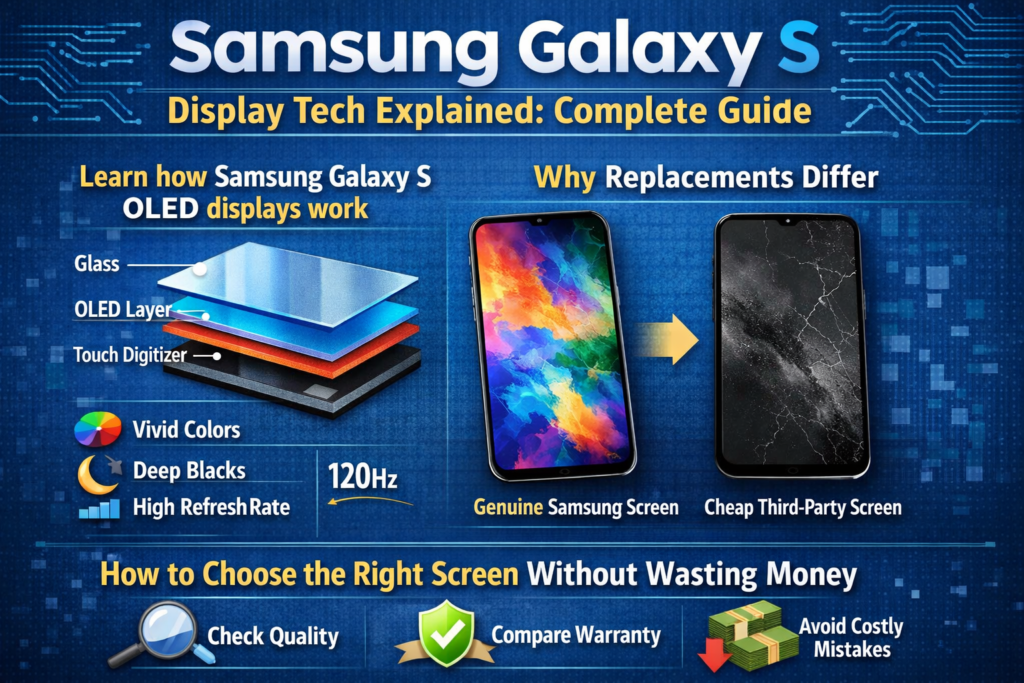
Εισαγωγή στις οθόνες της σειράς Samsung Galaxy S
Όταν οι άνθρωποι μιλούν για τηλέφωνα Samsung Galaxy S, το πρώτο πράγμα που εμφανίζεται συνήθως δεν είναι η κάμερα ή ο επεξεργαστής - είναι η οθόνη. Και ειλικρινά, αυτό είναι απολύτως λογικό. Η Samsung όχι μόνο χρήση εμφανίζει; έχτισε μια αυτοκρατορία γύρω τους. Η σειρά Galaxy S έχει γίνει το χρυσό πρότυπο για οθόνες smartphone, θέτοντας σημεία αναφοράς που άλλες μάρκες κυνηγούν χρόνο με το χρόνο.
Αλλά τι κρύβεται στην πραγματικότητα πίσω από αυτά τα εκπληκτικά γραφικά? Αυτό που κάνει μια οθόνη Galaxy S να αισθάνεται κορυφαία ενώ μια άλλη οθόνη αντικατάστασης είναι… απενεργοποιημένη? Αυτό ακριβώς καταρρίπτουμε εδώ - χωρίς χνούδι, χωρίς τσιτάτα μάρκετινγκ, απλά αληθινό, πρακτικές εξηγήσεις.
Γιατί η οθόνη είναι η ψυχή της σειράς Galaxy S
Σκεφτείτε την οθόνη ως το στάδιο όπου όλα συμβαίνουν. Φωτογραφίες, βίντεο, παιχνίδια, δακτυλικά αποτυπώματα, ακόμη και διάρκεια ζωής της μπαταρίας—όλα εξαρτώνται από την οθόνη. Η Samsung το καταλαβαίνει καλύτερα από τον καθένα, γι' αυτό η σειρά Galaxy S σχεδόν ποτέ δεν συμβιβάζεται με την τεχνολογία της οθόνης.
Μια κακή οθόνη δεν φαίνεται απλώς χειρότερη; το αλλάζει τον τρόπο συμπεριφοράς του τηλεφώνου. Ακρίβεια αφής, λάμψη, κατανάλωση ρεύματος, και βιομετρική ασφάλεια όλα ζωντανά ή πεθαίνουν από την ποιότητα της οθόνης.
Εξέλιξη της τεχνολογίας οθόνης Samsung Galaxy S Series
Πρώιμες καινοτομίες AMOLED
Η Samsung ήταν ένας από τους πρώτους κατασκευαστές που πόνταρε μεγάλα στο AMOLED. Ενώ άλλοι κόλλησαν με LCD, Η Samsung είδε το μέλλον: αυτοεκπομπών pixel, βαθύτερα μαύρα, λεπτότερα πάνελ. Τα πρώιμα μοντέλα Galaxy S εισήγαγαν το AMOLED στο mainstream — και δεν κοίταξαν ποτέ πίσω.
Από Super AMOLED έως Dynamic AMOLED
Το Super AMOLED αφαίρεσε επιπλέον στρώματα μεταξύ της οθόνης και του αισθητήρα αφής, κάνοντας τις οθόνες πιο λεπτές και με μεγαλύτερη απόκριση. Η Dynamic AMOLED προχώρησε τα πράγματα περαιτέρω με το HDR10+, βελτιωμένη ακρίβεια χρώματος, και πιστοποιήσεις άνεσης ματιών. Εν συντομία: πιο όμορφο, πιο έξυπνος, και πιο εύκολο στα μάτια σου.
Επινοήσεις LTPO και Adaptive Refresh Rate
Τα σύγχρονα μοντέλα Galaxy S χρησιμοποιούν πάνελ LTPO OLED που προσαρμόζουν δυναμικά τους ρυθμούς ανανέωσης—από 10Hz έως 120Hz. Είναι σαν το cruise control για την μπαταρία σας: γρήγορα όταν χρειάζεστε ταχύτητα, αργό όταν δεν το κάνεις.
Βασικές τεχνολογίες οθόνης που χρησιμοποιούνται στη σειρά Galaxy S
Επεξήγηση τεχνολογίας οθόνης OLED
OLED Δομή και Αρχή Εργασίας
Το OLED σημαίνει Organic Light-Emitting Diode. Κάθε pixel παράγει το δικό του φως. Χωρίς οπίσθιο φωτισμό. Κανένας συμβιβασμός. Όταν ένα pixel απενεργοποιείται, είναι πραγματικά μαύρο — σαν να έσβησαν τελείως τα φώτα.
Πλεονεκτήματα της OLED στα Flagship Smartphones
- Άπειρη αναλογία αντίθεσης
- Αληθινά μαύρα και ζωηρά χρώματα
- Ταχύτερος χρόνος απόκρισης
- Πιο λεπτά και εύκαμπτα πάνελ
- Χαμηλότερη κατανάλωση ενέργειας με σκοτεινό περιβάλλον χρήστη
Αυτός είναι ο λόγος για τον οποίο η OLED είναι αδιαπραγμάτευτη στις ναυαρχίδες του Galaxy S.
Επεξήγηση τεχνολογίας LCD εντός κυψέλης
Τι σημαίνει πραγματικά το In-cell
Το In-cell δεν είναι τύπος οθόνης - είναι μέθοδος ενσωμάτωσης αφής. Οι αισθητήρες αφής είναι ενσωματωμένοι στην ίδια την οθόνη LCD. Ακούγεται αποτελεσματικό, δικαίωμα? Είναι… για τηλέφωνα μεσαίας κατηγορίας.
Τεχνικοί περιορισμοί οθονών εντός κυψέλης
Εδώ είναι η σύλληψη: Οι οθόνες εντός κυψέλης εξακολουθούν να βασίζονται σε οπίσθιο φωτισμό LCD. Αυτό σημαίνει:
- Όχι αληθινοί μαύροι
- Χαμηλότερη αντίθεση
- Υψηλότερη κατανάλωση ενέργειας
- Χωρίς υποστήριξη δακτυλικών αποτυπωμάτων υπερήχων
Και αυτό το τελευταίο σημείο? Αποτελεί έκπτωση για τις συσκευές Galaxy S.
OLED έναντι LCD εντός κυψέλης: Βασικές τεχνικές διαφορές
Σύγκριση ποιότητας εμφάνισης
Το OLED κερδίζει. Πάντοτε. Καλύτερη αντίθεση, πιο πλούσια χρώματα, υψηλότερη φωτεινότητα, και σωστή υποστήριξη HDR. Οι οθόνες LCD εντός κυψέλης απλά δεν μπορούν να ταιριάζουν με γραφικά σε επίπεδο ναυαρχίδας.
Κατανάλωση Ενέργειας και Απόδοση
Τα εικονοστοιχεία OLED απενεργοποιούνται μεμονωμένα. Οι οπίσθιοι φωτισμοί LCD παραμένουν αναμμένοι ό,τι κι αν γίνει. Η σκοτεινή λειτουργία σε OLED εξοικονομεί μπαταρία. Σε LCD? Όχι πραγματικά.
Συμβατότητα με υπερηχητικούς αισθητήρες δακτυλικών αποτυπωμάτων
Αυτό είναι κρίσιμο. Χρήση τηλεφώνων Samsung Galaxy S υπερηχητικός σαρωτές δακτυλικών αποτυπωμάτων. Ο οπίσθιος φωτισμός LCD μπλοκάρει τα υπερηχητικά κύματα. Αποτέλεσμα? Οθόνες εντός κυψέλης = το δακτυλικό αποτύπωμα δεν λειτουργεί. Περίοδος.
Πρωτότυπες οθόνες έναντι οθονών αντικατάστασης
Γνήσιες οθόνες Service Pack της Samsung
Πρόκειται για οθόνες πιστοποιημένες από το εργοστάσιο που πωλούνται μέσω επίσημων καναλιών. Ίδια ποιότητα, ίδια απόδοση, ίδια τιμή που πονάει λίγο.
OEM και ανακαινισμένες οθόνες OLED
Εναλλακτικές λύσεις υψηλής ποιότητας που χρησιμοποιούν αυθεντικά ή σχεδόν αυθεντικά πάνελ OLED. Όταν γίνει σωστά, Αυτές οι οθόνες υποστηρίζουν αισθητήρες δακτυλικών αποτυπωμάτων, HDR, και προσαρμοστικούς ρυθμούς ανανέωσης—με πιο λογικό κόστος.
Οθόνες αντικατάστασης LCD εντός κυψέλης
Φτηνός, λειτουργικός, και συμβιβάστηκε. Δουλεύουν, αλλά αφαιρούν αυτό που κάνει ένα τηλέφωνο Galaxy S ξεχωριστό. Προστατεύεται καλύτερα για έκτακτη ή προσωρινή χρήση.
Κατανόηση των βαθμών ποιότητας οθόνης στην αγορά επισκευών
Αυθεντικές αποσυναρμολογημένες οθόνες
Τραβηγμένο από κατεστραμμένα τηλέφωνα. Συνήθως εξαιρετικής ποιότητας, αλλά η κατάσταση ποικίλλει. Η γήρανση και η προηγούμενη χρήση έχουν σημασία.
Πλεονεκτήματα οθόνης με συναρμολόγηση πλαισίου
Προεγκατεστημένο με πλαίσιο = λιγότερα σφάλματα εγκατάστασης, καλύτερη ευθυγράμμιση, μειωμένος κίνδυνος διαρροής φωτός. Για κυρτές οθόνες Galaxy S, αυτό είναι ένα τεράστιο συν.
Πώς να επιλέξετε τη σωστή οθόνη για το τηλέφωνό σας Galaxy S
Με βάση τον Προϋπολογισμό
- Απεριόριστος προϋπολογισμός → Original Service Pack
- Έξυπνες δαπάνες → OEM / Ανακαινισμένο OLED
- Minimal budget → In-cell LCD (με συμβιβασμούς)
Με βάση τις ανάγκες χρήσης
Εάν χρησιμοποιείτε ξεκλείδωμα δακτυλικού αποτυπώματος καθημερινά, Το OLED είναι υποχρεωτικό. Χωρίς εξαιρέσεις.
Βασισμένο στη Μακροπρόθεσμη Αξιοπιστία
Οι οθόνες OLED διαρκούν περισσότερο, αποδίδουν καλύτερα, και διατήρηση της αξίας μεταπώλησης.
Συμβουλές αναγνώρισης οθόνης και δοκιμής
Δοκιμή λειτουργίας δακτυλικών αποτυπωμάτων
Να ελέγχετε πάντα τη λειτουργικότητα των δακτυλικών αποτυπωμάτων υπερήχων πριν από την τελική εγκατάσταση.
Οπτική και Φυσική Επιθεώρηση
Ελέγξτε την ομοιομορφία φωτεινότητας, χρωματική απόχρωση, νεκρά εικονοστοιχεία, και κατάσταση σύνδεσης.
Λίστα ελέγχου επαλήθευσης πωλητή
- Εγγυημένη υποστήριξη δακτυλικών αποτυπωμάτων
- Διατίθεται πολιτική επιστροφών
- Σαφής σήμανση προϊόντος
Κοινοί μύθοι για τις οθόνες Samsung Galaxy S
- "In-cell μοιάζει με το OLED" → Δεν είναι
- "Το δακτυλικό αποτύπωμα μπορεί να διορθωθεί με λογισμικό" → Δεν μπορεί
- "Όλες οι οθόνες OLED είναι αυθεντικές" → Σίγουρα όχι
Ποιος πρέπει να επιλέξει ποιον τύπο οθόνης
- Καταναλωτές → OEM ή πρωτότυπο
- Επαγγελματίες επισκευής → OLED συναρμολογημένο πλαίσιο
- Προσωρινοί χρήστες → Ενσωματωμένη οθόνη LCD
Μελλοντικές τάσεις στην τεχνολογία οθόνης Samsung
Αναμένετε φωτεινότερα πάνελ, πιο έξυπνη διαχείριση ενέργειας, κάμερες κάτω από την οθόνη, και ακόμη πιο ανθεκτικά εύκαμπτα υλικά OLED. Η Samsung δεν επιβραδύνει—αν μη τι άλλο, επιταχύνεται.
Σύναψη
Οι οθόνες της σειράς Samsung Galaxy S δεν είναι απλώς οθόνες - είναι αριστουργήματα μηχανικής. Η τεχνολογία OLED καθορίζει την εμπειρία της ναυαρχίδας, ενώ οι οθόνες LCD εντός κυψέλης υπάρχουν καθαρά ως εναλλακτικές λύσεις εξοικονόμησης κόστους στην αγορά επισκευής. Η κατανόηση αυτών των διαφορών σας δίνει τη δυνατότητα να επιλέξετε με σύνεση, προστατέψτε την επένδυσή σας, και αποφύγετε τις δυσάρεστες εκπλήξεις.
Όταν πρόκειται για οθόνες Galaxy S, η γνώση είναι πραγματικά δύναμη.
Συχνές Ερωτήσεις (Συχνές ερωτήσεις)
1. Μπορεί μια οθόνη εντός κυψέλης να υποστηρίζει δακτυλικό αποτύπωμα υπερήχων Samsung?
Οχι. Ο περιορισμός υλικού το καθιστά αδύνατο.
2. Είναι ασφαλείς στη χρήση οι ανακαινισμένες οθόνες OLED?
Ναί, εάν προέρχεται από αξιόπιστους προμηθευτές και έχει ελεγχθεί σωστά.
3. Γιατί η αρχική οθόνη της Samsung είναι τόσο ακριβή?
Πιστοποίηση, ποιοτικός έλεγχος, και εγγυημένη απόδοση.
4. Η ποιότητα της οθόνης επηρεάζει τη διάρκεια ζωής της μπαταρίας;?
Απολύτως. Οι οθόνες OLED είναι πολύ πιο αποδοτικές από πλευράς ενέργειας.
5. Αξίζει τον κόπο μια οθόνη συναρμολογημένη σε πλαίσιο?
Ναι—ειδικά για κυρτά μοντέλα Galaxy S.



