
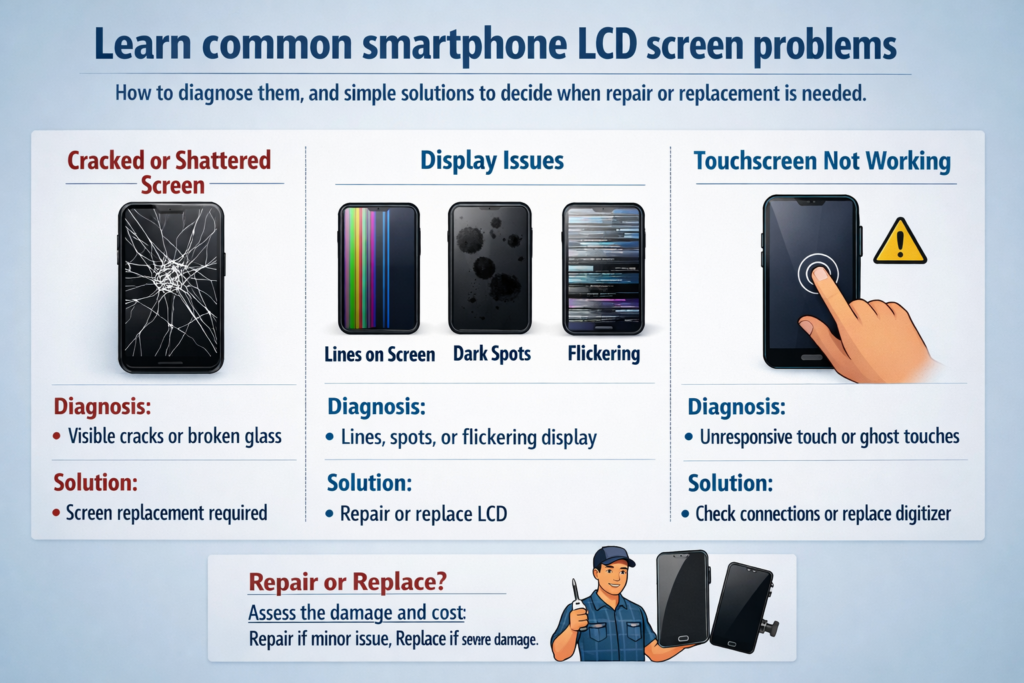
Wprowadzenie do problemów z ekranem LCD smartfona
Spójrzmy prawdzie w oczy – ekran smartfona jest najbardziej eksploatowaną częścią Twojego urządzenia. Jest dotykany tysiące razy dziennie, spadł przypadkowo, wciśnięte do kieszeni, i wystawiony na działanie ciepła i wilgoci. Więc kiedy coś pójdzie nie tak, rzadko jest to niespodzianka.
Podczas gdy ekrany OLED trafiają na pierwsze strony gazet, Ekrany LCD są nadal szeroko stosowane, zwłaszcza w smartfonach budżetowych i średniej półki. Zrozumienie problemów charakterystycznych dla wyświetlaczy LCD może zaoszczędzić pieniądze, czas, i frustracja.
Jak działają ekrany LCD smartfonów (Szybki przegląd)
Przed diagnozowaniem problemów, pomaga wiedzieć, co jest w środku.
Ekran LCD jest jak kanapka:
- Przednia szyba dla ochrony
- Dotknij digitalizatora, aby wyczuć palce
- Warstwa ciekłokrystaliczna kontrolująca światło
- Moduł podświetlenia, aby oświetlić wszystko
Kiedy jedna warstwa zawiedzie, objawy opowiadają historię – jeśli wiesz, jak ją przeczytać.
Pęknięty lub rozbity ekran
Najczęstsze przyczyny
Większość pęknięć powstaje w wyniku upadku, ciśnienie, lub siły zginające. Wystarczy usiąść na telefonie lub upuścić go ekranem w dół.
Widoczne objawy i ukryte ryzyko
- Pęknięcia pajęczyny
- Ostre krawędzie szkła
- Dotyk może nadal działać… na razie
Niebezpieczeństwo? Pęknięcia przepuszczają wilgoć i kurz do środka, powoli zabijając znajdujący się pod spodem wyświetlacz LCD.
Wskazówki dotyczące autodiagnostyki
Jeśli wyświetlacz jest wyraźny i dotyk działa wszędzie, wyświetlacz LCD może być nadal nienaruszony. Ale jeśli czarne plamy lub linie pojawią się później, szkody się rozprzestrzeniają.
Poziome lub pionowe linie na ekranie
Co powoduje linie
Te linie często oznaczają:
- Uszkodzone piksele LCD
- Luźny lub uszkodzony kabel elastyczny wyświetlacza
- Awaria sterownika panelu
Tymczasowe vs stałe
Jeśli linie zmienią się po lekkim obróceniu telefonu, może to być luźne połączenie. Naprawił, nieruchome linie zwykle oznaczają trwałe uszkodzenie wyświetlacza LCD.
Szybki test
Zrób zrzut ekranu.
- Linie pojawiają się na zrzucie ekranu? Problem z oprogramowaniem
- Zrzut ekranu wygląda normalnie? Problem sprzętowy
Wyciek cieczy LCD (Czarne plamy lub rozlane atramenty)
Co to jest wyciek LCD
Te czarne lub fioletowe plamy rozprzestrzeniające się po ekranie? Jest to wyciek ciekłego kryształu na skutek uszkodzenia spowodowanego ciśnieniem lub uderzeniem.
Wczesne znaki ostrzegawcze
- Z czasem rośnie mała ciemna plamka
- Kolory rozmazane na krawędziach
Czy można to naprawić?
NIE. Gdy zacznie się wyciek, Jedynym rozwiązaniem jest wymiana LCD. Pomyśl o tym jak o pękniętym jajku – nie wróci.
Problemy z migotaniem ekranu
Typowe powody
- Niestabilne zasilanie
- Wadliwe podświetlenie
- Uszkodzone złącze wyświetlacza
Problemy z PWM i zasilaniem
Przy niskiej jasności występuje pewne migotanie spowodowane przyciemnieniem PWM, ale ciągłe migotanie nie jest normalne.
Kontrole DIY
- Zwiększ jasność
- Uruchom ponownie telefon
- Przetestuj w trybie awaryjnym
Jeśli migotanie nadal występuje, prawdopodobnie jest to związane ze sprzętem.
Ekran dotykowy nie odpowiada lub działa częściowo
Dotknij warstwy vs warstwy wyświetlania
Obraz może wyglądać idealnie, ale dotyk nie działa, ponieważ digitalizator jest uszkodzony.
Typowe objawy
- Martwe strefy
- Opóźniona reakcja
- Dotyk działa tylko przy nacisku
Prosty test
Cyferblat *#*#2664#*#* (na niektórych telefonach z Androidem) aby przejść do trybu testu dotykowego.
Ciemne plamy lub nierówne podświetlenie
Co jest tego przyczyną
- Uszkodzenia ciśnieniowe
- Starzenie się podświetlenia
- Uszkodzenie wewnętrzne dyfuzora
Jak to wygląda
- Zacienione obszary
- Jasne krawędzie, ciemny środek
- „Pochmurny” wygląd na białych ekranach
Wskazówka diagnostyczna
Wyświetl całkowicie biały obraz. Nierówne oświetlenie staje się natychmiast widoczne.
Obraz na ekranie jest przyćmiony lub rozmyty
Możliwe przyczyny
- Starzejące się diody LED podświetlenia
- Luźne złącze
- Problemy z układem zasilania
Lista kontrolna
- Maksymalna jasność włączona?
- Automatyczna jasność wyłączona?
- Porównaj z innym telefonem obok siebie
Jeśli nadal słabo, konieczna jest naprawa sprzętu.
Dotyk ducha i losowe wejścia
Dlaczego to się dzieje
- Wilgoć pod szkłem
- Niskiej jakości ekrany zamienne
- Zakłócenia elektryczne
Próby szybkiej naprawy
- Dokładnie wyczyść ekran
- Usuń osłonę ekranu
- Uruchom ponownie urządzenie
Utrzymujący się dotyk ducha zwykle oznacza wymianę digitalizatora.
Problemy z ekranem oprogramowania i sprzętu
Jak powiedzieć
- Pojawia się w trybie awaryjnym? Sprzęt komputerowy
- Pojawia się po aktualizacji? Oprogramowanie
Wiarygodne testy
- Metoda zrzutu ekranu
- Wyświetlacz zewnętrzny (jeśli jest obsługiwany)
- Reset do ustawień fabrycznych (ostatnia deska ratunku)
Kiedy konieczna jest wymiana ekranu
Wymień ekran, jeśli:
- Pojawia się wyciek płynu
- Linie się nie zmieniają
- Dotyk całkowicie zawodzi
- Uszkodzenia spowodowane podświetleniem pogłębiają się
Korzystanie z uszkodzonego ekranu jest jak jazda po pękniętej przedniej szybie – jest tylko gorzej.
Wskazówki zapobiegawcze wydłużające żywotność ekranu LCD
Małe nawyki robią dużą różnicę:
- Użyj zabezpieczenia ze szkła hartowanego
- Unikaj ucisku w kieszeniach
- Nie używaj telefonu podczas nadmiernego ładowania
- Trzymać z dala od wilgoci i ciepła
Wybór niezawodnego rozwiązania naprawczego
Oryginał vs rynek wtórny
- Oryginalny: lepszy kolor, jasność, żywotność
- Rynek wtórny: tańsze, jakość jest różna
Pytania, które należy zadać
- Czy jest oryginalny, czy kompatybilny?
- Okres gwarancji?
- Jest testowany dotykowo przed instalacją?
Wniosek
Problemy z ekranem LCD smartfona mogą wyglądać zastraszająco, ale większość kieruje się jasnymi wzorami. Rozumiejąc objawy takie jak linie, migocący, przeciek, lub awaria dotyku, możesz szybko ocenić, czy jest to drobny problem, czy usterka wymagająca naprawy. Pomyśl o ekranie jako o „oknie na świat” telefonu – po jego uszkodzeniu, klarowność i kontrola szybko zanikają. Wczesna diagnoza pozwala zaoszczędzić pieniądze, dane, i frustracja.
FAQ
1. Czy z pękniętego ekranu można nadal bezpiecznie korzystać??
Tymczasowo, Tak, ale ryzyko wzrasta z czasem z powodu wilgoci i dalszych uszkodzeń.
2. Czy pionowe linie zawsze są problemem sprzętowym??
Przez większość czasu, tak — zwłaszcza jeśli nie pojawiają się na zrzutach ekranu.
3. Czy wyciek z wyświetlacza LCD może się rozprzestrzeniać??
Tak. Zwykle z czasem rośnie.
4. Czy migotanie jest zawsze spowodowane złym ekranem?
Nie zawsze. Problemy z zasilaniem lub oprogramowaniem mogą również powodować migotanie.
5. Czy warto naprawiać wyświetlacz LCD w starym telefonie??
Jeśli koszt naprawy przekroczy 50% wartości telefonu, wymiana może być nieopłacalna.



