
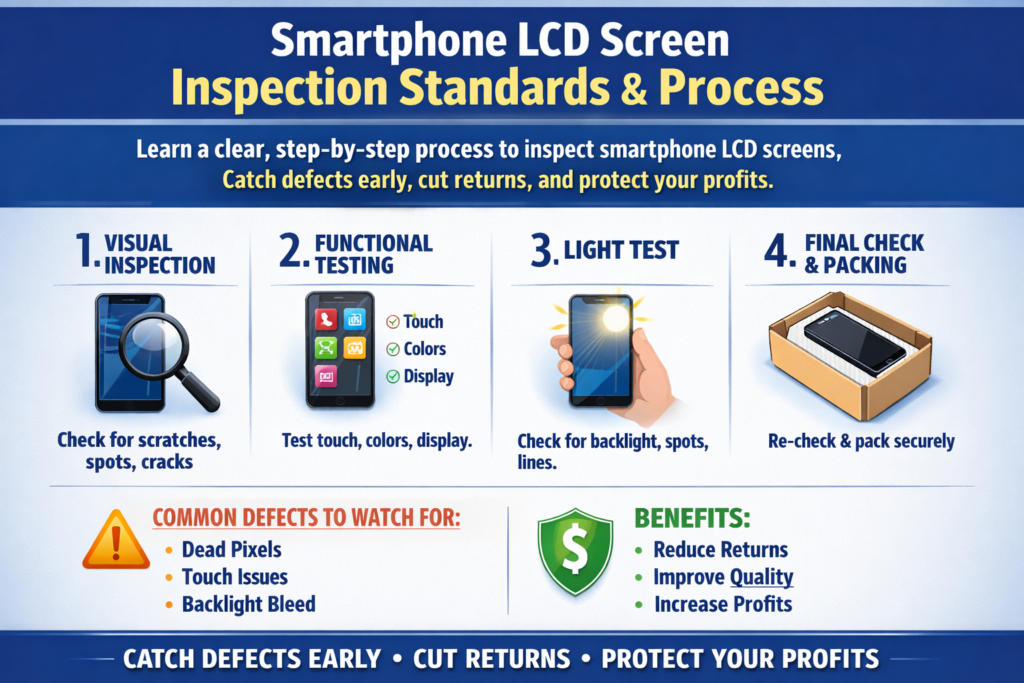
Wprowadzenie do kontroli jakości przychodzących wyświetlaczy LCD smartfonów
Kupowanie hurtowych ekranów LCD do smartfonów bez odpowiedniej kontroli jest jak kupowanie owoców w ciemności — nigdy nie wiesz, co dostaniesz, dopóki nie będzie za późno. Kontrola przychodząca to pierwsza i najważniejsza bramka jakości, która gwarantuje, że każdy otrzymany ekran LCD spełnia wymagania zamówienia, zanim trafi do magazynu lub linii produkcyjnej.
W tym przewodniku, przejdziemy przez całość, praktyczny, oraz łatwy do przestrzegania standard i proces kontroli ekranów LCD smartfonów. Niezależnie od tego, czy jesteś hurtownikiem, właściciel warsztatu naprawczego, dystrybutor, lub kupujący OEM, ten artykuł pomoże Ci zmniejszyć straty, unikać sporów, i chroń swoją reputację.
Dlaczego kontrola przychodząca ma kluczowe znaczenie przy zakupie ekranów LCD?
Ekrany LCD są delikatne, komponenty o dużej wartości. Pojedyncza wada może zamienić opłacalne zamówienie w kosztowny ból głowy. Kontrola przychodząca pomoże Ci:
- Wyłap wady przed odsprzedażą lub instalacją
- Zapobiegaj mieszaniu niewłaściwych modeli w ekwipunku
- Zmniejsz liczbę zwrotów i reklamacji posprzedażowych
- Przedstaw solidne dowody podczas negocjacji z dostawcami
Pomyśl o inspekcji przychodzącej jak o punkcie kontroli bezpieczeństwa. Jeśli problemy prześlizgną się tutaj, rozmnażają się w dół.
Najczęstsze zagrożenia związane z pominięciem kontroli przychodzącej wyświetlacza LCD
Pominięcie kontroli może dzisiaj zaoszczędzić czas, ale jutro będzie to kosztować znacznie więcej. Typowe zagrożenia obejmują:
- Otrzymywanie odnowionych lub fałszywych ekranów
- Ukryte pęknięcia lub uszkodzenia wewnętrzne
- Zły rozmiar, złącze, lub modelka
- Zbyt późno odkryto wysoki współczynnik martwych pikseli
Po zainstalowaniu lub odsprzedaży ekranów, spory stają się trudniejsze do rozwiązania.
Przygotowanie przed kontrolą ekranu LCD
Zrozumienie zamówień i specyfikacji
Przed otwarciem jakiegokolwiek pudełka, dokładnie przejrzyj swoje zamówienie. Sprawdzać:
- Numery modeli
- Typ ekranu (OLED / LCD / Incell)
- Stopień (Oryginalny, OEM, Odnowiony)
- Wymagania dotyczące ilości i opakowania
Standardy inspekcji muszą zawsze opierać się na ustaleniach pisemnych.
Przygotowanie narzędzi kontrolnych i sprzętu testowego
Podstawowe narzędzia, które będziesz potrzebować, obejmują:
- Płyta główna testowa LCD lub kabel testowy
- Jasne źródło światła
- Suwmiarka lub mikrometr
- Rękawiczki antystatyczne
- Czystą ściereczkę z mikrofibry
Bez odpowiednich narzędzi, kontrola staje się domysłem.
Stworzenie czystego i bezpiecznego środowiska inspekcji
Pył, elektryczność statyczna, i słabe oświetlenie mogą uszkodzić ekrany lub ukryć defekty. Zawsze sprawdzaj w czystości, dobrze oświetlony, Obszar bezpieczny ESD.
Ogólny przebieg kontroli przychodzącej
Odbiór i weryfikacja ilości
Zacznij prosto. Policz kartony i jednostki, aby potwierdzić, że ilości odpowiadają liście pakowania i fakturze. Brakujące lub dodatkowe jednostki należy natychmiast odnotować.
Identyfikacja partii i identyfikowalność
Oznacz każdą partię etykietą:
- Nazwa dostawcy
- Data otrzymania
- Numer zamówienia
Pomaga to w późniejszym śledzeniu problemów, jeśli pojawią się defekty.
Standardy pobierania próbek dla zamówień masowych
Do dużych przesyłek, pełna inspekcja może nie być realistyczna. Użyj losowego pobierania próbek (takie jak standardy AQL) jednocześnie zwiększając wielkość próby w przypadku nowych lub niewiarygodnych dostawców.
Standardy kontroli wyglądu wizualnego
Stan powierzchni ekranu i szkła
Sprawdź przednią szybę w mocnym świetle:
- Zadrapania
- Spękanie
- Frytki
- Peeling powłoki
Podczas instalacji mogą rozprzestrzeniać się nawet włoskowate pęknięcia.
Rama, Kant, i kontrola płyty tylnej
Sprawdź:
- Wygięte ramy
- Odkształcenie
- Przepełnienie kleju
- Luźne elementy
Wypaczona ramka może powodować problemy z dopasowaniem i dotykiem.
Kontrola polaryzatora i folii ochronnej
Upewnij się, że polaryzator jest:
- Czysty
- Bez pęcherzyków
- Prawidłowo wyrównane
Folie ochronne powinny być nienaruszone i łatwe do usunięcia.
Kontrola wymiarowa i strukturalna
Pomiar rozmiaru i grubości ekranu LCD
Aby to sprawdzić, użyj suwmiarki:
- Długość i szerokość
- Konsystencja grubości
Nawet niewielkie odchylenia mogą mieć wpływ na montaż.
Wymagania dotyczące wyrównania i płaskości
Umieść ekrany na płaskiej powierzchni, aby sprawdzić wypaczenia. Nierówne ekrany mogą powodować wyciek światła lub naprężenia instalacyjne.
Normy tolerancji dla ekranów LCD smartfonów
Przestrzegaj branżowych standardów tolerancji, zazwyczaj w granicach ±0,1 mm, chyba że określono inaczej.
Kontrola złącza i interfejsu
Kontrola integralności złącza FPC
Sprawdź elastyczny obwód drukowany (FPC):
- Żadnych pęknięć
- Żadnych uszkodzonych śladów
- Brak zanieczyszczeń
Uszkodzony FPC oznacza martwy ekran.
Weryfikacja liczby pinów i układu
Porównaj układ złącza z potwierdzoną dobrą próbką. Nieprawidłowe układy pinów powodują problemy ze zgodnością.
Typowe wady złączy, na które należy zwrócić uwagę
- Wygięte szpilki
- Utlenianie
- Słabe lutowanie
Wady te często powodują sporadyczne awarie wyświetlania.
Testy funkcjonalne i po włączeniu zasilania
Testowanie jasności i kolorów wyświetlacza
Włącz ekran i sprawdź:
- Poziom jasności
- Dokładność koloru
- Balans bieli
Kolory powinny wyglądać naturalnie, nie żółty ani niebieski.
Dotknij opcji Test działania i reakcji
Przetestuj funkcjonalność wielodotyku:
- Płynna reakcja
- Brak martwych stref
- Żadnego dotyku ducha
Problemy z dotykiem należą do najczęstszych przyczyn zwrotów.
Martwy piksel, Jasny Punkt, i inspekcja ciemnych plam
Wyświetlaj jednolite kolory do wykrycia:
- Martwe piksele
- Jasne plamy
- Ciemne plamy
Zdefiniuj akceptowalne limity z wyprzedzeniem z dostawcami.
Ocena wydajności podświetlenia i wyświetlacza
Testowanie jednorodności i wycieku światła
Sprawdź:
- Nierówna jasność
- Wyciek światła krawędziowego
Słaba jednolitość psuje wrażenia użytkownika.
Wykrywanie migotania i cieni
Obserwuj ekran przy różnych poziomach jasności. Migotanie może wskazywać na problemy z zasilaniem lub podświetleniem.
Weryfikacja zgodności i dopasowania modelu
Weryfikacja numeru modelu i etykiety
Sprawdź etykiety ze szczegółami zamówienia. Nigdy nie zakładaj, że etykiety na opakowaniach są prawidłowe.
Kompatybilność z docelowymi modelami smartfonów
Jeśli to możliwe, dopasuj ekrany do rzeczywistych urządzeń. Potwierdza to zgodność mechaniczną i funkcjonalną.
Kontrola stanu opakowania i transportu
Kontrola opakowania antystatycznego i odpornego na wstrząsy
Odpowiednie opakowanie powinno zawierać:
- Torby ESD
- Ochrona piankowa
- Indywidualne gniazda
Złe opakowanie często powoduje ukryte uszkodzenia.
Uszkodzenia spowodowane niewłaściwą logistyką
Poszukaj zgniecionych pudełek lub narażonych na wilgoć. Natychmiast udokumentuj wszystko.
Dokumentacja inspekcji i raportowanie
Rejestrowanie wyników kontroli
Do rejestrowania używaj standardowych formularzy inspekcji:
- Typy defektów
- Wielkie ilości
- Numery partii
Spójność poprawia odpowiedzialność dostawców.
Kolekcja dowodów fotograficznych i wideo
Zdjęcia i filmy wzmacniają roszczenia podczas sporów i przyspieszają ich rozstrzygnięcie.
Postępowanie z niezgodnymi ekranami LCD
Sortowanie, Etykietowanie, i Izolacja
Natychmiast oddziel uszkodzone ekrany. Nigdy nie mieszaj ich z dobrym bulionem.
Komunikacja z dostawcą i proces zwrotów
Skontaktuj się z dostawcami, dysponując jasnymi dowodami i postępuj zgodnie z ustalonymi procedurami RMA, aby uniknąć opóźnień.
Najlepsze praktyki dotyczące masowej kontroli przychodzących wyświetlaczy LCD
- Sprawdź natychmiast po przybyciu
- Utrzymuj spójne standardy kontroli
- Regularnie szkolić personel
- Prowadź dokumentację inspekcji
Dyscyplina pozwala zaoszczędzić pieniądze później.
Typowe błędy popełniane przez kupujących podczas kontroli wyświetlaczy LCD
- Pospieszna kontrola
- Ignorowanie drobnych usterek
- Pomijanie testów włączania
- Słaba dokumentacja
Małe błędy prowadzą do dużych strat.
Jak kontrola przychodząca zmniejsza liczbę zwrotów i problemy posprzedażowe
Właściwa inspekcja pozwala wcześnie wykryć problemy, zapewnienie, że do klientów dotrą wyłącznie wykwalifikowane ekrany. Dzięki temu jest mniej skarg, niższe stopy zwrotu, i większe zaufanie klientów.
Wniosek
Kontrola przychodzącego wyświetlacza LCD smartfona nie jest opcjonalna – jest niezbędna. Przestrzegając ustrukturyzowanego standardu kontroli i procesu obejmującego wygląd, wymiary, złącza, funkcjonalność, i opakowanie, chronisz swój biznes przed kosztownymi błędami. Pomyśl o inspekcji jako o swoim zabezpieczeniu. Tym silniejszy, tym bezpieczniejsze będą Twoje zyski.
FAQ
1. Czy każdy ekran LCD powinien być testowany po włączeniu zasilania??
Tak, szczególnie w przypadku zamówień o dużej wartości lub wrażliwych. Testowanie po włączeniu wychwytuje ukryte defekty.
2. Jaka jest najczęstsza wada LCD wykrywana podczas kontroli?
Martwe piksele, problemy z dotykiem, i uszkodzenia złączy to najczęstsze problemy.
3. Ile próbek należy sprawdzić w przypadku zamówień zbiorczych?
Zależy to od wielkości zamówienia i wiarygodności dostawcy, ale zamówienia o większym ryzyku wymagają większych próbek.
4. Czy wady opakowania mogą mieć wpływ na jakość wyświetlacza LCD??
Absolutnie. Złe opakowanie często powoduje wewnętrzne uszkodzenia podczas transportu.
5. Czy kontrola przychodząca jest konieczna dla zaufanych dostawców??
Tak. Nawet wiarygodni dostawcy mogą mieć sporadyczne problemy. Inspekcja chroni obie strony.



