
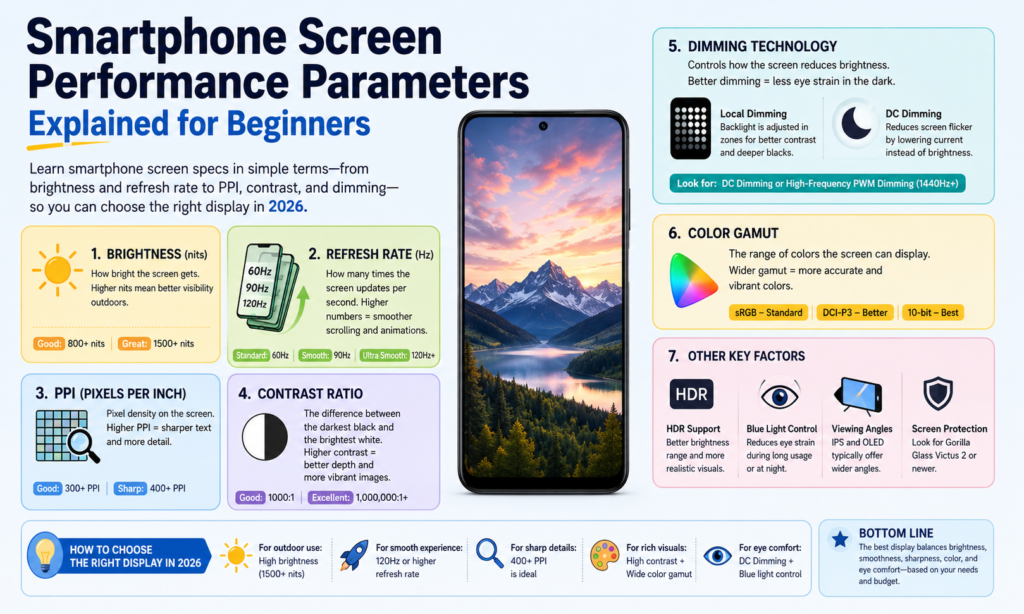
Warum Smartphone-Bildschirmspezifikationen wichtiger denn je sind 2026 Bildschirmspezifikationen sind wichtiger denn je 2026
Wenn Sie darüber nachdenken, Die Bildschirm ist die Seele eines Smartphones. Es ist der eine Teil, den Sie jeden Tag hunderte Male berühren. Sie lesen Nachrichten darauf, Schauen Sie sich Videos dazu an, Scrollen Sie in den sozialen Medien darauf, Fotos darauf bearbeiten, und vielleicht sogar daran arbeiten. Egal wie leistungsstark der Prozessor ist oder wie viele Megapixel die Kamera bietet, wenn sich der Bildschirm matt anfühlt, verschwommen, oder unangenehm anzusehen, Das gesamte Telefonerlebnis fühlt sich schwächer an. Aus diesem Grund ist es wichtiger, die Display-Spezifikationen von Smartphones zu verstehen, als vielen Menschen bewusst ist.
In 2026, Die Display-Technologie entwickelt sich rasant weiter. Premium-Telefone erreichen jetzt regelmäßig 3,000+ Helligkeit der Nissen, während 120Adaptive Bildwiederholraten in Hz sind bei Geräten der oberen Mittelklasse weit verbreitet. Hochfrequenz-PWM-Dimmung oben 2,160Hz wird auch immer beliebter, vor allem im Flaggschiff-OLEDe-Komfort. citeturn0search0turn0search2
Der schwierige Teil? Die meisten Datenblätter werfen Ihnen Zahlen vor, ohne zu erklären, was sie tatsächlich bedeuten. PPI, Kontrastverhältnis, Bildwiederholfrequenz, Farbskala – es kann sich anfühlen, als würde man eine andere Sprache lesen. Dieser Leitfaden schlüsselt alles in einfachem Englisch auf, also egal, ob Sie ein neues Telefon kaufen, Vergleich von LCD und OLED, oder einfach nur neugierig auf die Display-Technologie, Sie wissen genau, wonach Sie suchen müssen.
Dimmtechnologie
Was ist DC-Dimmung??
DC-Dimmung Passt die Helligkeit an, indem der dem Display zugeführte Strom direkt verändert wird. Stellen Sie sich das vor, als würden Sie den Knopf eines Wasserhahns langsam herunterdrehen – das Wasser fließt weiter, nur mit weniger Kraft. Das Licht bleibt kontinuierlich, aber die Helligkeit nimmt ab.
Für LCD -Bildschirme, Die Helligkeit kommt hauptsächlich von der Hintergrundbeleuchtung, Wenn also Spannung oder Strom reduziert werden, verringert sich die Helligkeit. Für OLED-Bildschirme, Jedes Pixel sendet sein eigenes Licht aus, Daher ändert sich die Helligkeit, indem der an diese einzelnen Pixel gesendete Strom verringert wird.
Viele Benutzer bevorzugen DC-Dimmen, weil es sich optisch stabil anfühlt. Da das Licht nicht schnell an- und ausgeht, Es kann für empfindliche Augen schonender sein. Das ist besonders wichtig für Menschen, die in dunklen Umgebungen stundenlang auf ihr Telefon schauen.
Der Nachteil besteht darin, dass DC-Dimmen manchmal die Farbkonsistenz bei sehr geringer Helligkeit auf OLED-Panels beeinträchtigen kann. Schwarze können ausgezeichnet bleiben, Die Farbkalibrierung kann sich jedoch je nach Paneldesign leicht verschieben. Hersteller versuchen hier oft, Augenkomfort und Farbgenauigkeit in Einklang zu bringen.
Was ist PWM-Dimmen??
PWM steht für Pulsweitenmodulation. Anstatt die Leistung kontinuierlich zu senken, Die Anzeige wechselt schnell zwischen ein → aus → ein → aus mit hoher Geschwindigkeit.
Stellen Sie sich vor, Sie betätigen einen Lichtschalter hunderte oder tausende Male pro Sekunde. Normalerweise können Ihre Augen das Flimmern nicht direkt erkennen, Daher erscheint es dunkler, anstatt zu blinken.
Die Zeitspanne, die das Licht während jedes Zyklus eingeschaltet bleibt, bestimmt die Helligkeit:
- Längere Einschaltzeit = hellerer Bildschirm
- Kürzere Einschaltzeit = dunklerer Bildschirm
PWM ist bei OLED-Smartphones äußerst verbreitet.
In 2026, Flaggschiff-Android-Handys werden zunehmend beworben 2,160Hz bis 3.840 Hz PWM-Dimmung, Dies ist viel höher als bei älteren 240-Hz-480-Hz-Implementierungen. Höhere Frequenz-PWM für viele Benutzer. citeturn0search8turn0search6
Welches ist besser für den Augenkomfort??
Es gibt keine allgemeingültige Antwort, denn das menschliche Auge ist wunderbar kompliziert.
Einige Benutzer bemerken das PWM-Flimmern überhaupt nicht. Andere verspüren danach Kopfschmerzen 10 Minuten.
Allgemein:
| Technologie | Hauptvorteil | Hauptnachteil |
|---|---|---|
| DC-Dimmung | Weniger sichtbares Flimmern, oft schonender für die Augen | Kann die OLED-Farbleistung leicht beeinträchtigen |
| PWM-Dimmung | Bessere Helligkeitskontrolle und Farbkonsistenz | Kann bei empfindlichen Benutzern zu einer Überanstrengung der Augen führen |
Wenn Sie empfindlich auf Bildschirmflimmern reagieren, DC-Dimmung oder Hochfrequenz-PWM ist es wert, Prioritäten zu setzen.
Farbleistung
Sättigung
Sättigung beschreibt, wie satt oder rein eine Farbe erscheint.
Hochgesättigte Farben wirken lebendig und kräftig. Eine niedrige Sättigung wirkt gedämpft oder verwaschen.
Denken Sie an eine reife rote Erdbeere im Vergleich zu einem verblassten rosa Hemd, das zu lange in der Sonne liegt. Gleiche Farbfamilie – sehr unterschiedliche Intensität.
OLED-Panels fühlen sich oft gesättigter an, da jedes Pixel unabhängig sein eigenes Licht aussendet.
Manche Menschen lieben diesen „Wow“-Effekt. Andere bevorzugen natürlichere Farben zum Bearbeiten von Fotos.
Farbraum
Farbskala bezieht sich auf die gesamte Farbpalette, die ein Bildschirm anzeigen kann.
Ein größerer Farbraum bedeutet, dass das Display mehr Schattierungen wiedergeben kann.
Zu den gängigen Standards gehören::
- sRGB
- DCI-P3
- Adobe RGB
- BT.2020
Bei Smartphones, DCI-P3 ist mittlerweile bei Premium-Displays weit verbreitet.
Die neuesten Display-Konzepte von Samsung werden auf der SID Display Week gezeigt 2026 demonstriert bis zu 96% BT.2020-Berichterstattung, ganze Anzeigen. zitierenturn0news16turn0news17
Farbgenauigkeit
Farbgenauigkeit misst, wie nahe die angezeigte Farbe an der beabsichtigten Originalfarbe liegt.
Das ist sehr wichtig für:
- Fotografen
- Video-Editoren
- Designer
- Online-Verkäufer zeigen Produktfarben
Wenn ein weißes Bild gelblich erscheint oder ein rotes Produktfoto orange aussieht, Die Farbgenauigkeit ist schlecht.
Eine übliche Messung ist hier Delta E.
Geringeres Delta E = genauere Farbwiedergabe.
Graustufen
Graustufen beziehen sich auf die Helligkeitsstufen zwischen Schwarz und Weiß.
Eine gute Graustufenleistung bedeutet reibungslose Übergänge.
Schlechte Graustufen führen zu sichtbaren Streifen oder ungleichmäßigen Schattierungen.
Dies macht sich deutlich bemerkbar, wenn Sie dunkle Filme oder Fotos bei schlechten Lichtverhältnissen ansehen.
Helligkeit und Kontrast
Helligkeit erklärt
Die Helligkeit wird in gemessen Nissen.
Höhere Nits = helleres Display.
Warum ist das wichtig??
Weil es Sonnenlicht gibt.
Ein Telefon kann in Innenräumen perfekt aussehen, im Freien jedoch unleserlich werden.
Flaggschiff-Smartphones in 2026 häufig erreichen 3,000–3.500 Nits Spitzenhelligkeit. Zum Beispiel, das OnePlus 15 wird herumgemeldet 3,500 Nissen, während Pixe herum 3,300 Nissen. citeturn0search2
Kontrastverhältnis erklärt
Das Kontrastverhältnis ist der Unterschied zwischen:
hellstes Weiß ÷ dunkelstes Schwarz
Höherer Kontrast erzeugt:
- tiefere Schwarztöne
- stärkere Highlights
- besseres HDR
- größere Bildtiefe
OLED dominiert hier, weil sich Pixel komplett ausschalten lassen.
Das erzeugt echtes Schwarz.
Das LCD kann die Hintergrundbeleuchtung nicht auf die gleiche Weise vollständig ausschalten.
Deshalb fühlt es sich bei OLED-Schwarzen oft an, als würde man in einen dunklen Nachthimmel blicken.
Klarheit und Schärfe
Auflösung (DPI)
Die Auflösung bezieht sich darauf, wie viele Pixel horizontal und vertikal vorhanden sind.
Beispiele:
- 1080 × 2400
- 1440 × 3200
Mehr Pixel = mehr Details.
Allerdings über einen bestimmten Punkt hinaus, Bei normalem Betrachtungsabstand ist der Unterschied schwerer zu erkennen.
Pixeldichte (PPI)
PPI bedeutet Pixel pro Zoll.
Es zeigt an, wie dicht die Pixel gepackt sind.
Höherer PPI = schärferer Text und sauberere Kanten.
Beispiele:
| Anzeigetyp | Typischer PPI |
|---|---|
| Budget-LCD | 300–400 |
| Mittelklasse-OLED | 400–460 |
| Flaggschiff-OLED | 450–550+ |
Oben ungefähr 450 PPI, Text sieht normalerweise gestochen scharf aus.
Pixelabstand
Der Pixelabstand ist der Abstand zwischen benachbarten Pixeln.
Kleinerer Pixelabstand = höhere Schärfe.
Kleinere Lücken zwischen den Pixeln sorgen dafür, dass Bilder nahtloser und ausgefeilter wirken.
Bewegung und Reaktionsfähigkeit
Ansprechzeit
Die Reaktionszeit misst, wie schnell ein Pixel von einem Zustand in einen anderen wechselt.
Wird oft beschrieben als:
Schwarz → Weiß → Schwarz
Eine kürzere Reaktionszeit trägt zur Reduzierung bei:
- Geisterbilder
- verwischen
- verschmieren
Besonders auffällig beim Spielen oder bei schneller Videowiedergabe.
Aktualisierungsrate
Aktualisierungsrate = wie oft die Anzeige jede Sekunde aktualisiert wird.
Gemessen in Hz.
Beispiele:
- 60Hz
- 90Hz
- 120Hz
- 144Hz
A 120Hz-Anzeige wird doppelt so oft aktualisiert wie 60 Hz.
Dadurch fühlt sich das Scrollen flüssiger an und Animationen sind flüssiger.
Sobald Sie regelmäßig 120 Hz verwenden, Die Rückkehr zu 60 Hz kann sich anfühlen, als würde man durch nassen Sand laufen.
Weitere wichtige Anzeigefaktoren
Betrachtungswinkel
Unter Betrachtungswinkel versteht man, wie gut man das Display auch von der Seite noch sehen kann.
Gute Betrachtungswinkel bleiben erhalten:
- Helligkeit
- Farbe
- Kontrast
OLED schneidet hier in der Regel besser ab als LCD.
Stromverbrauch
Displays verbrauchen einen Großteil der Akkulaufzeit von Smartphones.
OLED kann im Dunkelmodus effizienter sein, da schwarze Pixel vollständig ausgeschaltet werden können.
Die LCD-Hintergrundbeleuchtung bleibt dauerhaft eingeschaltet.
Aus diesem Grund kann der Dunkelmodus bei OLED-Geräten Batterie sparen.
Elektromagnetische Strahlung
Displays geben Energie durch elektrische und magnetische Felder sowie sichtbares Licht und Wärme ab.
Für die normale Smartphone-Nutzung, Dies bleibt innerhalb der Sicherheitsstandards für Unterhaltungselektronik.
Was Benutzern normalerweise eher praktisch auffällt, ist:
- Blaulichtbelichtung
- Augenermüdung
- Wärmeerzeugung
und nicht elektromagnetische Strahlung selbst.
So wählen Sie den richtigen Smartphone-Bildschirm entsprechend Ihren Anforderungen aus
Die Wahl eines Smartphone-Displays ist wie die Wahl einer Brille. Das „Beste“ hängt von Ihnen ab.
Wenn es Ihnen am wichtigsten ist Filme schauen, priorisieren:
- OLED
- hoher Kontrast
- HDR
- hohe helligkeit
Wenn Sie ein sind mobiler Gamer, konzentrieren Sie sich auf:
- 120Hz+
- schnelle Reaktionszeit
- High-Touch-Sampling
Wenn Sie empfindlich auf Augenbelastung reagieren:
- DC-Dimmung
- Hochfrequenz-PWM
- Augenkomforteinstellungen
Wenn die Batterie am wichtigsten ist:
- LTPO SIE SIND
- adaptive Bildwiederholfrequenz
- effizientes Helligkeitsmanagement
Verfolgen Sie nicht jede Zahl.
Suchen Sie nach den Nummern, die Ihrer tatsächlichen Nutzung Ihres Telefons entsprechen.
Abschluss
Smartphone-Displays sind nicht mehr nur leuchtende Rechtecke. Sie sind die Eingangstür zu Ihrem gesamten digitalen Leben.
Verständnis DC-Dimmung, PWM, Sättigung, Kontrastverhältnis, Auflösung, PPI, Bildwiederholfrequenz, Ansprechzeit, Farbraum, Und Stromverbrauch hilft Ihnen, über das Marketing hinaus zu lesen.
Ein hellerer Bildschirm ist nicht immer besser.
Eine höhere Bildwiederholfrequenz ist nicht immer notwendig.
Ein größerer Farbraum ist nicht sinnvoll, wenn die Farbgenauigkeit schlecht ist.
Der beste Smartphone-Bildschirm ist derjenige, der sich jedes Mal mühelos anfühlt, wenn Sie Ihr Telefon entsperren.
Und sobald Sie wissen, was diese Spezifikationen wirklich bedeuten, Die Auswahl dieses Bildschirms wird viel einfacher.
FAQs
1. Was besser für die Augen ist: DC-Dimmung oder PWM-Dimmung?
Für viele Benutzer, die empfindlich auf Flimmern reagieren, DC-Dimmung fühlt sich wohler an. Je nach Empfindlichkeit kann auch Hochfrequenz-PWM angenehm sein.
2. Ist ein höherer PPI immer besser??
Nicht immer. Über etwa 450–500 PPI hinaus, Unterschiede sind bei normalem Gebrauch schwerer zu erkennen.
3. Ist OLED besser als LCD??
OLED bietet normalerweise einen besseren Kontrast, tiefere Schwarztöne, und sattere Farbe. LCDs bieten immer noch eine hervorragende Helligkeit und vermeiden häufig Probleme mit dem Flimmern von OLEDs.
4. Lohnen sich 120 Hz auf einem Smartphone??
Ja – vor allem, wenn Sie häufig spielen oder scrollen. Die sanftere Bewegung ist deutlich spürbar.
5. Welche Bildschirmspezifikation ist am wichtigsten??
Es gibt keine einzige Antwort. Für die meisten Menschen, Die größte tägliche Wirkung kommt von:
- Helligkeit
- Bildwiederholfrequenz
- Kontrast
- Augenkomfort



