
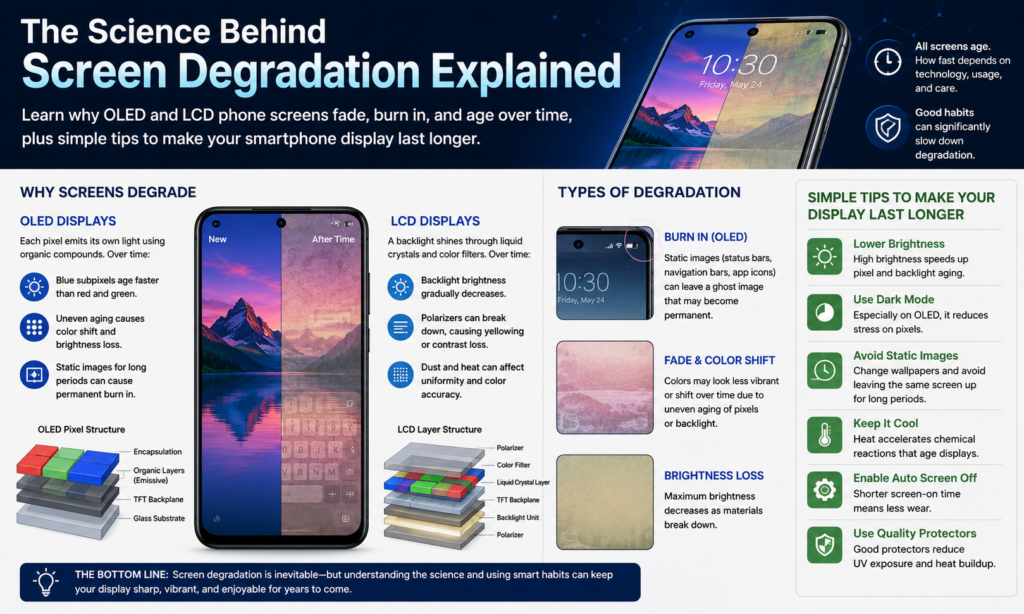
Ang Siyensya sa Luyo sa Pagdaot sa Screen
Ang mga pagpakita sa smartphone mahimong tan-awon nga futuristic, apan sa kinahiladman sila pa gihapon ang mga pisikal nga materyales nga hinayhinay nga mahurot sama sa mga ligid sa usa ka awto o mga baterya sa sulod sa usa ka laptop. Matag higayon nga ang mga pixel modan-ag, gamay nga elektrikal ug kemikal nga mga reaksyon mahitabo sa sulod sa screen. Labaw sa liboan ka oras, kini nga mga reaksyon anam-anam nga nagpahuyang sa mga materyales nga responsable sa kahayag ug katukma sa kolor. Kini ang hinungdan ngano nga ang mga tigulang nga telepono kanunay nga makita nga dimmer o gamay nga dilaw kung itandi sa bag-ong mga aparato nga naglingkod sa tupad nila.
Kay Mga display sa OLED, ang proseso sa pagkatigulang gihigot direkta sa mga organikong materyal nga nagpagawas sa kahayag. Ang matag pixel nagmugna sa kaugalingon nga kahayag, nga naghatag sa mga panel sa OLED sa mga bantog nga lawom nga itom ug dili katuohan nga mga ratios sa kalainan. Ang downside mao nga ang mga organikong compound natural nga madaot sa paglabay sa panahon. Ang mga asul nga OLED subpixels kasagaran labing paspas nga mahurot tungod kay nanginahanglan sila og dugang nga kusog aron makahimo og kahayag. Kana nga dili patas nga pagkadaot mao gyud ang nagmugna sa gikahadlokan nga "burn-in" nga epekto nga gikahadlokan sa mga tawo.
Lainlain ang pagtrabaho sa mga screen sa LCD. Imbes sa self-emitting pixels, Ang mga panel sa LCD nagsalig sa usa ka separado nga LED backlight sa luyo sa display. Tungod kay ang mga pixel mismo dili makamugna og kahayag, Ang mga LCD dili kaayo huyang sa permanente nga pagkasunog. Hinoon, ang ilang backlight system hinayhinay nga nahuyang sa edad, padulong sa pagkunhod sa kahayag, yellow nga tinting, ug dili patas nga kahayag. Bag-o nga kasaligan nga pagsulay sa labaw pa sa 100 nakit-an sa mga gipakita nga ang mga kapakyasan sa backlight sa LCD nagpabilin nga usa sa labing kadaghan nga mga problema sa kadugay nga durability sa tradisyonal nga mga panel.
Ngano nga ang Modernong mga Telepono Dili Gihapon Makalikay sa Pagkatigulang
Daghang mga tatak sa smartphone ang nag-anunsyo sa mga advanced nga teknolohiya nga anti-burn, Pagkontrol sa kahayag sa AI, o mga sistema sa pagbalhin sa pixel. Kini nga mga himan hingpit nga makatabang, apan dili nila hingpit nga mapahunong ang pisika. Hunahunaa sila sama sa sunscreen. Ang sunscreen makapamenos sa kadaot sa panit, apan ang pagpabilin ubos sa grabeng kahayag sa adlaw kada adlaw magpatigulang gihapon sa imong panit sa kadugayan. Ang mga screen sa smartphone nagsunod sa parehas nga prinsipyo.
Ang mga moderno nga OLED nga mga panel labi ka maayo kaysa sa una nga mga pagpakita sa AMOLED gikan sa mga tuig na ang milabay. Dugay-dugay nga mga pagsulay sa torture nga gihimo sa 2025 ug 2026 ipakita nga daghang mga panel sa OLED karon nagpabilin nga madawat nga kahayag bisan pagkahuman 5,000 ngadto 6,500 oras sa mapintas nga mga kondisyon sa paggamit. Sa gihapon, static nga mga elemento sa interface sama sa TikTok navigation bars, gaming HUDs, o kanunay-on nga mga pasundayag mahimong permanenteng edad sa piho nga mga pixel mas paspas kay sa palibot nga mga dapit.
Bisan ang teknolohiya sa LCD dili immune. Ang mga barato nga sulud sa sulud sa LCD nga mga panel kanunay nga nag-antos sa pag-usbaw sa kainit, mga lut-od nga nagsabwag sa kahayag, o pagkapakyas sa mga LED sa paglabay sa panahon. Kana nagpasabut nga walay teknolohiya sa pagpakita nga tinuod nga imortal. Ang kalainan anaa sa unsaon edad nila. Ang OLED kasagaran nagpakita sa pagpabilin sa imahe ug pagsunog. Ang LCD kasagarang nagpakita sa pagkahanaw sa kahayag ug pag-yellowing.
Ang importante nga takeaway mao nga ang screen lifespan kay naimpluwensyahan pag-ayo sa user. Ang duha ka managsama nga mga telepono mahimong hingpit nga magkalainlain ang edad depende sa mga batasan sa kahayag, pagkaladlad sa temperatura, oras sa pagdula, ug charging behavior.
OLED vs LCD — Unsang Teknolohiya sa Screen ang Nagdugay?
Giunsa ang OLED Displays Naguba
Ang mga screen sa OLED nagdominar sa mga punoan nga smartphone sa usa ka hinungdan. Nindot tan-awon sila. Ang mga itom hingpit nga itom, ang mga kolor nag-pop dramatically, ug ang mga oras sa pagtubag hilabihan ka paspas. Ang pagtan-aw sa HDR nga mga video sa usa ka premium nga OLED nga telepono gibati sama sa pagtan-aw sa usa ka bintana imbis nga magtan-aw sa usa ka screen.
Apan ang teknolohiya sa OLED adunay kahuyang nga gitago sa ilawom sa tanan nga katahum. Ang matag pixel usa ka gamay nga tinubdan sa kahayag, ug ang matag tinubdan sa kahayag hinayhinay nga nahanaw sa paggamit. Kung ang pipila ka mga pixel magpabilin nga hayag sa taas nga panahon samtang ang uban magpabilin nga ngitngit, ang dili patas nga pagsul-ob nagsugod sa pagpakita sa display. Mao kini ang hinungdan nga ang mga navigation bar, mga icon sa baterya, ug ang mga elemento sa interface sa social media usahay magbilin ug mga anino nga sama sa multo sa mga daan nga OLED nga mga telepono.
Long-term nga pagsulay sa 2025 ug 2026 nagpamatuod nga ang OLED burn-in anaa gihapon, ilabina ubos sa grabeng static nga kondisyon sa paggamit. Ang mga tiggamit sa Reddit nagpadayon sa pagreport sa makita nga pagkasunog gikan sa mga app sama sa TikTok, Google Maps, Candy Crush, ug mga kontrol sa pagrekord sa kamera human sa pipila ka tuig nga paggamit.
Ang makapaikag nga bahin mao nga ang pagkadaot sa OLED dili kanunay nga katalagman. Sa daghang mga kaso, ang pagkunhod sa kahayag ug mga pagbag-o sa kolor hinayhinay nga mahitabo ug nagpabilin nga halos dili makita sa adlaw-adlaw nga paggamit. Kana nagpasabut nga ang mga modernong OLED nga mga telepono makahatag gihapon og maayo kaayo nga gitas-on sa kinabuhi kung maayo ang pagtratar.
Giunsa Nagkalainlain ang Edad sa LCD Screen
Ang mga panel sa LCD mas tigulang kaysa tradisyonal nga suga sa panimalay. Tungod kay ang display nagdepende sa usa ka bulag nga LED backlight, ang tibuok nga screen kasagarang modulom nga parehas sa paglabay sa panahon imbes nga mag-develop og localized burn-in patterns. Kanunay nga namatikdan sa mga tiggamit ang mas karaan nga mga screen sa LCD nga mahimong medyo dilaw, gihugasan, o dili kaayo lagsik human sa pipila ka tuig.
Usa ka bentaha sa teknolohiya sa LCD mao ang pagbatok sa permanente nga pagpadayon sa imahe. Ang mga static nga elemento sa kasagaran dili permanente nga makadaut sa display sama sa ilang gibuhat sa OLED. Kana naghimo sa mga panel sa LCD nga madanihon alang sa mga aparato nga nagpakita sa naayos nga sulud sa taas nga panahon, sama sa mga kagamitan sa industriya o mga smartphone sa badyet.
Hinoon, Ang mga display sa LCD adunay kaugalingon nga mga kahuyangan. Ang istruktura sa backlight nagpatunghag kainit ug nagdepende sa daghang mga layer nga nagtinabangay nga tukma. Ang bag-o nga dagkong mga pagsulay sa durability nagpakita nga daghang mga kapakyasan sa LCD naggikan sa nadaot nga mga kadena sa LED, naglikos nga mga lut-od, o dili patas nga kahayag nga mga sona tungod sa dugay nga thermal stress.
Dali nga Pagtandi nga Talaan
| Kalidad | Pormel | LCD |
|---|---|---|
| Itom nga lebel | Perpekto nga mga itom | Mga itom nga abuhon |
| Risgo sa Pagsunog | Taas | Ubos kaayo |
| Kahayag Pagkatigulang | Dili parehas nga pagsul-ob sa pixel | Anam-anam nga pagkahanaw sa backlight |
| Pagkasensitibo sa Kainit | Taas | Kasarangan |
| Kinaandan nga mga Timailhan sa Pagkatigulang | Burn-in, pagbalhin sa kolor | Pag-yellowing, pag-dimming |
| Kahusayan sa Power | Mas maayo para sa dark mode | Lig-on sa tibuok sulod |
| Kinabuhi Ubos sa Dili Maayo nga Paggamit | Mas mugbo | Medyo dugay |
Mga Kalahian sa Kalidad sa Materyal ug Paggama
Ngano nga ang mga Premium Panels Nagdugay
Dili tanan nga mga screen sa smartphone gihimo nga managsama. Ang duha ka OLED nga mga display mahimong susama sa papel, apan ang ilang lifespan mahimong magkalahi kaayo depende sa kalidad sa panel, katukma sa paggama, ug mga teknolohiya sa pagpanalipod nga gigamit sa panahon sa produksiyon.
Ang mga premium nga flagship nga mga telepono kanunay nga naggamit sa mga advanced nga encapsulation layer nga makapamenos sa oxygen ug moisture exposure. Nganong importante kana? Tungod kay ang mga organikong compound sa OLED sensitibo kaayo sa kontaminasyon sa kalikopan. Bisan ang microscopic moisture intrusion makapadali sa pagkadaot. Ang mas maayo nga encapsulation naglihok sama sa armadura nga nanalipod sa mga delikado nga materyales gikan sa gawas nga kalibutan.
Ang mas taas nga katapusan nga mga pasundayag naglakip usab sa mas maalamon nga mga sistema sa pagdumala sa thermal. Ang kainit mao ang usa sa pinakadako nga kaaway sa screen lifespan, mao nga ang mga flagship device kasagaran mokaylap sa kainit nga mas episyente pinaagi sa mga vapor chamber, graphite layer, o gipaayo nga mga istruktura sa panel. Ang mga galamiton sa badyet kasagaran kulang niini nga mga panalipod, nagpasabot nga ang ilang mga screen makasinati og mas concentrated nga thermal stress atol sa pagdula o pag-charge.
Ang bag-o nga mga inobasyon sa pagpakita gikan sa Samsung ug LG nagpunting usab pag-ayo sa pagpalugway sa kinabuhi sa OLED samtang gipaubos ang konsumo sa kuryente. Ang bag-ong henerasyon nga tandem nga mga istruktura sa OLED gikataho nga nagpauswag sa kalig-on ug nagpamenos sa pagmugna sa kainit kon itandi sa mga daan nga disenyo.
Ang Papel sa Driver Chips ug Encapsulation
Daghang mga tawo ang nagpunting lamang sa makita nga display panel samtang wala magtagad sa mga elektronik nga nagkontrol niini. Mga IC sa drayber, mga sirkito sa pagpadala sa kuryente, ug ipakita ang firmware tanan nag-impluwensya kung unsa ka agresibo ang paglihok sa mga pixel. Ang dili maayo nga pagkakalibrate makapugos sa mga panel nga modagan nga mas init ug mas hayag kay sa gikinahanglan, pagpamubo sa ilang magamit nga kinabuhi.
Ang kalidad sa encapsulation hinungdanon kaayo. Hunahunaa ang pagputos sa pagkaon gamit ang nipis nga plastik batok sa vacuum-sealing niini nga propesyonal. Ang duha ka pamaagi nanalipod sa mga sulod, apan ang usa mas dugay. Ang mga pagpakita sa smartphone parehas nga nagtrabaho. Ang mas maayo nga teknolohiya sa sealing makapahinay sa oksihenasyon ug pagkadaot sa kaumog sulod sa mga layer sa OLED.
Gipatin-aw niini kung ngano nga ang pipila nga mga tiggamit nakasinati og grabe nga pagkasunog sa sulod sa tulo ka tuig samtang ang uban nagpabilin nga limpyo nga tan-awon ang mga OLED nga telepono pagkahuman sa lima o unom ka tuig.. Ang kalidad sa hardware ug pag-optimize sa software nagmugna og dagkong mga kalainan sa tinuod nga kalibutan nga kalig-on.
Taas nga Kahayag — Ang Labing Dako nga Kinabuhi nga Mamatay
Ngano nga ang Pinakataas nga Kahayag Nagpapaspas sa Kadaot
Kung ang pagkatigulang sa screen sa smartphone adunay "turbo mode,” ang labing taas nga kahayag mao kini. Pagpadagan sa usa ka display sa 100% ang kahayag kanunay sama sa pagdrayb og sports car sa redline RPM matag oras sa adlaw. Ang telepono mahimong mabuhi sa makadiyot, apan ang pagsul-ob sa mahinuklugong pagtaas.
Ang mga panel sa OLED labi nga huyang tungod kay ang labi ka taas nga kahayag nanginahanglan daghang mga kuryente nga nag-agay sa mga organikong materyales. Ang dugang nga kasamtangan nagmugna og dugang nga kainit, ug mas daghang kainit makapadali sa pagkadaot sa kemikal. Sa paglabay sa panahon, ang daghang gigamit nga mga pixel mawad-an sa kahusayan, nagpasabot nga nagkinahanglan pa sila og dugang gahum aron mapadayon ang kahayag. Naghimo kana usa ka daotan nga siklo sa pagkatigulang.
Ang mga tigdukiduki ug mga long-term tester kanunay nga nag-obserbar sa mas paspas nga pagkasunog ubos sa mga kondisyon sa stress nga taas ang kahayag. Ang mahayag nga puti nga mga interface labi nga makadaot tungod kay ang tanan nga mga subpixel kusog nga naglihok sa parehas nga oras. Mga puti nga wallpaper, maximum nga kahayag sa gawas, ug ang taas nga mga sesyon sa pagdula mahimong makapamubo pag-ayo sa kinabuhi sa OLED.
Ang mga panel sa LCD nag-antus usab ubos sa grabe nga kahayag, bisan sa lainlaing paagi. Ang ilang mga LED backlight mas paspas nga makapahuyang ug makamugna og dugang nga kainit sulod sa display assembly, usahay hinungdan sa yellowing o dili patas nga suga.
Awtomatikong Kahayag kumpara sa Manwal nga Kahayag
Daghang mga tawo ang nag-disable sa auto brightness tungod kay naghunahuna sila nga kini dili managsama. Katingad-an, kini nga bahin mao ang usa sa labing maayo nga mga depensa batok sa wala'y panahon nga pagkatigulang sa screen. Ang mga awtomatikong sistema sa kahayag padayon nga nag-adjust sa output base sa mga kondisyon sa kahayag sa palibot, pagpakunhod sa wala kinahanglana nga strain sa display.
Kung ang mga tiggamit mano-mano nga nag-lock sa kahayag sa labing taas nga mga setting, ang screen nagpadayon sa pagpabuto sa kahayag bisan sa sulod sa balay diin ang ubos nga kahayag motrabaho nga maayo. Kini nag-usik sa kinabuhi sa baterya ug nagpadali sa pagkatigulang nga dungan.
Simple ra ang maayong lagda: gamita ang labing ubos nga komportable nga kahayag kung mahimo. Imong mga mata, baterya, ug ipakita ang gitas-on sa kinabuhi ang tanan makabenepisyo.
Static nga mga Imahe ug Screen Burn-In
Mga Navigation Bar, TikTok UI, ug Gaming HUDs
Ang static nga sulod mao ang hilom nga mamumuno sa mga OLED display. Dili sama sa dinamikong mga video diin ang mga pixel kanunay nga nagbag-o, Ang naayos nga mga elemento sa interface nagpadayon sa pagpasiugda sa parehas nga mga subpixel nga balik-balik. Sulod sa mga bulan o tuig, Kadtong mga piho nga mga lugar mas paspas ang edad kaysa sa palibot nga mga pixel, nagbilin ug makita nga mga anino.
Ang kasagarang mga hinungdan sa pagkasunog naglakip:
- Mga icon sa interface sa TikTok
- Navigation bar
- Mga status bar
- Kanunay nga gipakita
- Mga elemento sa HUD sa mobile nga dula
- Mga outline sa keyboard
- Mga screen sa nabigasyon sa GPS
Ang mga tiggamit sa Reddit kanunay nga nagtaho nga nakakita sa mga luya nga mga multo sa mga pana sa Google Maps, Mga buton sa TikTok, o mga icon sa pagrekord nga permanente nga gikulit sa mga daan nga OLED nga mga pasundayag.
Gipatin-aw niini kung ngano nga ang mga demo nga telepono sa mga tindahan sa elektroniko kanunay nga nagpakita sa grabe nga pagkasunog. Nagpakita sila sa parehas nga mahayag nga mga screen sa promosyon nga padayon sa mga bulan sa ilawom sa taas nga kahayag.
Ngano nga ang OLED Mas Sensitibo sa Static Content
Ang teknolohiya sa OLED nagtrabaho sa indibidwal nga lebel sa pixel. Ang matag pixel nag-edad nga independente depende sa kung unsa ka daghan ang gigamit. Kung ang usa ka eskina kanunay nga nagpakita sa usa ka mahayag nga puti nga icon samtang ang palibot nga mga lugar nagpabilin nga ngitngit, mas paspas ang pagsul-ob niana nga suok.
Ang mga display sa LCD nag-apod-apod sa kahayag nga lahi pinaagi sa usa ka shared backlight system, busa ang mga lokal nga mga sumbanan sa pagsul-ob dili kaayo mamatikdan. Mao nga ang mga tag-iya sa OLED kinahanglan nga maghatag labi nga pagtagad sa static nga pagkaladlad sa sulud.
Salamat kaayo, Ang modernong mga telepono naglakip sa mga bahin sa pagpagaan sama sa:
- Pagbalhin sa pixel
- Awtomatikong UI dimming
- Mga screen saver
- Dark mode
- Mapasibo nga kahayag
- I-refresh ang mga siklo
Kini nga mga himan makapakunhod pag-ayo sa risgo, bisan kung dili nila kini mapapas sa hingpit.
Kainit ug Kadaot sa Kalikopan
kahayag sa adlaw, Pag-charge sa Kainit, ug Gaming
Ang kainit mao tingali ang labing gipakaubos nga hinungdan sa pagkatigulang sa screen sa smartphone. Daghang mga tiggamit ang hingpit nga nagpunting sa pagsunog samtang wala magtagad sa temperatura, bisan pa nga ang sobra nga kainit makapapaspas sa halos tanang matang sa pagkadaot sa display.
Ang pagbiya sa usa ka telepono ubos sa direktang kahayag sa adlaw mahimong paspas nga makapataas sa internal nga temperatura lapas sa luwas nga mga limitasyon sa pag-opera. Isagol kana sa labing taas nga kahayag sa gawas ug maghimo ka usa ka hingpit nga bagyo alang sa pagsul-ob sa screen. Ang mga materyales sa OLED mas paspas nga madaot ubos sa thermal stress, samtang ang mga LCD polarizer mahimo nga yellow o warp.
Ang pagdula samtang nag-charge usa pa ka bantog nga problema. Ang processor nagpatunghag kainit, Ang pag-charge nagmugna og dugang nga kainit, ug ang display kanunay nga nagdagan sa taas nga kahayag nga dungan. Kana nga kombinasyon nagduso sa mga temperatura sa screen nga mas taas kaysa normal nga paggamit.
Ang bag-o nga dugay nga mga pagsulay balik-balik nga nagpasiugda sa kainit ingon usa ka hinungdan nga hinungdan nga nakaimpluwensya sa taas nga kinabuhi sa pagpakita.
Cold-to-Hot Temperature Shock
Ang grabe nga mga pagbag-o sa temperatura makapahingangha nga peligro usab. Ang pagbalhin sa usa ka nagyelo nga telepono ngadto sa usa ka mainit nga lawak makamugna og condensation sulod sa device, susama sa mga baso nga fogging human sa pagsulod sa usa ka gipainit nga bilding sa panahon sa tingtugnaw.
Ang kaumog nga natanggong sa sulod sa mga smartphone mahimong makaguba sa mga display circuit o makadaut sa mga sistema sa backlight. Ang mga adhesive nga nagkupot sa mga display layer nga magkauban mahimo usab nga makapahuyang ubos sa balik-balik nga pagpalapad ug mga siklo sa pagkontrata.
Ang mga tawo panagsa ra maghunahuna bahin niining dili makita nga mga kapit-os, apan sila hinayhinay nga nagpalayo sa kasaligan sa screen sa paglabay sa panahon.
Pisikal nga Kadaot ug Electrical Failures
Tulo, Kapit-os, ug Screen Cracks
Dili tanan nga kadaot sa screen naggikan sa pagkatigulang. Usahay ang kalaglagan moabot dayon. Tulo, kapit-os, ug ang mga pwersa sa pagyukbo mahimong makaliki sa mga display layer o makadaut sa mga delikado nga internal nga koneksyon bisan kung ang bildo morag wala'y labot..
Ang mga pasundayag sa OLED labi ka huyang tungod kay ang ilang nabag-o nga organikong istruktura mas manipis ug labi ka delikado kaysa tradisyonal nga mga asembliya sa LCD.. Ang usa ka lisud nga epekto makahimo sa mga patay nga pixel, mga kapakyasan sa paghikap, o mikaylap ang itom nga "tinta" nga nagtulo sa panel.
Ang kadaot sa presyur usa pa nga wala matagad nga problema. Ang paglingkod sa usa ka telepono sa usa ka hugot nga bulsa o pagbutang og bug-at nga mga butang sa ibabaw niini mahimong anam-anam nga deform sa internal nga mga layer.
Pagkadaot sa Tubig ug Pagkondensasyon
Ang tubig nagpabilin nga usa sa pinakapaspas nga paagi sa pagguba sa mga display sa smartphone. Bisan ang mga water-resistant nga mga telepono dili mabuntog hangtod sa hangtod tungod kay ang mga selyo nadaot sa edad.
Ang pagsulod sa kaumog mahimo’g mubu nga pagpakita sa mga sirkito, kadaot sa mga backlight, o mag-trigger sa corrosion sa palibot sa connector pin. Usahay ang kadaot makita sa ulahi imbes diha-diha dayon.
Ang pagkondensasyon labi pa nga labi ka malimbungon tungod kay ang mga tiggamit dili gyud makaamgo nga ang kaumog misulod sa aparato. Ang gagmay nga mga tinulo nga naporma sa sulod sa panahon sa pagbag-o sa temperatura hilom nga makapahuyang sa elektroniko sa paglabay sa panahon.
Giunsa ang Pag-impluwensya sa Mga Setting sa Pagpakita sa Pagtigulang sa Screen
Temperatura sa Kolor ug Saturation
Ang mga setting sa display makaapekto labaw pa sa biswal nga estilo. Impluwensya usab nila kung unsa ka lisud ang pagtrabaho sa panel matag adlaw.
Ang bugnaw nga mga temperatura sa kolor nga labaw sa 7500K kanunay nga nagduso sa asul nga mga subpixel nga mas lisud, labi na sa mga panel sa OLED diin ang mga asul nga materyales mas paspas kaysa pula o berde. Ang labi ka tin-aw nga mga mode sa saturation mahimo usab nga magpataas sa panginahanglan sa kuryente tungod kay ang mga kolor makita nga labi ka hayag ug labi ka grabe.
Wala kini magpasabut nga ang mga tiggamit kinahanglan nga likayan ang bug-os nga madasigon nga mga pasundayag. Nagpasabot lang kini nga makatabang ang pagkamakasaranganon. Ang natural nga mga mode sa kolor kasagarang makapamenos sa wala kinahanglana nga kapit-os nga walay pagsakripisyo sa maayong kalidad sa hulagway.
Dark Mode ug Mga Pagpili sa Wallpaper
Dili lang uso ang dark mode. Alang sa mga OLED screen, kini tinuod nga makatabang sa pagpakunhod sa pagkatigulang tungod kay ang mga itom nga pixel naggamit og gamay o walay gahum. Ang puti nga mga interface nagpugos sa matag subpixel nga modan-ag pag-ayo, pagdugang sa kainit ug pagsul-ob.
Ngitngit nga mga wallpaper, mas itom nga mga tema sa app, ug ang gipakunhod nga puti nga mga background mahimong mamatikdan nga makapaubos sa lebel sa stress sa OLED sa taas nga mga panahon. Kana ang usa ka hinungdan nga daghang mga tiggama ang agresibo nga nagpasiugda sa mga bahin sa dark mode karon.
Ang mga tiggamit sa LCD makakuha og mas gamay nga lifespan nga mga benepisyo gikan sa dark mode tungod kay ang backlight nagpabilin nga aktibo, apan ang pagkunhod sa kahayag mahimo gihapon nga mubu nga gamay nga henerasyon sa kainit.
Praktikal nga mga Tip aron Madugangan ang Kinabuhi sa Screen sa Smartphone
Ang pagpabilin nga himsog ang display sa smartphone dili komplikado. Ang gagmay nga adlaw-adlaw nga mga batasan naghimo sa usa ka katingad-an nga dako nga kalainan sa daghang mga tuig.
Ania ang labing epektibo nga mga estratehiya:
| batasan | Kaayohan |
|---|---|
| Gamit ug auto brightness | Pagpakunhod sa wala kinahanglana nga tensiyon sa panel |
| Likayi kanunay ang pinakataas nga kahayag | Gipahinay ang pagkadaot sa kemikal |
| I-enable ang dark mode | Nagtabang sa OLED nga taas nga kinabuhi |
| Kanunay nga usbon ang mga wallpaper | Gipugngan ang dili patas nga pagsul-ob |
| Likayi ang static nga sulod sa taas nga panahon | Pagpakunhod sa risgo sa pagkasunog |
| Limitahi ang pagdula samtang nag-charge | Gipaubos ang thermal stress |
| Ipahilayo ang mga telepono sa direktang silaw sa adlaw | Makapugong sa sobrang kainit |
| Gamit ug dekalidad nga mga charger | Pagpakunhod sa electrical instability |
| Limpyohi ang mga screen sa hinay | Gipanalipdan ang mga layer sa coating |
| Likayi ang grabeng temperatura | Gipugngan ang pagkadaot sa condensation |
Hunahunaa ang mga screen sa smartphone sama sa panit sa tawo. Ang panagsa nga stress maayo. Ang kanunay nga pag-abuso makapadali sa pagkatigulang.
Kataposan
Ang mga screen sa smartphone hilabihan ka abante, apan dili sila imortal. Kung mogamit ka ug OLED o LCD nga teknolohiya, ang matag display hinayhinay nga natigulang pinaagi sa kainit, kahayag, kemikal nga pagsul-ob, ug pisikal nga stress. Ang mga panel sa OLED naghatod sa mga katingad-an nga biswal apan nagpabilin nga mas huyang sa pagkasunog ug dili patas nga pagkatigulang sa pixel. Ang mga display sa LCD mas maayo nga makasukol sa pagkasunog apan kanunay nga nag-antus sa pagkawala sa kahayag ug pag-yellowing sa paglabay sa panahon.
Ang pinakadako nga mga kaaway sa screen lifespan katingad-an nga matag-an: hataas nga kahayag, static nga mga imahe, ug sobra nga kainit. Paghiusa sa tanan nga tulo ug ang pagkatigulang mokusog. Mao nga ang pagdula samtang nag-charge ubos sa labing taas nga kahayag gibati sama sa hingpit nga resipe alang sa kadaot sa pagpakita.
Ang maayong balita mao nga ang mga modernong screen mas lig-on kaysa sa mga tigulang nga henerasyon. Ang bag-o nga dugay nga pagsulay nagpakita sa hinungdanon nga mga pag-uswag sa kasaligan sa OLED ug mga teknolohiya sa pagdumala sa thermal. Uban sa maalamon nga mga batasan sama sa paggamit sa kahayag sa awto, paglikay sa dugay nga static nga sulod, ug pagkunhod sa pagkaladlad sa kainit, Ang mga tiggamit mahimo’g mapalawig ang gitas-on sa kinabuhi sa pagpakita nga labi pa sa gipaabut.
Sa katapusan sa adlaw, Ang pagkatigulang sa screen dili kaayo bahin sa swerte ug labi pa bahin sa pagtambal. Ang display sa imong smartphone nahinumdom sa tanan nimong gibuhat niini — matag oras nga init, matag static nga icon, matag gabii nga gigugol nga nagdan-ag sa bug-os nga kahayag sa ilawom sa usa ka habol.
Tagda kinig maayo, ug kini mobalik sa pabor sulod sa mga katuigan.
FAQS
1. Kanunay bang masunog ang mga screen sa telepono sa OLED?
Dili kanunay, apan ang tanan nga mga panel sa OLED sa teorya adunay katakus sa pagsunog tungod kay ang mga organikong pixel nag-edad sa tagsa-tagsa. Ang mga modernong OLED nga mga screen naglakip sa mga teknolohiya sa pagpanalipod nga makapamenos pag-ayo sa risgo atol sa normal nga paggamit.
2. Mas maayo ba ang LCD kaysa OLED alang sa dugay nga kalig-on?
Ang mga panel sa LCD mas makasukol sa pagsunog, apan kasagaran sila makasinati sa kahayag nga mawala ug yellowing sa paglabay sa panahon. Naghatag ang OLED og mas maayong kalidad sa imahe apan nanginahanglan ug labi ka mabinantayon nga batasan sa paggamit.
3. Nakatabang ba gyud ang dark mode sa OLED lifespan?
Oo. Ang mangitngit nga mode nagpamenos sa gidaghanon sa nalamdagan nga mga pixel sa mga OLED nga gipakita, pagpaubos sa kainit ug pagpahinay sa pagkadaut sa pixel.
4. Mahimo bang ipaayo ang screen burn-in?
Ang permanente nga pagkasunog kasagaran dili hingpit nga ayohon. Ang temporaryo nga pagpabilin sa imahe mahimong mawala sa paglabay sa panahon, apan ang grabe nga pagkasunog sa OLED sa kasagaran nanginahanglan pag-ilis sa screen.
5. Unsa ang pinakapaspas nga paagi sa pagdaot sa screen sa smartphone?
Ang padayon nga pagpadagan sa labing taas nga kahayag samtang ang pagdula ug pag-charge sa init nga mga palibot usa sa labing kadali nga paagi aron mapadali ang pagkatigulang sa pagpakita ug kadaot sa init..



