
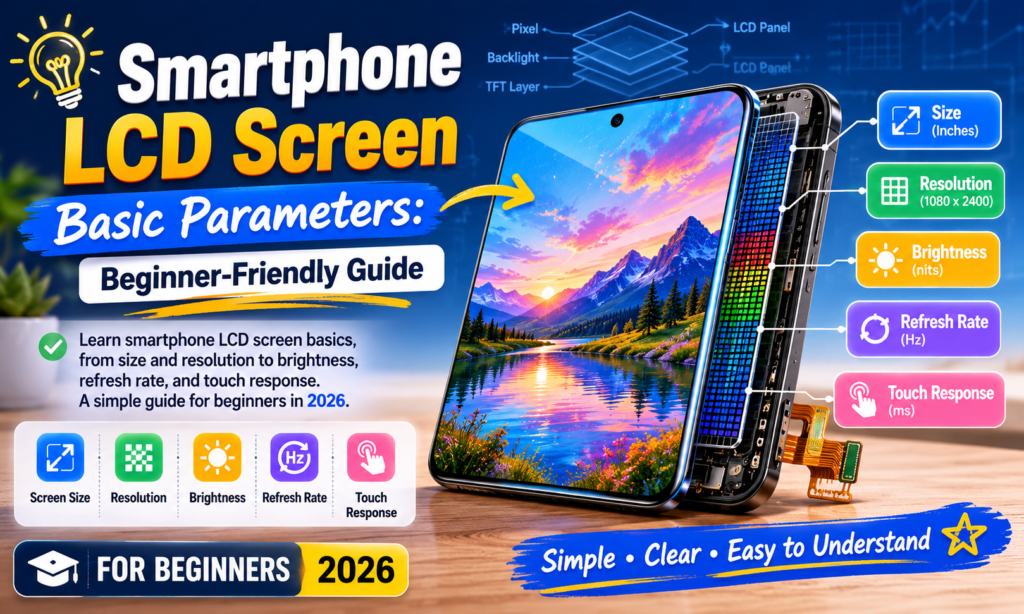
Dlaczego zrozumienie parametrów ekranu LCD ma znaczenie
Jeśli kiedykolwiek spojrzałeś na arkusz specyfikacji ekranu smartfona i zastanawiałeś się, Co w ogóle oznaczają te wszystkie liczby? – na pewno nie jesteś sam. Terminy takie jak FHD+, 120Hz, 1000 gnidy, I PPI rzucać się wszędzie, ale często wydają się bardziej językiem marketingowym niż użyteczną informacją. Prawda jest, te liczby mają znaczenie. O wiele więcej, niż większość ludzi zdaje sobie sprawę.
Ekran smartfona to część telefonu, z którą współpracujesz bardziej niż z czymkolwiek innym. Dotykasz go setki razy dziennie. Czytasz na nim wiadomości, obejrzyj filmy, przeglądać strony internetowe, edytować zdjęcia, grać w gry, i prawdopodobnie wpatrujesz się w niego przed snem częściej, niż chciałbyś przyznać. To drzwi wejściowe Twojego telefonu do wszystkiego. Jeśli wyświetlacz jest słaby, całe doświadczenie wydaje się kiepskie — nawet jeśli procesor jest szybki, a aparat doskonały.
Jest to szczególnie ważne w branży wymiany i naprawy wyświetlaczy LCD w smartfonach. Niezależnie od tego, czy kupujesz zamienny wyświetlacz LCD, pozyskiwanie części do odsprzedaży, lub po prostu wybrać następny telefon, zrozumienie parametrów LCD pomaga podejmować lepsze decyzje. Arkusz specyfikacji przestaje być ścianą mylących liczb i staje się czymś praktycznym. Staje się listą kontrolną.
Pomyśl o tym jak o zakupie samochodu. Nie musisz być mechanikiem, aby zrozumieć moc, efektywność paliwowa, lub oceny bezpieczeństwa. Wyświetlacze smartfonów działają w ten sam sposób. Nie musisz być inżynierem — wystarczy, że wiesz, co się liczy.
Co to jest ekran LCD smartfona?
LCD oznacza Wyświetlacz ciekłokrystaliczny, i pomimo tego, że we flagowych rozmowach telefonicznych dominuje OLED, LCD pozostaje niezwykle powszechny – szczególnie w telefonach budżetowych, urządzenia ze średniej półki, i ekrany zamienne na rynku wtórnym.
Wyświetlacz LCD sam nie wytwarza światła. Zamiast, opiera się na A podświetlenie za panelem. Ciekłe kryształy kontrolują następnie ilość światła przechodzącego przez kolorowe filtry, tworząc obrazy, które widzisz. Właśnie dlatego panele LCD zwykle wydają się jasne i czyste, ale nie zapewniają tego samego kontrastu „prawdziwej czerni”, jaki można zobaczyć na OLED.
OLED działa inaczej, ponieważ każdy piksel emituje własne światło. Czarne piksele mogą zostać całkowicie wyłączone. Piksele LCD nie mogą. Nawet czarne obszary nadal są podświetlone, co sprawia, że czerń wygląda w porównaniu z nią lekko szaro.
Nadal, LCD ma kilka zalet:
- Niższy koszt
- Stabilna wydajność kolorów
- Brak ryzyka poparzenia
- Często łatwiej i taniej jest wymienić
- Niezawodna, długoterminowa trwałość
Wielu użytkowników nadal preferuje wyświetlacze LCD ze względów praktycznych. Na rynku części zamiennych, LCD jest szczególnie ważny, ponieważ koszty wymiany są niższe, a kompatybilność jest często szersza.
Rozmiar ekranu
Rozmiar ekranu to zazwyczaj pierwsza liczba, którą zauważają ludzie.
Przekątną wyświetlacza smartfona mierzy się w calach — od jednego rogu do przeciwnego rogu.
W 2026, typowe rozmiary obejmują:
| Rozmiar wyświetlacza | Typowe doświadczenie | Najlepsze dla |
|---|---|---|
| 6.1″ | Kompaktowy | Obsługa jedną ręką |
| 6.4″ | Zrównoważony | Codzienni użytkownicy |
| 6.6″ | Duży | Filmy & media społecznościowe |
| 6.7–6,9″ | Bardzo duży | Hazard & przesyłanie strumieniowe |
Większość telefonów znajduje się teraz gdzieś pomiędzy 6.1 I 6.8 cale. Większe nie zawsze znaczy lepsze.
Większy ekran daje:
- Bardziej wciągające odtwarzanie wideo
- Większa klawiatura
- Lepsza widoczność w grach
- Łatwiejsze czytanie
Ale to także oznacza:
- Trudniejsza obsługa jedną ręką
- Cięższe urządzenie
- Większy ślad kieszeni
Wybór rozmiaru ekranu jest kwestią indywidualną. Mniej chodzi o „najlepsze”, a bardziej o „najlepsze dla Ciebie”.
Rezolucja
Rozdzielczość informuje, ile pikseli mieści się w wyświetlaczu.
Więcej pikseli zazwyczaj oznacza więcej szczegółów.
Typowe rozdzielczości wyświetlaczy LCD smartfonów obejmują:
| Rezolucja | Liczba pikseli | Poziom jakości |
|---|---|---|
| HD | 1280 × 720 | Poziom podstawowy |
| FHD | 1920 × 1080 | Standard |
| FHD+ | 2400 × 1080 | Nowoczesne standardy |
| Jakość HD | 2560 × 1440 | Premia |
FHD+ pozostaje preferowanym rozwiązaniem w latach 2025–2026, oferując dużą ostrość bez dodatkowego zużycia baterii w przypadku QHD.
Rozdzielczość wpływa:
- Ostrość tekstu
- Wyraźność zdjęcia
- Szczegóły wideo
- Przejrzystość interfejsu aplikacji
Powiązanym miernikiem jest PPI (pikseli na cal).
Typowy smartfonowy PPI:
- 300 PPI = akceptowalne
- 400 PPI = ostry
- 450+ PPI = bardzo ostry
- 500+ PPI = gęstość na poziomie premium
Poza okolicą 450 PPI, wiele osób ma trudności z zauważeniem ogromnej różnicy w normalnym użytkowaniu.
Jasność
Jasność mierzy się w gnidy.
Jedna nita równa się jednej kandeli na metr kwadratowy. Brzmi technicznie – ale w rzeczywistości jest proste.
Wyższe gnidy = jaśniejszy wyświetlacz.
Jasność jest jedną z najważniejszych rzeczywistych specyfikacji LCD, ponieważ wpływa na to, czy rzeczywiście widzisz ekran na zewnątrz.
Typowy przewodnik po jasności:
| Jasność | Doświadczenie |
|---|---|
| 400–500 nitów | Tylko do użytku w pomieszczeniach |
| 700–900 nitów | Dobry |
| 1000+ gnidy | Doskonała widoczność na zewnątrz |
| 2000+ gnidy | Szczytowa jasność na poziomie flagowym |
Najnowsze raporty dotyczące wyświetlaczy smartfonów zalecają 800–1000 nitów lub więcej zapewniając komfortową widoczność w świetle słonecznym.
Jasność też ma wpływ:
- Odtwarzanie HDR
- czytelność w świetle słonecznym
- dokładność edycji zdjęć
- komfort oczu
Jasny wyświetlacz od razu sprawia wrażenie bardziej premium. To jedna z tych specyfikacji, które użytkownicy zauważają, nie wiedząc dlaczego.
Częstotliwość odświeżania
Częstotliwość odświeżania jest mierzona w Hz.
Opisuje, ile razy na sekundę wyświetlacz jest odświeżany.
Typowe częstotliwości odświeżania:
| Częstotliwość odświeżania | Doświadczenie użytkownika |
|---|---|
| 60Hz | Standard |
| 90Hz | Gładki |
| 120Hz | Bardzo gładka |
| 144Hz+ | Skoncentrowany na grach |
60Hz oznacza 60 odświeża się co sekundę.
120Hz oznacza dwukrotnie więcej.
To wpływa:
- płynność przewijania
- animacje aplikacji
- hazard
- dotyk, dotyk
Gdy regularnie korzystasz z częstotliwości 120 Hz, powrót do 60 Hz może wydawać się zaskakująco wzburzony.
Ale jest kompromis.
Często oznacza to wyższą częstotliwość odświeżania:
- większe zużycie baterii
- większe obciążenie procesora graficznego
Właśnie dlatego wyświetlacze z adaptacyjnym odświeżaniem stały się coraz bardziej powszechne.
Przez 2025, 120Hz jest teraz powszechny nawet w urządzeniach średniej klasy.
Wydajność kolorów
Rozdzielczość przyciąga uwagę, ale jakość kolorów sprawia, że wyświetlacz wydaje się żywy.
Ważne parametry kolorów LCD obejmują:
- Gama kolorów
- Temperatura barwowa
- Dokładność koloru
- Kontrast
- Kąt widzenia
Gama kolorów
Określa, ile kolorów może odtworzyć wyświetlacz.
Wspólne standardy:
- sRGB
- DCI-P3
DCI-P3 jest szerszy i bogatszy niż sRGB.
Dokładność kolorów
Często mierzone przez Delta E.
Niższy = lepszy.
- Delta E < 3 = bardzo dobrze
- Delta E < 2 = doskonałe
Niektóre wyświetlacze premium osiągają teraz kalibrację na poziomie niemal profesjonalnym.
Dokładność kolorów ma znaczenie:
- fotografia
- wideo
- zakupy w Internecie
- reprodukcja odcienia skóry
Jeśli kolory są wyłączone, wszystko wydaje się złe.
Dotknij Wydajność
Dotyk nie jest już tylko dotykiem.
Istnieją tutaj dwa ważne pomiary:
Czułość dotyku
Jak łatwo ekran reaguje na dotyk palca.
Słaby wyświetlacz LCD może sprawiać wrażenie opóźnionego lub niespójnego.
Kliknij Częstotliwość próbkowania
Oto częstotliwość, z jaką ekran wykrywa wprowadzanie dotykowe na sekundę.
Mierzone w Hz.
Przykłady:
- 120Hz
- 240Hz
- 360Hz
Wyższe środki próbkowania dotykowego:
- szybsza reakcja na dotknięcie
- płynniejsza kontrola w grach
- lepsza dokładność pisania
Gracze zauważają to natychmiast.
Zwykli użytkownicy mogą nie zauważać tego świadomie, ale to czują.
To jak prowadzenie samochodu z bardziej rygorystycznym prowadzeniem. Być może nie wyjaśnisz tego technicznie, ale czujesz reakcję.
Wniosek
Zrozumienie parametrów ekranu LCD smartfona nie wymaga wiedzy inżynierskiej. Gdy terminologia stanie się znana, czytanie arkusza specyfikacji wyświetlacza staje się znacznie łatwiejsze.
Jeśli pamiętasz tylko kilka rzeczy, skoncentruj się na nich:
- Rozmiar ekranu wpływa na komfort
- Rezolucja wpływa na ostrość
- Jasność wpływa na widoczność
- Odświeżanie wpływa na gładkość
- Wydajność kolorów wpływa na jakość widzenia
- Próbkowanie dotykowe wpływa na responsywność
Dla większości użytkowników w 2026, świetny wyświetlacz LCD zwykle wygląda tak:
- 6.4–6,7 cala
- FHD+
- 450+ PPI
- 800+ jasność nitów
- 120Hz Szybkość odświeżania
- silna kalibracja kolorów
Ta kombinacja zapewnia złoty środek pomiędzy ceną, użyteczność, i wydajność wyświetlania.
Na ekranie odbywa się całe korzystanie ze smartfona. To jest scena. Każda aplikacja, każde zdjęcie, każdy film pojawia się tam jako pierwszy.
Wybierz mądrze.
FAQ
1. Jaki jest najważniejszy parametr LCD w smartfonie?
To zależy od użytkowania, Ale jasność I rezolucja są zwykle najbardziej zauważalne w codziennym użytkowaniu. Jasność wpływa na czytelność na zewnątrz, podczas gdy rozdzielczość wpływa na ostrość.
2. Czy LCD jest lepszy od OLED-a??
Nie powszechnie. OLED ma lepszą czerń i kontrast. LCD jest często tańszy, wytrzymały, i wolne od ryzyka wypalenia.
3. Czy warto brać 120 Hz??
Tak dla większości użytkowników. Przewijanie jest płynniejsze, a telefon ogólnie szybszy.
4. Jaka rozdzielczość jest najlepsza dla wyświetlaczy LCD smartfonów?
Dla większości ludzi, FHD+ zapewnia najlepszą równowagę pomiędzy ostrością i czasem pracy baterii.
5. Ile nitów jest dobre dla ekranu smartfona?
Wokół 800–1000 nitów jest doskonały do większości codziennego użytku, zwłaszcza na świeżym powietrzu. Wyżej jest jeszcze lepiej w bezpośrednim świetle słonecznym.



