
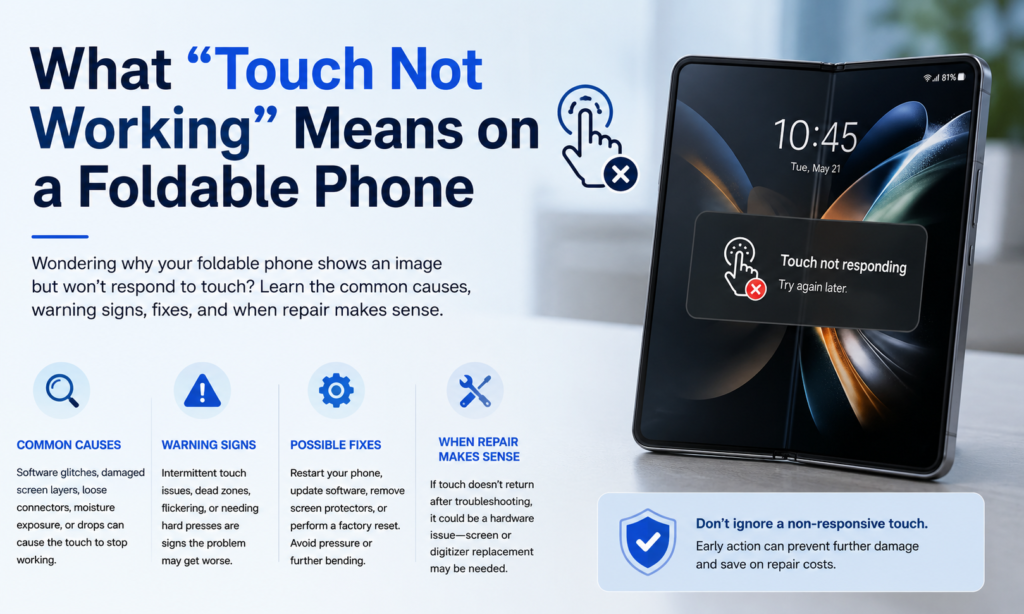
Kiedy ludzie mówią, że składany telefon ma „martwy dotyk” lub „dotyk nie reaguje”.,” problem może wyglądać zupełnie inaczej w zależności od urządzenia. Czasami ekran nadal pięknie się świeci — kolory są idealne, jasność jest normalna, ale wprowadzanie dotykowe całkowicie zanika. Innym razem awaria dotyczy tylko części wyświetlacza, często wokół środkowego zagięcia, gdzie ekran składa się tysiące razy w ciągu swojego użytkowania.
Ma to znaczenie, ponieważ problem z wyświetlaczem i problem z dotykiem nie zawsze oznaczają to samo. Panel OLED generuje obraz. . digitalizator czyta z Twojego palca. Na składanych, te warstwy są niewiarygodnie blisko siebie, prawie jak strony wklejone w maleńką, poruszającą się książeczkę. Jeśli jedna warstwa jest uszkodzona, telefon może nadal wyświetlać obraz, odmawiając rejestracji dotyku. Dlatego niektórzy użytkownicy nadal mogą widzieć powiadomienia, odblokuj za pomocą czujnika linii papilarnych, lub oglądaj filmy, ale nie możesz dotykać niczego na wewnętrznym wyświetlaczu.
Na początku objawy mogą wydawać się przypadkowe. Może górna połowa działa, a dolna nie. Być może rysik przestaje reagować w pobliżu zagięcia. Być może problem pojawia się dopiero po całkowitym otwarciu. Ta losowość zwykle wcale nie jest przypadkowa. Często jest to wskazówka wskazująca na prawdziwą awarię sprzętu.
Dlaczego składane telefony są bardziej podatne na zagrożenia niż tradycyjne telefony
Ekran normalnego smartfona pozostaje płaski przez cały dzień. Składany ekran ugina się przy każdym otwarciu lub zamknięciu. Ta pojedyncza różnica zmienia wszystko.
Zastosowanie składanych wyświetlaczy ultracienkie szkło, elastyczne warstwy OLED, kleje, polimery, i wbudowane czujniki dotykowe. Każda warstwa musi płynnie się ze sobą łączyć, bez pękania. Wyobraź sobie, że zginasz stos papieru, plastikowy, i okablowanie w kółko. To działa — dopóki zużycie nie zacznie narastać niewidocznie pod powierzchnią.
Specjaliści od napraw nadal podkreślają, że obszar zagięcia pozostaje najbardziej naprężoną mechanicznie częścią urządzenia. Nadgodziny, wielokrotne otwieranie i zamykanie powoduje obciążenie nie tylko samego wyświetlacza, ale także na maleńkich wewnętrznych kablach taśmowych poprowadzonych przez zawias.
A potem jest zawias.
Zawias to genialna inżynieria, ale jest to także największy punkt nacisku składanego telefonu. Maleńkie ruchome elementy otwierają się i zamykają setki razy w tygodniu. Do wnętrza może dostać się kurz. Narasta mikroskopijne tarcie. Niewielki spadek może zmienić ustawienie bez widocznych uszkodzeń zewnętrznych. W przeciwieństwie do tradycyjnych telefonów płytowych, Urządzenia składane są zawsze poddawane obciążeniom związanym z ruchem.
Właśnie dlatego składane urządzenia są tak niesamowite w użyciu, ale także dlatego wymagają większej ostrożności.
Najczęstsze przyczyny awarii ekranu dotykowego w telefonach składanych
Uszkodzenie kabla elastycznego
Jeśli jest jeden element, który pojawia się wielokrotnie w dyskusjach na temat napraw składanych, to jest kabel elastyczny.
Wewnątrz składanych telefonów, cienkie kable taśmowe przechodzą przez zawias, aby połączyć dwie połówki urządzenia. Kable te wyginają się przy każdym składaniu telefonu. Przez miesiące lub lata, materiał się męczy. Tworzą się drobne pęknięcia. Połączenia słabną. W końcu sygnały między wyświetlaczem a płytą główną zaczynają zawodzić.
Kiedy to się stanie, użytkownicy mogą to zauważyć:
- Wewnętrzny dotyk nie reaguje
- Po rozłożeniu ekran robi się czarny
- Dotyk działa tylko przy określonych kątach otwarcia
- Jednocześnie awaria Wi-Fi lub Bluetooth
- Problemy z rysikiem
Technicy coraz częściej zgłaszają awarię przewodu elastycznego jako jedną z najczęstszych przyczyn problemów ze składanym dotykiem w najnowszym Galaxy Fold, Trzepnięcie, i urządzenia Pixel Fold.
Pomyśl o tym jak o wielokrotnym zginaniu kabla ładującego w pobliżu złącza. W końcu pęka w środku. Ten sam pomysł – tylko ukryty głęboko w zawiasie.
Dotknij Awaria Digitizera
Digitizer to niewidzialna warstwa, która wyczuwa Twój palec. Jeśli się nie powiedzie, obraz może nadal wyglądać normalnie, gdy dotyk zaniknie.
Przyczyną awarii digitalizatora może być::
- Powtarzający się nacisk wokół fałdu
- Wewnętrzne mikropęknięcia
- Stres produkcyjny
- Uszkodzenia cieplne
- Rozwarstwienie pomiędzy warstwami ekranu
Właśnie dlatego wiele składanych telefonów z „idealnie wyglądającymi” wyświetlaczami nadal wymaga wymiany całego ekranu. OLED może być OK. Warstwa dotykowa pod spodem nie jest.
Uszkodzenie ciśnieniowe w pobliżu zagięcia
Składane ekrany są wytrzymalsze, niż wyglądają, ale nie niepokonane.
Uszkodzenia spowodowane ciśnieniem często zdarzają się bez wiedzy użytkownika:
- Siedzę z telefonem w kieszeni
- Noszenie go ciasno w plecaku
- Zamykanie urządzenia, w którym znajduje się kurz lub piasek
- Mocno naciskaj na linię zagięcia
Ponieważ wyświetlacz wygina się do wewnątrz, każda uwięziona cząstka staje się punktem nacisku. To maleńkie ziarenko piasku nagle zachowuje się jak kamyk dociśnięty do przedniej szyby.
Centra napraw często opisują nacisk w obszarze zagnieceń jako główną przyczynę powstawania martwych stref dotykowych i awarii wyświetlacza.
Kurz i zanieczyszczenia wewnątrz zawiasu
Pył jest podstępny.
Nie widać, jak wchodzi do zawiasu. Nie słyszysz, jak się porusza. Ale z biegiem czasu to się buduje. Składane mają lepszą odporność w porównaniu z wczesnymi modelami, jednak zanieczyszczenie zawiasów nadal pozostaje znanym problemem.
Może śmieci:
- Ogranicz ruch zawiasów
- Uniemożliwić pełne otwarcie
- Utwórz nierówny nacisk na ekran
- Z czasem uszkadzają kable wewnętrzne
Niektórzy użytkownicy zgłaszali, że telefony nie otwierają się już płasko z powodu zanieczyszczenia zawiasów. Po zmianie ustawienia zawiasów, zmienia się także rozkład ciśnienia na ekranie.
Ekspozycja na wilgoć
Woda nie zawsze powoduje natychmiastową awarię.
Czasami jest powoli.
Wilgoć przedostaje się przez małe szczeliny, otwory zawiasowe, lub osłabione uszczelki. Następnie zaczyna się korozja. Reakcja na dotyk staje się niespójna. Pojawiają się dotyki duchów. Następują martwe strefy.
Nawet wilgoć może mieć wpływ na wrażliwe obwody dotykowe wewnątrz składanego wyświetlacza.
Błędy oprogramowania
Nie każdy problem z dotykiem oznacza uszkodzony sprzęt.
Czasami telefon po prostu się zawiesza.
Typowe przyczyny związane z oprogramowaniem obejmują:
| Wydanie | Możliwa poprawka |
|---|---|
| Zawieszenie interfejsu użytkownika systemu | Wymuś ponowne uruchomienie |
| Błąd oprogramowania po aktualizacji | Zaktualizuj poprawkę lub wycofaj |
| Konflikt aplikacji | Test trybu awaryjnego |
| Problem z kalibracją dotyku | Reset do ustawień fabrycznych |
| Tymczasowy problem z pamięcią podręczną | Wyczyść pamięć podręczną systemu |
Jeśli po aktualizacji nagle przestaje działać dotyk – lub tylko w niektórych aplikacjach – warto najpierw sprawdzić oprogramowanie.
Nadal, jeśli ponowne uruchomienie nie pomoże, a problem wynika z kąta zagięcia, sprzęt jest zwykle bardziej prawdopodobnym winowajcą.
Znaki ostrzegawcze, zanim dotyk przestanie działać całkowicie
Składane telefony rzadko zawodzą bez ostrzeżenia.
Zwykle urządzenie szepcze, zanim zacznie krzyczeć.
Uważaj na znaki takie jak:
- Opóźnienie dotyku w pobliżu środkowego zagięcia
- Duchy stukają
- Miga przy otwieraniu
- Po rozłożeniu ekran na chwilę gaśnie
- Telefon nie otwiera się już na płasko
- W rysiku brakuje niektórych obszarów
- Martwy pasek w środku
Wielu użytkowników ignoruje te wczesne objawy, ponieważ telefon nadal w większości działa. To zrozumiałe. Nikt nie chce wierzyć, że składany egzemplarz klasy premium zmierza w kierunku naprawy.
Ale wczesne sygnały ostrzegawcze mają znaczenie.
Mała martwa strefa dzisiaj może w przyszłym miesiącu stać się całkowicie niereagującym wyświetlaczem wewnętrznym.
Czy da się to naprawić bez wymiany ekranu?
Czasami tak. Czasami nie.
To frustrująca prawda.
Zacznij od prostych kroków:
- Wymuś ponowne uruchomienie telefonu
- Usuń nieoryginalną osłonę ekranu
- Przetestuj w trybie awaryjnym
- Zaktualizuj oprogramowanie sprzętowe
- Natychmiast wykonaj kopię zapasową danych
- Sprawdź stan gwarancji
Jeśli dotyk powróci po ponownym uruchomieniu, mogło to być związane z oprogramowaniem.
Jeśli dotyk zawodzi tylko po rozłożeniu, lub tylko w pobliżu zagięcia, sprzęt jest bardziej prawdopodobny.
Opcje naprawy sprzętu mogą obejmować:
- Wymiana kabla elastycznego
- Wymiana wyświetlacza wewnętrznego
- Wymiana Digitizera
- Naprawa zawiasów
- Pełna wymiana zespołu wyświetlacza
Niestety, wielu producentów wymienia cały zespół wyświetlacza, a nie pojedyncze warstwy, ponieważ elementy są ze sobą połączone.
Jak zapobiegać problemom z dotykiem składanego ekranu
Nie możesz wyeliminować ryzyka, ale możesz je zmniejszyć.
Dobre nawyki bardzo pomagają.
Unikaj naciskania bezpośrednio na zagięcie. Nie zatrzaskuj telefonu agresywnie. Utrzymuj kieszenie wolne od monet i kurzu. Nigdy nie zamykaj urządzenia, jeśli na wyświetlaczu znajdują się zanieczyszczenia.
Sprzątanie też ma znaczenie.
Regularnie używaj ściereczki z mikrofibry. Zwróć szczególną uwagę na krawędzie zawiasów. Unikaj wdmuchiwania sprężonego powietrza bezpośrednio w szczeliny zawiasów, chyba że jest to zatwierdzone przez producenta.
Ciepło ma również większe znaczenie, niż wielu ludzi zdaje sobie sprawę.
Pozostawianie składanego telefonu w nagrzanym samochodzie z czasem powoduje osłabienie kleju. Wysoka temperatura plus wielokrotne składanie to szorstka kombinacja dla warstw OLED.
Pomyśl o urządzeniach składanych, takich jak luksusowe zegarki lub samochody wyczynowe: są znakomicie zbudowane, ale nagradzają ostrożną własność.
Koszt naprawy a wymiana: Co ma większy sens?
Tutaj sprawy stają się praktyczne.
Naprawy składanych są drogie w porównaniu z tradycyjnymi smartfonami.
Typowe decyzje dotyczące naprawy zależą od:
- Wiek telefonu
- Stan gwarancji
- Ubezpieczenie
- Koszt wymiany ekranu
- Wartość handlowa
- Wartość odsprzedaży po naprawie
Naprawa dwuletniego składanego urządzenia z kosztownymi uszkodzeniami wewnętrznego wyświetlacza może kosztować prawie tyle samo, co wymiana na nowsze urządzenie.
Jeśli jest na gwarancji? Łatwa decyzja — napraw to.
Brak gwarancji? Staje się to problemem matematycznym.
Zapytać:
- Czy ekran zewnętrzny nadal działa?
- Czy można nim handlować?
- Czy naprawa kabla elastycznego jest dostępna lokalnie?
- Czy producent wymienia tylko podzespoły?
Czasem naprawa wygrywa.
Czasami wymiana jest mądrzejszym posunięciem finansowym.
Wniosek
Składane telefony to jedne z najbardziej ekscytujących urządzeń współczesnej elektroniki użytkowej. Łączą telefon i tablet w jedno eleganckie dzieło inżynierii. Ale ta innowacja wiąże się z kompromisami.
Kiedy składany ekran przestaje reagować na dotyk, pierwotna przyczyna zwykle sięga wstecz powtarzające się obciążenia mechaniczne. Zawias się wygina. Kabel elastyczny wygina się. OLED się wygina. Digitizer się wygina. Nadgodziny, coś w końcu osiąga swój limit.
Do najczęstszych przyczyn należą:
- Zmęczenie kabla elastycznego
- Awaria digitalizatora dotykowego
- Uszkodzenia ciśnieniowe
- Kurz wewnątrz zawiasu
- Ekspozycja na wilgoć
- Błędy oprogramowania
Dobra wiadomość? Nie każdy problem z dotykiem oznacza, że urządzenie jest martwe. Niektóre problemy można zdiagnozować wcześnie. Niektóre można naprawić. I z lepszymi nawykami obsługi, wiele może się spóźnić.
Urządzenia składane wciąż szybko się rozwijają. Producenci stale poprawiają trwałość zawiasów, warstwy ochronne, i prowadzenie kabli każdej generacji. Oznacza to, że przyszłe składane modele prawdopodobnie staną się bardziej niezawodne.
Ale dzisiaj, jeśli Twój składany telefon nagle zignoruje Twój dotyk, zwykle próbuje ci powiedzieć, że coś mechanicznego w środku wymaga uwagi.
Słuchaj wcześnie — a możesz później zaoszczędzić sobie znacznie większej naprawy.
FAQ
1. Dlaczego ekran dotykowy mojego składanego telefonu działa tylko w pozycji do połowy otwartej??
Często na to wskazuje zużycie kabla elastycznego wewnątrz zawiasu. Kabel może nadal łączyć się pod pewnymi kątami, ale traci kontakt po całkowitym otwarciu.
2. Czy składany ekran telefonu może wyświetlać się normalnie, ale nie reaguje na dotyk?
Tak. Panel OLED i dotykowy digitalizator to osobne warstwy. Obraz może być nadal wyświetlany w przypadku awarii digitalizatora.
3. Czy można naprawić martwy dotyk w pobliżu linii zagięcia?
Czasami. W zależności od przyczyny, naprawa może obejmować wymianę przewodu elastycznego lub całego zestawu wyświetlacza wewnętrznego.
4. Czy składanie telefonu zbyt często powoduje uszkodzenie ekranu?
Składane są przeznaczone do wielokrotnego użytku, ale przez lata, wielokrotne składanie w naturalny sposób zwiększa zużycie zawiasu i elementów wewnętrznych.
5. Czy powinienem nadal korzystać ze składanego telefonu, jeśli dotyk zacznie zawodzić??
Jeśli problem jest niewielki, natychmiast wykonaj kopię zapasową swoich danych. Dalsze użytkowanie może pogorszyć uszkodzenia wewnętrzne — szczególnie jeśli problem jest związany z zawiasem lub kablem elastycznym.



