
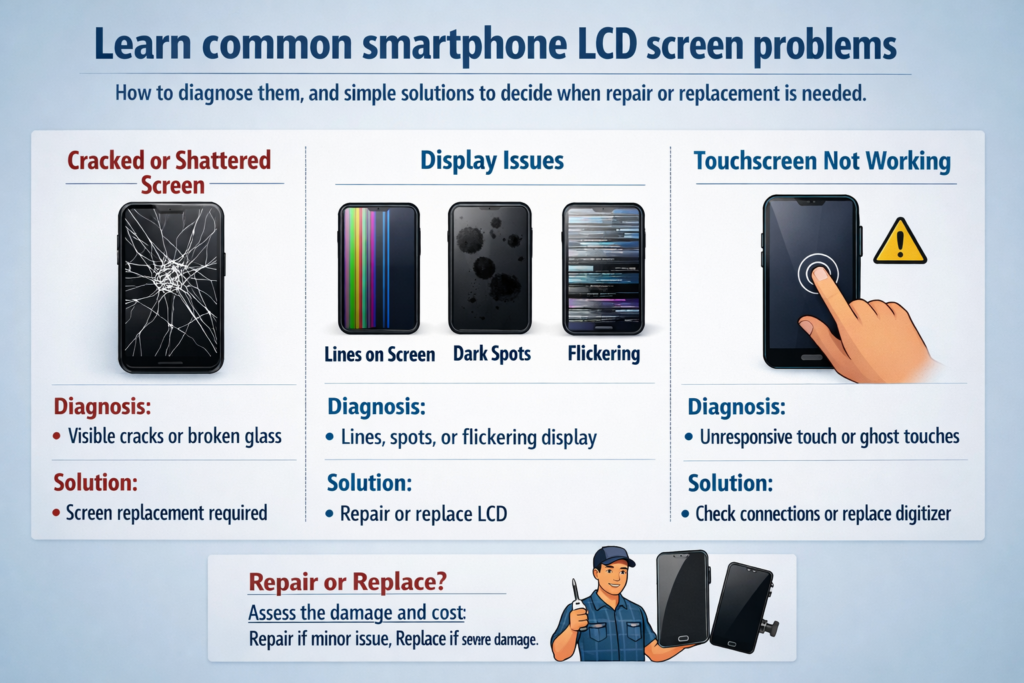
Introducere în problemele cu ecranul LCD al smartphone-ului
Să recunoaștem – ecranul smartphone-ului tău este partea cea mai abuzată a dispozitivului tău. Este atins de mii de ori pe zi, scăpat accidental, strâns în buzunare, și expus la căldură și umiditate. Deci când ceva nu merge bine, rareori este o surpriză.
În timp ce ecranele OLED atrag titluri, Ecranele LCD sunt încă utilizate pe scară largă, mai ales în smartphone-urile de buget și de gamă medie. Înțelegerea problemelor specifice LCD-ului vă poate economisi bani, timp, si frustrare.
Cum funcționează ecranele LCD ale smartphone-urilor (Prezentare generală rapidă)
Înainte de a diagnostica problemele, ajută să știi ce este înăuntru.
Un ecran LCD este ca un sandviș:
- Sticla frontala pentru protectie
- Atingeți digitizer pentru a vă simți degetele
- Strat de cristale lichide pentru controlul luminii
- Modul de iluminare de fundal pentru a ilumina totul
Când un strat eșuează, simptomele spun o poveste — dacă știi să o citești.
Ecran spart sau spart
Cauze comune
Cele mai multe fisuri provin din picături, presiune, sau forțe de încovoiere. Să stai pe telefon sau să-l arunci cu fața în jos este tot ce trebuie.
Simptome vizibile și riscuri ascunse
- Pânză de păianjen se sparge
- Margini ascuțite din sticlă
- Atingerea poate funcționa în continuare... deocamdată
Pericolul? Crăpăturile lasă umezeala și praful înăuntru, omorând încet LCD-ul de dedesubt.
Sfaturi de auto-diagnosticare
Dacă afișajul este clar și atingerea funcționează peste tot, LCD-ul poate fi încă intact. Dar dacă mai târziu apar pete sau linii negre, daunele se extind.
Linii orizontale sau verticale pe ecran
Ce cauzează liniile
Aceste rânduri înseamnă adesea:
- Pixeli LCD deteriorați
- Cablu flexibil pentru afișaj slăbit sau deteriorat
- Eroare driver de panou
Temporar vs Permanent
Dacă liniile se schimbă atunci când răsuciți ușor telefonul, poate fi o conexiune slabă. Fix, liniile nemișcate înseamnă de obicei deteriorarea permanentă a LCD-ului.
Test rapid
Faceți o captură de ecran.
- Liniile apar în captură de ecran? Problemă de software
- Captura de ecran pare normală? Problemă hardware
Scurgeri de lichid LCD (Pete negre sau vărsări de cerneală)
Ce este scurgerea LCD-ului
Acele pete negre sau violete care se răspândesc pe ecran? Este vorba despre scurgeri de cristale lichide din cauza presiunii sau deteriorării impactului.
Semne de avertizare timpurie
- O mică pată întunecată crește în timp
- Culorile sângerând la margini
Poate fi reparat?
Nu. Odată ce începe scurgerea, Inlocuirea LCD-ului este singura solutie. Gândește-te la el ca la un ou spart - nu se va întoarce.
Probleme de pâlpâire a ecranului
Motive comune
- Alimentare instabilă
- Iluminare de fundal defectă
- Conector de afișare deteriorat
PWM și probleme de alimentare
O oarecare pâlpâire are loc la luminozitate scăzută din cauza estomparii PWM, dar pâlpâirea constantă nu este normală.
Cecuri de bricolaj
- Creșteți luminozitatea
- Reporniți telefonul
- Testați în modul sigur
Dacă pâlpâirea rămâne, este probabil legat de hardware.
Ecranul tactil nu răspunde sau funcționează parțial
Atingeți Strat vs Strat de afișare
Imaginea poate arata perfect, dar atingerea eșuează deoarece digitizatorul este deteriorat.
Simptome tipice
- Zone moarte
- Răspuns întârziat
- Atingerea funcționează numai cu presiune
Test simplu
Apelează *#*#2664#*#* (pe unele telefoane Android) pentru a intra în modul test de atingere.
Pete întunecate sau iluminare de fundal neuniformă
Ce cauzează asta
- Deteriorarea presiunii
- Îmbătrânirea la lumină de fundal
- Deteriorarea difuzorului intern
Cum arată
- Zone umbroase
- Margini luminoase, centru întunecat
- Aspect „înnorat” pe ecranele albe
Sfat de diagnostic
Afișează o imagine albă completă. Iluminarea neuniformă devine evidentă imediat.
Ecranul este estompat sau spălat
Cauze posibile
- LED-uri de iluminare de fundal îmbătrânite
- Conector slăbit
- Probleme cu puterea IC
Lista de verificare
- Luminozitate maximă activată?
- Auto-luminozitate oprită?
- Comparați cu un alt telefon unul lângă altul
Dacă încă este slab, este nevoie de reparații hardware.
Ghost Touch și intrări aleatorii
De ce se întâmplă
- Umiditate sub pahar
- Ecrane de schimb de calitate scăzută
- Interferențe electrice
Încercări de remediere rapidă
- Curățați bine ecranul
- Scoateți protecția ecranului
- Reporniți dispozitivul
Atingerea persistentă a fantomei înseamnă de obicei înlocuirea digitizatorului.
Probleme de ecran software vs hardware
Cum să spun
- Apare în modul sigur? Hardware
- Apare după actualizare? Software
Teste de încredere
- Metoda capturii de ecran
- Display extern (dacă este susținut)
- Resetare din fabrică (ultima solutie)
Când este necesară înlocuirea ecranului
Înlocuiți ecranul dacă:
- Apare o scurgere de lichid
- Liniile nu se schimbă
- Atingerea eșuează complet
- Deteriorarea iluminării de fundal se agravează
Folosirea unui ecran deteriorat este ca și cum ați conduce pe un parbriz crăpat - doar se înrăutățește.
Sfaturi preventive pentru a prelungi durata de viață a ecranului LCD
Obiceiurile mici fac o mare diferență:
- Folosiți o protecție din sticlă călită
- Evitați presiunea în buzunare
- Nu folosiți telefonul în timp ce încărcați excesiv
- A se păstra departe de umiditate și căldură
Alegerea unei soluții de reparații de încredere
Original vs aftermarket
- Original: culoare mai buna, luminozitate, durată de viaţă
- Aftermarket: mai ieftin, calitatea variază
Întrebări de pus
- Este original sau compatibil?
- Perioada de garantie?
- Este testat la atingere înainte de instalare?
Concluzie
Problemele cu ecranul LCD al smartphone-ului pot părea intimidante, dar majoritatea urmează modele clare. Prin înțelegerea simptomelor precum liniile, pâlpâind, scurgere, sau eșec la atingere, puteți judeca rapid dacă este o problemă minoră sau o defecțiune care merită reparată. Gândiți-vă la ecranul dvs. ca la „fereastra către lume” a telefonului, odată deteriorat, claritatea și controlul se estompează rapid. Diagnosticarea precoce economisește bani, date, si frustrare.
Întrebări frecvente
1. Poate fi folosit în siguranță un ecran crăpat?
Temporar, Da, dar riscurile cresc în timp din cauza umidității și a daunelor ulterioare.
2. Liniile verticale sunt întotdeauna o problemă hardware?
De cele mai multe ori, da, mai ales dacă nu apar în capturi de ecran.
3. Se poate răspândi scurgerea LCD-ului?
Da. De obicei crește cu timpul.
4. Pâlpâirea este întotdeauna cauzată de un ecran prost?
Nu întotdeauna. Problemele de alimentare sau de software pot provoca, de asemenea, pâlpâirea.
5. Merită să reparați LCD-ul unui telefon vechi?
Daca costul reparatiei depaseste 50% de valoarea telefonului, înlocuirea poate să nu fie economică.



