
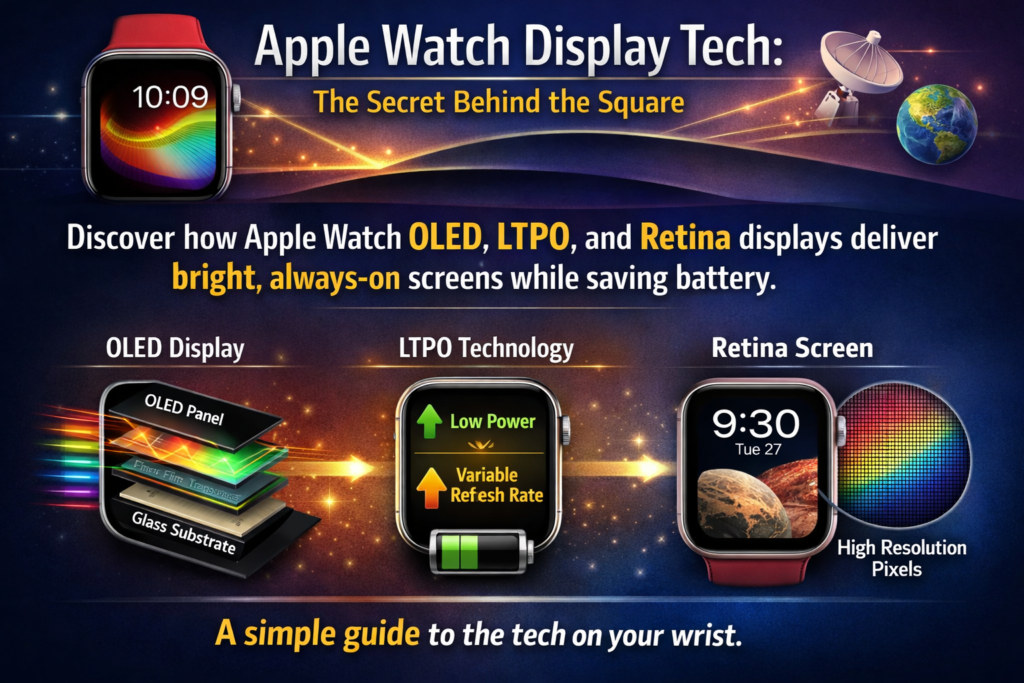
Waarom het Apple Watch-scherm belangrijker is dan je denkt
De rol van het beeldscherm in draagbare technologie
Als mensen aan smartwatches denken, ze richten zich vaak op gezondheidskenmerken, levensduur van de batterij, of ontwerp. Maar in werkelijkheid, het display is het hart van de hele ervaring. Elke interactie: de tijd controleren, berichten lezen, trainingen bijhouden – gebeurt via dat kleine vierkantje glas om je pols.
In tegenstelling tot smartphones, smartwatches werken onder veel strengere fysieke beperkingen. Het display moet extreem klein zijn, ongelooflijk energiezuinig, duurzaam genoeg om dagelijkse slijtage te weerstaan, en helder genoeg om buiten te lezen. Het gelijktijdig verwezenlijken van al deze dingen is een serieuze technische uitdaging.
Voor de Apple Watch, het scherm is zelfs nog belangrijker omdat Apple het product daaromheen heeft ontworpen overzichtelijke informatie. Het idee is eenvoudig: je zou slechts een seconde naar je pols moeten kunnen kijken en meteen begrijpen wat er gebeurt, of het nu een melding is, uw hartslag, of de tijd.
Dat betekent dat het display dat moet zijn snel, duidelijk, en altijd klaar. Het moet ook minimaal stroom verbruiken, omdat de batterij in een smartwatch veel kleiner is dan die in een telefoon. Het balanceren van zichtbaarheid en efficiëntie is een delicate dans, en Apple heeft jarenlang de technologie erachter verfijnd.
Apple's filosofie: Klein scherm, Grote innovatie
Apple heeft beeldschermen altijd als een kernproductfunctie beschouwd. Van het Retina-display op de iPhone tot de Liquid Retina-panelen op iPads en MacBooks, het bedrijf investeert zwaar in schermtechnologie.
De Apple Watch volgt dezelfde filosofie. Ook al meet het scherm maar een paar centimeter in doorsnede, het integreert verschillende geavanceerde technologieën die gewoonlijk in grotere apparaten worden aangetroffen.
Apple-ingenieurs moesten verschillende unieke problemen oplossen:
- Hoe maak je een display dat leesbaar blijft in zonlicht?
- Hoe houd je het scherm de hele dag aan zonder de levensduur van de batterij te vernietigen?
- Hoe bescherm je het display tegen krassen en stoten?
De antwoorden op die vragen vormden de evolutie van het Apple Watch-display, van OLED-panelen tot geavanceerd LTPO-technologie die de Always-On Display-functie aanstuurt.
OLED vanaf dag één: Waarom Apple LCD vermeed
OLED-technologie begrijpen
Een veel voorkomende misvatting is dat vroege Apple Watches LCD-schermen gebruikten. In werkelijkheid, Apple gebruikt OLED-panelen sinds de allereerste Apple Watch die werd uitgebracht 2015.
OLED staat voor Organische lichtemitterende diode. In tegenstelling tot LCD-schermen, OLED-panelen hebben geen achtergrondverlichting nodig. Elke pixel produceert zijn eigen licht. Dat klinkt misschien als een klein verschil, maar het verandert volledig hoe het scherm zich gedraagt.
Dit is waarom dat ertoe doet.
Wanneer een OLED-scherm zwart weergeeft, de pixels worden eenvoudigweg uitgeschakeld. Dit betekent dat zwarte gebieden bijna verbruiken nul energie. Het resultaat is een extreem hoog contrast en diepere zwarttinten vergeleken met LCD-schermen.
Het maakt het ook mogelijk dat schermen dunner zijn. LCD-schermen vereisen meerdere lagen, inclusief achtergrondverlichting en diffuser, terwijl OLED-panelen veel compacter kunnen zijn.
Voor een smartwatch, dat voordeel is enorm. Elke millimeter is van belang bij het ontwerpen van een apparaat dat om de pols wordt gedragen.
Waarom OLED beter bij wearables past dan bij LCD
OLED-technologie lost verschillende problemen op waar LCD bij draagbare apparaten mee worstelt.
Eerst, energie-efficiëntie. Omdat zwarte pixels vrijwel geen energie verbruiken, donkere wijzerplaten verminderen het batterijgebruik aanzienlijk. Apple maakt hiervan gebruik door horloge-interfaces met donkere thema's te ontwerpen.
Seconde, contrast en leesbaarheid. Omdat OLED echt zwart produceert, heldere tekst steekt dramatisch af tegen een donkere achtergrond. Dit verbetert de leesbaarheid bij snelle blikken.
Derde, flexibiliteit en dunheid. OLED-panelen kunnen dunner en zelfs licht gebogen worden vervaardigd, waardoor Apple strakke horlogebehuizingen kon ontwerpen.
De combinatie van deze voordelen verklaart waarom Apple nooit heeft geëxperimenteerd met LCD voor de Apple Watch. De technologie zou simpelweg niet dezelfde efficiëntiebalans opleveren, contrast, en compact ontwerp.
Retina-display op Apple Watch
Wat ‘Retina’ eigenlijk betekent
Apple brengt zijn horlogeschermen op de markt als Retina-displays, maar wat betekent dat eigenlijk?
De term ‘Retina’ verwijst niet naar een specifieke technologie. In plaats van, het beschrijft een niveau van pixeldichtheid waarbij het menselijk oog geen individuele pixels kan onderscheiden op normale kijkafstand.
Voor de Apple Watch, dit betekent dat tekst ongelooflijk scherp wordt weergegeven, zelfs op een klein scherm.
Moderne Apple Watch-modellen reiken rond 326 pixels per inch (PPI), wat vergelijkbaar is met de pixeldichtheid die werd gebruikt in vroege Retina-iPhones.
Als je naar het horloge kijkt, je ziet scherpe lettertypen, gladde iconen, en gedetailleerde wijzerplaten. Er is geen zichtbaar raster van pixels.
Die helderheid is essentieel omdat het scherm zo klein is. Zelfs kleine tekst, zoals agenda-items of voorbeeldweergaven van meldingen, moet leesbaar blijven.
Pixeldichtheid en visuele helderheid
Een hoge pixeldichtheid gaat niet alleen over esthetiek. Het verbetert ook de bruikbaarheid.
Stel je voor dat je een sms-bericht leest op een scherm met een lage resolutie. Letters zouden er gekarteld en moeilijk leesbaar uitzien, waardoor je langer geconcentreerd moet blijven. Op een smartwatch, die extra seconde aandacht verslaat het doel van snelle blikken.
Apple heeft de Apple Watch-interface zorgvuldig afgestemd op de schermresolutie. Lettertypen zijn geoptimaliseerd voor kleine formaten, en interface-elementen zijn uit elkaar geplaatst om rommel te voorkomen.
Het resultaat voelt verrassend comfortabel aan, ook al is het scherm slechts ongeveer zo groot als een postzegel.
LTPO-technologie uitgelegd
De geboorte van LTPO in Apple Watch
Een van de belangrijkste upgrades in de geschiedenis van Apple Watch kwam met de introductie van LTPO-weergavetechnologie.
LTPO staat voor Polykristallijn oxide bij lage temperatuur. Het is een speciaal type OLED-backplane-technologie waarmee het scherm de vernieuwingsfrequentie dynamisch kan wijzigen.
Traditionele beeldschermen worden met een vaste snelheid vernieuwd, vaak 60 keer per seconde (60Hz). Maar het voortdurend verversen van het scherm verspilt energie als er niets op het scherm beweegt.
LTPO lost dit op door het scherm dit toe te staan pas de vernieuwingsfrequentie dynamisch aan.
Apple introduceerde LTPO voor het eerst in de Apple Watch Series 4, de basis leggen voor toekomstige functies zoals het Always On Display.
Hoe LTPO Always-On Display mogelijk maakt
De echte doorbraak kwam met Apple Watch-serie 5, die introduceerde de Altijd ingeschakeld Retina-display.
Normaal gesproken, smartwatch-schermen worden uitgeschakeld wanneer uw pols wordt neergelaten om de batterij te sparen. Apple veranderde dat gedrag. In plaats van helemaal uit te schakelen, het scherm wordt eenvoudigweg gedimd en blijft de tijd weergeven.
LTPO-technologie maakte dit mogelijk.
Het beeldscherm kan de vernieuwingsfrequentie dramatisch verlagen 60Hz tijdens actief gebruik tot slechts 1 Hz bij inactiviteit.
Dat betekent dat het scherm slechts één keer per seconde wordt bijgewerkt in de energiezuinige modus, enorme hoeveelheden energie besparen.
Gecombineerd met efficiënte displaydrivers en sensoren, Apple wist het vol te houden rondom 18 uur batterijduur, zelfs als het display altijd zichtbaar is.
Variabele vernieuwingsfrequenties en energiebesparingen
Beschouw de vernieuwingsfrequentie als een automotor.
Wanneer u op een snelweg rijdt, je hebt hoge snelheid nodig. Als je vastzit in het verkeer, Je gaat langzamer rijden om brandstof te besparen.
LTPO werkt op dezelfde manier.
Wanneer u met het horloge communiceert (door apps scrollt of meldingen leest), wordt het scherm verhoogd naar een hoge vernieuwingsfrequentie voor vloeiende bewegingen.
Wanneer je geen interactie hebt, het scherm wordt dramatisch langzamer. De wijzerplaat wordt zwakker, animaties stoppen, en het scherm wordt op minimale snelheid vernieuwd.
Dit dynamische gedrag is een van de grootste redenen waarom de Apple Watch een display dat altijd aan staat kan leveren zonder de levensduur van de batterij te verkorten.
Schermmaterialen: Ion-X-glas versus saffierkristal
De technologie in het display is belangrijk, maar de materiaal dat het scherm bedekt is even kritisch.
Apple gebruikt twee verschillende beschermende materialen, afhankelijk van het model.
Ion-X versterkt glas
Er wordt gebruik gemaakt van Ion-X-glas aluminium Apple Watch-modellen, Dit zijn doorgaans de meer betaalbare versies.
Dit materiaal is een speciaal versterkt glas dat is gemaakt met behulp van een ionenuitwisselingsproces. Tijdens de productie, kleinere ionen in het glas worden vervangen door grotere, het vergroten van de sterkte van het materiaal.
Ion-X glas heeft verschillende voordelen:
- Lichter gewicht
- Flexibeler en slagvaster
- Minder kans op versplinteren tijdens vallen
Echter, het is ook gevoeliger voor krassen vergeleken met saffierglas.
Saffier Kristal
Hogere Apple Watch-modellen, zoals roestvrijstalen en titaniumversies, gebruiken saffier kristal.
Saffier is een van de hardste materialen die in consumentenelektronica worden gebruikt. Op de hardheidsschaal van Mohs, het staat net onder diamant.
Dat betekent alledaagse voorwerpen zoals sleutels, munten, en zand zullen veel minder snel krassen op het oppervlak veroorzaken.
Echter, saffier heeft ook een keerzijde: het is brosser dan Ion-X-glas. Onder extreme impact, het kan gemakkelijker barsten.
Welke is beter voor dagelijks gebruik?
Kiezen tussen Ion-X en saffier hangt echt af van levensstijl.
| Materiaal | PROS | Nadelen | Typische modellen |
|---|---|---|---|
| Ion-X-glas | Lichter, flexibeler, goedkoper | Gemakkelijker te krabben | Aluminium Apple Watch |
| Saffier Kristal | Extreem krasbestendig | Brozer, hogere kosten | Roestvrij staal / Titanium |
Voor de meeste mensen, beide materialen bieden uitstekende duurzaamheid. Het verschil komt vooral tot uiting in ruige omgevingen zoals bouwwerkzaamheden of buitensporten.
Schermevolutie tussen Apple Watch-generaties
Uit serie 1 naar serie 3
Vroege Apple Watch-modellen waren erop gericht te bewijzen dat smartwatches nuttig konden zijn.
De schermen waren al op OLED- en Retina-niveau, maar ze waren kleiner en omgeven door dikkere randen.
Helderheid en reactievermogen waren goed voor die tijd, maar het display werd nog steeds volledig uitgeschakeld toen de pols werd neergelaten.
Dat betekende dat gebruikers vaak opzettelijk hun pols moesten optillen om de tijd te controleren.
De grote sprong met series 4 en Serie 5
De Serie 4 introduceerde een groter edge-to-edge display, dramatisch vergroten van het schermoppervlak zonder het horloge aanzienlijk groter te maken.
Toen kwam de Serie 5, die het Always-on-display opleverde, mogelijk gemaakt door LTPO-technologie.
Deze upgrade veranderde fundamenteel de manier waarop mensen het horloge gebruikten. In plaats van het scherm actief te wekken, gebruikers konden er eenvoudigweg naar kijken, net als bij een traditioneel polshorloge.
Moderne Apple Watch-displays (Serie 7–9)
Recente Apple Watch-modellen bleven het scherm verfijnen.
Belangrijke verbeteringen zijn onder meer:
- Grotere schermen met dunnere randen
- Verhoogde helderheid
- Betere kijkhoeken
- Verbeterde duurzaamheid
Bijvoorbeeld, nieuwere modellen kunnen bereiken tot 2000 nits helderheid, waardoor ze buitenshuis aanzienlijk gemakkelijker te lezen zijn.
's Nachts, het scherm kan tot extreem lage niveaus worden gedimd 1 neet—om verstoring van de slaap of donkere omgevingen te voorkomen.
Helderheid, Zichtbaarheid buiten, en praktijkervaring
Smartwatch-displays staan voor één grote uitdaging: zonlicht.
De helderheid buitenshuis kan zwakkere beeldschermen gemakkelijk overweldigen, waardoor ze onleesbaar worden.
Apple pakt dit aan met extreem heldere OLED-panelen en automatische helderheidsaanpassing met behulp van omgevingslichtsensoren.
Als je op een zonnige dag naar buiten stapt, het horloge verhoogt onmiddellijk de helderheid. Binnenshuis, het dimt om energie te besparen.
Gecombineerd met OLED-contrast, Dit zorgt ervoor dat het display in vrijwel elke omgeving leesbaar blijft.
Een andere factor is de kijkhoek. Apple heeft verfijnde OLED-panelen zodat het scherm zichtbaar blijft, zelfs vanuit scherpe hoeken – belangrijk als je snel naar je pols kijkt.
Veelgestelde vragen over Apple Watch-schermen
Heeft u een schermbeschermer nodig??
Of je een screenprotector moet aanbrengen, hangt af van jouw Apple Watch-model.
Voor saffierkristal modellen, veel gebruikers slaan schermbeschermers over. Het materiaal is al zeer krasbestendig.
Voor Ion-X-glasmodellen, een dunne filmbeschermer kan microkrassen helpen voorkomen, vooral als u in omgevingen met zand werkt, stof, of metalen gereedschap.
Nog steeds, het Apple Watch-display is ontworpen om dagelijks gebruik zonder extra bescherming te weerstaan.
Wat gebeurt er als het scherm kapot gaat?
Het repareren van een Apple Watch-display is ingewikkeld.
In tegenstelling tot smartphones, De interne componenten van het horloge zijn extreem compact en nauw geïntegreerd. In veel gevallen, Apple vervangt het hele apparaat in plaats van alleen het scherm te repareren.
Dit is de reden waarom veel gebruikers ervoor kiezen AppleCare+, waardoor de kosten van reparaties van accidentele schade worden verminderd.
Conclusie
Het Apple Watch-scherm ziet er misschien klein uit, maar de technologie erin vertegenwoordigt jaren van innovatie.
Van OLED-panelen die perfect contrast leveren tot LTPO-technologie die displays die altijd aan staan mogelijk maakt zonder dat de batterij leegraakt, Apple heeft de weergave-ervaring van smartwatches voortdurend verfijnd.
De combinatie van hoge helderheid, dynamische vernieuwingsfrequenties, duurzame materialen, en scherpte op Retina-niveau creëert een display dat natuurlijk aanvoelt in gebruik. Je kijkt ernaar, krijg de informatie die u nodig heeft, en ga verder met je dag.
Dat is de echte magie van het Apple Watch-display: het combineert op stille wijze geavanceerde techniek met alledaags gemak.
FAQ's
1. Maakt Apple Watch gebruik van LCD of OLED??
Alle Apple Watch-modellen gebruiken OLED-schermen. Apple heeft nog nooit LCD-panelen gebruikt in de Apple Watch-reeks.
2. Wat is LTPO op Apple Watch?
LTPO (Polykristallijn oxide bij lage temperatuur) is een weergavetechnologie die dynamische vernieuwingsfrequenties mogelijk maakt, waardoor functies zoals het Always On Display mogelijk worden terwijl de batterij wordt bespaard.
3. Waarom kan het Apple Watch-scherm de hele tijd aan blijven??
Omdat LTPO-schermen de vernieuwingsfrequentie kunnen verlagen tot zo laag als 1Hz, waardoor het energieverbruik drastisch wordt verlaagd terwijl de wijzerplaat nog steeds zichtbaar is.
4. Welk Apple Watch-scherm is duurzamer??
Modellen met saffier kristal zijn krasbestendiger, terwijl Ion-X-glas is iets slagvaster.
5. Hoe helder is het Apple Watch-display?
Recente Apple Watch-modellen kunnen reiken tot 2000 nits helderheid, waardoor ze gemakkelijk leesbaar zijn, zelfs in fel zonlicht.



