
🔧 Wprowadzenie
Spójrzmy prawdzie w oczy — pęknięcie ekranu telefonu przypomina nadepnięcie na klocki LEGO bosymi stopami. Bolesny, nieoczekiwany, i drogie. Ale hej, co jeśli mógłbyś go wymienić samodzielnie? Witamy w najlepszym przewodniku, który pokazuje, jak dokładnie to zrobić — niezależnie od tego, czy masz do czynienia z iPhonem, czy z Androidem. Przeprowadzimy Cię przez wszystko krok po kroku, ze zdjęciami lub linkami do filmów, i dodawaj ostrzeżenia o ryzyku, aby mieć pewność, że nie zamienisz telefonu w przycisk do papieru.
🔩 Niezbędne narzędzia & Przybory
Podstawowy zestaw narzędzi do wymiany ekranu
Aby rozpocząć, będziesz potrzebować:
- Zestaw wkrętaków precyzyjnych (zwykle z Pentalobe, Phillipsa, Głowice trójpunktowe)
- Przyssawka
- Plastikowe narzędzia do podważania
- Pinceta
- Narzędzie do wyjmowania karty SIM
- Alkohol izopropylowy (do czyszczenia)
Zalecany sprzęt ochronny
- Pasek na nadgarstek ESD (zapobiega uszkodzeniom statycznym)
- Mata antystatyczna
- Okulary ochronne (ekrany mogą pęknąć podczas wyjmowania)
Jak pozyskać wysokiej jakości ekrany zamienne
Nie wszystkie ekrany są sobie równe. Unikaj super tanich na podejrzanych targowiskach. Szukać:
- Etykiety OEM lub podobne do OEM
- Gwarancja (nawet 30 dni są lepsze niż żadne)
- Sprawdzona kompatybilność z Twoim modelem telefonu
⚠️ Alerty o ryzyku przed rozpoczęciem
Unieważnienie gwarancji
Po otwarciu urządzenia, pożegnaj się z roszczeniami gwarancyjnymi. Zastanów się dwa razy, jeśli Twoje urządzenie jest nadal objęte gwarancją lub usługą AppleCare.
Części wysokiego ryzyka, które możesz uszkodzić
- Skanery linii papilarnych (Dotykowy identyfikator, niedoświetlony)
- Moduły identyfikacji twarzy (na iPhone'ach)
- Panele OLED (bardzo kruche, zwłaszcza na Samsungu)
Ryzyko uszkodzeń statycznych i wyładowań elektrostatycznych
Elektryczność statyczna może usmażyć delikatne elementy. Stosuj ochronę ESD i uziemiaj się.
Kiedy nie powinieneś robić majsterkowania
- Jeśli ekran jest połączony z akumulatorem
- Jeśli brakuje Ci pewnych rąk i cierpliwości
- Jeśli telefon jest uszkodzony przez wodę
🛠️ Proces demontażu krok po kroku
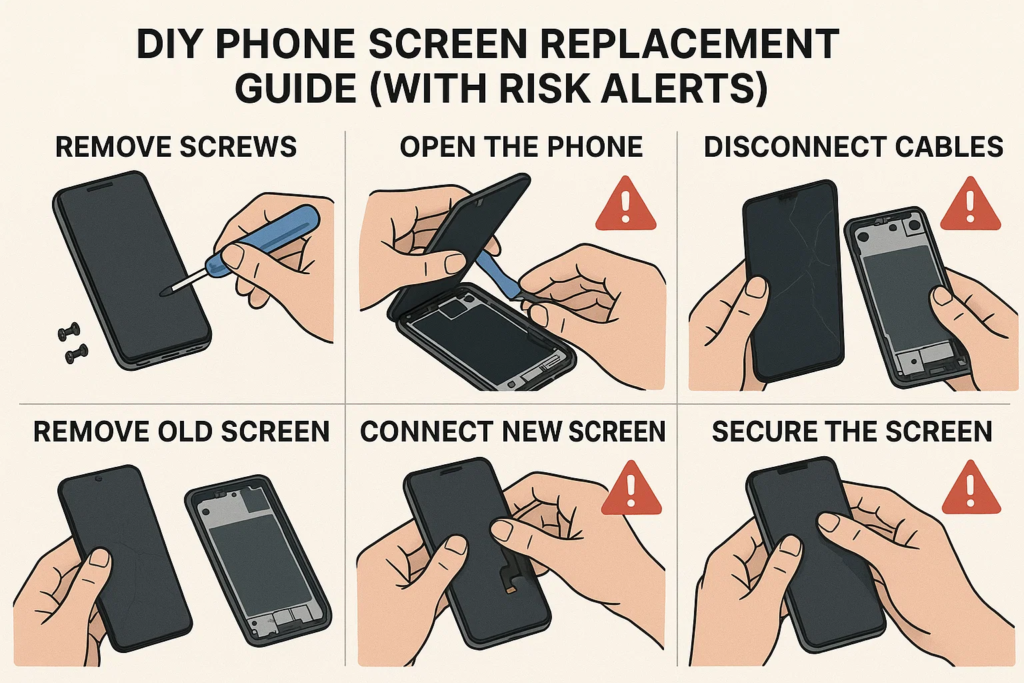
Krok 1: Wyłącz i rozładuj akumulator
Przytrzymaj przycisk zasilania i wyłącz telefon. Poczekaj 2–3 minuty, aż kondensatory się rozładują.
Krok 2: Wykręć śruby i otwórz urządzenie
iPhone
Za pomocą śrubokręta Pentalobe odkręć dolne śruby w pobliżu portu ładowania. Przyłóż przyssawkę do ekranu i delikatnie podważ plastikowym narzędziem. Nie wkładaj zbyt głęboko!
Android
Zależy od modelu. Dla Samsunga, podgrzej krawędzie za pomocą opalarki (70–80°C), użyj ssania i plastikowej karty, aby oddzielić szybę. Dla Xiaomi lub OPPO, śruby mogą znajdować się pod tylnym panelem.
Krok 3: Najpierw odłącz akumulator!
Nigdy tego nie pomijaj. Odłączenie akumulatora w pierwszej kolejności zapobiega zwarciu płytki logicznej.
Krok 4: Oznacz i odłącz kable elastyczne
Użyj pęsety lub spudera, aby ostrożnie odłączyć elastyczne kable łączące ekran, kamera, lub czujniki.
Krok 5: Ostrożnie usuń uszkodzony ekran
Gdy wszystkie kable zostaną wyłączone, zdejmij z ekranu. Bądź delikatny. Niektóre urządzenia zawierają klej, który należy ponownie zmiękczyć pod wpływem ciepła.
📲 Instalowanie nowego ekranu
Krok 6: Wyczyść obudowę i ponownie nałóż klej
Zeskrob resztki kleju. Używaj alkoholu i niestrzępiącej się szmatki. Nałóż nowe paski samoprzylepne lub klej.
Krok 7: Podłącz kable elastyczne do płytki logicznej
Podłącz ponownie wyświetlacz, digitalizator, przedni aparat, itp. Bądź stanowczy, ale ostrożny.
Krok 8: Podłącz ponownie akumulator (Ostatni krok!)
Gdy już wszystko będzie w środku, podłącz ponownie akumulator i zabezpiecz go.
Krok 9: Ponownie przykręć śruby i uszczelnij urządzenie
Wymień panel tylny lub ekran, zastosować równomierny nacisk, i wkręć wszystko z powrotem.
🧪 Testowanie przed ostatecznym montażem
Zanim zapieczętujesz wszystko na stałe:
- Responsywność dotyku
- Jasność & kolory wyświetlacza
- Martwe piksele
- Przód & funkcja tylnej kamery
- Identyfikator twarzy lub czytnik linii papilarnych
Jeśli coś jest nie tak, otwórz ponownie i sprawdź złącza.
🚫 Typowe błędy, których należy unikać
Zapominanie o odłączeniu akumulatora
To jest #1 przyczyną przepalonych obwodów podświetlenia lub uszkodzonych płytek logicznych.
Zaciśnięcie kabli lub nieprawidłowe ustawienie złączy
Kable elastyczne są jak żyły — jeśli je uszczypniesz lub skręcisz, mogą rozerwać się wewnętrznie.
Nadmierne dokręcenie śrub
Może to spowodować pęknięcie szkła pod wpływem ciśnienia wewnętrznego. Przytulny wystarczy.
🔍 Specjalne uwagi według marki urządzenia
iPhone X i nowsze: Ostrzeżenie dotyczące identyfikacji twarzy
Komponenty Face ID są wrażliwe. Uszkodzenie ich = trwała utrata Face ID. Nie można ich po prostu wymienić — system Apple łączy je w parę z płytką główną.
Wyświetlacze Samsung Edge: Kruchość OLED-ów
Te wygięte ekrany są niezwykle delikatne. Zastosowanie zbyt dużej ilości ciepła lub nacisku może zniszczyć je jeszcze przed zakończeniem.
Xiaomi & Oppo: Integracja baterii i ekranu
W niektórych modelach, ekran jest przyklejony bezpośrednio nad akumulatorem. Jeśli zejdziesz zbyt głęboko, ryzykujesz przebiciem akumulatora.
🎥 Demo wideo i przewodnik wizualny
Polecane kanały YouTube
- JerryRig Wszystko
- iFixit
- Instytut Napraw Mobilnych
- Witrigs
Gdzie znaleźć pliki PDF dotyczące rozbiórki
- iFixit.com
- Witrigs
- Instrukcje serwisowe producenta (jeśli publiczne)
👨🔧 Czy zamiast tego powinieneś zatrudnić profesjonalistę?
Porównanie kosztów: Zrób to sam kontra sklep
- Zrób to sam: $20– 80 dolarów za części
- Sklep: $50– 150 USD+ w zależności od modelu
Zrób to sam oszczędza pieniądze – ale tylko wtedy, gdy zrobisz to dobrze za pierwszym razem.
Kiedy technik naprawy ratuje dzień
- Jeśli Twój telefon jest Twoim jedynym ratunkiem
- Jeśli praca polega na lutowaniu płyty głównej
- Jeśli wymieniasz przednią i tylną szybę
🧠 Ostatnie przemyślenia
Wymiana ekranu telefonu może być niezwykle satysfakcjonująca — jak naprawa własnego roweru po raz pierwszy. Ale łatwo też zepsuć, jeśli nie jesteś przygotowany. Jeśli jesteś ostrożny, użyj odpowiednich narzędzi, i postępuj zgodnie z takimi przewodnikami, możesz zaoszczędzić pieniądze i ulepszyć swoją grę naprawczą.
Ale hej - jeśli nie masz pewności lub Twój telefon jest modelem flagowym, całkowicie w porządku jest pozwolić profesjonalistom się tym zająć.
❓ Często zadawane pytania
1. Czy mogę wymienić ekran bez użycia narzędzi??
Niezalecane. Ryzykujesz uszkodzeniem komponentów lub zranieniem się.
2. Ile czasu zajmuje wymiana ekranu w telefonie?
Zwykle 30–90 minut, w zależności od Twojego doświadczenia i modelu.
3. Czy mój telefon będzie nadal wodoodporny po wymianie ekranu??
NIE. Po otwarciu, wodoodporność zostanie pogorszona, chyba że zostanie ponownie profesjonalnie uszczelniona.
4. Skąd mam wiedzieć, czy mój zamienny ekran jest uszkodzony??
Sprawdź, czy nie ma migotania, martwe piksele, problemy z kolorami, lub brak reakcji przed ostatecznym montażem.
5. Czy mogę użyć używanego ekranu z innego telefonu?
Tylko jeśli jest to dokładny model i w pełni funkcjonalny. Przetestuj przed instalacją.



