
Waarom smartphoneschermen belangrijker zijn dan ooit
Kijk snel op je telefoon. Waar heb je het meest mee te maken? Niet de camerabobbel. Niet de luidsprekergrill. Zelfs de knoppen niet. Het is het scherm. In het huidige smartphonetijdperk, het display neemt het grootste deel van de voorkant in beslag, en het is waar bijna elke tik, vegen, video, bericht, en fotolevens. Je scherm is je toetsenbord, uw televisie, uw cameravoorbeeld, uw winkeletalage, en je kaart, allemaal verpakt in één klein stukje technologie.
Dat is waarom schermkwaliteit is veel belangrijker dan alleen ‘ziet het er leuk uit?Een betere weergave verandert hoe leesbare tekst aanvoelt, hoe levendig uw foto's verschijnen, hoe soepel games verlopen, en zelfs hoe lang uw batterij meegaat voordat u een oplader nodig heeft. Schermfabrikanten hebben hard gewerkt om de helderheid te verbeteren, efficiëntie, dunheid, duurzaamheid, en kleurprestaties – allemaal tegelijk. Het is een evenwichtsoefening, zoals proberen een sportwagen sneller te maken, lichter, veiliger, en tegelijkertijd zuiniger met brandstof.
De markt weerspiegelt die inspanning. Volgens Omdia, Met AMOLED uitgeruste smartphones zijn verzonnen 63% van de wereldwijde smartphoneverzendingen in het eerste kwartaal 2025, laat zien hoe snel weergavetechnologie isturn0search0turn0search7 Toch blijven LCD-schermen enorm belangrijk, vooral in betaalbare smartphones, reparatie markten, en apparaten waarbij kosten en duurzaamheid het belangrijkst zijn.
Je hebt waarschijnlijk termen gehoord als helderheid, PPI, oplossing, contrast, volledige laminering, of Aanraking in de cel. Ze verschijnen op de specificatiebladen, beoordelingen, en online winkels de hele tijd. Maar tenzij je in displays werkt, ze kunnen aanvoelen als technisch jargon dat op volle snelheid naar je wordt gegooid.
In deze gids worden de algemene termen voor smartphoneschermen in gewoon Engels vertaald.
Helderheid
Wat helderheid eigenlijk betekent
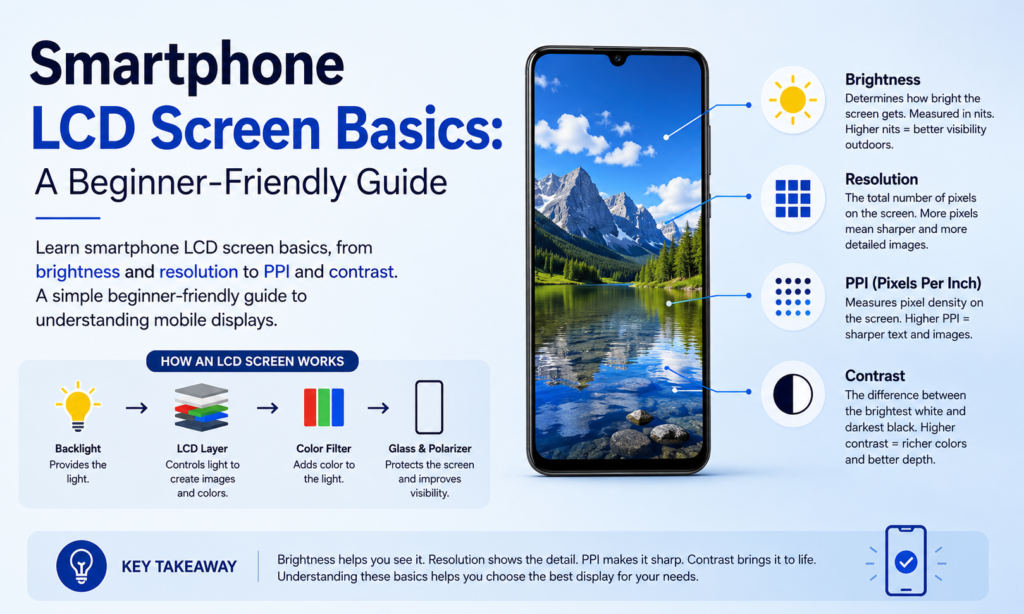
Helderheid verwijst naar hoeveel licht het scherm uitstraalt. In eenvoudige bewoordingen: hoe helder uw scherm kan worden als het wit wordt weergegeven. Het wordt gewoonlijk gemeten neten, hoewel veel mensen dat apparaat nooit zien tenzij ze de technische specificaties lezen.
Een helderder scherm ziet er meestal levendiger uit. Blanken zien er sterker uit. Kleuren voelen pittiger aan. Beelden kunnen levendiger aanvoelen. Denk aan helderheid zoals zonlicht dat door glas-in-lood schijnt: hoe meer licht erachter, hoe meer de kleuren opvallen.
Maar helderder is niet altijd beter.
Als de helderheid binnenshuis te hoog is, het kan hard aanvoelen voor de ogen. Lezen in bed met het display op maximale helderheid? Dat kan voelen alsof je in een zaklamp staart. De meeste gebruikers nestelen zich van nature in een comfortabele middenzone, afhankelijk van de omgeving.
Helderheid heeft ook een zeer directe invloed op de levensduur van de batterij. Hoe hoger de helderheid, hoe meer stroom het beeldscherm verbruikt. Omdat het display al een van de grootste stroomverbruikers in een smartphone is, maximale helderheid kan de batterijduur merkbaar verkorten.
De positieve kant? Hoge helderheid wordt buitenshuis ongelooflijk handig. Onder direct zonlicht, een zwak scherm kan bijna onleesbaar worden. Een helder scherm gaat schittering en reflectie tegen, zodat tekst zichtbaar blijft.
| Gebruiksscenario | Aanbevolen helderheid |
|---|---|
| Gebruik in donkere kamer/nacht | Laag |
| Binnen kantoor/thuis | Medium |
| Buiten daglicht | Hoog |
| Direct zonlicht | Maximaal / automatische boost |
Dat is de reden waarom veel moderne telefoons dit nu aanbieden maximale helderheidsverhoging buitenshuis, automatisch de helderheid tijdelijk alleen verhogen wanneer dat nodig is.
Kleurtemperatuur
Warme schermen versus koele schermen
Kleurtemperatuur beschrijft of een scherm er meer geel/rood of meer blauw/wit uitziet.
Als een display enigszins gelig lijkt, het heet een warm scherm. Als het blauwachtig lijkt, het wordt beschouwd als een koel scherm.
Geen van beide is automatisch beter.
Het is verrassend persoonlijk.
Iemand die gewend is aan een warme vertoning, kan naar een koele vertoning kijken en nadenken: “Waarom ziet dit er blauw uit?”
Iemand die gewend is aan een koele vertoning, kan een warme vertoning oppakken en zeggen: “Waarom ziet dit er geel uit?”
Beide kunnen technisch normaal zijn.
Onze ogen passen zich snel aan. Na een paar dagen één scherm gebruiken, het begint “correct” te voelen,' en al het andere kan niet goed aanvoelen.
Fabrikanten stemmen schermen ook anders af. Sommigen geven prioriteit aan levendige, koele wittinten omdat deze scherper overkomen in de winkels. Anderen leunen warmer omdat het zachter en natuurlijker aanvoelt.
Er bestaat geen universele perfecte standaard, Daarom kunnen zelfs twee toestellen van hetzelfde telefoonmodel er soms enigszins verschillend uitzien.
Veel nieuwere smartphones bevatten nu instellingen zoals:
- Warm
- Standaard
- Koel
- Natuurlijk
- Levendig
- Nachtmodus / Oogcomfortmodus
Hiermee kunnen gebruikers kiezen wat het beste voelt voor hun ogen.
Contrastverhouding
Hoe contrast de helderheid en details verbetert
Contrastverhouding is het verschil tussen het helderste wit en het donkerste zwart dat een beeldscherm kan produceren.
Hoe hoger het contrast, hoe meer visuele scheiding er bestaat tussen licht en donker.
Stel je voor dat je 's nachts naar een filmscène kijkt.
Op een scherm met laag contrast:
- zwart ziet er grijs uit
- schaduwen voelen modderig aan
- bijzonderheden verdwijnen
Op een contrastrijk display:
- zwarten voelen dieper
- hoogtepunten pop
- details worden gemakkelijker opgemerkt
Hierdoor voelt alles scherper aan.
Tekst wordt scherper.
Foto’s krijgen diepte.
Video's voelen filmischer aan.
Daarom is contrast zo belangrijk bij dagelijks gebruik. Het verbetert:
- beeldhelderheid
- grijswaardenprestaties
- schaduwdetail
- waargenomen scherpte
- kleur levendigheid
Een scherm met een zwak contrast voelt vaak vervaagd aan, zelfs als de resolutie hoog is.
Het is alsof je een foto afdrukt op vervaagd papier in plaats van op glanzend papier. Hetzelfde beeld, heel andere ervaring.
Kijkhoek
Waarom schermen er vanaf de zijkant anders uitzien
Kijkhoek verwijst naar hoe goed een scherm kleur en helderheid behoudt wanneer het vanuit verschillende hoeken wordt bekeken.
Als je recht naar je telefoon kijkt, bijna elk scherm ziet er fatsoenlijk uit.
Maar kantel het.
Draai hem zijwaarts.
Kijk vanuit een hoek.
Dat is het moment waarop de verschillen duidelijk worden.
Beeldschermen van lagere kwaliteit kunnen dat wel zijn:
- kleuren verschuiven
- helderheid verliezen
- keer zwarten om
- zien er vervaagd uit
Betere weergaven blijven consistent.
Dit is belangrijker dan mensen denken.
Je merkt het wanneer:
- video's kijken met een vriend
- gamen terwijl u de telefoon kantelt
- de telefoon op een tafel gebruiken
- controleer het display vanaf de zijkant
TFT versus IPS versus AMOLED-prestaties
Hier is een snelle vergelijking:
| Schermtype | Kijkhoekprestaties |
|---|---|
| TFT-LCD | Eerlijk |
| IPS-LCD | Goed |
| AMOLED | Uitstekend |
Traditionele TFT-panelen vertonen vaak duidelijke kleurverschuivingen wanneer ze worden gekanteld.
IPS verbetert dit dramatisch.
AMOLED presteert doorgaans erg goed, hoewel de werkelijke kwaliteit nog steeds sterk afhankelijk is van de kalibratie van de fabrikant.
PPI (Pixels per inch)
Wat pixeldichtheid betekent
PPI staat voor Pixels per inch.
Dit meet hoeveel pixels er in één inch scherm zijn verpakt.
Hogere PPI betekent:
- fijnere details
- scherpere tekst
- gladdere randen
- realistischere beelden
Een lagere PPI betekent dat pixels gemakkelijker op te merken zijn.
Zie het als mozaïeken.
Ga ver weg staan en het beeld ziet er vloeiend uit.
Als je dichtbij genoeg staat, zie je elke afzonderlijke tegel.
Pixels werken op dezelfde manier.
Hoe dichter ze verpakt zijn, hoe minder zichtbaar ze worden.
Voorbeeldberekening met behulp van een smartphonedisplay
Neem dit klassieke voorbeeld:
- Schermgrootte: 4.3 inch
- ResolutiePPI=12802+72024.3PPI=frac{\sqrt{1280^2+720^2}}{4.3}PPI=4,312802+7202 vierkante meter{1280^2+720^2}}{4.3}”}}
Resultaat:
≈ 342 PPI
Dat betekent ongeveer 342 pixels verpakt in elke centimeter scherm.
Bij die dichtheid, tekst en afbeeldingen zien er op normale kijkafstand zeer scherp uit voor het menselijk oog.
Oplossing
Waarom meer pixels meestal scherpere beelden betekenen
Oplossing verwijst naar het aantal pixels dat op het scherm wordt weergegeven.
Veelvoorkomende voorbeelden:
- 1280 × 720
- 1920 × 1080
- 2400 × 1080
- 3200 × 1440
Hoe hoger de resolutie:
- hoe meer details getoond kunnen worden
- de scherpere beelden verschijnen
- hoe meer informatie er op het scherm past
Meer pixels betekent meer visuele informatie, verpakt in dezelfde ruimte.
Dit verbetert:
- foto scherpte
- videohelderheid
- UI-detail
- leesbaarheid van de tekst
Dat gezegd hebbende, resolutie werkt samen met schermgrootte.
Een gigantisch beeldscherm met een hoge resolutie kan nog steeds een lagere PPI hebben dan een kleiner beeldscherm.
Dus resolutie alleen vertelt niet het hele verhaal.
Oplossing + maat = de echte ervaring.
Volledige lamineertechnologie
Hoe weergavelagen zijn gestructureerd
Een smartphonescherm bevat meestal meerdere lagen:
- Beschermend glas
- Raak laag aan
- Weergavepaneel
Deze lagen moeten met elkaar verbonden worden.
Oudere ontwerpen hadden vaak kleine luchtspleten tussen de lagen.
Deze hiaten kunnen leiden tot:
- meer reflecties
- dikkere beeldschermen
- verminderde helderheid
Volledige laminering verbindt deze lagen stevig aan elkaar met behulp van optische lijm.
Dit vermindert interne reflecties en verbetert de visuele kwaliteit.
Voordelen zijn onder meer:
- betere weergavehelderheid
- dunnere schermstructuur
- verbeterd aanraakgevoel
- verminderde verblinding
- nauwere visuele verbinding tussen beeld en glas
Het geeft de inhoud het gevoel alsof deze zich onder uw vingertop bevindt.
Alsof je inkt direct onder het glas aanraakt.
In cel, Op mobiel, en OGS uitgelegd
Fabrikanten hebben de integratie later nog verder gestimuleerd.
In plaats van afzonderlijke aanraaklagen, Aanraakdetectie werd ingebouwd in de displaystapel zelf.
Dit is het verschil:
| Technologie | Beschrijving |
|---|---|
| In cel | Touch geïntegreerd in LCD-pixels |
| Op mobiel | Touch geplaatst tussen filter en polarisator |
| OGS | Aanraaklaag geïntegreerd met afdekglas |
Alle drie streven ernaar:
- dikte verminderen
- verbeteren de lichttransmissie
- gewicht verminderen
- lager stroomverbruik
Dit is een van de redenen waarom moderne smartphones slanker aanvoelen, terwijl schermen er schoner uitzien dan oudere modellen.
Conclusie
Smartphoneschermen zijn een van die technologieën waar we elke dag mee omgaan zonder er veel over na te denken, totdat we een geweldig scherm met een slecht scherm vergelijken.
Dan wordt het meteen duidelijk.
Een goed scherm draait niet alleen om flitsende kleuren. Het beïnvloedt de levensduur van de batterij, leesbaarheid, gamen, fotografie, oog comfort, en zelfs hoe premium een telefoon in je hand voelt.
Als je termen als helderheid, kleur temperatuur, contrast, kijkhoek, PPI, oplossing, En volledige laminering, het lezen van het specificatieblad van een telefoon wordt veel eenvoudiger.
Je ziet geen marketingbuzzwoorden meer.
Je begint te zien wat er werkelijk toe doet voor gebruik in de echte wereld.
En dat maakt het kiezen van uw volgende telefoon (of vervangend LCD-scherm) een stuk eenvoudiger.
FAQ's
1. Betekent een hogere helderheid altijd een beter telefoonscherm??
Niet altijd. Een hogere helderheid helpt buitenshuis, vooral onder zonlicht, maar te veel helderheid binnenshuis kan oncomfortabel aanvoelen en de batterij sneller leegmaken.
2. Is AMOLED beter dan LCD??
AMOLED biedt over het algemeen diepere zwarttinten en een sterker contrast. LCD kost vaak minder en kan nog steeds uitstekende prestaties leveren, vooral IPS LCD-panelen.
3. Welke PPI wordt als goed beschouwd voor smartphones?
Rondom 300+ PPI is voor de meeste gebruikers al erg scherp. Premium-telefoons overschrijden vaak 400 PPI.
4. Waarom zien sommige schermen er geel uit, terwijl andere er blauw uitzien??
Dat is kleurtemperatuur. Warmere displays zien er geler uit. Koelere displays zien er blauwer uit. Persoonlijke voorkeur speelt een grote rol.
5. Wat verbetert volledig lamineren??
Het verbetert de duidelijkheid, vermindert reflectie, maakt schermen dunner, en zorgt voor een betere aanraakervaring.



