
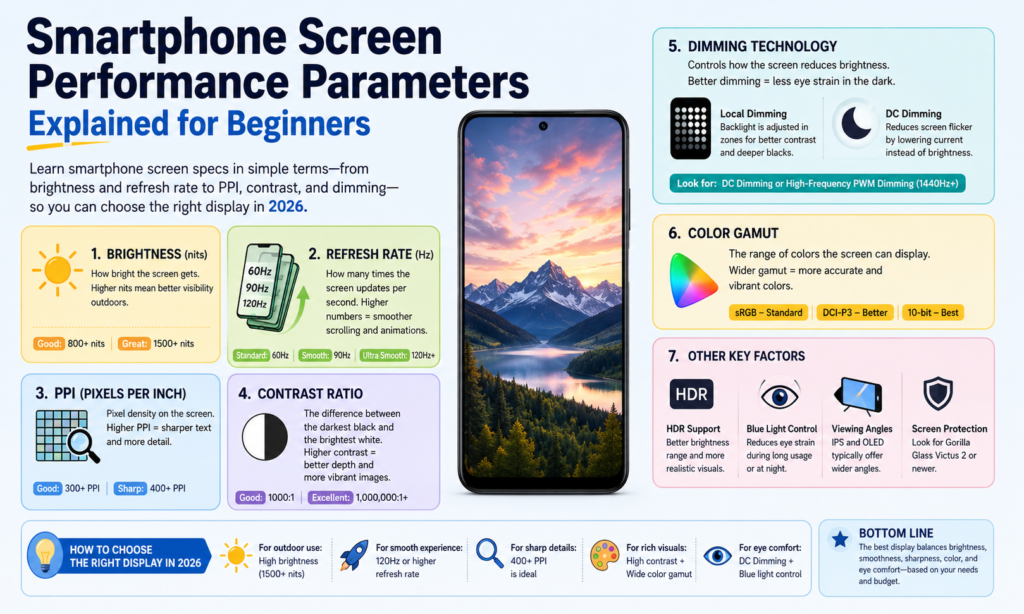
Waarom de specificaties van smartphoneschermen belangrijker zijn dan ooit 2026 Schermspecificaties zijn belangrijker dan ooit 2026
Als je erover nadenkt, de scherm is de ziel van een smartphone. Het is het enige onderdeel dat je elke dag honderden keren aanraakt. Je leest er berichten op, bekijk er video's over, scroll er sociale media op, bewerk er foto's op, en misschien zelfs van daaruit werken. Hoe krachtig de processor ook is of hoeveel megapixels de camera ook biedt, als het scherm dof aanvoelt, wazig, of ongemakkelijk om naar te kijken, de hele telefoonervaring voelt zwakker. Daarom is het begrijpen van de schermspecificaties van smartphones belangrijker dan veel mensen zich realiseren.
In 2026, displaytechnologie blijft snel evolueren. Premium-telefoons bereiken nu regelmatig 3,000+ nits helderheid, terwijl 120Hz adaptieve vernieuwingsfrequenties zijn gemeengoed geworden op apparaten uit het hogere middensegment. Hoogfrequent PWM-dimmen hierboven 2,160Hz wordt ook steeds populairder, vooral in het vlaggenschip OLEDe-comfort. citeturn0search0turn0search2
Het lastige deel? De meeste specificatiebladen gooien cijfers naar je toe zonder uit te leggen wat ze eigenlijk betekenen. PPI, contrastverhouding, vernieuwingsfrequentie, kleurengamma: het kan aanvoelen alsof u een andere taal leest. Deze gids legt alles uit in eenvoudig Engels, dus of je nu een nieuwe telefoon koopt, LCD versus OLED vergelijken, of gewoon nieuwsgierig naar displaytechnologie, Je weet precies waar je naar moet zoeken.
Dimtechnologie
Wat is DC-dimmen?
DC-dimmen past de helderheid aan door de elektrische stroom die naar het display wordt geleverd rechtstreeks te veranderen. Zie het als het langzaam naar beneden draaien van een kraanknop: het water blijft stromen, alleen met minder kracht. Het licht blijft continu, maar de helderheid neemt af.
Voor LCD-schermen, helderheid komt voornamelijk uit de achtergrondverlichting, dus het verminderen van spanning of stroom verlaagt de helderheid. Voor OLED-schermen, elke pixel straalt zijn eigen licht uit, dus de helderheid verandert door de stroom die naar die individuele pixels wordt gestuurd te verminderen.
Veel gebruikers geven de voorkeur aan DC-dimmen omdat dit visueel stabiel aanvoelt. Omdat het licht niet snel aan en uit flikkert, het kan gemakkelijker zijn voor gevoelige ogen. Dat is vooral belangrijk voor mensen die in donkere omgevingen urenlang naar hun telefoon kijken.
Het nadeel is dat DC-dimmen soms de kleurconsistentie kan beïnvloeden bij zeer lage helderheid op OLED-panelen. Zwarten kunnen uitstekend blijven, maar de kleurkalibratie kan enigszins verschuiven, afhankelijk van het paneelontwerp. Fabrikanten proberen hier vaak een balans te vinden tussen oogcomfort en kleurnauwkeurigheid.
Wat is PWM-dimmen?
PWM staat voor Pulsbreedtemodulatie. In plaats van het vermogen voortdurend te verlagen, het display schakelt snel tussen aan → uit → aan → uit op hoge snelheid.
Stel je voor dat je een lichtschakelaar honderden of duizenden keren per seconde omdraait. Uw ogen kunnen de flikkering meestal niet direct waarnemen, dus het lijkt zwakker in plaats van te knipperen.
De hoeveelheid tijd dat het licht tijdens elke cyclus “aan” blijft, bepaalt de helderheid:
- Langere “aan”-tijd = helderder scherm
- Kortere “aan”-tijd = dimmer scherm
PWM is zeer gebruikelijk op OLED-smartphones.
In 2026, vlaggenschip Android-telefoons adverteren steeds vaker 2,160Hz tot 3.840 Hz PWM-dimmen, wat veel hoger is dan oudere 240Hz–480Hz-implementaties. Hogere frequentie PWM voor alle gebruikers. citeturn0search8turn0search6
Welke is beter voor oogcomfort?
Er is geen universeel antwoord, omdat menselijke ogen wonderbaarlijk ingewikkeld zijn.
Sommige gebruikers merken helemaal geen PWM-flikkering. Anderen voelen daarna hoofdpijn 10 notulen.
Algemeen:
| Technologie | Belangrijkste voordeel | Belangrijkste nadeel |
|---|---|---|
| DC-dimmen | Minder zichtbare flikkering, vaak gemakkelijker voor de ogen | Kan de OLED-kleurprestaties enigszins beïnvloeden |
| PWM-dimmen | Betere helderheidscontrole en kleurconsistentie | Kan vermoeide ogen veroorzaken bij gevoelige gebruikers |
Als u gevoelig bent voor schermflikkering, DC-dimmen of hoogfrequente PWM het waard is om prioriteit te geven.
Kleurprestaties
Verzadiging
Verzadiging beschrijft hoe rijk of puur een kleur verschijnt.
Zeer verzadigde kleuren voelen levendig en pittig aan. Lage verzadiging ziet er gedempt of vervaagd uit.
Denk aan een rijpe rode aardbei versus een vervaagd roze shirt dat te lang in de zon heeft gelegen. Dezelfde kleurenfamilie – heel andere intensiteit.
OLED-panelen voelen vaak meer verzadigd aan omdat elke pixel onafhankelijk zijn eigen licht uitstraalt.
Sommige mensen houden van dat ‘wauw’-effect. Anderen geven de voorkeur aan meer natuurlijke kleuren voor het bewerken van foto's.
Kleurengamma
Kleurengamma verwijst naar het totale kleurenbereik dat een scherm kan weergeven.
Een breder kleurengamma betekent dat het scherm meer tinten kan reproduceren.
Gemeenschappelijke normen omvatten:
- sRGB
- DCI-P3
- Adobe-RGB
- BT.2020
Op smartphones, DCI-P3 is nu heel gebruikelijk in premium displays.
De nieuwste displayconcepten van Samsung getoond tijdens SID Display Week 2026 gedemonstreerd tot 96% BT.2020-dekking, terwijl wordt weergegeven. citeerturn0nieuws16turn0nieuws17
Kleurnauwkeurigheid
Kleurnauwkeurigheid meet hoe dicht de weergegeven kleur bij de beoogde originele kleur ligt.
Dit maakt veel uit voor:
- fotografen
- video-editors
- ontwerpers
- online verkopers die productkleuren tonen
Als een witte afbeelding gelig lijkt of een rode productfoto oranje lijkt, kleurnauwkeurigheid is slecht.
Een gebruikelijke meting hier is Delta E.
Lagere Delta E = nauwkeurigere kleurweergave.
Grijsschaal
Grijsschaal verwijst naar de helderheidsniveaus tussen zwart en wit.
Goede grijswaardenprestaties zorgen voor vloeiende overgangen.
Een slechte grijsschaal zorgt voor zichtbare strepen of ongelijkmatige schaduwen.
Dit wordt erg merkbaar bij het kijken naar donkere films of het bekijken van foto's bij weinig licht.
Helderheid en contrast
Helderheid uitgelegd
Helderheid wordt gemeten in neten.
Hogere nits = helderder scherm.
Waarom maakt het uit?
Omdat zonlicht bestaat.
Een telefoon kan er binnenshuis perfect uitzien, maar buitenshuis onleesbaar worden.
Vlaggenschip-smartphones binnen 2026 algemeen bereiken 3,000–3.500 nits piekhelderheid. Bijvoorbeeld, de OnePlus 15 wordt rond gerapporteerd 3,500 neten, terwijl Pixe rond 3,300 neten. citeturn0search2
Contrastverhouding uitgelegd
Contrastverhouding is het verschil tussen:
helderste wit ÷ donkerste zwart
Er ontstaat een hoger contrast:
- Dieper zwarten
- sterkere hoogtepunten
- betere HDR
- rijkere beelddiepte
OLED domineert hier omdat pixels volledig kunnen worden uitgeschakeld.
Zo ontstaat echt zwart.
LCD kan de achtergrondverlichting niet op dezelfde manier volledig uitschakelen.
Daarom hebben OLED-zwarte kleuren vaak het gevoel alsof je in een donkere nachtelijke hemel kijkt.
Duidelijkheid en scherpte
Oplossing (DPI)
Resolutie verwijst naar het aantal pixels horizontaal en verticaal.
Voorbeelden:
- 1080 × 2400
- 1440 × 3200
Meer pixels = meer details.
Ook al is het voorbij een bepaald punt, het verschil wordt moeilijker op te merken op normale kijkafstand.
Pixeldichtheid (PPI)
PPI middelen pixels per inch.
Het vertelt je hoe dicht opeengepakt de pixels zijn.
Hogere PPI = scherpere tekst en schonere randen.
Voorbeelden:
| Weergavetype | Typische PPI |
|---|---|
| Budget-LCD | 300–400 |
| OLED uit het middensegment | 400–460 |
| Vlaggenschip OLED | 450–550+ |
Boven ongeveer 450 PPI, tekst ziet er meestal vlijmscherp uit.
Pixelhoogte
Pixelpitch is de afstand tussen aangrenzende pixels.
Kleinere pixelafstand = hogere scherpte.
Kleinere ruimtes tussen de pixels zorgen ervoor dat afbeeldingen naadloos en gepolijst aanvoelen.
Beweging en reactievermogen
Reactietijd
De responstijd meet hoe snel een pixel van de ene toestand naar de andere verandert.
Vaak omschreven als:
Zwart → Wit → Zwart
Een lagere responstijd helpt verminderen:
- spookbeelden
- vervagen
- uitsmeren
Vooral merkbaar tijdens het gamen of het snel afspelen van video.
Vernieuwingsfrequentie
Vernieuwingsfrequentie = hoe vaak het scherm per seconde wordt vernieuwd.
Gemeten in Hz.
Voorbeelden:
- 60Hz
- 90Hz
- 120Hz
- 144Hz
A 120Hz -display ververst twee keer zo vaak als 60 Hz.
Daardoor voelt het scrollen vloeiender en verlopen de animaties vloeiender.
Zodra u regelmatig 120 Hz gebruikt, teruggaan naar 60 Hz kan voelen alsof je door nat zand loopt.
Andere belangrijke weergavefactoren
Kijkhoek
Kijkhoek betekent hoe goed u het scherm vanaf de zijkant nog kunt zien.
Goede kijkhoeken blijven behouden:
- helderheid
- kleur
- contrast
OLED presteert hier doorgaans beter dan LCD.
Stroomverbruik
Beeldschermen verbruiken een groot deel van de levensduur van de batterij van een smartphone.
OLED kan efficiënter zijn in de donkere modus, omdat zwarte pixels volledig kunnen worden uitgeschakeld.
LCD-achtergrondverlichting blijft continu branden.
Dit is de reden waarom de donkere modus de batterij op OLED-apparaten kan besparen.
Elektromagnetische straling
Displays zenden energie uit via elektrische en magnetische velden, maar ook via zichtbaar licht en warmte.
Voor normaal smartphonegebruik, dit blijft binnen de veiligheidsnormen voor consumentenelektronica.
Wat gebruikers meestal praktischer opmerken, is:
- blootstelling aan blauw licht
- vermoeidheid van de ogen
- warmte generatie
in plaats van elektromagnetische straling zelf.
Hoe u het juiste smartphonescherm kiest op basis van uw behoeften
Het kiezen van een smartphonedisplay is als het kiezen van een bril. De “beste” hangt van jou af.
Als je er het meeste om geeft films kijken, prioriteit geven:
- OLED
- hoog contrast
- HDR
- hoge helderheid
Als je een mobiele gamer, focus op:
- 120Hz+
- snelle responstijd
- high-touch-sampling
Als u gevoelig bent voor vermoeide ogen:
- DC-dimmen
- hoogfrequente PWM
- instellingen voor oogcomfort
Als de batterij er het meest toe doet:
- LTPO BENT U
- adaptieve vernieuwingsfrequentie
- efficiënt helderheidsbeheer
Achtervolg niet elk nummer.
Zoek de nummers die overeenkomen met hoe u uw telefoon daadwerkelijk gebruikt.
Conclusie
Smartphonedisplays zijn niet langer alleen rechthoeken die oplichten. Ze vormen de voordeur van je hele digitale leven.
Begrip DC-dimmen, PWM, verzadiging, contrastverhouding, oplossing, PPI, vernieuwingsfrequentie, reactietijd, kleurengamma, En stroomverbruik helpt u verder te lezen dan alleen de marketing.
Een helderder scherm is niet altijd beter.
Een hogere vernieuwingsfrequentie is niet altijd nodig.
Een breder kleurengamma is niet nuttig als de kleurnauwkeurigheid slecht is.
Het beste smartphonescherm is het scherm dat moeiteloos aanvoelt elke keer dat u uw telefoon ontgrendelt.
En als je eenmaal weet wat deze specificaties werkelijk betekenen, het kiezen van dat scherm wordt veel eenvoudiger.
FAQ's
1. Wat beter is voor de ogen: DC-dimmen of PWM-dimmen?
Voor veel gebruikers gevoelig voor flikkering, DC-dimmen voelt comfortabeler. Hoogfrequente PWM kan ook comfortabel zijn, afhankelijk van de gevoeligheid.
2. Is een hogere PPI altijd beter?
Niet altijd. Verder dan ongeveer 450-500 PPI, verschillen worden moeilijker op te merken tijdens normaal gebruik.
3. Is OLED beter dan LCD??
OLED biedt doorgaans een beter contrast, Dieper zwarten, en rijkere kleur. LCD kan nog steeds een uitstekende helderheid bieden en vermijdt vaak problemen met OLED-flikkering.
4. Is 120Hz de moeite waard op een smartphone??
Ja, vooral als je vaak gamet of scrollt. De vloeiendere beweging is zeer merkbaar.
5. Welke schermspecificaties het belangrijkst zijn?
Er is niet één enkel antwoord. Voor de meeste mensen, waar de grootste dagelijkse impact vandaan komt:
- helderheid
- vernieuwingsfrequentie
- contrast
- oog comfort



