
🔧 Introducere
Să recunoaștem: spargerea ecranului telefonului este ca și cum ai călca pe LEGO cu picioarele goale. Dureros, neaşteptat, si scumpe. Dar hei, ce dacă l-ai putea înlocui singur? Bun venit la ghidul suprem care vă arată cum să faceți exact asta, indiferent dacă aveți de-a face cu un iPhone sau Android. Vă vom prezenta totul pas cu pas, cu fotografii sau link-uri video, și introduceți avertismente de risc pentru a vă asigura că nu vă transformați telefonul într-un precipice.
🔩 Instrumente esențiale & Materiale
Setul de instrumente de bază pentru înlocuirea ecranului
Pentru a începe, vei avea nevoie:
- Un set de șurubelnițe de precizie (de obicei cu Pentalobe, Phillips, Capete în trei puncte)
- Ventuză
- Unelte din plastic
- Pensetă
- Instrument de ejectare a cartelei SIM
- Alcool izopropilic (pentru curatare)
Echipament de siguranță recomandat
- Curea de mână ESD (previne deteriorarea statică)
- Covoraș antistatic
- Ochelari de protecție (ecranele se pot sparge în timp ce sunt îndepărtate)
Cum să obțineți ecrane de înlocuire de calitate
Nu toate ecranele sunt egale. Evitați cele super-ieftine pe piețele umbrite. Caută:
- Etichete de tip OEM sau OEM
- garanție (chiar 30 zile este mai bine decât niciunul)
- Compatibilitate verificată cu modelul de telefon
⚠️ Alerte de risc înainte de a începe
Anularea garanției dvs
Odată ce ați deschis dispozitivul, spune la revedere cererilor de garanție. Gândește-te de două ori dacă dispozitivul tău este încă în garanție sau AppleCare.
Piese cu risc ridicat pe care le-ați putea sparge
- Scanere de amprente (Touch ID, sub afișaj)
- Module Face ID (pe iPhone-uri)
- panouri OLED (foarte fragil, mai ales pe Samsung)
Daune statice și riscuri ESD
Electricitatea statică poate prăji componentele delicate. Folosiți protecție ESD și împământare.
Când nu ar trebui să faci bricolaj
- Dacă ecranul este fuzionat de baterie
- Dacă vă lipsesc mâinile statornice sau răbdarea
- Dacă telefonul are daune cauzate de apă
🛠️ Proces de dezasamblare pas cu pas
Pas 1: Opriți și descărcați bateria
Țineți apăsat puterea și opriți telefonul. Așteptați 2-3 minute pentru a lăsa condensatorii să se scurgă.
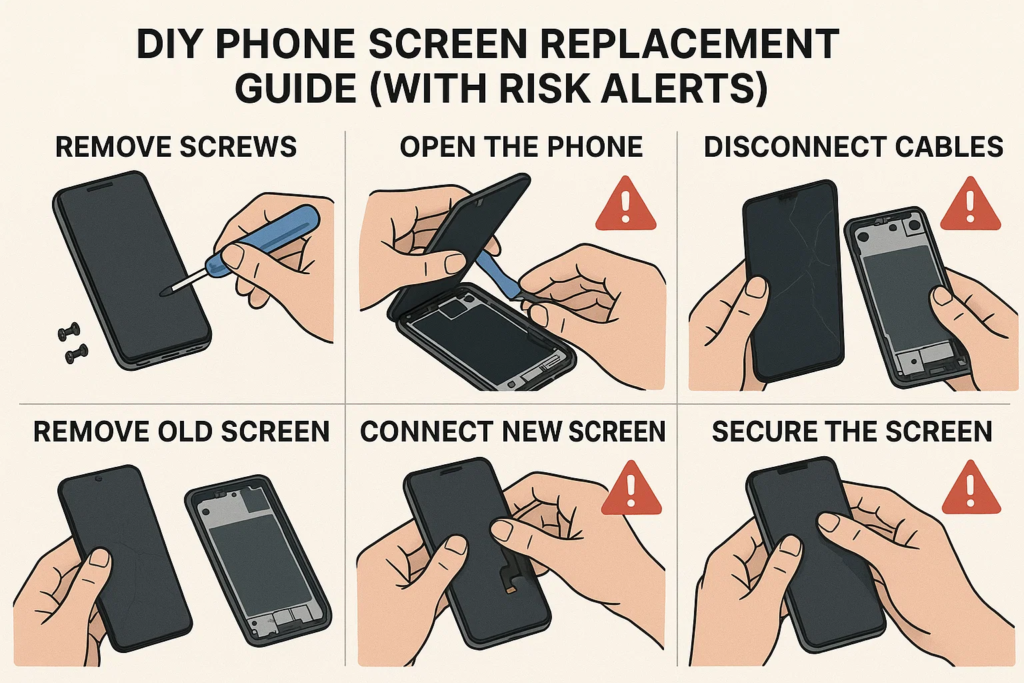
Pas 2: Scoateți șuruburile și deschideți dispozitivul
iPhone
Utilizați o șurubelniță Pentalobe pentru a îndepărta șuruburile de jos din apropierea portului de încărcare. Aplicați o ventuză pe ecran și trageți ușor cu o unealtă de plastic. Nu introduceți prea adânc!
Android
Depinde de model. Pentru Samsung, încălziți marginile cu un pistol termic (70–80°C), utilizați o aspirație și un card de plastic pentru a separa sticla. Pentru Xiaomi sau OPPO, șuruburile pot fi sub panoul din spate.
Pas 3: Deconectați mai întâi bateria!
Nu sări peste asta niciodată. Deconectarea bateriei mai întâi previne scurtcircuitarea plăcii logice.
Pas 4: Etichetați și deconectați cablurile flexibile
Folosiți o pensetă sau un spudger pentru a detașa cu grijă cablurile flexibile care conectează ecranul, aparat de fotografiat, sau senzori.
Pas 5: Îndepărtați cu grijă ecranul spart
Odată ce toate cablurile sunt oprite, ridicați ecranul. Fii blând. Unele dispozitive au adeziv pe care va trebui să-l înmoaie din nou cu căldură.
📲 Instalarea noului ecran
Pas 6: Curățați carcasa și aplicați din nou adezivul
Îndepărtați resturile de lipici. Folosiți alcool și cârpă fără scame. Aplicați benzi adezive sau lipici noi.
Pas 7: Conectați cablurile flexibile la placa logică
Reconectați afișajul, digitizator, camera frontala, etc. Fii ferm, dar atent.
Pas 8: Reconectați bateria (Ultimul Pas!)
Odată ce totul este înăuntru, reconectați bateria și fixați-o.
Pas 9: Reatașați șuruburile și sigilați dispozitivul
Înlocuiți panoul din spate sau ecranul, aplicați o presiune uniformă, și înșurubați totul înapoi.
🧪 Testare înainte de asamblarea finală
Înainte de a sigila totul definitiv:
- Reactivitatea la atingere
- Luminozitate & culorile afișajului
- Pixeli morți
- Faţă & functia camera spate
- Face ID sau cititor de amprentă
Dacă ceva este dezactivat, redeschideți și verificați conectorii.
🚫 Greșeli frecvente de evitat
Am uitat să deconectați bateria
Acesta este #1 cauza circuitelor de iluminare de fundal suflate sau a plăcilor logice deteriorate.
Ciupirea cablurilor sau alinierea greșită a conectorilor
Cablurile flexibile sunt ca venele - dacă le ciupești sau le răsuciți, se pot rupe în interior.
Șuruburi de strângere excesivă
Acest lucru poate sparge sticla din cauza presiunii interne. Este suficient.
🔍 Note speciale după marca dispozitivului
iPhone X și mai târziu: Avertisment Face ID
Componentele Face ID sunt sensibile. Deteriorarea acestora = pierderea permanentă a Face ID. Nu le puteți înlocui pur și simplu – sistemul Apple le împerechează cu placa logică.
Afișaje Samsung Edge: Fragilitate OLED
Aceste ecrane pline sunt super delicate. Aplicarea prea multă căldură sau presiune le poate distruge chiar înainte de a termina.
Xiaomi & Oppo: Integrare baterie și ecran
La unele modele, ecranul este lipit direct peste baterie. Riști să spargi bateria dacă mergi prea adânc.
🎥 Demo video și ghid vizual
Canale YouTube recomandate
- JerryRigTotul
- iFixit
- Institutul de reparații mobile
- Witrigs
Unde să găsiți PDF-uri Teardown
- iFixit.com
- Witrigs
- Manuale de service a producatorului (dacă public)
👨🔧 În schimb, ar trebui să angajezi un profesionist?
Comparația costurilor: DIY vs Magazin
- DIY: $20– 80 USD pentru piese
- Magazin: $50– 150 USD+ în funcție de model
DIY economisește numerar, dar numai dacă este făcut corect prima dată.
Când un tehnic de reparații salvează ziua
- Dacă telefonul tău este singurul tău colac de salvare
- Dacă lucrarea implică lipirea plăcii de bază
- Dacă înlocuiți atât geamul din față, cât și din spate
🧠 Gânduri finale
Schimbarea ecranului telefonului poate fi foarte satisfăcătoare, cum ar fi repararea propriei biciclete pentru prima dată. Dar este și ușor să dai peste cap dacă nu ești pregătit. Daca esti atent, utilizați instrumentele potrivite, și urmează ghiduri ca acesta, puteți economisi bani și vă puteți îmbunătăți jocul de reparații.
Dar hei, dacă nu ești sigur sau telefonul tău este un model emblematic, este perfect în regulă să lași profesioniștii să se ocupe de asta.
❓ Întrebări frecvente
1. Pot înlocui un ecran fără unelte?
Nerecomandat. Veți risca să deteriorați componente sau să vă răniți.
2. Cât timp durează înlocuirea ecranului unui telefon?
De obicei, 30-90 de minute, in functie de experienta si modelul tau.
3. Telefonul meu va fi încă rezistent la apă după înlocuirea ecranului?
Nu. Odată deschis, rezistenta la apa este compromisa daca nu este resigilata profesional.
4. Cum știu dacă ecranul meu de înlocuire este defect?
Verificați pâlpâirea, pixeli morți, probleme de culoare, sau lipsa de răspuns înainte de asamblarea finală.
5. Pot folosi un ecran folosit de la alt telefon?
Doar dacă este modelul exact și pe deplin funcțional. Testați-l înainte de instalare.



