
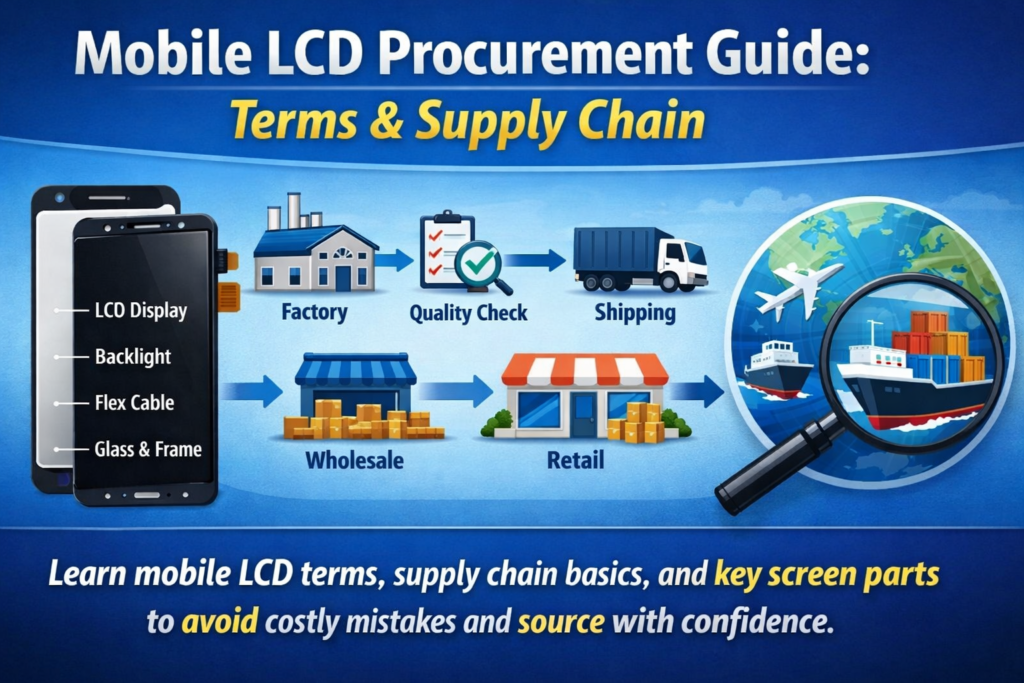
A mobil kijelző ellátási láncának megértése
Az okostelefon képernyőjének kulcsfontosságú összetevői
Ha valaha is próbálkozott mobiltelefon-képernyők beszerzésével, valószínűleg észrevette, milyen zavaros lehet a terminológia. Az egyik szállító azt mondja: „LCD modul,” egy másik azt mondja: „érintős összeszerelés,” és valaki más bedobja a „külső üveget” vagy a „digitalizálót”. Mintha mindenki ugyanazt a nyelvet beszélné – de teljesen más dialektusokkal.
A lényegében, az okostelefon kijelzője nem csak egy darabból áll. Ez egy gondosan megtervezett komponensek halmaza, amelyek együtt dolgoznak a látvány és az érintésre adott válasz érdekében. A LCD panel állítja elő a képet, a érintési réteg érzékeli az ujjak mozgását, és a fedőüveg mindent megvéd, ami alatta van. Ezek az elemek külön-külön vagy teljesen integrált modulként is értékesíthetők, a termék típusától és a javítási követelményektől függően.
Fontos megérteni, hogy ezek a részek hogyan hatnak egymásra, főleg ha beszerzésben vesz részt. Egy apró félreértés – például egy teljes összeállítás összekeverése egy üveglencsével – költséges hibákhoz vezethet, késések, vagy vásárlói panaszok. Ez az oka annak, hogy ezeknek a kifejezéseknek a megismerése nem csak hasznos, hanem feltétlenül szükséges, ha hatékonyan szeretne működni ebben az iparágban.
Miért számít a terminológia a beszerzésben?
Legyünk őszinték: a mobil alkatrészek üzletágában, a tisztaság egyenlő a haszonnal. Ha nem határozza meg egyértelműen, hogy mit vásárol, előfordulhat, hogy olyasmiért fizet, amit nem szándékozott megvenni – vagy ami még rosszabb, nem kompatibilis alkatrészek fogadása.
Például, „képernyő” rendelése anélkül, hogy meghatározná, hogy a teljes LCD modul vagy csak a külső üveg komoly zavarokhoz vezethet. A beszállítók saját szabványaik alapján eltérő dolgokat feltételezhetnek. És mivel a nemzetközi kereskedelemről van szó, a nyelvi akadályok csak felerősítik a kérdést.
A pontos terminológia segíti a kommunikáció egyszerűsítését, csökkenti a vitákat, és biztosítja az összhangot a megrendelések között. Ezenkívül megkönnyíti a különböző beszállítóktól származó árajánlatok összehasonlítását. Amikor mindenki a definíciókhoz igazodik, átláthatóvá válik az árképzés, és sokkal gördülékenyebbé válik a tárgyalás.
Röviden, ezeknek a kifejezéseknek az elsajátítása nem csupán technikai tudás, hanem stratégiai előny.
Mi az a mobil LCD képernyő modul?
Az LCD-modul meghatározása (LCM)
A kifejezés LCD modul (LCM) az egyik leggyakrabban használt kifejezés a mobilmegjelenítési iparágban. Egyszerűen fogalmazva, az LCM a komplett kijelzőegység amely magában foglalja az LCD-panelt és általában az érintőfunkciókat, mind előre összeszerelve egyetlen alkatrészbe.
Gondoljon rá, mint egy telepítésre kész csomagra. Ahelyett, hogy több réteggel külön-külön foglalkozna, mindent összefogsz. Ez csökkenti a telepítési időt és minimálisra csökkenti a sérülések kockázatát a javítás vagy az összeszerelés során.
A beszerzésben, az „LCM” megadása általában azt jelenti, hogy a teljesen működőképes kijelzőegység, nem csak az egyes részek. Viszont, továbbra is fontos tisztázni, hogy a modul tartalmaz-e további összetevőket, például a keretet, háttérvilágítás, vagy IC chipek.
Alapelemek az LCM-ben
Egy szabványos LCD-modul általában több rétegből áll:
- LCD panel (Folyékony kristály kijelző) – felelős a képalkotásért
- Háttérvilágítási egység – megvilágítást biztosít
- Érintse meg a digitalizátort – érzékeli az érintéses bevitelt
- Takaróüveg – védi a képernyőt
- FPC (Rugalmas nyomtatott áramkör) – csatlakoztatja a modult az alaplaphoz
Ezeket a rétegeket gyakran olyan fejlett laminálási technikákkal kötik össze, mint pl OCA (Optikailag átlátszó ragasztó). Az integráció javítja a kijelző tisztaságát és az érintésérzékenységet, miközben csökkenti a tükröződést.
A vásárlóknak, ezen összetevők megértése segít a termék minőségének és árának értékelésében. A jobb laminálású és jobb minőségű anyagokkal rendelkező modul természetesen többe kerül, de jobb teljesítményt és tartósságot is biztosít.
Mobil képernyős érintőképernyős technológia magyarázata
Capacitive Touch vs Resistive Touch
Az érintéstechnológia a láthatatlan varázslat minden csúsztatás mögött, csap, és csípje meg. Ma, szinte minden okostelefont használ kapacitív érintőképernyők, de a régebbi vagy speciális eszközök továbbra is támaszkodhatnak rezisztív érintési technológia.
A kapacitív érintőképernyők érzékelik az ujjából érkező elektromos jeleket, gyorsabb válaszidőt és többérintéses képességeket kínál. Ezért uralják a fogyasztói piacot. Rezisztív képernyők, másrészt, nyomásra támaszkodnak, és kevésbé érzékenyek, de tartósabbak bizonyos ipari környezetben.
Beszerzési szempontból, a kapacitív érintőpanelek alapfelszereltség. Viszont, nem minden kapacitív képernyő egyenlő. Érzékenységbeli eltérések, tartósság, és a vezérlő IC-k jelentősen befolyásolhatják a felhasználói élményt.
Az érintőpanel szerepe a modern okostelefonokban
A érintőpanel, más néven a digitalizáló, a kijelzőréteg felett helyezkedik el, és a fizikai érintést digitális jelekké alakítja. Modern kivitelben, ezt a réteget gyakran közvetlenül integrálják az LCD-be vagy az üvegbe olyan technológiák segítségével, mint pl Incell vagy Oncell.
Ez az integráció csökkenti a vastagságot és javítja a reakcióképességet. Az ellátási láncot is leegyszerűsíti, mivel kevesebb különálló alkatrészre van szükség. Viszont, ez megdrágíthatja a javításokat, mivel az egész modult ki kell cserélni, ha az egyik réteg meghibásodik.
A vásárlóknak, A különálló érintőpanelek és az integrált megoldások közötti választás a célpiactól függ – akár javításra összpontosító, akár végfelhasználói termékekről van szó.
Külső képernyő (Üveg) vs belső képernyő (Kijelző)
Mi az a külső képernyő (Takaróüveg)?
A külső képernyő, gyakran nevezik fedőüveg, a legfelső réteg, amelyet a felhasználók fizikailag érintenek. Elsődleges szerepe a védelem. Megvédi az érzékeny belső alkatrészeket a karcolásoktól, hatások, és a környezeti károkat.
A jó minőségű fedőüveg jellemzően megerősített anyagokból, például edzett üvegből készül. Néhányan még bevonattal is rendelkeznek ujjlenyomat-ellenes vagy tükröződésmentes tulajdonságait.
A beszerzésben, a külső üveget javítás céljából gyakran külön árulják. Olcsóbb, mint egy teljes modul, de képzett technikusokat igényel a telepítése. Ez a lehetőség népszerű azokon a piacokon, ahol a költségtakarékos javításokat részesítik előnyben.
Mi az a belső képernyő (LCD panel)?
A belső képernyő a tényleges kijelzőpanelre vonatkozik – arra a részre, amely képeket generál. Ez magában foglalja a folyadékkristály réteget, színszűrők, és háttérvilágítási rendszer.
A külső üveggel ellentétben, a belső képernyő nagyon érzékeny és drága. Ennek az alkatrésznek a sérülése általában olyan megjelenítési problémákat okoz, mint például az elhalt pixelek, vonalak, vagy egyáltalán nincs kép.
A belső képernyő elválasztása a külső üvegtől lehetséges, de technikailag kihívást jelent. Ez az oka annak, hogy sok vásárló inkább a teljes modulokat választja – ez egyszerűbb és megbízhatóbb.
Különbségek a teljes összeszerelés és a különálló alkatrészek között
Teljes laminálás vs keretszétválasztás
A teljes összeszerelés (teljes laminálásnak is nevezik) minden réteget jelent – üveget, érintés, és a kijelző – egyetlen egységbe vannak kötve. Ez jobb optikai tisztaságot és tartósságot biztosít.
Ezzel szemben, különálló részek lehetővé teszi az egyes rétegek egyenkénti cseréjét. Miközben ez csökkenti az anyagköltségeket, növeli a munka bonyolultságát és kockázatát a telepítés során.
Előnyök és hátrányok a vásárlók számára
| Opció | Előnyök | Hátrányok |
|---|---|---|
| Teljes összeszerelés | könnyű telepítés, jobb minőségű | Magasabb költségek |
| Külön alkatrészek | Alacsonyabb költség, rugalmas javítás | Magasabb munkaügyi kockázat |
A megfelelő opció kiválasztása az üzleti modelltől függ. Ha a gyorsaságot és a megbízhatóságot részesíti előnyben, teljes szerelvények a járható út. Ha a költségmegtakarítás a fő cél, különálló részek alkalmasabbak lehetnek.
Általános iparági kifejezések, amelyeket ismernie kell
OEM, Utángyártott, Felújított Magyarázva
- OEM (Eredeti berendezés gyártó): Eredeti gyári alkatrészek
- Utángyártott: Harmadik fél által gyártott alkatrészek
- Felújított: A használt alkatrészek működőképes állapotba kerültek
Minden kategóriának megvan a maga árazási és minőségi szintje. Az OEM alkatrészek a legdrágábbak, de a legnagyobb megbízhatóságot kínálják.
Incell, Oncell, és a TFT Technologies
- Incell: LCD rétegbe integrált érintőképernyő
- Oncell: Érintőréteg az LCD tetején
- TFT: Hagyományos LCD technológia
E kifejezések megértése segít a termékek hatékonyabb összehasonlításában.
Minőségi fokozatok és vizsgálati szabványok
A és B fokozatú képernyők
A minőségi osztályozás kulcsfontosságú a beszerzéseknél. A-osztályú képernyők közel tökéletesek, míg B-kategóriás képernyők kisebb hibái lehetnek.
Kulcsfontosságú tesztelési eljárások a szállítás előtt
A beszállítók általában teljesítenek:
- Fényerő tesztelése
- Érintésérzékenységi vizsgálat
- Halott pixel vizsgálat
Ezek a tesztek biztosítják a termék megbízhatóságát a szállítás előtt.
Árképzési tényezők az LCD-képernyő beszerzésében
Anyagköltség és technológiai hatás
Az olyan fejlett technológiák, mint az Incell, növelik a gyártási költségeket, de javítják a teljesítményt.
MOQ és ellátási lánc szempontok
Minimális rendelési mennyiség (MOQ) jelentősen befolyásolhatja az árat. A tömeges rendelések általában kedvezményekkel járnak.
A megfelelő beszállító kiválasztása
Kulcsfontosságú értékelési kritériumok
Keres:
- Állandó minőség
- Átlátható kommunikáció
- Megbízható szállítás
Elkerülendő vörös zászlók
Kerülje el azokat a beszállítókat, akik:
- Tanúsítványok hiánya
- Nem egyértelmű specifikációkat adjon meg
- Kínáljon szokatlanul alacsony árakat
A mobil kijelzők beszerzésének jövőbeli trendjei
Váltás az OLED és a rugalmas képernyők felé
Bár az LCD továbbra is uralja a költségvetési eszközöket, Az OLED egyre népszerűbb a jobb színek és rugalmasság miatt.
Növekvő kereslet az integrált modulok iránt
Az integrált megoldások továbbra is növekedni fognak, a gyártás és a javítások egyszerűsítése.
Következtetés
A mobil LCD-képernyők beszerzésének világában való eligazodás elsőre elsöprőnek tűnhet, de ha egyszer megérted a terminológiát, kezd értelmet nyerni minden. Tól LCD modulok -hoz érintőpanelek, -tól külső üveg -hoz belső kijelzők, minden kifejezés egy meghatározott komponenst képvisel, saját szerepével a nagyobb képben.
Amikor világosan megérted, hogy mit veszel, csökkented a kockázatokat, javítja a kommunikációt a beszállítókkal, és végül okosabb vásárlási döntéseket hozhat. Akár javítóműhelyeket keres, nagykereskedelmi forgalmazás, vagy gyártás, ezen fogalmak elsajátítása valódi versenyelőnyt biztosít.
GYIK
1. Mi a különbség az LCD modul és az érintőképernyő között??
Az LCD-modul a kijelzőt és az érintőképernyőt is tartalmazza, míg az érintőképernyő csak az érintésérzékeny rétegre vonatkozik.
2. Kicserélhetem-e a telefon képernyőjének csak a külső üvegét??
Igen, de ehhez speciális felszerelésre és képzett technikusokra van szükség.
3. Mit jelent az Incell technológia??
Az Incell az érintőfunkciót közvetlenül az LCD-rétegbe integrálja, vékonyabbá és érzékenyebbé teszi a képernyőket.
4. Az utángyártott képernyők megbízhatóak??
Lehetnek, de a minőség a gyártótól függően változik.
5. Miért drágábbak a teljes szerelvények??
Mivel több komponenst egyesítenek egy egységbe, jobb teljesítményt és egyszerűbb telepítést kínál.



